
Firecrawl vs. Tavily: Which Web Data API Should You Use?

Both Tavily and Firecrawl give AI agents access to live web content, but they serve different use cases. Tavily is search-first. It finds and returns relevant pages from across the web, making it the better default for most AI agent developers. Firecrawl is extraction-first. Use it when you need to pull content from specific URLs at high volume, automate browser interactions, or process PDFs at scale.
In this article we break down the core features of each product and how they differ. We also tested how easy it is to set up a coding agent to work with each tool, scoring them out of four across four metrics:
- Discoverability — does the agent already know about this tool and recommend it unprompted?
- Onboarding — can the agent get you set up automatically, or does it require manual steps?
- Agent tooling — does the tool ship an MCP server, agent skills, and documentation built for AI?
- Integration — how easy is it to build a working prototype in a single session?
Then we ran our own benchmark against 848 real-world URLs to compare the two tools on coverage, content recall, latency, and cost per URL.
Results at a glance
Firecrawl
Tavily
Benchmark results
| Metric | Firecrawl | Tavily |
|---|---|---|
| Coverage | 67.7% | 82.1% |
| Avg Recall (successful URLs) | 0.697 | 0.746 |
| P50 Latency (ms) | 1,875 | 334 |
| P95 Latency (ms) | 6,542 | 1,481 |
| Cost/URL | $0.0063 | $0.0013 |
What are web data APIs?
Web data APIs give AI agents access to live content from the internet. Instead of working only from training data, an agent connected to one of these tools can search the web, scrape pages, and extract structured information at runtime.
You can use them to build agents that answer questions from live sources, pipelines that ingest content from documentation sites or news feeds, and automated workflows that pull structured data from pages at scale.
What is Firecrawl?
Firecrawl is built around three capabilities:
- Scrape a URL you give it, returning clean content even from JavaScript-heavy pages.
- Search the web and return full-page markdown for each result in a single call.
- Interact with pages like a browser, clicking buttons, filling forms, and navigating multi-step flows.
The infrastructure runs headless Chromium and serves around 40% of calls from a semantic cache.
Firecrawl /search and /agent
Firecrawl's query-first endpoints let you give a search query or a plain-language task description, and Firecrawl finds and fetches the relevant pages for you.
/search
- Query to full-page markdown in one call. Up to 10 results per call, each with the complete scraped content already included.
- Covers web, news, images, and specialised categories including GitHub, research papers, and PDFs.
- 2 credits per 10 results.
/agent
- Describe a task in plain language, no URLs needed. Firecrawl's Spark models navigate and extract autonomously.
- Single runs are dynamically priced.
- Batch runs via Parallel Agents at 10 credits per cell with Spark-1-Fast.
Firecrawl /scrape and /crawl
Firecrawl's URL-first endpoints are for when you already know which page or site you want, and need to pull the content from it.
/scrape
- 1 credit per page.
- Handles JavaScript, iframes, dynamic content, and cross-origin resources automatically.
- Supports browser actions before the scrape runs: click, scroll, type, wait.
- Output formats: markdown, HTML, raw HTML, screenshot, links, JSON, summary, images, branding, audio.
/crawl
- Starts from a URL and follows links recursively using sitemap and link traversal, up to 10,000 pages by default.
- Webhooks fire on started, page, completed, and failed events.
- WebSocket streaming available as pages complete.
Structured data extraction with Firecrawl
- Pass a JSON Schema (Pydantic or Zod) or a plain-text prompt to
/scrape, get structured JSON back. +4 credits per page. /agenthandles multi-source extraction without specifying URLs.
RAG pipelines with Firecrawl
Firecrawl outputs full-page markdown with structure and links preserved. It's well-suited to building a durable knowledge base from known sources like documentation sites or internal wikis.
Concurrency and batch processing with Firecrawl
Firecrawl is built for high-volume, parallelised workloads with a dedicated batch endpoint.
- Concurrent browsers scale from 2 (free) to 150 (Scale plan).
/batch_scrapehandles thousands of URLs asynchronously with polling or webhooks.
What is Tavily?
Tavily handles the entire retrieval pipeline internally. You send a question, and it:
- crawls, scrapes, filters, and ranks results
- returns structured chunks sized for LLM context windows
- attaches citations by default
You don't get raw page content. You get relevant excerpts from relevant pages.
Tavily /search
Tavily's core search endpoint, and the starting point for most integrations.
You send a query and get back ranked content from up to 20 sources, already filtered and chunked for use in an LLM prompt.
- Aggregates up to 20 sources per call, ranks them with Tavily's own AI scoring layer, and returns token-efficient content chunks rather than raw page content.
- Basic search: 1 credit, 180ms p50 latency claimed.
- Advanced search: 2 credits, goes deeper.
- Filter by domain, topic (general, news, finance), or time range. Optionally returns an LLM-generated answer alongside the ranked results.
Tavily /extract, /crawl, /map
Tavily's URL-first endpoints are for when you already have specific pages in mind rather than starting from a query.
/extract
- Converts 1-20 URLs per call to clean markdown or plain text.
- 1 credit per 5 URLs (basic) or 2 credits (advanced).
- Pass a query parameter to enable intent-based reranking of the returned content.
/crawl
- Site graph traversal. Priced as map cost plus extract cost combined.
/map
- Returns a normalised, deduplicated site graph.
- 1 credit per 10 pages without instructions, 2 credits with.
Structured data extraction with Tavily
/extractaccepts a natural-language prompt and an optional schema, and returns structured content chunks.- Use
chunks_per_sourceto control how much content per page is included in the output.
RAG pipelines with Tavily
Tavily is designed for pipelines where the agent discovers its own sources from a question rather than ingesting a fixed list.
TavilyHybridClientmerges a local MongoDB vector database with real-time web retrieval.- Uses Cohere for embeddings and reranking.
- Live search results can be persisted and queried alongside your existing data.
Concurrency and rate limits with Tavily
Tavily is request-response only, with no batch endpoint.
- 100 RPM on dev keys, 1,000 RPM on production.
How are Firecrawl and Tavily different?
Both tools offer search, scraping, crawling, and extraction endpoints. But they overlap more than their marketing suggests, and each has capabilities the other doesn't.
Scraping vs. grounding: how each company frames itself
Tavily draws a distinction between scraping and grounding:
- Scraping answers: what does this page contain?
- Grounding answers: which pages contain the best evidence for this question?
Their argument is that Firecrawl requires a URL to start, while Tavily discovers sources for you.
The problem with that framing is that Firecrawl's /search endpoint does exactly what Tavily describes. You give it a query and it returns full-page content from discovered sources.
Each company also makes inaccurate claims about the other on their comparison pages. Tavily marks Firecrawl as having no source discovery, which ignores /search and /agent. Firecrawl lists Tavily as Python-only, when Tavily also has a TypeScript SDK.
The honest answer is that they overlap significantly on search use cases. Firecrawl goes deeper on extracting content from known URLs. Tavily's retrieval ranking is its core differentiator.
Tavily is better for low-volume workloads
Tavily is cheaper at low volume. It offers a recurring free tier of 1,000 credits per month and pay-as-you-go pricing that doesn't require a subscription commitment. If your usage is variable or unpredictable, you're not locked into a monthly plan.
Firecrawl is better for large-volume workflows
At scale, Firecrawl's per-page pricing pulls significantly ahead. It also adds capabilities that Tavily simply doesn't have: remote browser automation, batch processing of thousands of URLs asynchronously, PDF scraping including scanned documents, and structured extraction from specific URLs at depth.
For a full list of differences between the two tools, we've compiled a feature comparison table below.
Firecrawl vs. Tavily: Feature Comparison
| Feature | Firecrawl | Tavily |
|---|---|---|
| Core strength | Full-page extraction from URLs you specify; search + scrape in one call | Search-first: discovers, ranks, and returns excerpts for a query |
| Starting point | URL or query | Query |
| Output | Markdown, JSON, HTML, screenshots, links, summary, branding, audio | Ranked excerpts with citations; optionally raw markdown |
| Search API | /search returns full-page markdown per result | /search returns ranked, chunked excerpts |
| Scraping | /scrape - full page, JS rendering, actions, structured extraction | /extract - URL to clean markdown; secondary feature |
| Crawling | /crawl - recursive site crawl, webhooks, up to 10k pages | /crawl - site graph traversal; combined map + extract cost |
| Site mapping | /map - up to 100k URLs, 1 credit per call | /map - site graph with instructions |
| Structured extraction | JSON Schema or natural-language prompt; +4 credits | Natural-language prompt + optional schema |
| Agent/autonomous | /agent (Spark models: Fast/Mini/Pro); no URLs needed | /research endpoint; multi-step autonomous workflow |
| Browser interaction | ✅ /interact - click, fill forms, Playwright/Bash; 5 credits/action | ❌ Not available |
| Batch processing | ✅ /batch_scrape, async jobs + webhooks | ❌ Request/response only |
| RAG support | Full-page markdown optimised for ingestion | TavilyHybridClient merges local vector DB + real-time web |
| Relevance ranking | ❌ Not built-in for scrape/crawl | ✅ Built-in; core feature of /search |
| Citations | Links returned with results | ✅ Citations returned by default |
| SDKs | Python, Node.js, Go, Rust, Java, Elixir + CLI | Python, TypeScript |
| MCP server | ✅ firecrawl-mcp; 400k+ installs | ✅ @tavily/mcp; remote URL + OAuth |
| LangChain integration | ✅ FireCrawlLoader | ✅ Default search tool; default in LangSmith Agent Builder |
| LlamaIndex integration | ✅ FireCrawlWebReader | ✅ Listed partner |
| Concurrency | Plan-based (2 to 150 concurrent browsers) | RPM-based (100 dev / 1,000 prod) |
| Rate limits | Concurrent browser limits by plan | 100 RPM (dev), 1,000 RPM (prod); crawl/research separate |
| PDF support | ✅ Including scanned PDFs via OCR (Fire-PDF engine) | ❌ Not documented |
| JavaScript rendering | ✅ Automatic, headless Chromium | ✅ Handled internally; not configurable |
| Proxy support | ✅ Configurable own proxies | ❌ Not documented |
| Zero data retention | Enterprise only | ✅ All plans |
| Open source | ✅ AGPL + hosted cloud | ❌ |
| Free tier | 500 credits (one-time) | 1,000 credits/month |
| Entry plan | $16/month (3,000 credits) | $30/month (4,000 credits) |
Firecrawl vs. Tavily: Pricing
Both tools use a credit system, but a credit means something different in each. Firecrawl charges one credit per page scraped. Tavily's pricing depends on the endpoint, and for extraction specifically, one credit covers five URLs rather than one.
Pricing comparison
| Firecrawl | Tavily | |
|---|---|---|
| Free tier | 500 credits (one-time) | 1,000 credits/month |
| PAYG | No | $0.008/credit |
| Entry plan | $16/month - 3,000 credits | $30/month - 4,000 credits |
| Mid tier | $83/month - 100,000 credits | $220/month - 38,000 credits |
| High volume | $208/month - 500,000 credits (est.) | $500/month - 100,000 credits |
| Credits don't roll over | Yes (except auto-recharge packs) | Yes (reset monthly) |
| Annual discount | ~16.7% (2 months free) | Not documented |
| Student program | Yes | Yes |
| Enterprise | Custom, ZDR, SSO, bulk discounts | Custom, SLAs, security packet |
Firecrawl credit costs
| Feature | Credits |
|---|---|
| Scrape (1 page) | 1 |
| Crawl (per page) | 1 |
| Map (per call, up to 100k URLs) | 1 |
| Search (per 10 results) | 2 |
| JSON structured extraction | +4 per page |
| Enhanced proxy | +4 per page |
| PDF parsing | +1 per PDF page |
| Audio extraction | +4 per page |
| Zero Data Retention | +1 per page |
| Browser Sandbox | 2 per browser minute |
| Agent (Spark-1 Fast, parallel) | 10 per cell |
| Agent (general) | Dynamic (usually hundreds) |
Tavily credit costs
| Feature | Credits |
|---|---|
| Search basic/fast/ultra-fast | 1 per request |
| Search advanced | 2 per request |
| Extract basic (per 5 URLs) | 1 |
| Extract advanced (per 5 URLs) | 2 |
| Map without instructions (per 10 pages) | 1 |
| Map with instructions (per 10 pages) | 2 |
| Crawl | Map cost + Extract cost |
| Research mini | 4-110 per request |
| Research pro | 15-250 per request |
Firecrawl's free tier and credit system
Firecrawl gives you 500 credits when you sign up, but they don't renew. Once they're gone, you need a paid plan. There's no pay-as-you-go option, so if your usage is occasional or unpredictable, you're committing to a monthly subscription whether it makes sense or not.
Tavily's free tier and credit system
Tavily's free tier gives you 1,000 credits every month, which resets on the first of each month. That's a better deal for low-volume use than Firecrawl's one-time allocation. If you need more, pay-as-you-go is available at $0.008 per credit with no monthly commitment. That flexibility disappears quickly at scale though.
High-volume pricing: where Firecrawl pulls ahead
At 100,000 credits per month, Firecrawl costs $83. The equivalent on Tavily's pay-as-you-go rate works out to $800. The fairer comparison is Tavily's Growth subscription at $500 per month, which also includes 100,000 credits. Firecrawl is still six times cheaper at that volume.
The important caveat is that those 100,000 credits don't cover the same work. A Firecrawl credit scrapes one page. A Tavily search credit returns ranked excerpts from up to 20 sources, and an extract credit covers five URLs. Whether Firecrawl is actually cheaper depends on what your agent is doing.
PAYG vs. subscriptions: which is cheaper for you?
If your usage is predictable and above roughly 10,000 requests per month, a Firecrawl subscription will cost less. If your usage is variable or low, Tavily's recurring free tier plus pay-as-you-go gives you more flexibility without locking you into a plan.
Which works better with AI agents: Firecrawl or Tavily?
Having the tool that works best with AI agents today is a massive advantage. To test which of these companies has the better agent experience, we ran both through four tests.
- Discoverability. What do agents know about these products, and which do they suggest when asked?
- Onboarding. Can an agent get you signed up and set up automatically, or is the process still manual?
- Agent tooling. What tools are available to make development more straightforward and reduce errors?
- Integration. How easy is it to build a working prototype of the product's main selling point?
Discoverability: what agents recommend
We tested what agents recommend when asked about web search APIs, first from training data alone, then after web search, then with a direct comparison prompt.
What agents recommend from training data
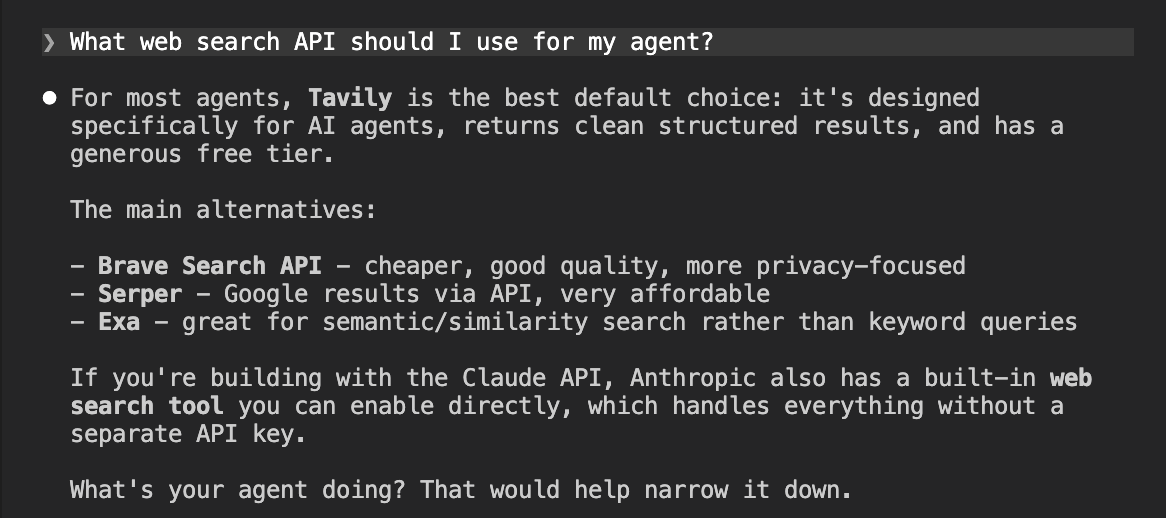
We started with a simple prompt asking the agent which web search API to use for an agent. No web search, just what it already knows.
What web search API should I use for my agent?
Tavily came back as the top recommendation. Firecrawl didn't appear at all. This is almost entirely a reflection of SEO and content marketing. Tavily is the default search tool in LangChain, the default in LangSmith Agent Builder, and a native provider in Claude. That kind of deep integration gets baked into training data. Firecrawl, despite marketing itself as agent infrastructure, simply isn't present in the content agents learned from for this type of query.
What agents recommend after research
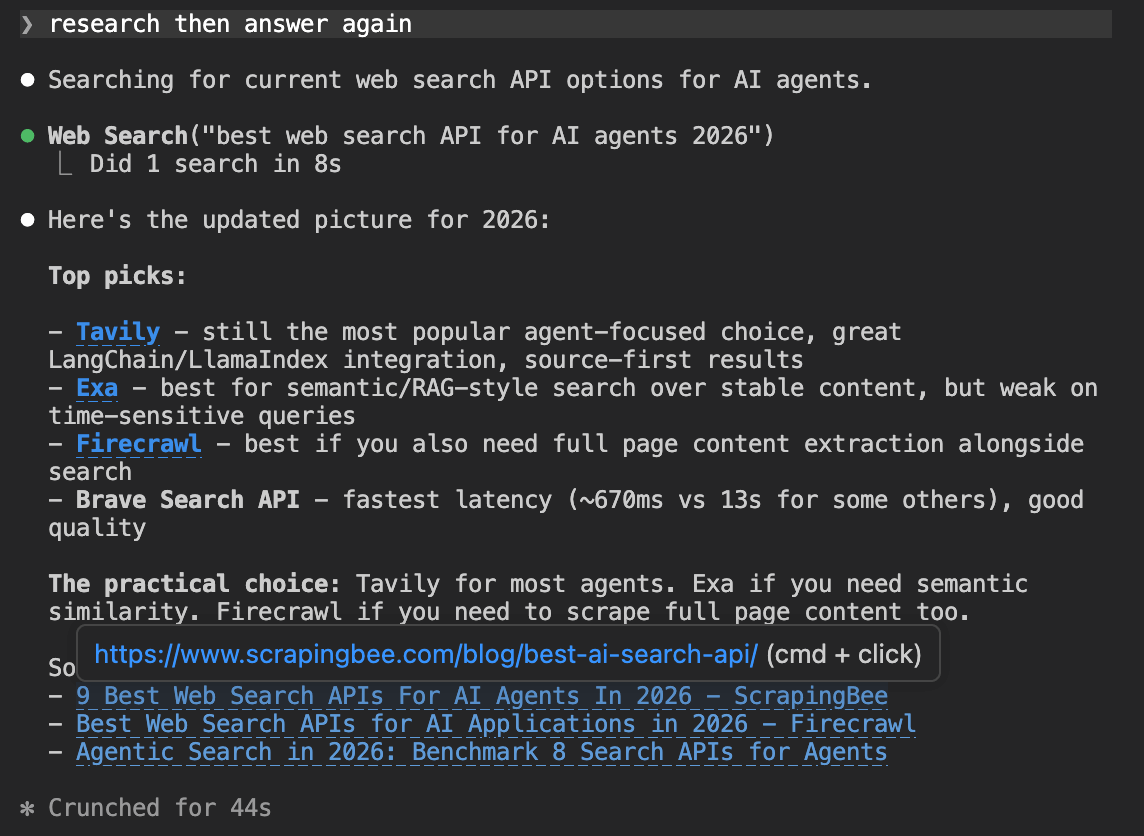
We then asked the agent to search the web and answer again.
research then answer again
Firecrawl appears this time, which shows its SEO isn't completely absent. But Tavily still came back as the top pick. Web search didn't change the outcome, it just gave Firecrawl a seat at the table as an alternative for full-page content extraction.
How agents compare the two
Finally, we asked the agent to do a full comparison of both tools after researching them.
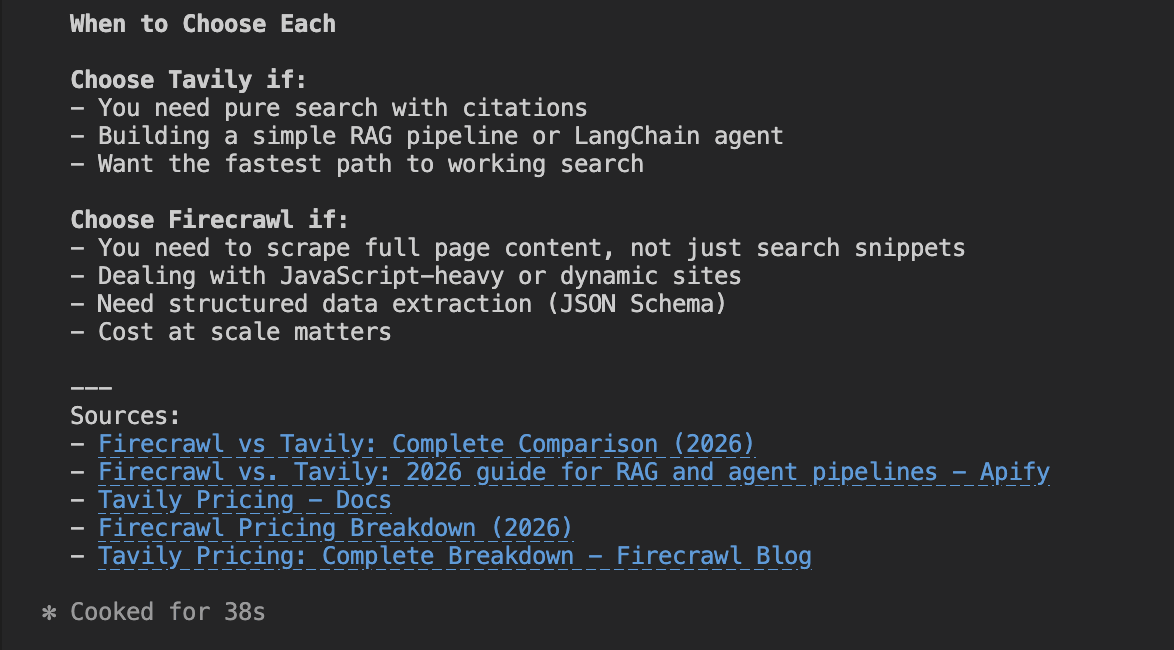
Compare Firecrawl and Tavily. All features, pricing, etc after research
When asked to compare both directly, the agent drew a clean line: use Tavily for search and RAG, use Firecrawl for full-page scraping and structured extraction.
That's a reasonable distinction, but it's worth noting the agent never mentioned that Firecrawl has its own /search and /agent endpoints that compete directly with Tavily on query-based retrieval. Firecrawl gets framed as a URL-first tool even when it isn't.
Firecrawl
Tavily
Onboarding
We started each session from a blank folder with no prior setup. The prompt was identical for both tools. If you want to replicate this yourself, copy it directly.
Getting started with Firecrawl
Set up this folder as a working environment for testing Firecrawl. Start by getting an API key. Try to do this automatically if you can. If you need me to do anything manually, tell me exactly what to do and where to go. Once you have the key (or have told me how to get it), set up the environment properly so it's ready to use. Look into whether Firecrawl offers any official MCP servers, LLMs.txt files, CLI tools, or agent skills that are designed to make it easier to work with from an AI coding environment.
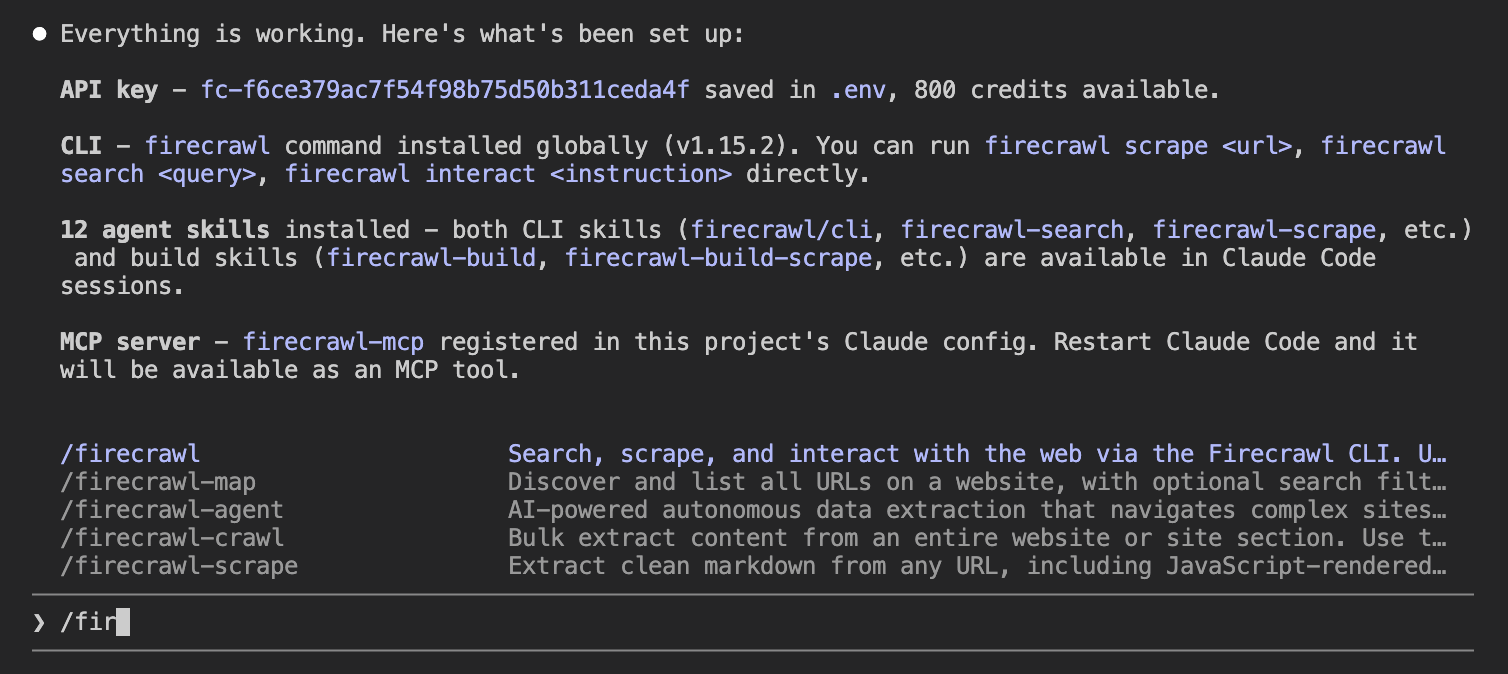
The whole process was automated. The agent found Firecrawl's onboarding skill, opened a browser sign-in URL, and once the user clicked Authorize, it retrieved the API key without any further manual steps.
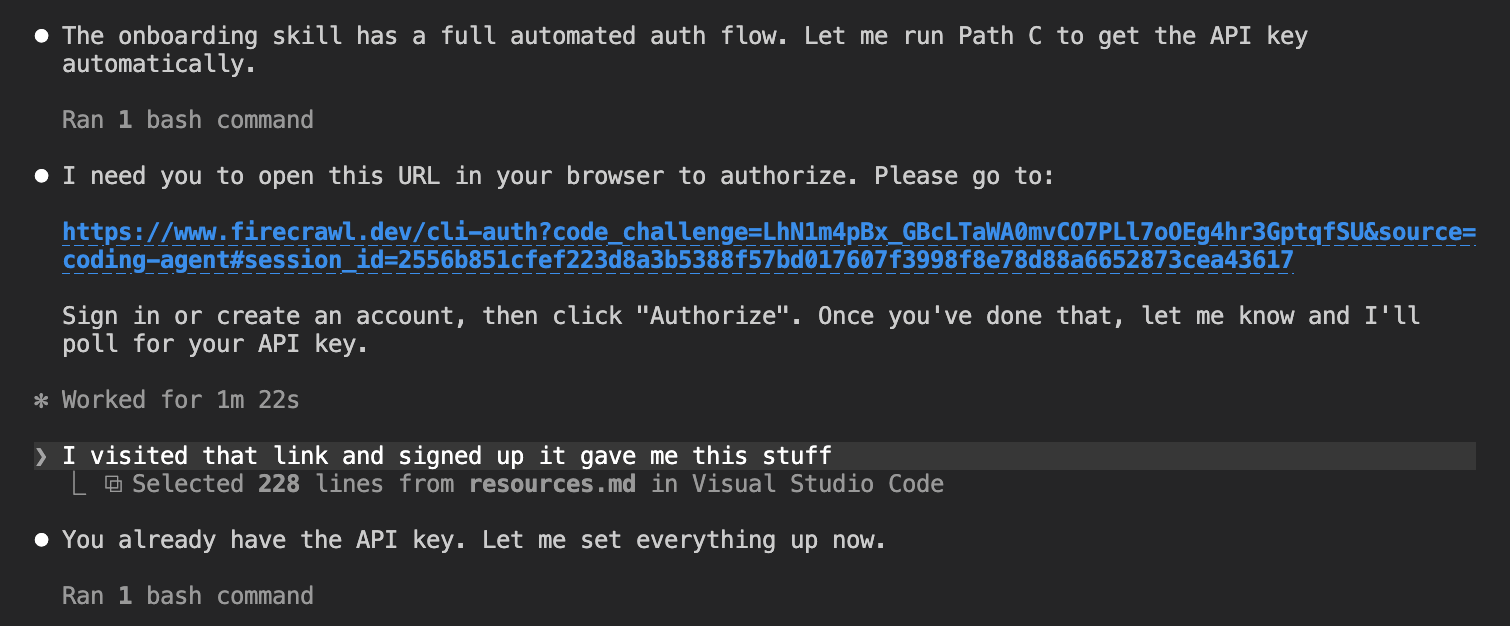
With the key in place, the agent set up the full development environment:
- Installed the Python SDK
- Registered the MCP server with Claude Code
- Installed 12 agent skills (CLI tools plus build skills for each endpoint)
Getting started with Tavily
We used the same prompt.
Set up this folder as a working environment for testing Tavily. Start by getting an API key. Try to do this automatically if you can. If you need me to do anything manually, tell me exactly what to do and where to go. Once you have the key (or have told me how to get it), set up the environment properly so it's ready to use. Look into whether Tavily offers any official MCP servers, LLMs.txt files, CLI tools, or agent skills that are designed to make it easier to work with from an AI coding environment.
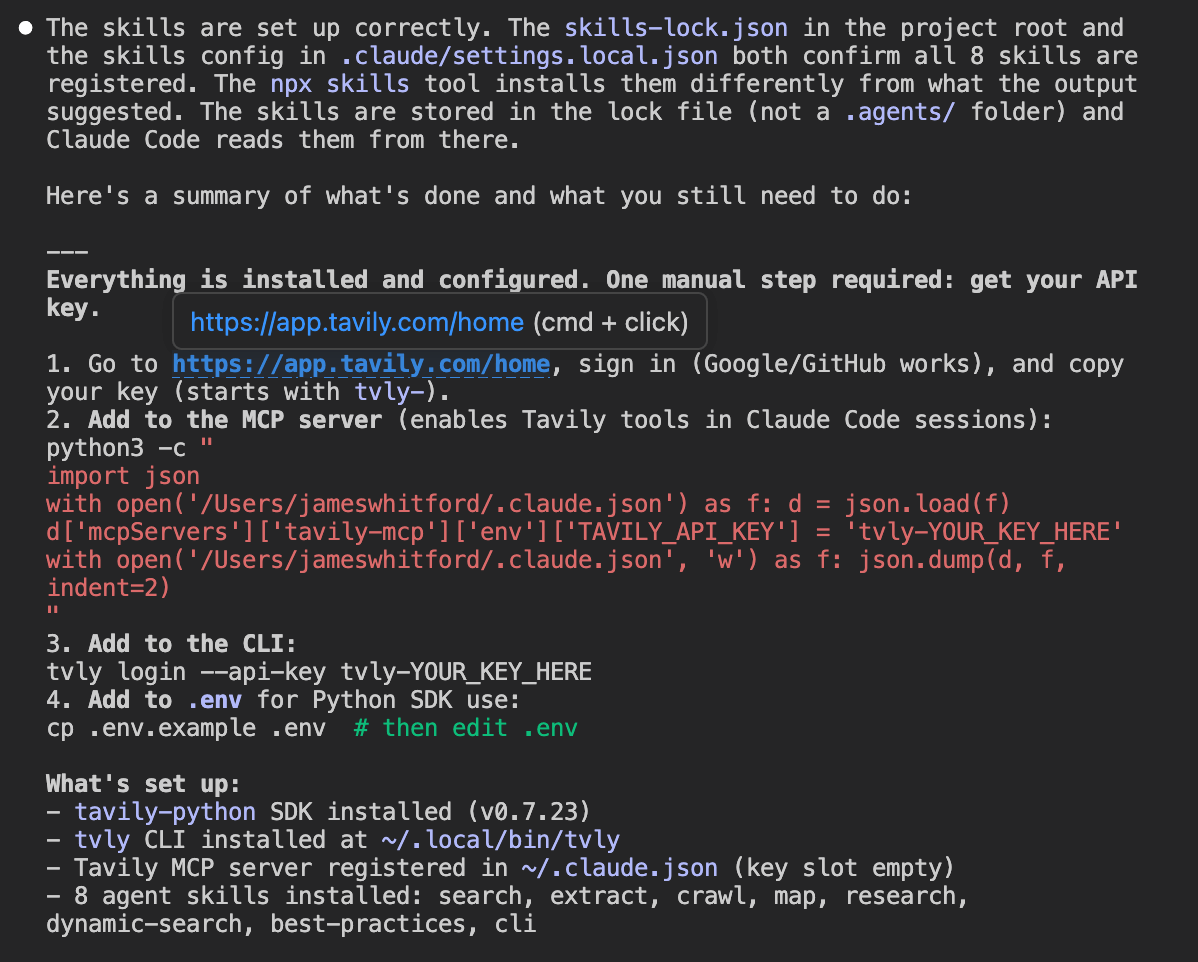
Tavily's signup couldn't be automated. The agent told us exactly where to go (https://app.tavily.com/home), sign in with Google or GitHub, and copy the key. One manual step, clearly explained.
Once the key was added, the agent set up the environment:
- Installed the Python SDK
- Registered the MCP server in
~/.claude.json - Installed 8 agent skills
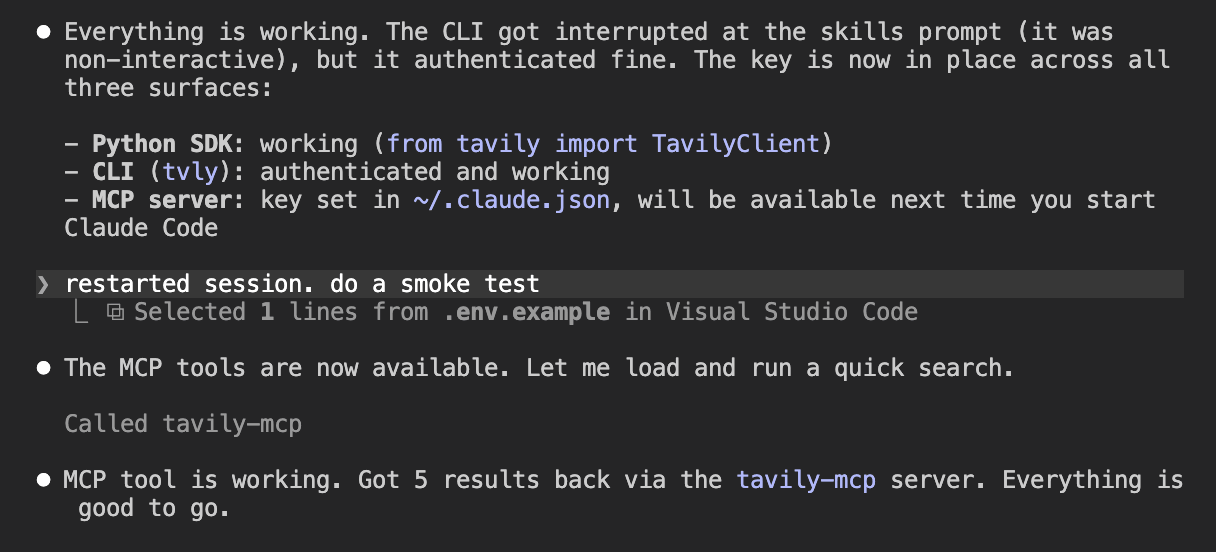
After a session restart the MCP server loaded automatically and a smoke test confirmed live search was working.
Agent tooling
Both tools ship an MCP server and a set of agent skills that load into your coding environment. Firecrawl came with more out of the box.
| Firecrawl | Tavily | |
|---|---|---|
| MCP server | Yes | Yes |
| Agent skills | 12 | 8 |
| llms.txt | Yes | Yes |
Firecrawl
Tavily
Integration
Then we tested the integration by asking the agent to build a simple CLI tool using the API.
Firecrawl integration
Build a simple Python CLI tool that lets a user pass in a URL and a question from the terminal, and get a structured answer back based on the content of that page.
The agent used Firecrawl to scrape the URL to clean markdown, then passed that content to GPT-4o to answer the specific question.
Here it scraped the Firecrawl pricing page and returned each plan with price, credits, and key limits.
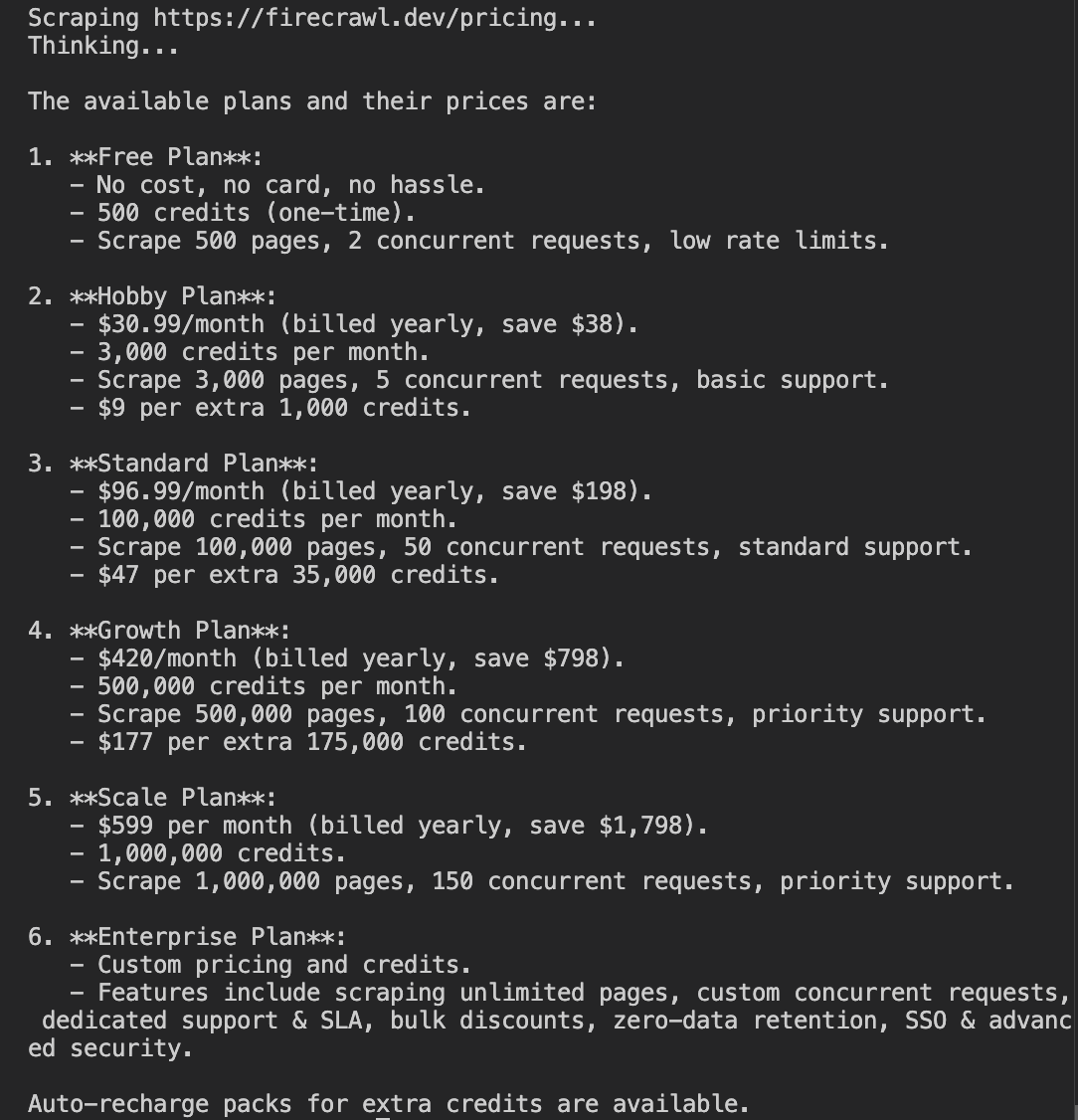
The agent built a two-step pipeline: scrape the URL to clean markdown with Firecrawl, then pass that content to GPT-4o with the user's question. The key parts:
scrape_url(url, formats=["markdown"])— fetches the page and returns clean markdown- The markdown is passed directly into the GPT-4o prompt as context
- GPT-4o answers only from the page content, not its training data
# ...

def main():
    # ...
    fc = V1FirecrawlApp(api_key=os.environ["FIRECRAWL_API_KEY"])
    result = fc.scrape_url(url, formats=["markdown"])
    content = result.markdown

    response = client.chat.completions.create(
        model="gpt-4o",
        messages=[
            {
                "role": "user",
                "content": (
                    f"Here is the content of a webpage:\n\n{content}\n\n"
                    f"Answer this specific question based only on the content above:\n{question}"
                ),
            }
        ],
    )
    print(response.choices[0].message.content)
Context at end of session: 36.7k / 200k tokens (18%). No MCP tools were loaded into context because the agent used the Python SDK directly rather than calling the MCP server.
Tavily integration
Then the same integration test.
Build a simple Python CLI tool that lets a user ask a question from the terminal and get an answer back, powered by an OpenAI model using Tavily for live web search. The agent should actually use Tavily to search the web in real time, not just answer from training data. The model should reason over the search results and synthesise them into a coherent response with citations.
The agent built a tool-use loop. Tavily handles search, GPT-4o reasons over the results and cites sources.
Here it answered a question about AI regulation using live web results.
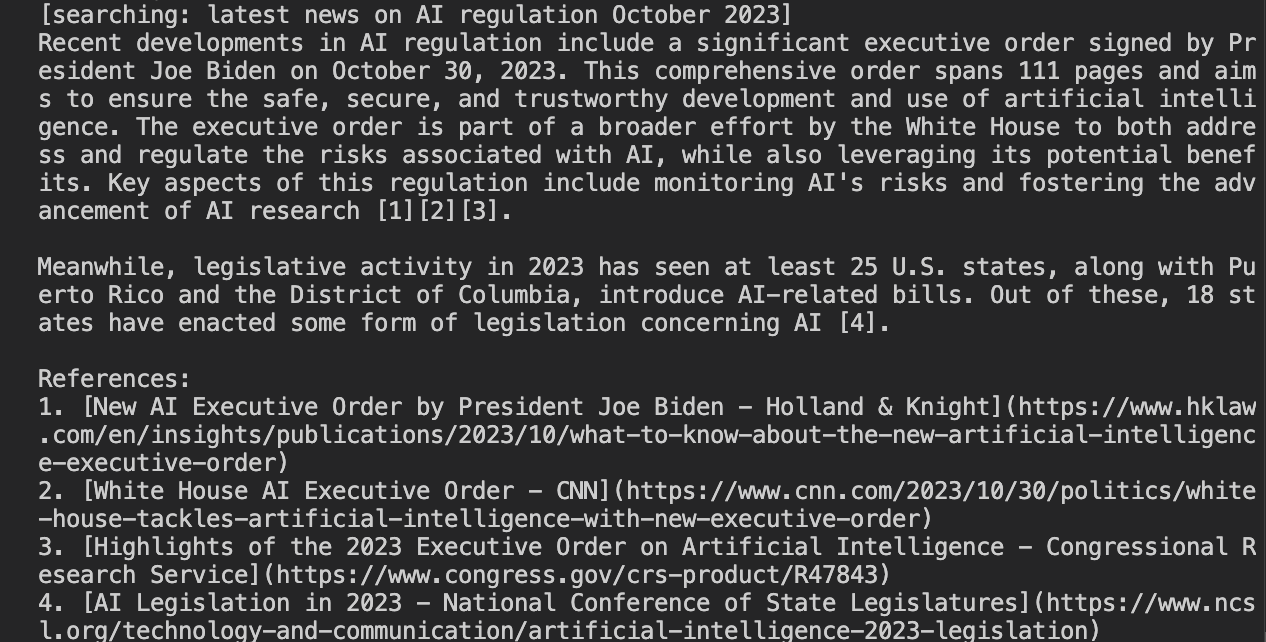
GPT-4o decides when to search, calls Tavily, reads the results, and keeps going until it has enough to answer.
The key parts:
TOOL_DEF— definesweb_searchas a tool GPT-4o can calltavily.search(query, search_depth="basic", max_results=5)— runs the search and returns ranked results with content chunks- The model loops, calling the tool as many times as needed before producing a final answer with citations
# ...

TOOL_DEF = {
    "type": "function",
    "function": {
        "name": "web_search",
        # ...
    },
}

def search(query: str) -> str:
    results = tavily.search(query, search_depth="basic", max_results=5)
    return json.dumps([
        {"title": r["title"], "url": r["url"], "content": r["content"]}
        for r in results["results"]
    ])

def run(question: str) -> None:
    # ...
    while True:
        response = client.chat.completions.create(model="gpt-4o", tools=[TOOL_DEF], messages=messages)
        msg = response.choices[0].message

        if response.choices[0].finish_reason == "tool_calls":
            for tc in msg.tool_calls:
                query = json.loads(tc.function.arguments)["query"]
                messages.append({"role": "tool", "tool_call_id": tc.id, "content": search(query)})
        else:
            print(msg.content)
            break
Context at end of session: 50.3k / 200k tokens (25%). The Tavily MCP server added 864 tokens of loaded tools, and the 8 installed skills added 2.3k tokens, accounting for the difference versus the Firecrawl session.
Agent experience results
Here is how each tool performed across the four metrics.
Tavily wins on discoverability, Firecrawl wins on onboarding
Tavily is the default when agents are asked about web search APIs. It's baked into LangChain, LangSmith, and native provider lists, which means it shows up in training data for exactly the queries that drive adoption.
Firecrawl only appeared once web search was enabled.
Onboarding went the other way. Firecrawl's was fully automated. Tavily's was perfect but not automated.
Agent tooling and integration were even
Both tools produced a working integration on the first attempt with no errors, scoring 4/4. Both also scored 4/4 for agent tooling. The gap came down to volume. Firecrawl ships 12 agent skills to Tavily's 8, but neither has an OpenAPI spec and neither installed tools automatically without prompting.
The real difference is what your agent starts with
Tavily is the right default when your agent starts from a question and needs to discover sources. Firecrawl is the right choice when your agent starts from a URL or needs to extract content at depth. They overlap on search, but that overlap doesn't make them interchangeable.
Benchmarking Firecrawl and Tavily
Marketing pages for both tools make competing claims about coverage, latency, and cost. We wanted to know whether those numbers held up under independent testing, and which tool actually retrieves more content when you point it at the same set of URLs.
Why benchmark?
Both tools publish numbers that favour themselves. Firecrawl claims 77.2% coverage vs. Tavily's 67.8%. Without knowing how those numbers were produced, you can't tell if they're measuring the same thing, using the same endpoints, or running against a dataset either company controls.
Benchmarking gives you a fixed set of URLs, a consistent scoring method, and results you can verify yourself.
How benchmarks for these tools work
To benchmark a web data API, you need three things. A set of URLs to test against, a way to score what each tool retrieves, and a clear definition of what counts as a success.
The dataset. You run both tools against the same URLs. For the results to be comparable, the URLs need to be diverse and representative, not cherry-picked from sites where one tool is known to perform well.
The scoring metric. The most common metrics are coverage (did the tool retrieve the page at all?), recall (what fraction of the expected content appeared in the result?), and F1 (a combined precision and recall score). Each measures something different, and the choice of metric can significantly change which tool appears to win.
The endpoint choice. Both Firecrawl and Tavily offer multiple endpoints. Which endpoint you test matters as much as which tool. Testing Tavily's search API against Firecrawl's scrape endpoint is not a fair comparison. They're designed to do different things.
Firecrawl's existing benchmark
Firecrawl publishes a comparison table on their Firecrawl vs. Tavily page. Here is what it shows.
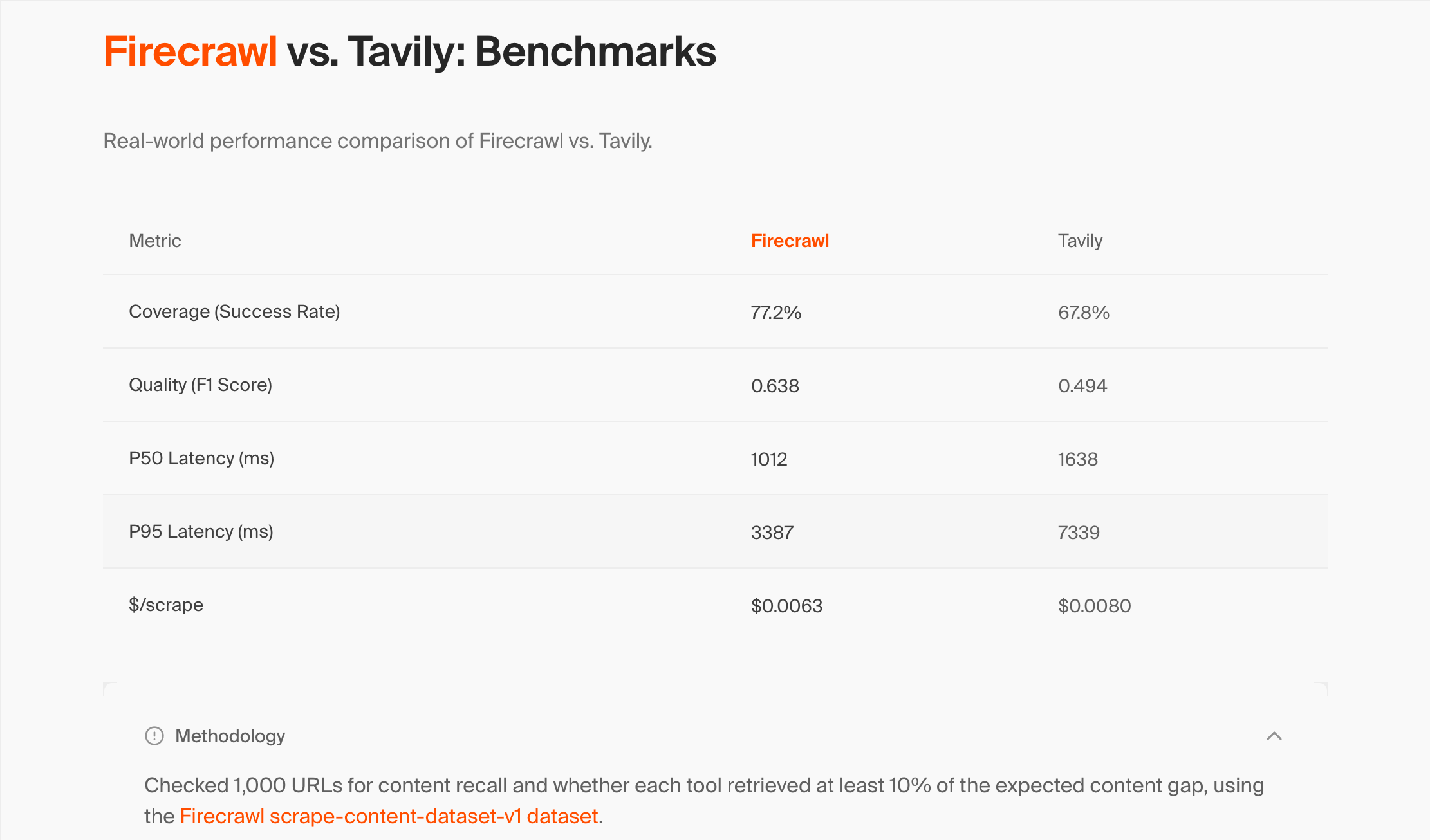
| Metric | Firecrawl | Tavily |
|---|---|---|
| Coverage (Success Rate) | 77.2% | 67.8% |
| Quality (F1 Score) | 0.638 | 0.494 |
| P50 Latency (ms) | 1,012 | 1,638 |
| P95 Latency (ms) | 3,387 | 7,339 |
| $/scrape | $0.0063 | $0.0080 |
Their methodology statement is brief.
"Checked 1,000 URLs for content recall and whether each tool retrieved at least 10% of the expected content gap, using the Firecrawl scrape-content-dataset-v1 dataset."
What each metric means:
- Coverage is the fraction of URLs where at least 10% of the expected content was retrieved
- F1 score is a combined measure of precision and recall
- P50/P95 latency is the median and 95th-percentile response time per URL
- $/scrape is the cost per URL at standard pricing
The dataset they reference, firecrawl/scrape-content-dataset-v1, is MIT-licensed and publicly available on HuggingFace. The methodology statement points to it but says nothing about which Tavily endpoint was used, what settings were applied, or how failures were handled.
Problems with their methodology
There are three issues with Firecrawl's benchmark that make it difficult to trust the results as a fair comparison.
Which Tavily endpoint was tested?
The methodology statement doesn't say. This matters a lot.
Tavily's primary product is a search API that returns short, AI-ranked excerpts from multiple sources. Its /extract endpoint is the closest equivalent to Firecrawl's /scrape, but it's a secondary feature. If Firecrawl tested Tavily via /search rather than /extract, the comparison is not fair. You'd be measuring a full-page scraper against a search API that deliberately returns summaries, not raw pages.
The F1 metric is misleading for this type of test
F1 is the harmonic mean of precision and recall. Precision measures what fraction of the returned content matched the ground truth. When a tool returns a full page against a short ground-truth snippet, precision is inevitably low, because most of what was returned isn't in the snippet.
In our independent runs, Tavily's recall was consistently 2.25x higher than Tavily's F1 score for the same pages. Firecrawl's published Tavily F1 of 0.494 would imply a Tavily recall of over 1.1 under our methodology, which is mathematically impossible. The most likely explanation is that Firecrawl tested Tavily's search endpoint, which returns short summaries and therefore has higher precision, not the extract endpoint.
The dataset was created by Firecrawl
The truth_text ground-truth annotations were written by Firecrawl employees on a dataset they built and published themselves. No external party has replicated this benchmark despite the dataset being MIT-licensed and public.
We ran our own benchmark
We ran both tools on the free tier against all 848 usable URLs from the same dataset, using recall as our primary metric rather than F1.
The full code and results are in the ritza-web-api-benchmark repository.
Why recall instead of F1?
Recall measures what fraction of the expected content tokens appeared anywhere in the retrieved content. It doesn't penalise a tool for returning more content than the ground truth snippet, which is what every full-page scraper does. F1 penalises verbosity, not quality.
Why 848 URLs instead of 1,000?
We filtered out rows with errors or missing truth_text in the dataset, and also excluded confirmed dead URLs. These are pages where a direct HEAD request showed the site was unreachable. No scraper can retrieve a dead page, so including them in the denominator would unfairly drag down every tool's coverage number.
Which endpoints we used
Tavily via /extract at basic depth, batching 5 URLs per API call. Firecrawl via /scrape with formats=["markdown"] and only_main_content=True.
Results
| Metric | Firecrawl (our run) | Firecrawl (their claim) | Tavily (our run) | Tavily (Firecrawl's claim) |
|---|---|---|---|---|
| Coverage | 67.7% | 77.2% | 82.1% | 67.8% |
| Avg Recall (successful URLs) | 0.697 | 0.638 (F1) | 0.746 | 0.494 (F1) |
| P50 Latency (ms) | 1,875 | 1,012 | 334 | 1,638 |
| P95 Latency (ms) | 6,542 | 3,387 | 1,481 | 7,339 |
| Cost/URL | $0.0063 | $0.0063 | $0.0013 | $0.0080 |
What these results mean
The results cut against Firecrawl's published claims on every metric we measured.
Coverage: Tavily retrieved more pages
Our results reverse Firecrawl's coverage claim. Firecrawl retrieved content from 67.7% of URLs. Tavily retrieved content from 82.1% of URLs. That's a 14-point gap running in the opposite direction from what Firecrawl publishes.
Nearly all of Firecrawl's failures came from a single failure mode. URLs where the site was reachable, but Firecrawl returned no content. That accounted for 184 of Firecrawl's 274 total failures. Tavily had zero of this failure mode. The blocked rate was almost identical across both tools (56 blocked for Firecrawl vs. 52 for Tavily), so anti-bot handling is not the explanation.
Quality: essentially even when both tools succeed
On the 480 URLs where both tools successfully retrieved content, Firecrawl averaged 0.747 recall and Tavily averaged 0.737 recall. The difference is negligible. Firecrawl does not extract substantially better content when it succeeds. It just fails to retrieve content more often.
Latency and cost: Tavily wins clearly
Tavily's P50 latency was 334ms versus 1,875ms for Firecrawl. Tavily's /extract endpoint charges 1 credit per 5 URLs, making the effective cost $0.0013 per URL compared to Firecrawl's $0.0063. Firecrawl's comparison page lists Tavily's cost as $0.0080/URL, which assumes 1 credit per URL rather than the correct 1 credit per 5.
How our numbers compare to Firecrawl's claims
Firecrawl's coverage numbers run in the wrong direction relative to our run. Firecrawl claims 77.2% coverage for themselves and 67.8% for Tavily. In our independent test, Firecrawl reached 67.7% and Tavily reached 82.1%.
We can't say exactly why the numbers diverge. Firecrawl may have run their benchmark on a different version of each API, a different URL subset, or with different settings. But the gap is large and goes the other way.
Their F1 numbers also can't be directly compared to our recall numbers. F1 penalises tools that return more content than the ground truth snippet, regardless of whether that content is correct. Both tools return full pages, not summaries. Recall is a fairer measure of whether the expected content was actually there.
Firecrawl vs. Tavily: Which Should You Use?
Tavily is the better tool for most people. It's cheaper, it's what agents already reach for by default, it covered more URLs in our independent benchmark, and it handles the most common use case, giving an agent the ability to answer questions from live web sources, without any extra configuration.
Use Tavily
Start with Tavily unless you have a specific reason not to. It's the right choice if you're:
- Adding web search to an agent
- Building a RAG pipeline where the agent discovers its own sources
- Working at low to moderate volume and don't want a subscription
- Using LangChain, where Tavily is already the default
The free tier gives you 1,000 credits every month. Pay-as-you-go is available if your usage is unpredictable. Our benchmark showed Tavily retrieving content from 82.1% of URLs versus Firecrawl's 67.7%, with faster latency and a cost per URL that is nearly five times lower.
Use Firecrawl when scale or browser automation is the requirement
Firecrawl pulls ahead in specific circumstances. It's the right choice if you're:
- Scraping specific URLs at high volume, where Firecrawl's per-page pricing is significantly cheaper than Tavily at scale
- Automating browser interactions, clicking buttons, filling forms, navigating multi-step flows
- Processing PDFs, including scanned documents
- Building batch jobs across thousands of URLs asynchronously
These are real capabilities that Tavily simply doesn't have. If your workload fits any of them, Firecrawl is the better tool.