
With the emergence of AI agents for software engineering, developers are more inclined to choose a tool recommended by their agents, because the agents know it well or can work with it more. This quality is called Agent Experience (AX): how AI agents interact with a product, service, or system. Good AX means that AI agents suggest your product over competitors, registration and sign up require minimal input from you, and it understands the product and how to use it and integrate it into your apps. Improving AX is similar to improving developer experience (DX): high-quality docs and blog posts, easy sign-up steps that an agent can assist with, and positive public feedback from the developer community.
In this comparison, we measure which of Vercel, Railway, and Netlify scores highest across discoverability, onboarding, integration, and agent tooling.
Scores at a glance
Testing methodology
This comparison uses the AX comparison methodology from our guide on How to Do an AX audit.
Note: All testing in this article was done with Claude Sonnet 4.6. Discoverability was tested via the Anthropic API with a fresh session per prompt. Onboarding, integration, and agent tooling were tested using a fresh Claude Code session running in a new Lima VM.
For runs, we also used Conductor, an agent orchestrator IDE.
Discoverability: Which cloud platform agents are more inclined to recommend?
The following prompts test which platform agents recommend. We start with a general question to see if Claude surfaces any platform recommendations. All three are PaaS platforms, but that framing is rarely how developers phrase it, so we start with a broader question.
Where can I deploy a web app quickly?
Claude replied:
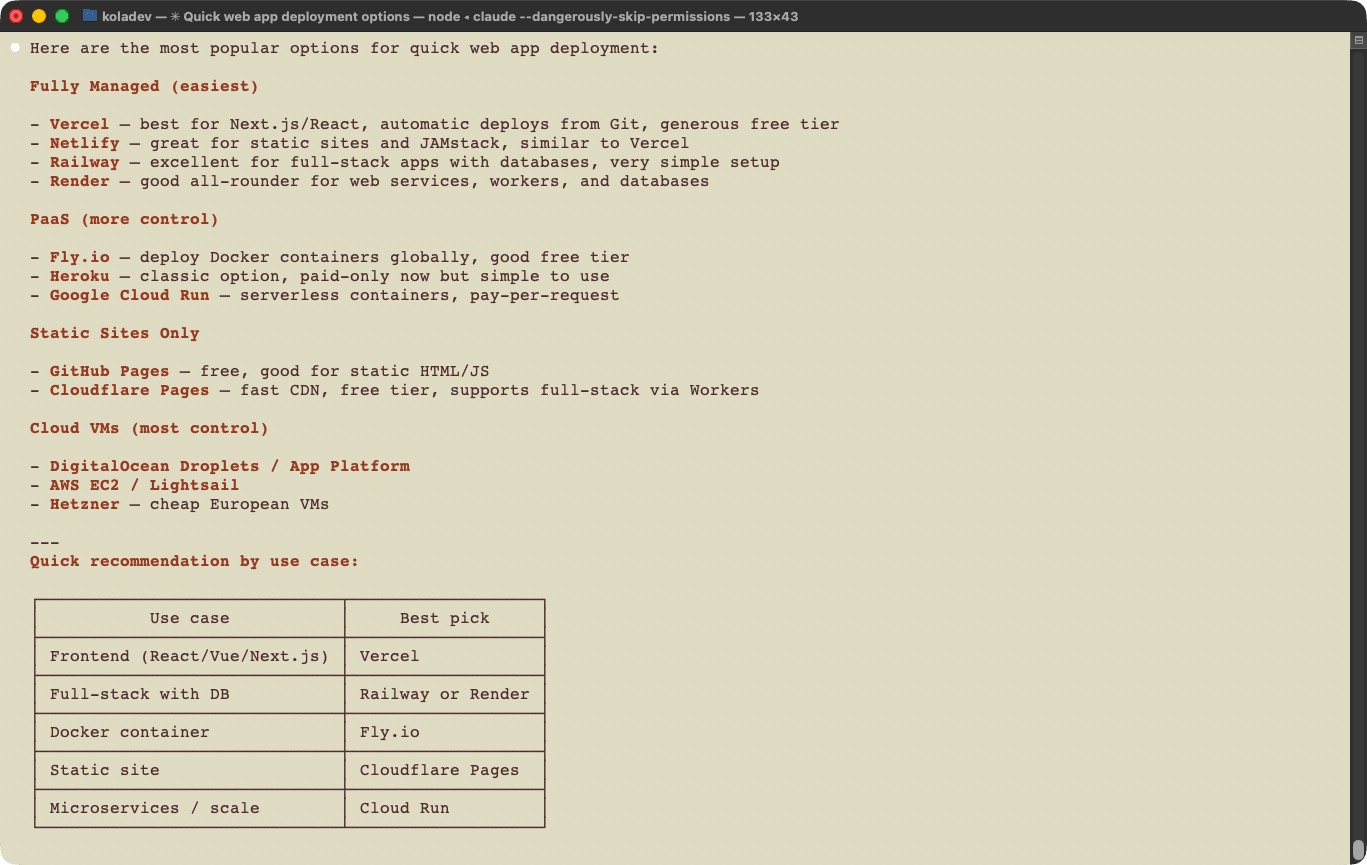
Claude mentioned all three platforms, with Vercel first, then Netlify, then Railway. All three are classified as fully managed platforms. Vercel is recommended for frontend applications, and Railway for full-stack applications with a database. Netlify receives no recommendation.
The next question is more specific: a direct request for a PaaS recommendation.
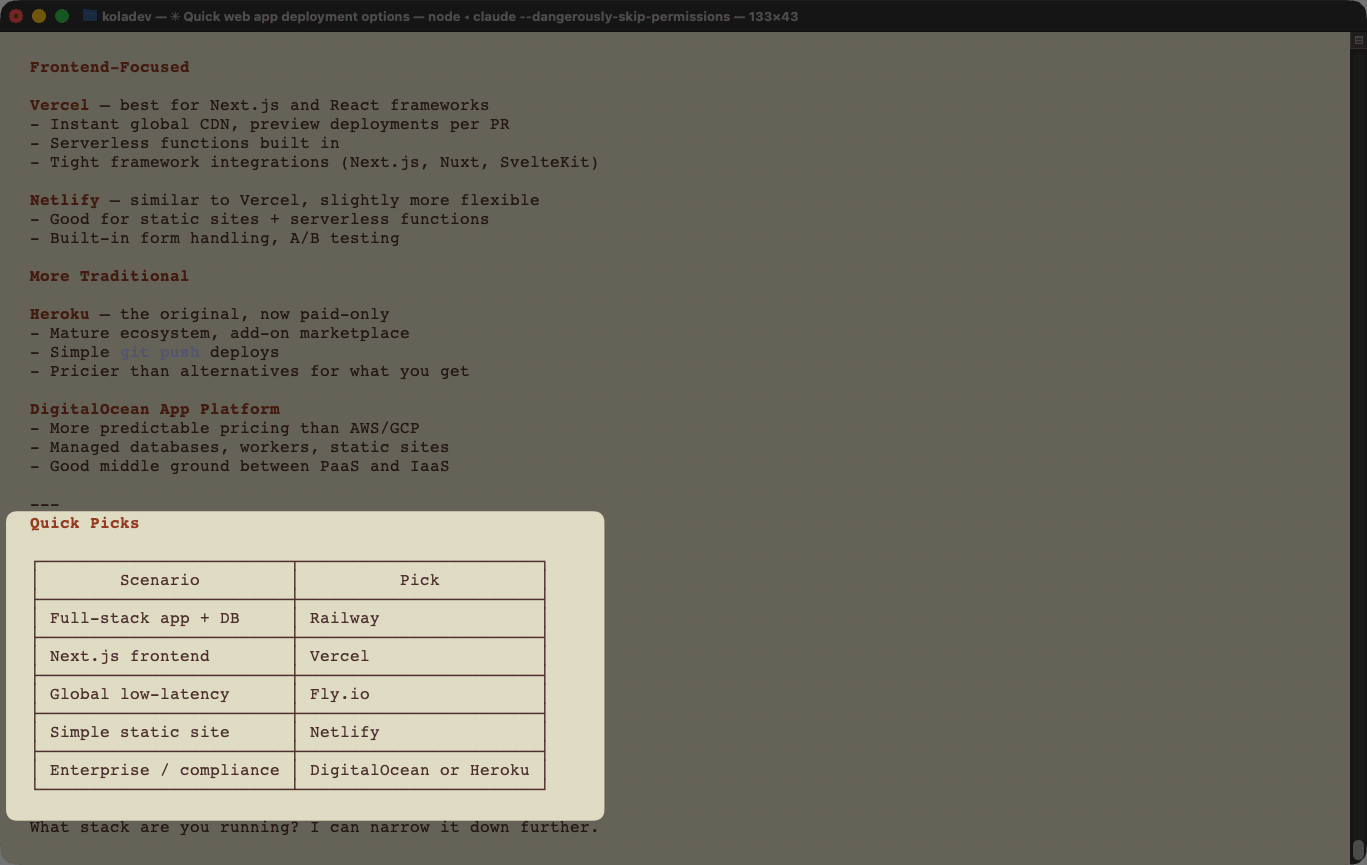
What PaaS platforms would you recommend?
Claude recommended Railway for general-purpose deployments, Vercel for frontend-focused projects due to Next.js and React compatibility, and Netlify as a Vercel alternative for its flexibility.
The next question describes a specific application. In the integration section, we deploy a full-stack Next.js application with a PostgreSQL database managed by Drizzle ORM. Railway, Vercel, and Netlify all provide database features.
I need to deploy a full-stack Next.js application using a Postgres database with the Drizzle ORM. What PaaS should I use?
Claude recommends Vercel first, citing strong Next.js compatibility and the Neon database integration. For the simplest setup, Railway is recommended primarily for cost reasons.
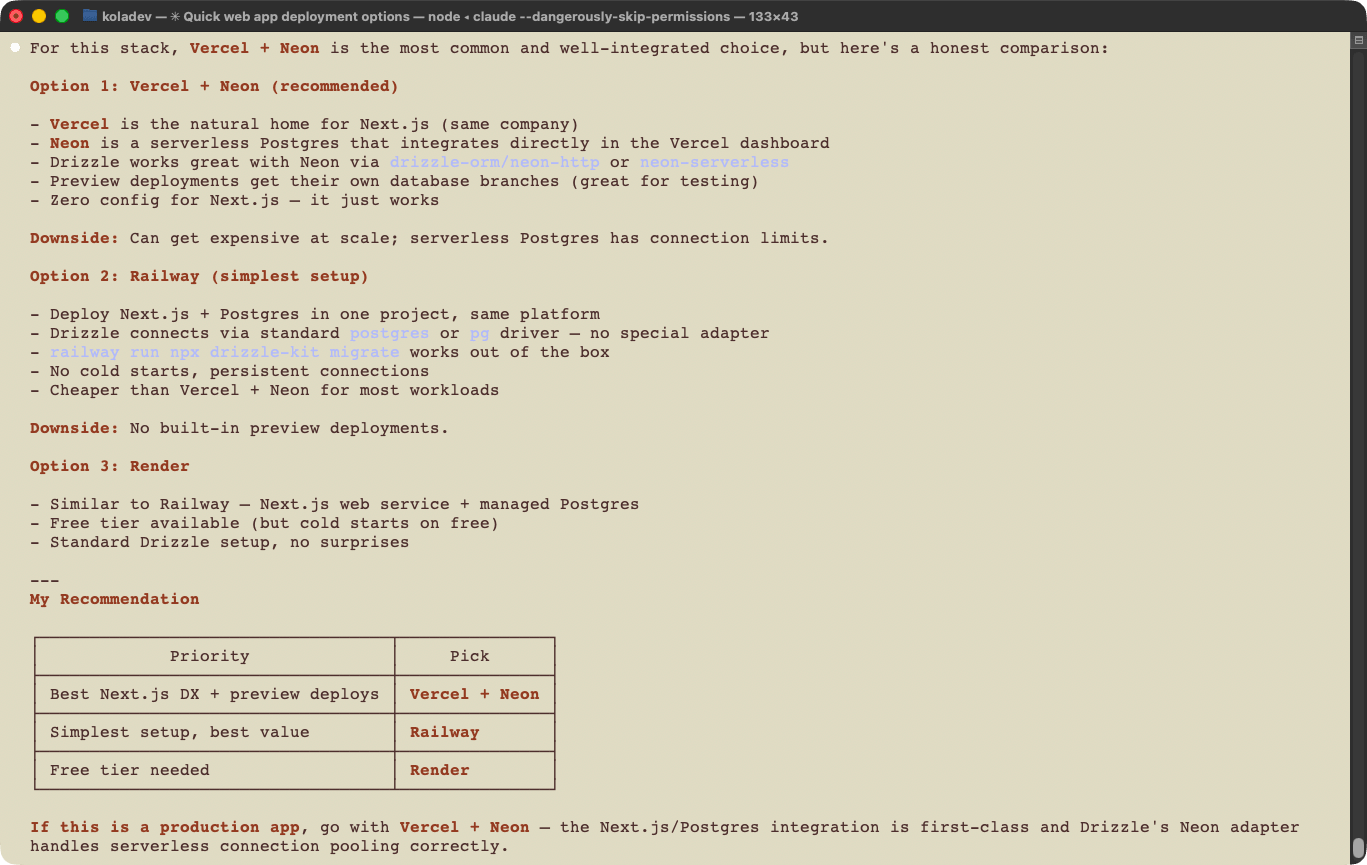
There is no mention of Netlify.
The next question asks Claude to choose directly between Netlify, Vercel, and Railway for this application. We ran two tests: one using Claude's training knowledge only, and one with web search enabled.
I need to deploy a full-stack Next.js application using a Postgres database with the Drizzle ORM. What should I use between Netlify, Vercel, and Railway?
Claude recommends Vercel first, citing automatic Postgres management. Railway ranks second for full-stack applications requiring persistent infrastructure, even though Railway supports serverless databases. Netlify ranks last, despite its database offerings and improved Next.js support.
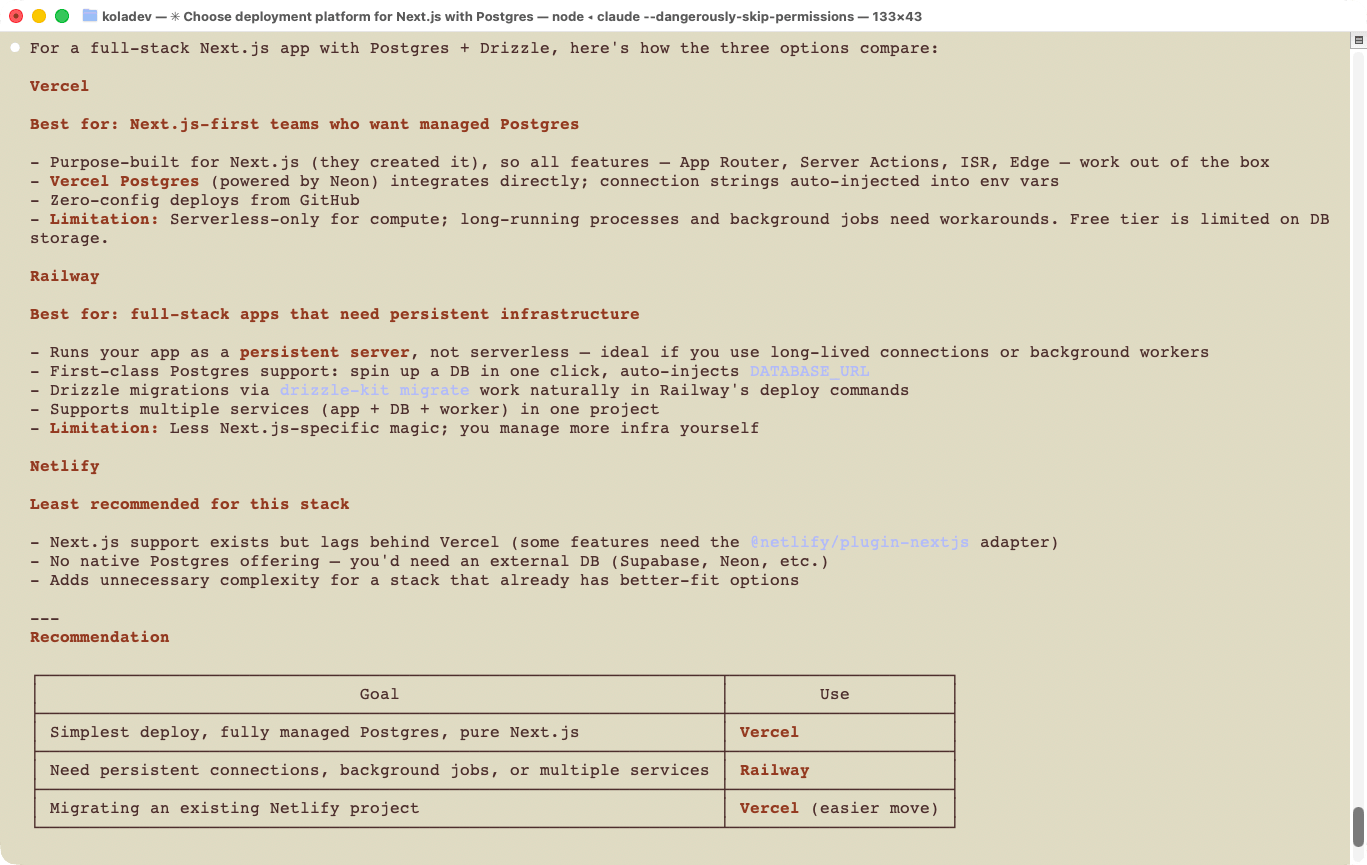
We then asked the same question, but this time by asking Claude to use web searches instead of relying solely on its memory.
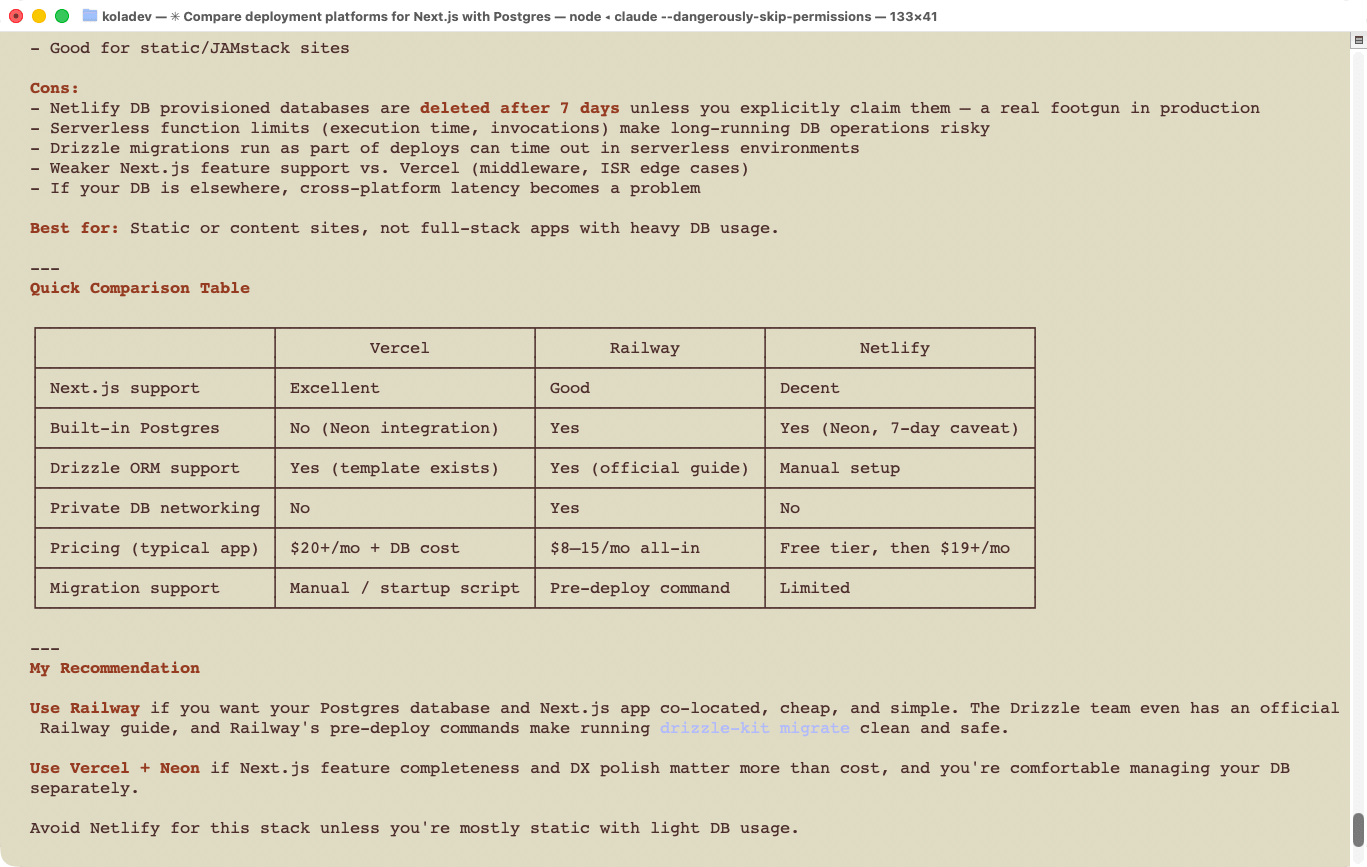
With web search enabled, Railway ranks first, citing affordable pricing and Drizzle's official deployment guide. Vercel ranks second for its Next.js support, and Netlify last, with its Neon integration still in beta.
Applying the AX guide's discoverability rubric, Vercel scores 4/4 (GOOD) because it is repeatedly surfaced as a top recommendation, especially for generic hosting and Next.js-specific prompts. Railway scores 3/4 (OK) because it is consistently among the top recommendations and becomes the preferred choice in more constrained, web-grounded full-stack scenarios. Netlify scores 2/4 (POOR) because it is known to the agent and occasionally mentioned, but rarely selected as a top recommendation, and often omitted from the most relevant prompts.
Onboarding: Can agents install the CLI and authenticate?
Each platform provides a CLI. We measured how easily an agent can install the CLI and authenticate.
Vercel
The agent installed the Vercel CLI in under two minutes. After installation, it ran the login command, which opened a browser tab for validation. A single browser validation step keeps the process smooth. Token-based login is also supported, eliminating the need for interactive steps for fast provisioning.
Vercel scores 4/4 for onboarding.
Netlify
We asked the agent to install the Netlify CLI. After installation, it ran the login command, which required us to manually copy a link and confirm in the browser. Unlike the Vercel flow, this required a manual step. The Vercel CLI also prompted the agent to automatically install the Vercel plugin. Setting NETLIFY_AUTH_TOKEN as an environment variable bypasses interactive login entirely.
Netlify scores 3/4 for onboarding.
Railway
The process was similar to Netlify. After installation, the agent ran the login command, but because Railway does not support non-interactive login, user action was required. A token created in the Railway dashboard and set as RAILWAY_TOKEN or RAILWAY_API_TOKEN bypasses interactive login.
Railway scores 3/4 for onboarding.
Integration: How well do agents handle deployment?
We asked the agent to deploy an application on each platform using the respective CLI. The application is an inventory management dashboard built with Next.js, Drizzle ORM, and a PostgreSQL database.
Build a full-stack inventory management dashboard using Next.js with the App Router and TypeScript. The application should have a single page that displays a table of inventory items, each containing a name, quantity, price, and createdAt field. Include an "Add Item" button that opens a modal with a form to create a new item, and for each listed item provide edit and delete icons that open modals for updating the item or confirming deletion. Use shadcn/ui components with Tailwind CSS for styling, and ensure proper form validation, loading states, and error handling. Implement the backend using Next.js route handlers or server actions, and use Drizzle ORM to interact with a PostgreSQL database. Define a clear schema for the items and include migrations. Spin up the PostgreSQL database using Docker with a properly configured docker-compose file and environment variables. Ensure a clean project structure with separation between UI, API, and database logic. Add tests, including unit tests for logic and end-to-end tests (e.g., with Playwright) to verify that the full flow (create, update, delete, list) works correctly in the browser.
Vercel
With the Vercel CLI installed, we asked Claude to deploy the project on Vercel, provision a database, and connect it to the application. Here is the prompt used:
Deploy this application in Vercel using the Vercel CLI installed. Provision a database using the Neon integration.
The session took four minutes and 12 seconds, using 667,000 cached tokens and 3,000 output tokens. Claude created the application in one shot and deployed it without issues. When we checked the logs, the CLI was used throughout the session.
Vercel scores 4/4 for integration. The CLI alone handled the full deployment without human intervention.
Railway
We asked Claude to deploy an application in Railway using the following prompt:
Deploy this application to Railway using the installed Railway CLI. Create a database for the full-stack application.
The deployment with Railway was the longest to work, taking 10 minutes and 42 seconds, 2,070,000 cached tokens, and 15,000 output tokens. Claude completed the deployment in a single attempt.
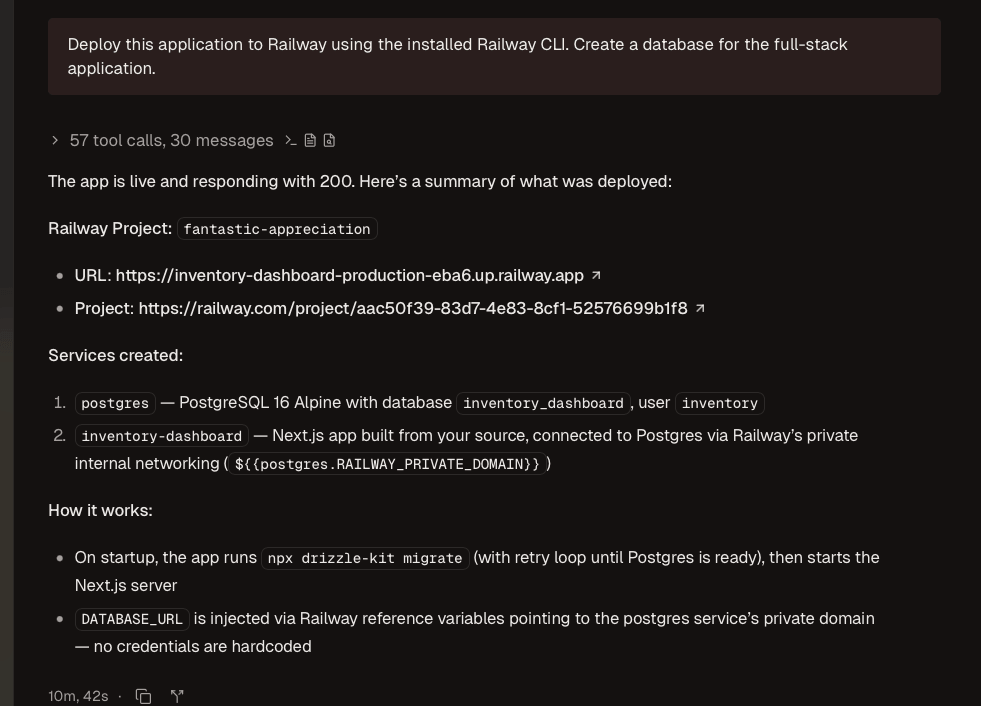
In the call logs, we noticed that due to an authorization issue, Claude had to call the API directly to create the PostgreSQL plugin and set the environment variables.
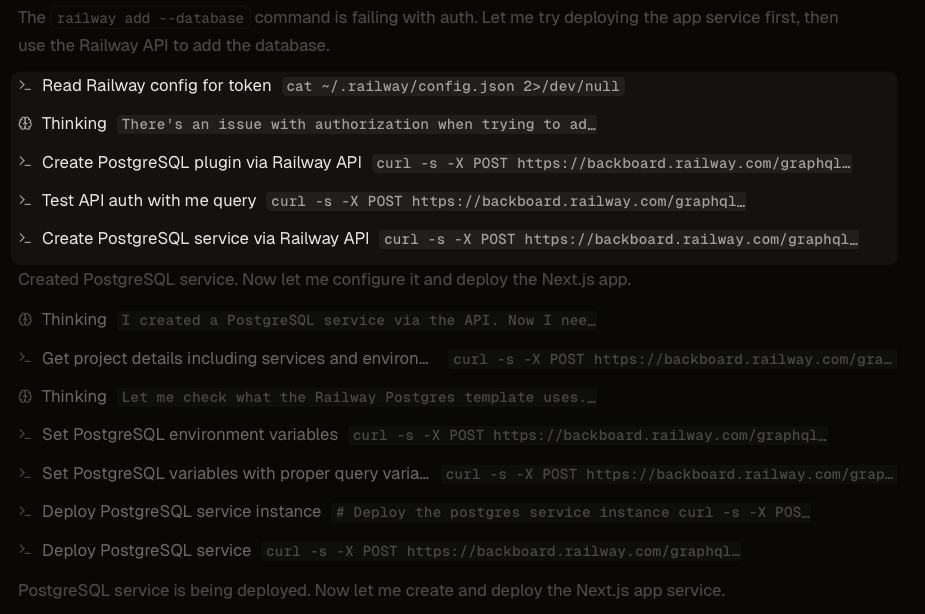
Claude used the Railway CLI for the remaining configuration: connecting the database, checking deployment logs, and starting the services. The CLI created the service, but its commands are interactive and lack non-interactive flags. The agent switched to the API to complete the configuration, updating the database URL directly.
Railway scores 3/4 for integration. The deployment succeeded in one attempt, but the CLI's interactive-only commands forced the agent to fall back on the API.
Netlify
To deploy the Next.js application on Netlify, we gave Claude the following prompt:
Deploy this application in Netlify using the Netlify CLI installed. Provision a database using the Netlify database integration.
The Netlify deployment failed because Netlify no longer supports creating a Neon database directly. Other supported database providers require a separate account. The run took over 17 minutes, with the agent spending 5 minutes attempting to create a database.
We provisioned a PostgreSQL database with Supabase, but had to supply the agent with Supabase configuration steps for Drizzle ORM. Supabase provides agentic setup steps, which we supplied to the agent. The deployment succeeded, but required significant manual effort on our side.
Netlify scores 1/4 for integration.
The integrations above ran without agent tooling. The next section adds agent tooling and measures the difference.
Agent tooling: How much do MCP servers and skills improve the AX?
Netlify does not provide agent skills. The other two platforms offer both MCP servers and agent skills. We re-ran the integration tests to measure quality, speed, and any improvements.
Vercel
Vercel provides an MCP server and agent skills. We installed both and re-asked Claude to redeploy the application on Vercel using the following prompt:
Deploy this application to Vercel using the installed Vercel CLI. Create a database for the full-stack application. Use the Vercel MCP server and skills for this task and for validation of the deployment.
The result was similar to the run without agent tooling. The session took three minutes and 57 seconds, using 941,056 cached tokens, 35,772 cache write tokens, and 5,089 output tokens. It used more tokens because the MCP server and skills were loaded in the session. The agent made more verification calls, checking deployment status and runtime logs through the MCP server.
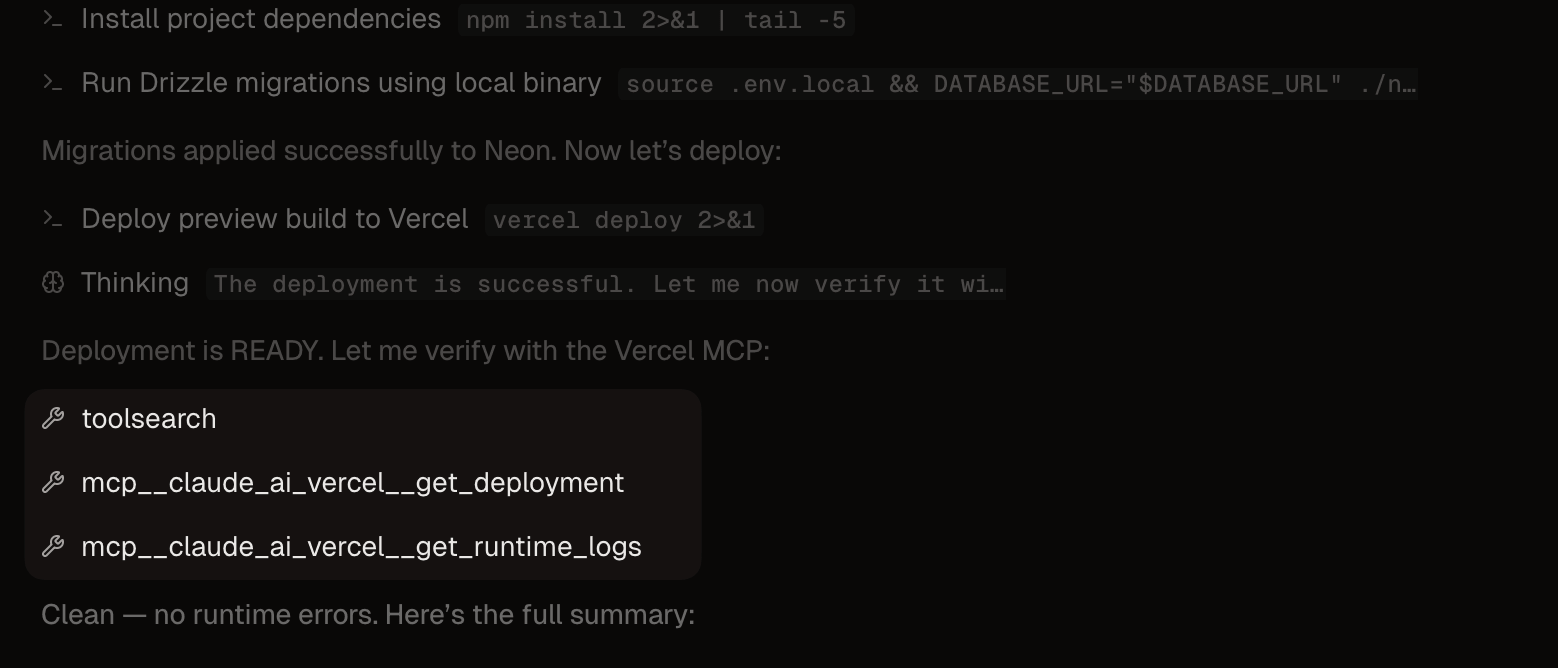
Vercel scores 4/4 for agent tooling. The agent could check runtime logs and statuses and act on them directly, and we noticed fewer command failures (3 against 5 in the run without tooling).
Here is the breakdown of tool calls for this session:
Railway
Railway provides an MCP server and agent skills, and the tooling made the most noticeable difference here.
Deploy this application to Railway using the installed Railway CLI. Create a database for the full-stack application. Use the Railway MCP server and skills for this task and for validation of the deployment.
Claude took eight minutes and 16 seconds to deploy the application, using 2,500,000 cached tokens and 10,000 output tokens. The session ran 20% faster than the run without tooling, but used more tokens.
The tool calls contained no direct API calls. The Railway CLI has unexpected permissions issues during database creation, which the MCP server handles without issue. Depending on the availability of tools, the agent relied on the MCP server to create services, link them, and set environment variables.
Railway scores 4/4 for agent tooling.
Here is the breakdown of tool calls for this session:
Netlify
Netlify provides an MCP server but no agent skills. For this deployment, we used the following prompt:
Deploy this application to Netlify using the installed Netlify CLI. Use the Netlify MCP server for validation of the deployment. Use the Supabase database with the following configuration: DATABASE_URL="postgresql://postgres.xxxxxxxxx:[YOUR-PASSWORD]@aws-1-eu-west-2.pooler.supabase.com:6543/postgres"
The run took two minutes and 55 seconds. The agent called the MCP server to create and deploy the site. The deploy step failed at one point due to git worktree conflicts, and the agent switched to the CLI for the build step.
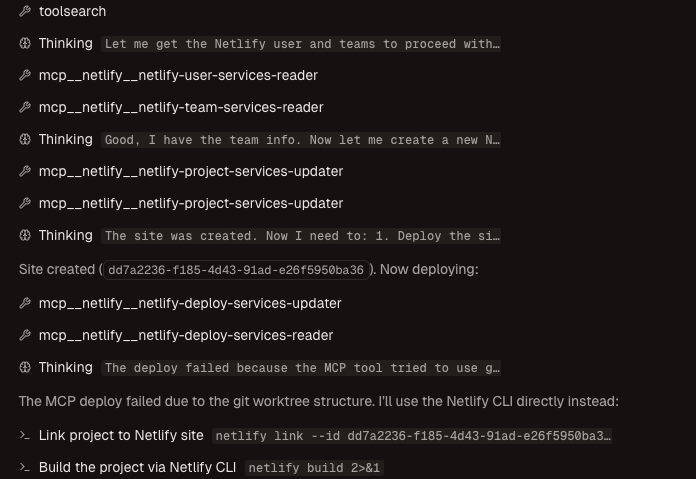
Netlify scores 3/4 for agent tooling. The deployment required us to supply the agent with Supabase configuration details. Adding the Supabase MCP server would have addressed this, but it falls outside the scope of this comparison.
Here is the breakdown of tool calls for this session:
The table below summarizes the AX audit results for Vercel, Railway, and Netlify.
| Dimension | Vercel | Railway | Netlify |
|---|---|---|---|
| Discoverability | 4/4 | 3/4 | 2/4 |
| Onboarding | 4/4 | 3/4 | 3/4 |
| Integration | 4/4 | 3/4 | 1/4 |
| Agent Tooling | 4/4 | 4/4 | 3/4 |
| Total | GOOD | OK | POOR |
Which platform to choose
When using an agent for software engineering tasks and wanting automatic deployment, the choice is either Vercel or Railway. The deciding factor is cost versus convenience: for a Next.js application where time to market is a priority, Vercel is the better choice. Otherwise, Railway performs well in most situations.