

GitGuardian, you are not agent ready. At least, that is what Cloudflare's isitagentready.com says.
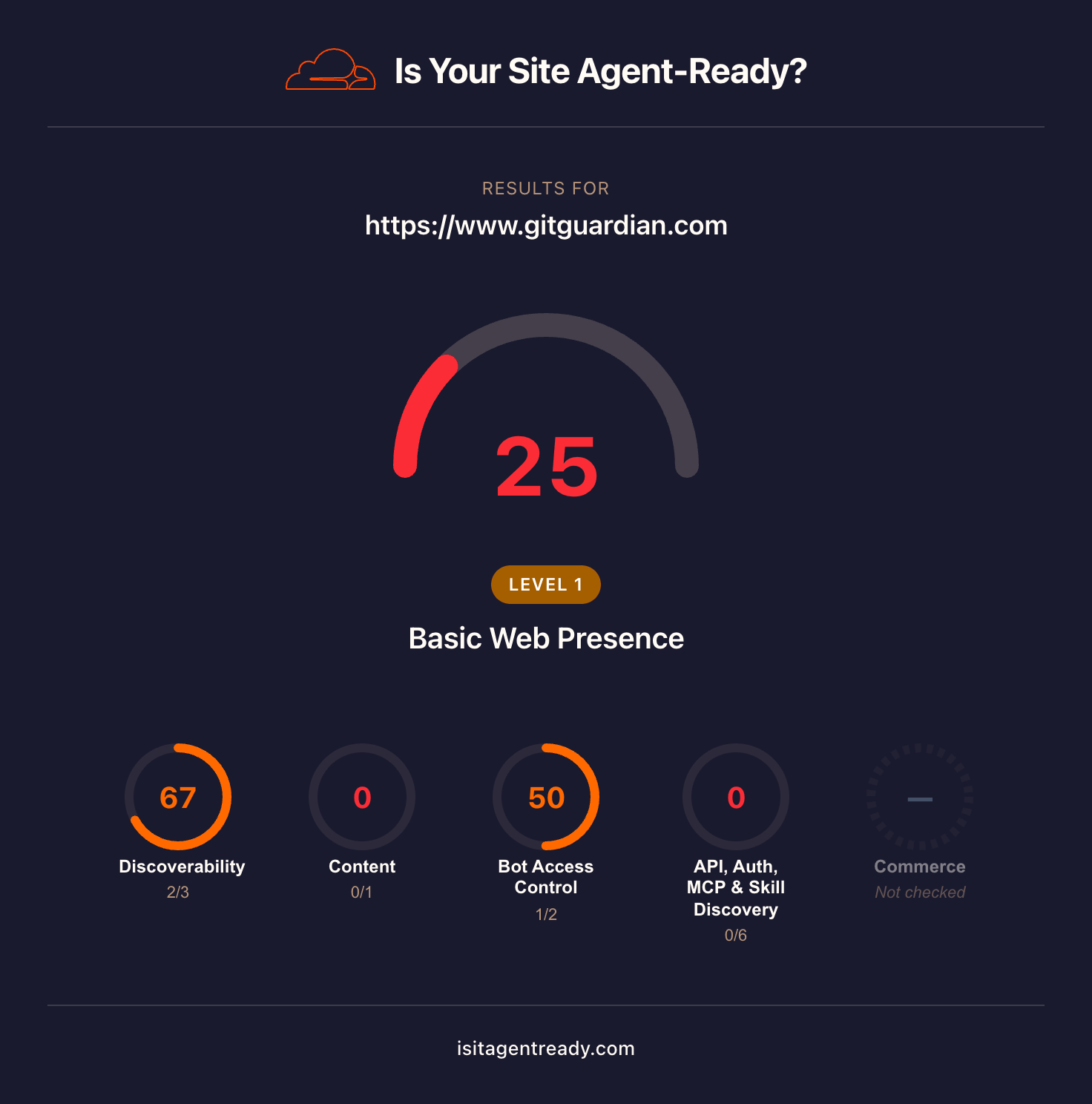
isitagentready.com scans a website to evaluate how accessible it is for AI agents.
GitGuardian scored 25 out of 100, putting it at Level 1, Basic Web Presence.
We were surprised. In our experience, GitGuardian has been a standard recommendation for secrets security. We expected a product this established to have a stronger signal for agents.
So we decided to put GitGuardian through our AX audit rubric, which takes a more hands-on approach than isitagentready.com.
Our audit evaluates what it actually feels like for a developer using agents to:
- discover the product
- onboard from scratch
- complete a realistic integration workflow
- make use of agent-specific tooling
We tested whether GitGuardian is ready for agentic engineers who expect products to have frictionless, automated workflows from signup to production.
All testing was done with Claude Sonnet 4.6 in Claude Code. Transcripts of each session are linked throughout the article.
- Discoverability session transcript
- Feature comparison session transcript
- Onboarding session transcript
- Integration session transcript
- Agent tooling session transcript
Scores at a glance
GitGuardian surfaces for public monitoring and MCP; not for broad secrets prevention queries
GitGuardian surfaces as a top recommendation for public GitHub monitoring, MCP servers for secrets scanning, and enterprise GHAS alternatives. It does not appear for generic secrets prevention or NHI governance queries, where competitors take the top slots.
The tooling exists but is fragmented
GitGuardian has an MCP server, a Claude Code hook, a ggshield skill, and an llms.txt. None of it surfaces together. The MCP install docs send agents to the wrong config file, the hook and skill are in separate repositories with no shared index, and the main site scores 25/100 on agent-readiness.
Onboarding and integration completed with minimal intervention
The agent pulled correct instructions from training data without web search, recovered from CLI issues independently, and completed a multi-step integration with only one manual intervention. The remaining gap is account provisioning. Signup still requires a browser, which blocks fully automated onboarding.
Discoverability
Discoverability measures whether agents surface GitGuardian unprompted, and what they say about it when they do.
We tested across four tiers, each designed to reveal something different about how agents perceive GitGuardian:
- Generic queries: does the agent reach for GitGuardian unprompted when a developer asks about secrets management?
- Feature-specific queries: does it know what GitGuardian is actually good at?
- Alternatives queries: does it surface GitGuardian for developers already looking for something like it?
- Feature comparison: how accurately can it research and synthesise GitGuardian's competitive position?
Here is where GitGuardian landed.
How we tested it
We gave the agent general prompts without mentioning GitGuardian, to see which tools it suggested for the problems GitGuardian solves.
Generic prompts
The generic prompts covered the broad problem space GitGuardian addresses, without naming it.
Example prompt
How do I prevent secrets and API keys from being committed to git?
When asked to research and answer again, the agent structured its response around four layers of prevention: .gitignore patterns, pre-commit hooks, CI/CD pipeline scanning, and platform-native scanning. GitGuardian did not appear in any of them. The recommended tools were Gitleaks for local pre-commit hooks and TruffleHog for CI pipelines.
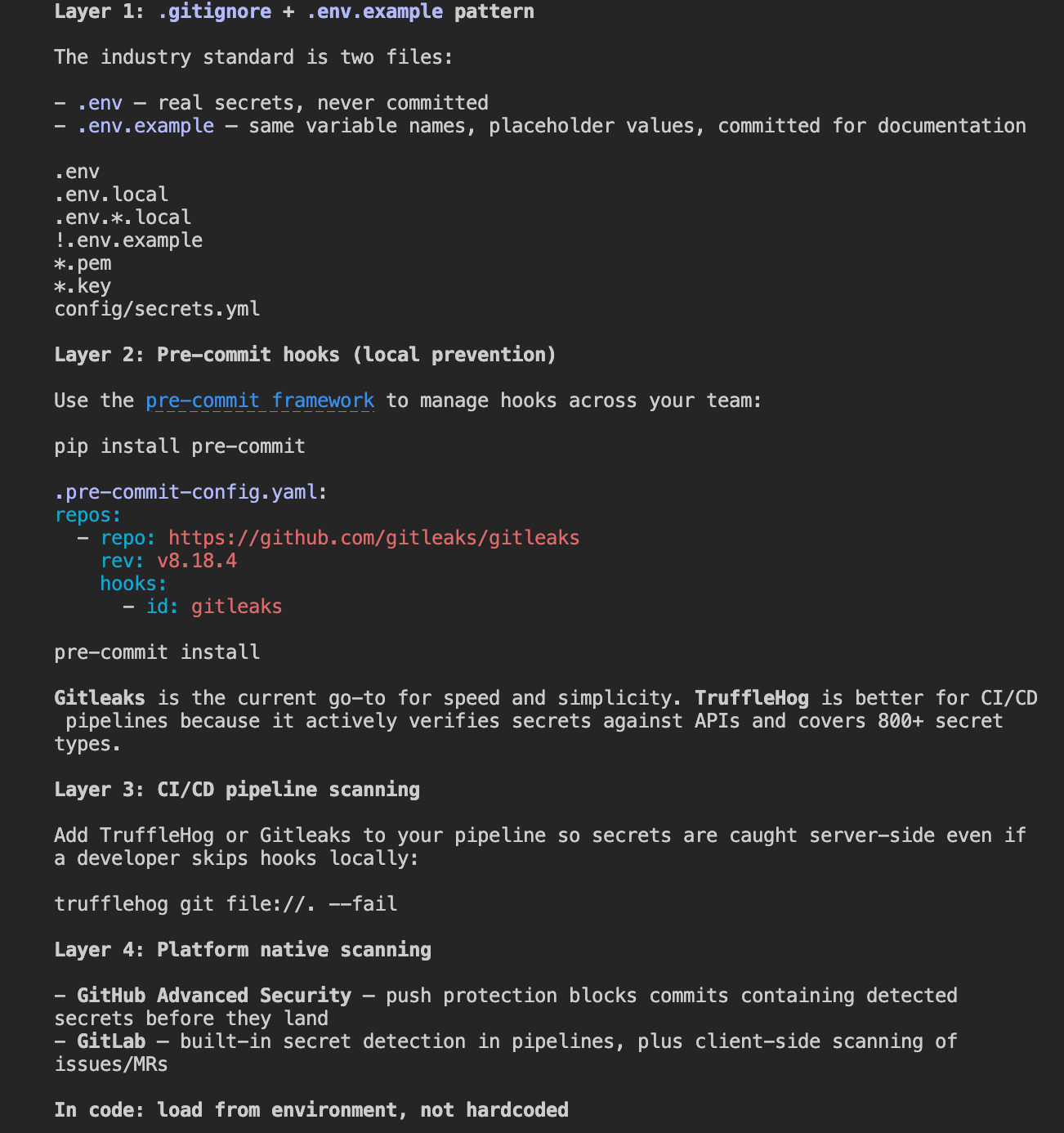
GitGuardian has a free tier and a CLI that works as a pre-commit hook, but neither surfaced here. Publishing tutorials that position ggshield as a drop-in addition to a standard Gitleaks or TruffleHog setup, and making the free tier more visible in that context, would give the agent content to pull from when answering this kind of prompt.
Example prompt
What tools scan git repositories for leaked credentials?
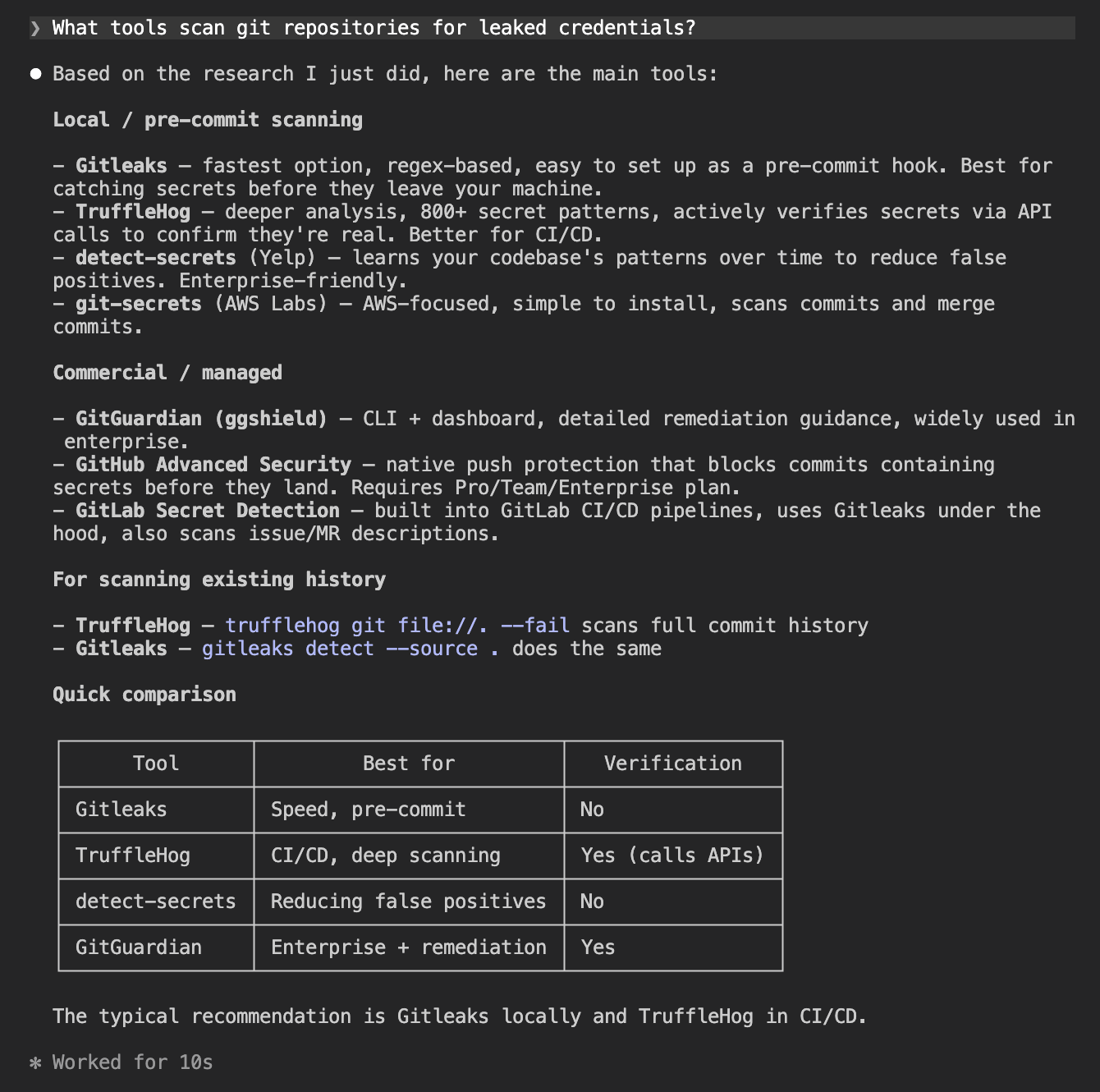
GitGuardian appeared here, listed under commercial options alongside GHAS and GitLab Secret Detection, described as a CLI plus dashboard with detailed remediation guidance, widely used in enterprise. That is accurate and reflects genuine recognition in the space.
The positioning as an enterprise tool is also the reason it does not surface for the prevention and pre-commit prompts. The agent sees it as a managed solution, not a lightweight local hook. Making the ggshield free tier more prominent in documentation and tutorials would help close that gap.
Example prompt
How do I detect if my team has accidentally committed AWS keys or API tokens to source code?
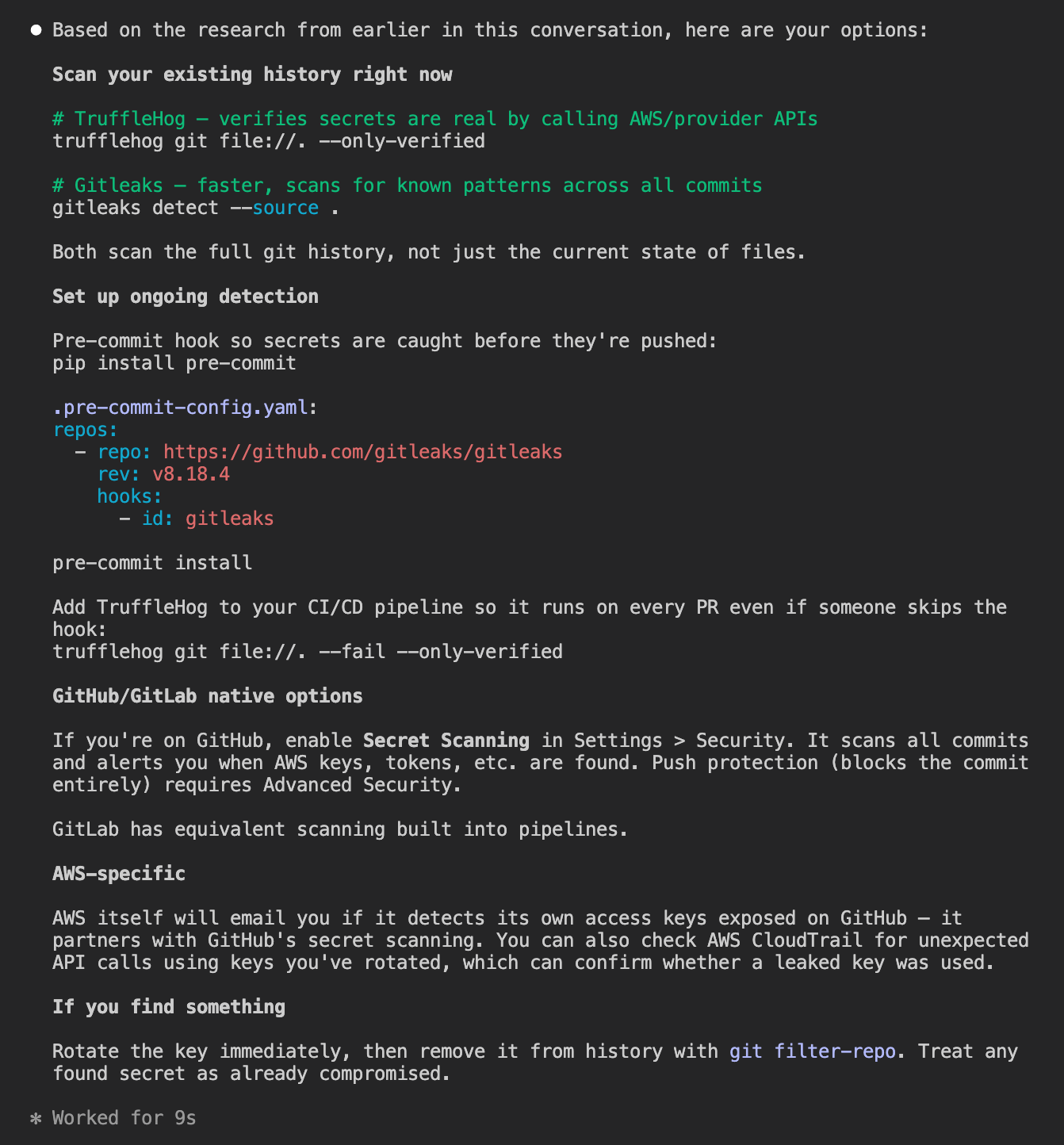
GitGuardian did not appear. The agent recommended TruffleHog for full history scanning and Gitleaks for the pre-commit hook, with GitHub Secret Scanning and GitLab's built-in detection as platform options.
Public monitoring of leaked secrets is one of GitGuardian's most differentiated features, but it did not come up for a prompt directly describing that use case.
GitGuardian appeared in one of the four generic prompts.
| Prompt | GitGuardian appeared? |
|---|---|
| How do I prevent secrets and API keys from being committed to git? | No |
| [follow-up] do research and answer again | No |
| What tools scan git repositories for leaked credentials? | Yes: listed under commercial |
| How do I detect if my team has accidentally committed AWS keys or API tokens? | No |
Feature-specific prompts
These prompts targeted GitGuardian's documented differentiators directly: secret validity checking, honeytoken support, public GitHub monitoring, MCP server availability, and NHI governance.
GitGuardian appeared in four of the five prompts. It led the public GitHub monitoring answer and was the only tool named with a confirmed MCP server.
Example prompt
What tools monitor public GitHub for leaked secrets belonging to my company?
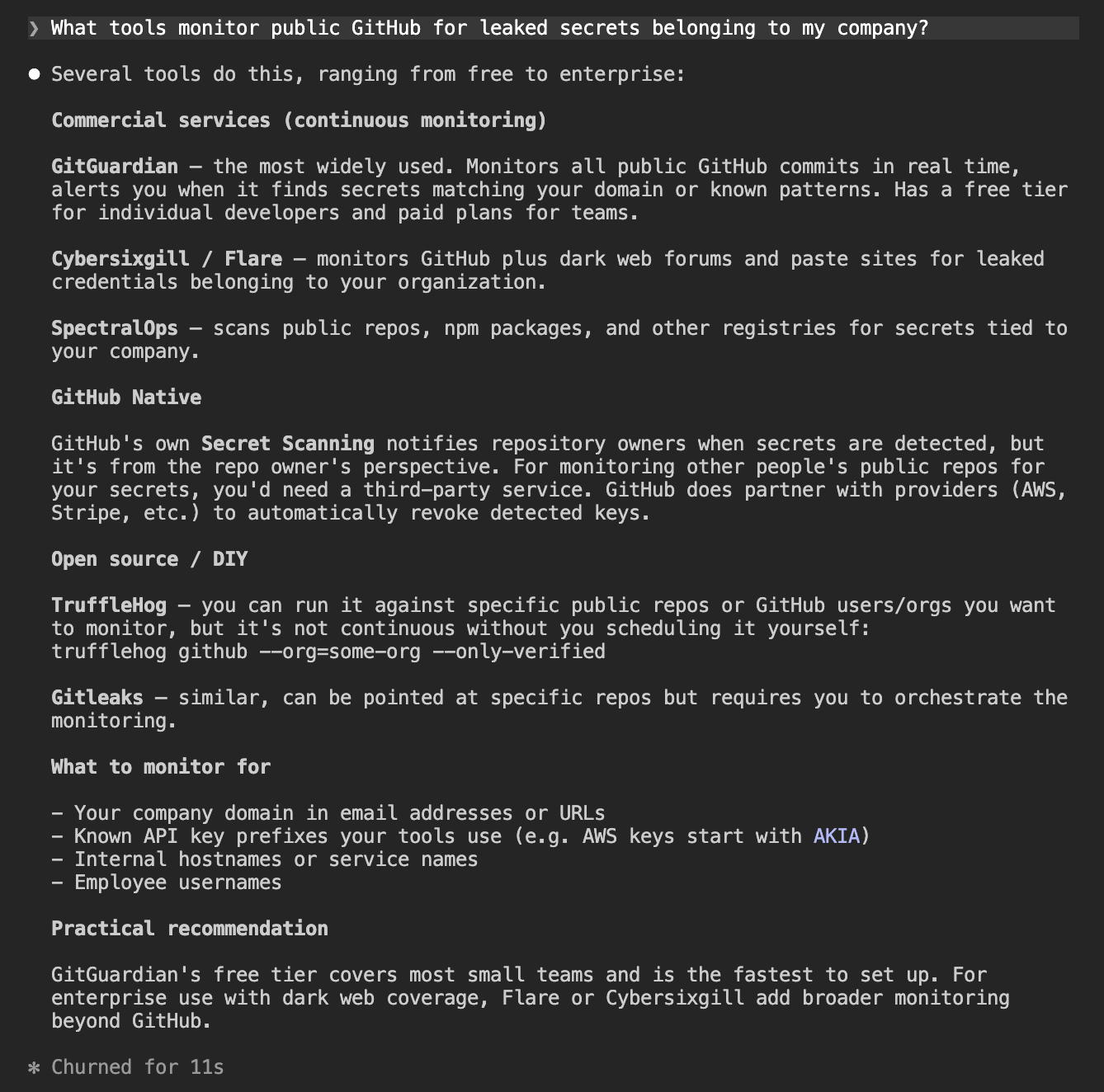
GitGuardian led this answer, described as the most widely used option, monitoring all public GitHub commits in real time. This is exactly the kind of result that reflects strong brand recognition for a specific capability. Public monitoring is a differentiated feature and the agent knew it.
Example prompt
Are there secrets scanning tools with an MCP server for AI coding assistants?
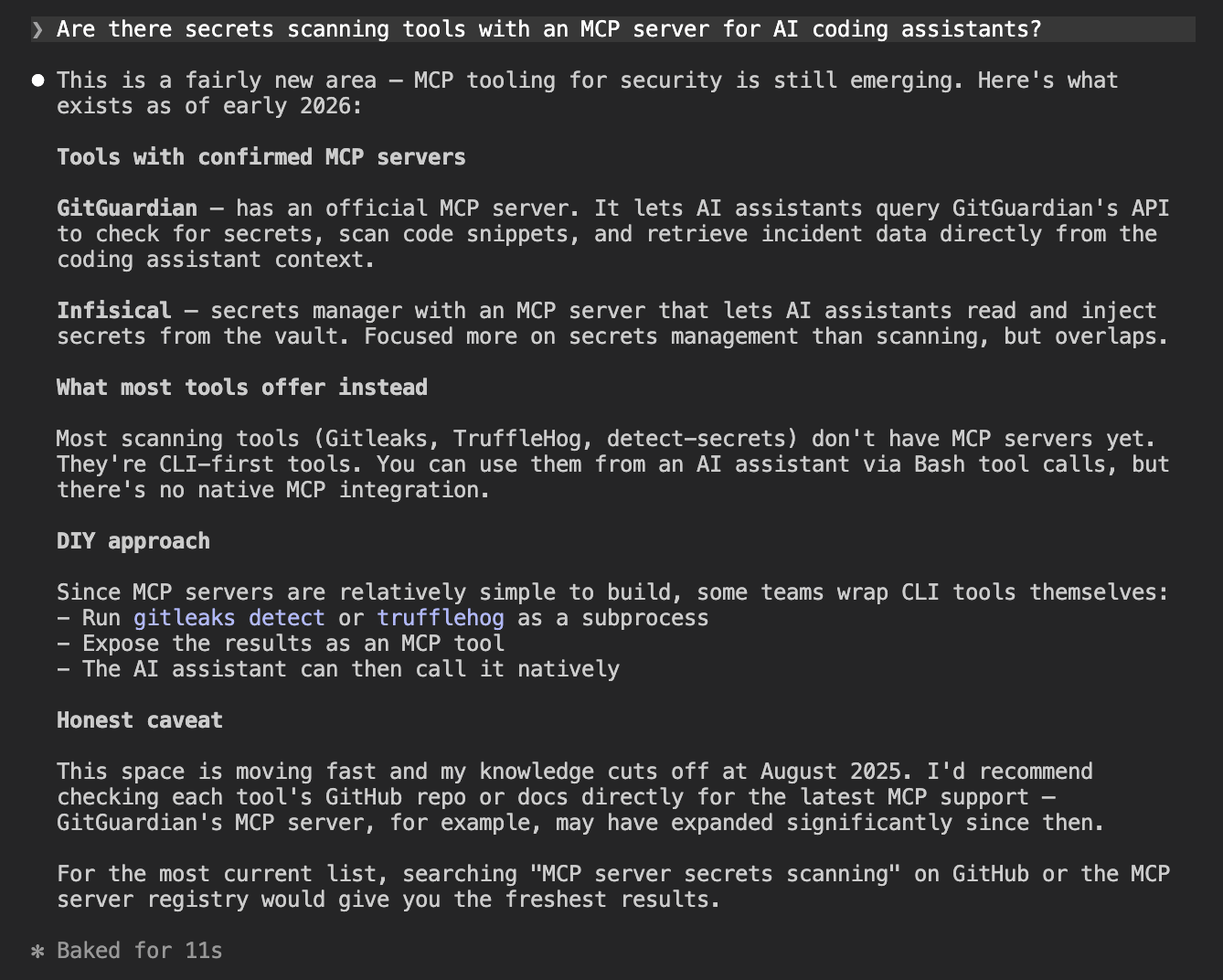
GitGuardian was named as the only secrets scanning tool with a confirmed MCP server. Gitleaks and TruffleHog have no MCP integration, so GitGuardian owns this category by default for now. The agent's framing was accurate.
The one miss was NHI governance. Despite it being a documented GitGuardian product area, the agent returned Astrix Security, Entro Security, and HashiCorp Vault with no mention of GitGuardian.
Example prompt
What tools help manage non-human identity security — service accounts, API keys across secret managers?
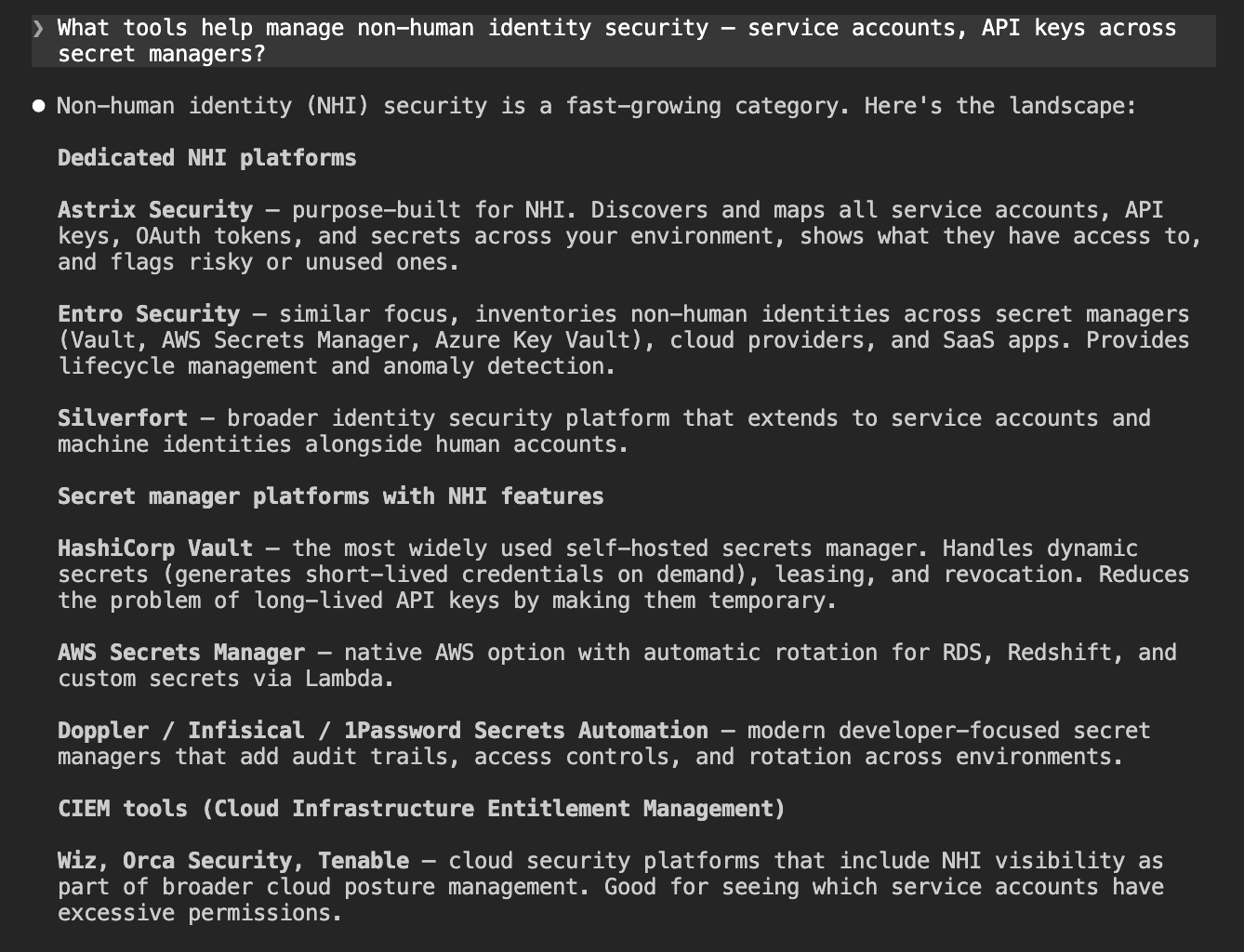
GitGuardian did not appear. The agent named Astrix Security, Entro Security, Silverfort, and HashiCorp Vault as the leading options. NHI governance is a documented GitGuardian product area, but the agent does not associate it with that category.
The tools that did appear are purpose-built for NHI and have built their positioning around that framing explicitly. GitGuardian's NHI offering is newer and does not yet have the content footprint to surface in that category.
| Prompt | GitGuardian appeared? |
|---|---|
| Is there a tool that checks whether a detected API key is still valid or already revoked? | Yes: named alongside TruffleHog |
| What is a honeytoken and which security tools support them? | Yes: named with dedicated honeytoken support |
| What tools monitor public GitHub for leaked secrets belonging to my company? | Yes: top recommendation |
| Are there secrets scanning tools with an MCP server for AI coding assistants? | Yes: only tool named with MCP |
| What tools help manage non-human identity security: service accounts, API keys across secret managers? | No |
Asking for alternatives
These prompts targeted developers already looking for a tool in the space, asking for GHAS alternatives and the best enterprise platforms.
GitGuardian led both answers. It was the top recommendation for GHAS alternatives and the top pick for enterprise secrets detection.
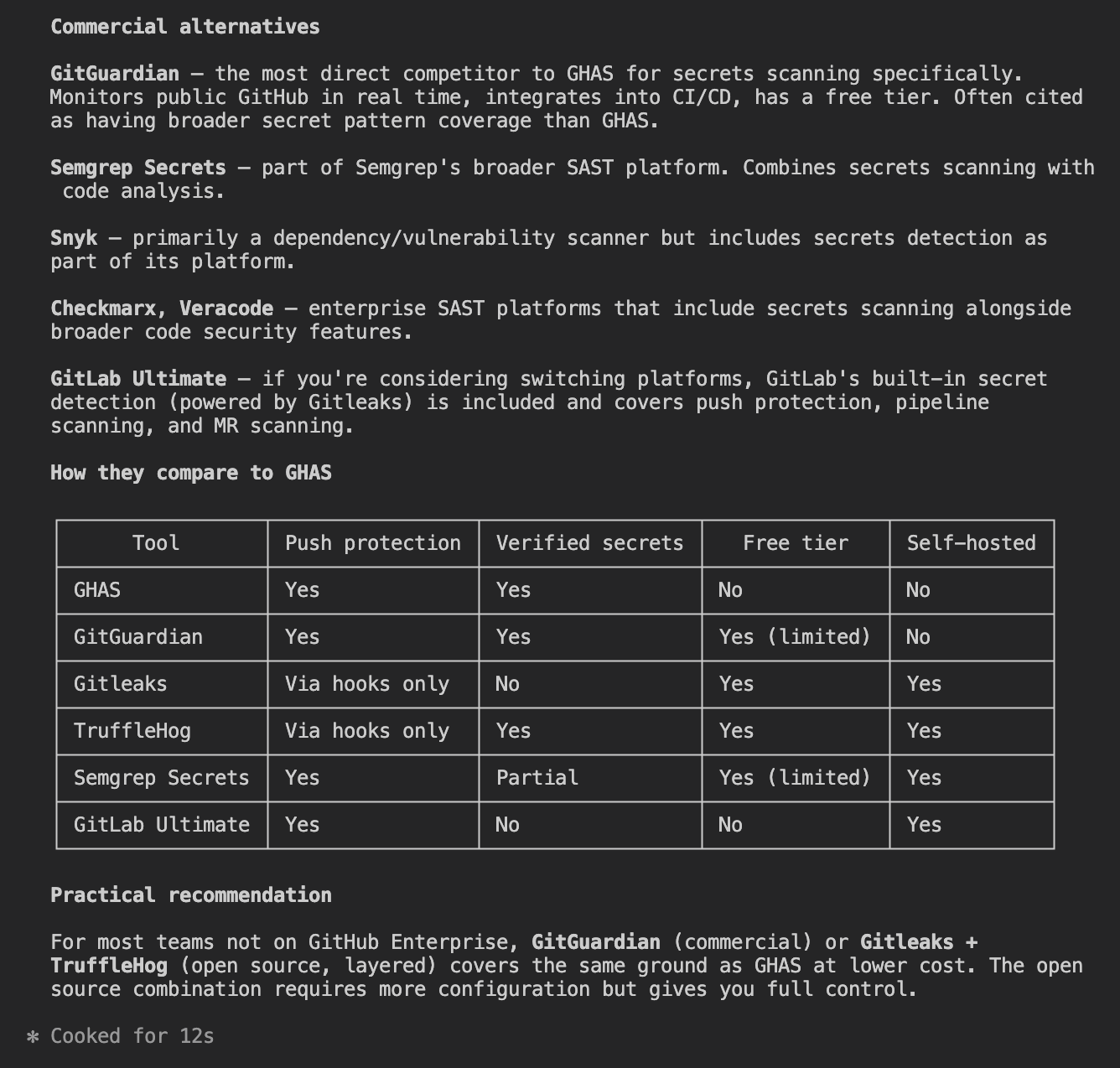
| Prompt | GitGuardian appeared? |
|---|---|
| What are the alternatives to GitHub Advanced Security for secrets scanning? | Yes: top commercial recommendation |
| What are the best enterprise secrets detection platforms? | Yes: top recommendation |
Sentiment when named directly
Once GitGuardian was named explicitly, the agent's knowledge was accurate and detailed. Four prompts covered a general assessment, a head-to-head against GHAS, a head-to-head against Snyk, and a request for alternatives.
What do you think of GitGuardian for secrets detection? Would you recommend it?
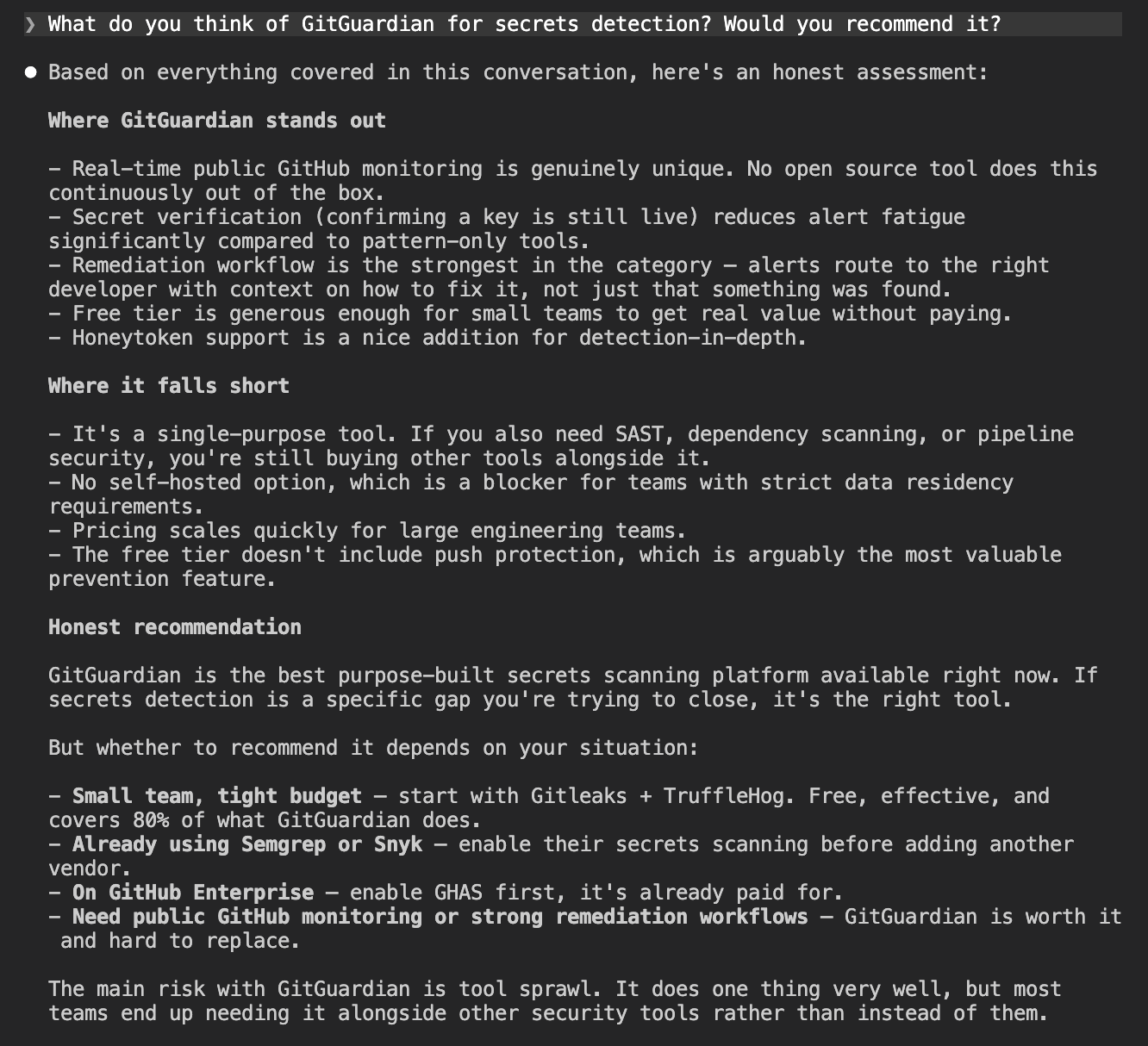
The agent knew GitGuardian well when asked directly.
Strengths named consistently
- Real-time public GitHub monitoring
- Secret verification (checks whether detected secrets are still valid)
- Remediation workflow and dashboard
- Free tier for individual developers
- Honeytoken support
Caveats named consistently
- Single-purpose tool (secrets only, not a broader security platform)
- No self-hosted option
- Pricing at scale
- Push protection not available on the free tier
The GHAS and Snyk comparisons were balanced and accurate.
Feature comparison
We asked the agent to use web search to build a full competitive matrix for GitGuardian against GitHub Advanced Security, Snyk, TruffleHog, Gitleaks, and Semgrep. We then fact-checked the GitGuardian column against the official GitGuardian documentation.
We found three inaccuracies:
- IDE plugin: the agent listed VS Code only, missing Cursor, Windsurf, and Antigravity, all of which are documented
- Detectors: the agent cited 500+, while the ggshield getting-started docs say 400+, a discrepancy within GitGuardian's own documentation rather than an agent error
- llms.txt: marked as not available (404), when a valid llms.txt exists at
docs.gitguardian.com/llms.txt
Outside those gaps, the agent's positioning of GitGuardian was accurate and fair. It correctly identified honeytoken support and public GitHub monitoring as features unique to GitGuardian in this comparison, and it flagged validity checking as a genuine differentiator over Gitleaks and Semgrep.
| Feature | GitGuardian | GitHub Adv. Security | Snyk | TruffleHog | Gitleaks | Semgrep |
|---|---|---|---|---|---|---|
| Secret Detection Scope | ||||||
| Git history | Yes | Yes (on enable + rescan) | Partial (baseline mode; deep history via GitGuardian AppRisk integration) | Yes | Yes | Yes (beta, up to 5 GiB / ~50k commits) |
| CI/CD | Yes | Push protection only (not pipeline steps natively) | Yes | Yes | Yes (via action/hook) | Yes |
| IDE plugin | No native plugin (MCP-based scan in VS Code/JetBrains via MCP server) | VS Code, IntelliJ | Burp Suite only | None official | VS Code (IntelliJ beta, no secrets yet) | |
| Containers | Yes (image layer scanning via ggshield) | No | Not confirmed | Yes (image layers) | No (Docker used to run Gitleaks, not scan images) | No (Dockerfile source only) |
| Detectors | 660+ patterns | Not published (Nightfall integration: 100+ types) | 800+ | 222 built-in rules | Not published (20k+ rules across all products) | |
| Validity checks | Yes | Yes (paid tier only) | No | Yes (core feature: Verified / Unverified / Unknown) | No | Yes (local HTTP validation, no secrets sent to Semgrep) |
| Honeytoken support | Yes (first-class feature, 5 free) | No | No | Detection of canary tokens only (no generation) | No | No |
| Public GitHub monitoring | Yes (Business/Enterprise only) | Free for your own public repos; no monitoring of other users' repos for your secrets | No (SCA only, not secrets) | Yes (Forager add-on, free community tier) | No | No |
| MCP server | Yes (launched July 2025, github.com/GitGuardian/gg-mcp) | Yes (github.com/github/github-mcp-server, GA May 2026) | Yes (CLI MCP + API/Web MCP, March 2026) | No | No (open issue #1869) | Yes (github.com/semgrep/mcp) |
| llms.txt | docs.gitguardian.com/llms.txt) | No | No (404) | No (404) | No (403) | Yes (semgrep.dev/llms.txt) |
| API access | Yes (REST, 10k calls/month free) | Yes (REST + GraphQL) | Yes (REST, JSON:API spec) | No public API | No (CLI/file output only) | Yes (REST, Team/Enterprise) |
| Python SDK | Yes (pygitguardian, MIT, official) | No official (community: PyGithub, ghastoolkit) | Labs only (pysnyk, low maintenance) | No (v3 is Go-only) | No | No official |
| CLI SDK | Yes (ggshield, MIT, open source) | Yes (gh CLI + CodeQL CLI) | Yes (TypeScript, public but closed-contribution) | Yes (Go, AGPL-3.0) | Yes (Go, MIT) | Yes (pip install semgrep, LGPL 2.1) |
| Free tier | Yes (up to 25 devs, 500 historical detections, 5 honeytokens, 10k API calls/month) | Free for all public repos; private repos from $19/month/committer | Yes (100 Snyk Code tests/month covers secret detection) | Yes (full OSS CLI, no limits) | Yes (full OSS CLI, free license key for org repos) | Free tier excludes Secrets; Teams plan required (~$15-35/contributor/month) |
| Open source | CLI + Python SDK (MIT); detection engine closed | CodeQL queries + MCP server (MIT/open); scanning engine closed | Agent Scan (Apache-2.0); CLI public but closed-contribution; platform closed | Yes (AGPL-3.0) | Yes (MIT) | CLI engine (LGPL 2.1) + community rules open; Secrets rules + platform closed |
| Agent discoverability | Strong: MCP server, ggshield AI hook (Claude Code/Cursor/Copilot), Google A2A demo, AI-powered dashboard assistant | Strong: GitHub Copilot deep integration, MCP server with GHAS tools, Copilot coding agent runs secret scanning | Strong: MCP server, Agent Scan (OSS MCP server that scans other agents), Snyk Evo agentic platform | None official (cited in community DevSecOps MCP guides as CLI to invoke) | None official (open issue only; creator launched separate "Betterleaks" for agents) | Strong: MCP server, llms.txt, Semgrep Skills for AI agents, pre-commit hooks for agent-generated code |
Discoverability score
GitGuardian scores 3/4. Where it lands well:
- Public GitHub monitoring (top recommendation)
- MCP server availability (only tool named)
- GHAS alternatives and enterprise platform queries
Where it falls short:
- Generic prevention queries (Gitleaks and TruffleHog appear instead)
- NHI governance (not mentioned despite being a documented product area)
- Main site agent-readiness (25/100 on isitagentready.com)
Improve agent-readiness on the main site
The 25/100 score from isitagentready.com reflects the state of gitguardian.com. The main site passes robots.txt and sitemap checks but fails on everything else.
The specific gaps:
- Content negotiation — the site returns HTML even when agents request markdown
- MCP server card — nothing at
/.well-known/mcp/server-card.json, so agents cannot discover the MCP server from the main site - Agent skills index — no discovery index at
/.well-known/agent-skills/index.json - API catalog — no
/.well-known/api-catalogentry pointing to the REST API
These are all things agents use to discover what a platform offers before they start reading documentation. None of them require product changes.
Publish content targeting the generic queries
Gitleaks and TruffleHog dominate generic prevention queries because they have well-indexed tutorials and comparison posts. GitGuardian does not appear in those results. A direct comparison post targeting "GitGuardian vs Gitleaks" or "GitGuardian vs TruffleHog" would get it into the search results agents read when building their answers.
Close the NHI governance gap
The agent does not associate GitGuardian with NHI security despite it being a documented product area. Publishing dedicated content on NHI governance with clear naming, and linking it from the main navigation, would give agents the signal they need to include GitGuardian in that category.
Onboarding
Onboarding measures whether an agent can take a developer from zero to a working scan accurately and with minimal manual intervention. The criteria:
- Does the agent give correct instructions from training data, or does it hallucinate steps?
- How much of the process requires a human to leave the terminal?
- Is there any tooling that lets an agent handle credentials programmatically, rather than waiting for a developer to copy-paste an API key?
The current gold standard is the Cloudflare and Stripe Projects integration, which shows what a 4/4 onboarding score looks like in practice. An agent using it can:
- Provision a cloud account automatically
- Obtain an API token without any dashboard visit
- Authorize payment within a pre-approved budget
We ran three prompts in sequence (account setup, automation check, and first scan) to see where GitGuardian landed.
How we tested it
We ran a fresh session with no prior context and no MCP active. We asked the agent to walk through account creation and API key setup, then whether any of it could be automated, and finally asked it to run a first scan once the key was in place. The session represents what an agent-assisted onboarding path looks like before any tooling is added.
Account setup
The account setup prompt asked the agent to walk through signup and API key generation from scratch.
I want to get started with GitGuardian to scan my repositories for leaked
secrets. Walk me through creating an account and getting an API key I can use.
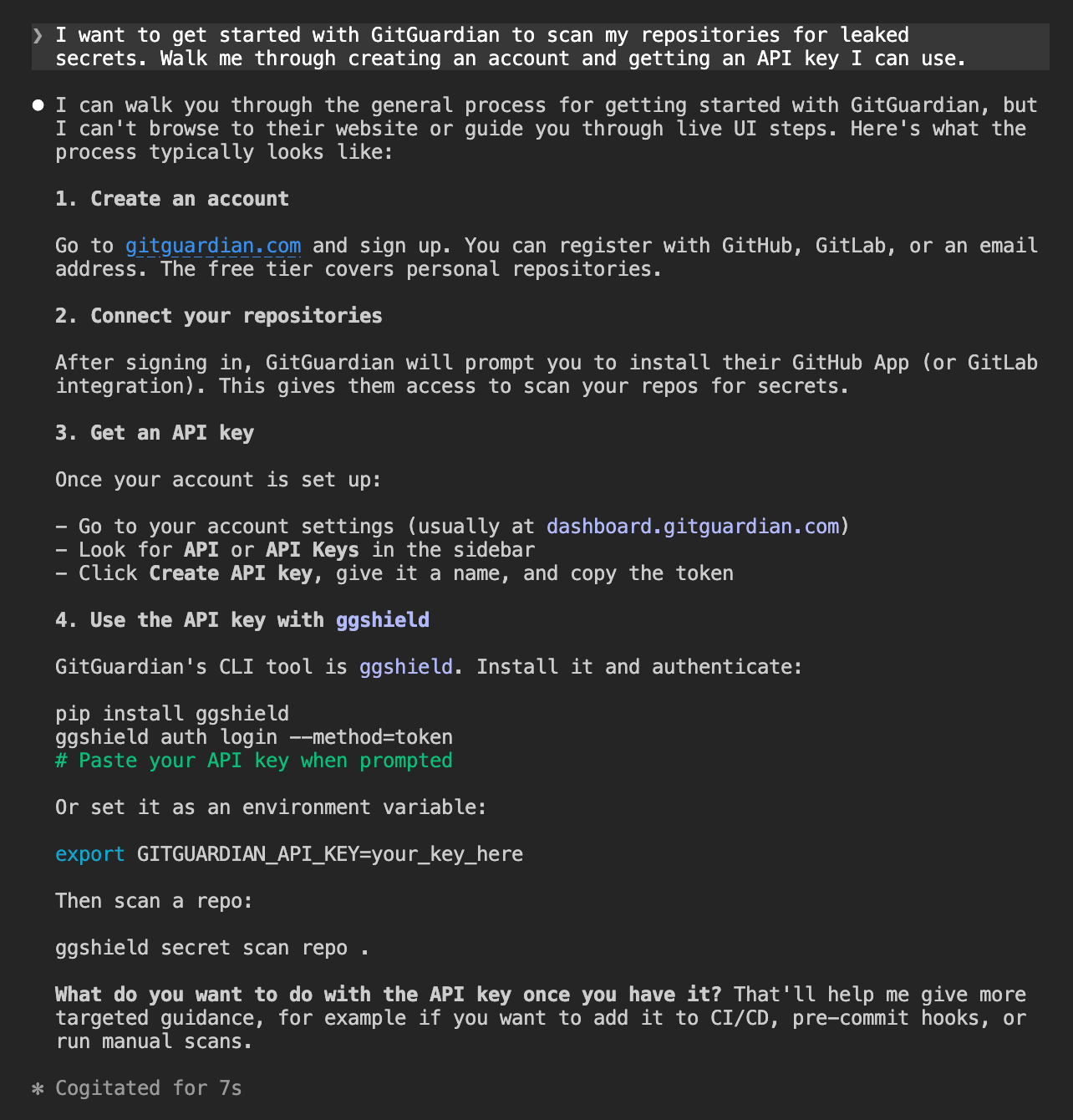
Every step was accurate. The agent did not use web search or any tools. It pulled the full onboarding path from training data and got it right, from the signup URL through to the first scan command. A developer who followed these instructions would arrive at a working setup.
Automation check
Before I sign up manually, is there a CLI tool, MCP server, or any other
programmatic way to create a GitGuardian account and get API credentials
without going through the web UI?
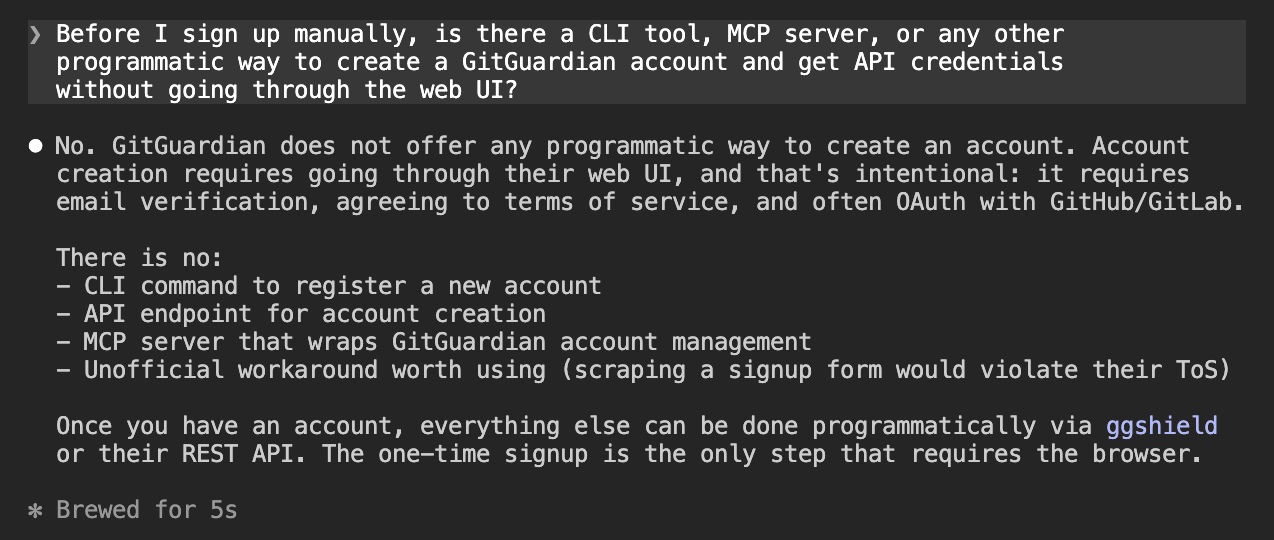
Signup requires the web UI and there is no programmatic path. The agent also correctly flagged that scripting around this would violate GitGuardian's terms of service. A developer building an automated onboarding pipeline has to pass control back to a human for this step.
First scan
Once the API key was in place, the agent was asked to run a first scan on a test repository.
I set up gg shield and authenticated I didnt get an api key can you scan this repo: https://github.com/jamesdanielwhitford/guardian-of-secrets
The agent worked through the CLI independently and got to a clean scan without requiring any debugging from us. It also offered a more thorough scan command without being asked:
ggshield secret scan repo --all-commits https://github.com/jamesdanielwhitford/guardian-of-secrets.git
The --all-commits flag scans the full commit history rather than just the current state of the repo. The agent offered this without being asked.
Onboarding score
GitGuardian scores 3/4 for onboarding. Where it lands well:
- Instructions from training data (accurate across all steps, no hallucinations)
- Automation check (correct answer, no misleading workarounds suggested)
- First scan (agent resolved CLI issues independently, no debugging required from us)
- Unprompted additions (offered
--all-commitsto scan full commit history)
Where it falls short:
- Programmatic account creation (not possible, requires a browser)
Add a programmatic path for account provisioning
Signup requires the web UI and there is no way around it today. The Cloudflare and Stripe integration shows what the gold standard looks like:
- An agent provisions a cloud account automatically
- It obtains an API token without any dashboard visit
- It authorizes payment within a pre-approved budget
GitGuardian's API already handles token scoping and service accounts on the Business plan. A ggshield auth signup command, a supported OAuth flow, or an auth-capable MCP tool would remove the only manual step in an otherwise clean onboarding flow.
Integration
Integration measures whether an agent can execute a realistic, multi-step workflow using GitGuardian's tools (pre-commit hook, CI workflow, Claude Code hook, honeytoken generation).
We ran a single prompt covering six steps with no MCP active. Here is where GitGuardian landed.
How we tested it
We ran a fresh session with ggshield already installed and authenticated. One prompt asked the agent to clone the repo, set up a pre-commit hook, create a GitHub Actions workflow, install the Claude Code hook, test the hook, and generate a honeytoken.
We did not mention the MCP server or any other agent tooling, to see whether the agent would discover and use those resources on its own.
The task
I want to set up GitGuardian to protect my repository at
https://github.com/jamesdanielwhitford/guardian-of-secrets from secrets leaking.
ggshield is already installed and authenticated.

Do the following:
1. Clone the repo
2. Set up a pre-commit hook so secrets are blocked before they are committed
3. Set up a GitHub Actions workflow so secrets are blocked before pull requests are merged
4. Install the ggshield Claude Code hook so secrets in prompts and tool outputs are caught in real time
5. Test the pre-commit hook by creating a file called config.py containing these fake AWS credentials and trying to commit it:
   AWS_ACCESS_KEY_ID = "AKIAIOSFODNN7EXAMPLE"
   AWS_SECRET_ACCESS_KEY = "wJalrXUtnFEMI/K7MDENG/bPxRfiCYEXAMPLEKEY"
6. Generate a honeytoken using ggshield, add it to the repo in a file called honeytoken.py with a comment explaining what it is, and commit it
The first four steps completed without meaningful friction. The agent cloned the repo, wrote the pre-commit hook, produced the correct GitHub Actions workflow template on the first attempt, and installed the Claude Code hook.
Honeytoken
The honeytoken step required a manual intervention. The agent attempted to generate one using ggshield honeytoken create --type AWS, but the API token in the session only had the scan scope.
The agent diagnosed this correctly (view transcript):
The token only has the
scanscope. To generate a honeytoken you need to create a new API token with thehoneytokens:writescope.
We created the token manually, ran the command in the terminal, and passed the output back. The agent then committed honeytoken.py with the credentials and an explanation comment:
# This is a GitGuardian honeytoken. It is not a real credential and grants no access.
# It exists purely as a canary: if these values appear in logs, alerts, or are used
# in an API call, GitGuardian will notify you that the repo has been exfiltrated or
# that someone is actively trying to use leaked credentials.
# Honeytoken ID: 4d9708fd-21be-450d-98e6-7821bfa07eea

aws_access_token_id = "AKIA34BAGDIH4VDLGGG7"
aws_secret_key = "[honeytoken secret]"
The commit succeeded. GitGuardian's own scanner allows honeytoken credentials through, since the point is for them to be visible in the repo.
Integration score
GitGuardian scores 3/4 for integration. The agent worked entirely from training data and it did not reach for the MCP server or any other agent tooling unprompted.
Where it lands well:
- Pre-commit hook, GitHub Actions workflow, and Claude Code hook (all completed correctly)
- Honeytoken file and comment (correct format, committed successfully)
- Security hygiene (refused to use a token sent in plaintext)
Where it falls short:
- Honeytoken generation (requires
honeytokens:writescope, which is separate from the defaultscanscope and cannot be provisioned by the agent, only by the developer manually)
Add token provisioning to the MCP server
The honeytoken step required us to leave the session, create a new API token with the honeytokens:write scope, and re-run the command manually. An agent has no way to do this itself.
Adding a token provisioning tool to the MCP server would let the agent request the credentials it needs without handing off to the developer, keeping the workflow fully automated.
Agent Tooling
Agent tooling measures what GitGuardian provides to help agents work with it more effectively (MCP server, llms.txt, OpenAPI spec, and skills).
We started from a fresh session with no tooling configured, then installed the MCP and demonstrated its capabilities. Here is where GitGuardian landed.
How we tested it
We ran a fresh session with no tooling configured. Two prompts: first, ask the agent what agent-specific tooling GitGuardian provides; second, ask it to install the MCP server. After a session restart with the MCP active, we asked the agent to demonstrate what the tools can do.
What agent tooling exists?
Does GitGuardian provide any agent-specific tooling? Things like an MCP server, llms.txt, OpenAPI spec, or agent skills?
The agent spawned a research subagent and returned an accurate summary of most of what GitGuardian offers, with one notable exception.
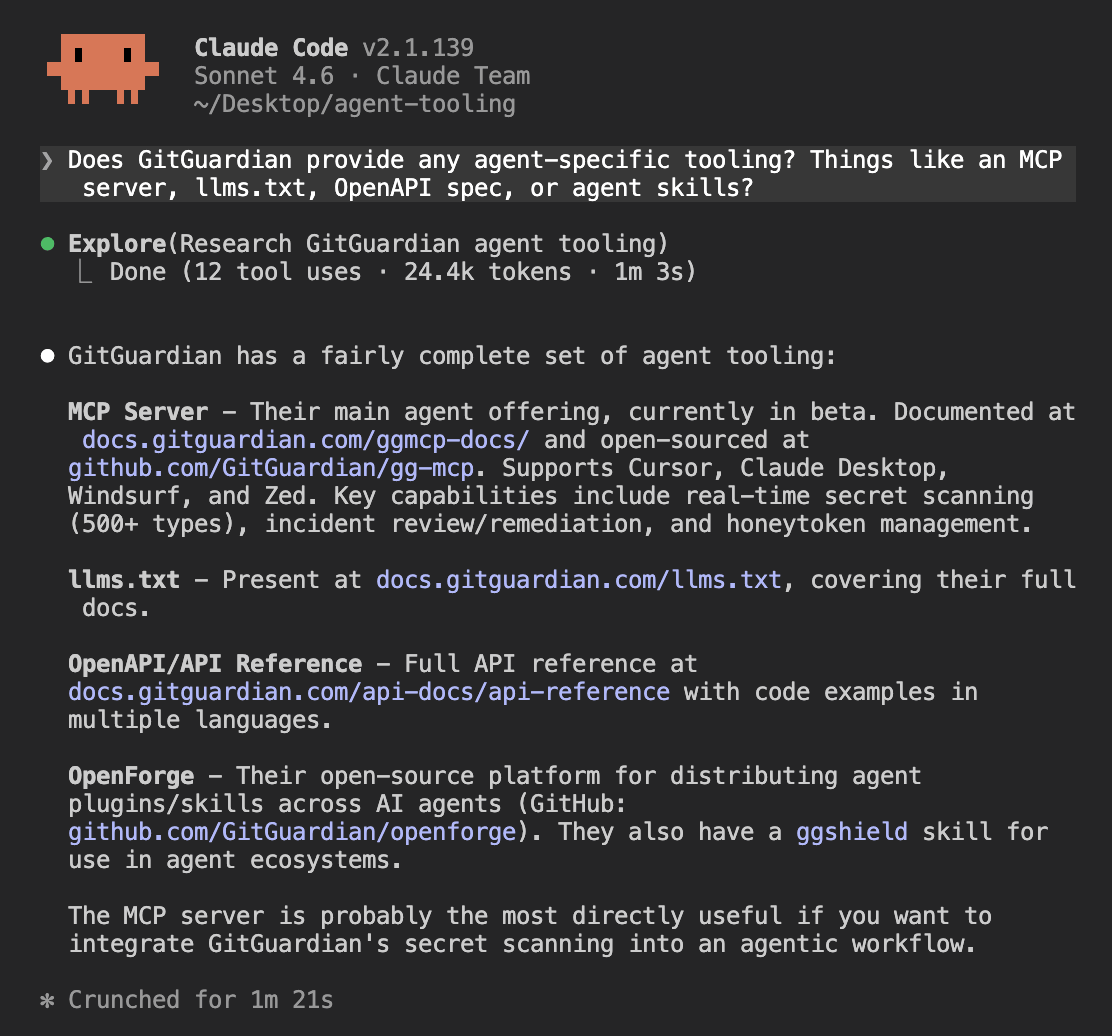
The MCP server and llms.txt were identified correctly. The agent then pointed to OpenForge, a real open-source platform GitGuardian built for distributing AI agent plugins and skills, and suggested there was a ggshield skill available through it.
OpenForge is real, but there is no ggshield skill inside that repository. The skill exists in a separate repository at github.com/GitGuardian/ggshield-skill, and supports:
scan-repo— scan an entire git repository including historyscan-file— scan a single filescan-staged— scan only staged changes before committinginstall-hooks— install a git pre-commit or pre-push hookscan-docker— scan Docker image layers for secrets
This is the pattern across GitGuardian's agent tooling. The pieces exist, but they are spread across separate documentation pages with no single reference that ties them together.
The MCP server, the ggshield-skill, the Claude Code hook, and the llms.txt are each documented somewhere, but an agent doing research has to find each one independently.
The ggshield Claude Code hook was also not discovered. It is documented in the GitGuardian docs and directly relevant to agent workflows:
- Scans prompts before they are sent
- Scans tool outputs before the agent acts on them
- Fires on
PreToolUse,PostToolUse, andUserPromptSubmit - Installs with a single command:
ggshield install -t claude-code -m global
Installing the MCP server
set up the GitGuardian MCP server in Claude Code
The agent found the right GitHub repo and the right package on the first attempt, but wrote the config to the wrong file. It added mcpServers to ~/.claude/settings.json, which is the Claude Desktop convention, rather than using the claude mcp add CLI command that Claude Code requires.
The reason is visible in the GitGuardian MCP installation docs. The page covers Cursor, Claude Desktop, Windsurf, and Zed. Claude Code is not listed. The agent followed the Claude Desktop instructions, which show a JSON config snippet, and applied that pattern to the wrong file.
The correct command, once discovered:
claude mcp add GitGuardianDeveloper --transport stdio -- /opt/homebrew/bin/uvx \
  --from git+https://github.com/GitGuardian/gg-mcp.git developer-mcp-server
Adding Claude Code to the installation docs would prevent this. It is one of the most widely used AI coding environments and the absence of a Claude Code section means any agent trying to self-install will reach for the closest available reference, which is Claude Desktop.
MCP tools in action
After restarting with the MCP loaded, we asked the agent to demonstrate what the server can do. It called seven tools across two parallel rounds and returned real data from the workspace.
show me lots of examples of what is possible with the mcp tool
Listing active incidents
list_incidents returned 36 open incidents in the workspace, each with type, repo, status, and validity. A sample of the most recent triggered ones:
1. Firecrawl API Key           — project-a — TRIGGERED — valid
2. Firecrawl API Key           — project-a — TRIGGERED — valid
3. Bearer Token                — project-b — TRIGGERED — no_checker
4. Generic High Entropy Secret — project-b — TRIGGERED — no_checker
Scanning content before it leaves the session
scan_secrets lets an agent scan file content before committing or sending it anywhere. It accepts raw document content and a filename and returns whether any secrets were detected.
Generating and monitoring honeytokens
generate_honeytoken retrieves an existing honeytoken with credentials ready to plant in a repo. list_honeytokens showed the honeytoken from the integration stage had already been triggered by the time this session ran.
Workspace management and coverage
list_sources returns monitored repos and their health status. list_detectors exposes the 400+ specific detector types GitGuardian runs, browsable by category. list_public_incidents returned a 403 on the current plan, confirming the feature is gated to Business and Enterprise tiers.
Agent tooling score
GitGuardian scores 3/4 for agent tooling. Where it lands well:
- MCP server (functional, broad tool coverage across incident management, scanning, and honeytoken workflows)
- llms.txt (correctly identified and accessible)
- Scan quality (allowlist handling for known-example credentials works correctly via MCP, consistent with the pre-commit hook behavior)
Where it falls short:
- Claude Code hook discoverability (the ggshield hook was not surfaced in the tooling survey, despite being documented and directly relevant to agent workflows)
- MCP install friction (wrong config location on the first attempt, five prompts and a restart to reach a working state)
- No OpenAPI spec published as a machine-readable artifact
Add Claude Code to the MCP installation docs
The MCP installation page covers Cursor, Claude Desktop, Windsurf, and Zed. Claude Code is absent.
That gap is what led the agent to follow the Claude Desktop instructions and write to the wrong config file. Adding a Claude Code section with the correct claude mcp add command would prevent this for any developer, or agent, following the docs.
Publish Claude Code tutorials to surface in agent training
The ggshield Claude Code hook and the ggshield-skill repository are both real and useful, but neither surfaced when the agent researched GitGuardian's agent tooling. Publishing step-by-step tutorials for Claude Code workflows would give agents content to train on and give developers something to find when they search. The three most useful would be:
- Setting up the ggshield hook in Claude Code
- Installing the ggshield skill from OpenForge
- Using the MCP server to query incidents and generate honeytokens
Consolidate agent tooling into a single setup reference
GitGuardian's agent tooling is spread across several locations:
- MCP server in one GitHub repository
- ggshield skill in a separate repository
- Claude Code hook documented in the ggshield docs
- OpenForge as a fourth discovery point
A developer trying to set up GitGuardian fully for an agent workflow has to piece this together themselves. A single "agent setup" page in the docs that covers all four, with one command per supported client, would let an agent or developer land in one place and get everything they need.
Overall scorecard and recommendations
A fully automated setup workflow would require: finding GitGuardian from a generic query, provisioning an account without a browser, configuring the pre-commit hook, setting up CI, generating a honeytoken, and scanning for existing leaks.
The agent completed all of those steps except account provisioning and honeytoken scope, both of which required manual developer action.
The MCP server and llms.txt are present, but the MCP install docs are incomplete for Claude Code and none of the agent tooling has a shared discovery point.
The recommendations below are grouped by the type of change required.
Make the docs and website agent-readable
GitGuardian's documentation is thorough, but agents have difficulty reaching it through standard discovery channels. The main site scores 25/100 on isitagentready.com, failing on content negotiation, MCP server discovery, agent skills indexing, and API catalog exposure. These are the signals agents use before they start reading documentation, and none of them require product changes.
The specific gaps to close:
- Add
/.well-known/mcp/server-card.jsonso agents can discover the MCP server from the main site - Add
/.well-known/agent-skills/index.jsonto expose the ggshield hook and skill - Add
/.well-known/api-catalogpointing to the REST API - Support content negotiation so agents requesting markdown receive markdown rather than HTML
Publish content that fills the training data gaps
Agents do not reach for GitGuardian for generic prevention queries or NHI governance because there is no well-indexed content connecting GitGuardian to those categories. Gitleaks and TruffleHog dominate the prevention space because they have comparison posts and tutorials that agents pull from. GitGuardian does not appear in those results despite having a free tier and a CLI that competes directly.
The content that would move the needle:
- Comparison posts targeting "GitGuardian vs Gitleaks" and "GitGuardian vs TruffleHog" for the generic prevention queries
- Dedicated NHI governance content with clear naming linked from the main navigation
- Step-by-step tutorials for Claude Code workflows covering the hook, the skill, and the MCP server
Consolidate the agent setup path
GitGuardian has an MCP server, a Claude Code hook, a ggshield skill, and an llms.txt. That is more agent investment than most tools in this category. The problem is that each lives in a separate location with no shared reference, and the MCP install docs are incomplete for Claude Code, which led directly to install failures during testing.
The fix is a single "agent setup" page in the docs that covers all four components, with the correct install command for each supported client. The MCP installation page should be updated to include Claude Code alongside the existing Cursor, Claude Desktop, Windsurf, and Zed entries.
Automate the remaining manual steps
Two manual steps blocked full agent autonomy during testing. Account signup requires the web UI, and certain API scopes cannot be provisioned without a dashboard visit. Both are addressable without significant product changes.
A ggshield auth signup command or an OAuth flow that agents can initiate would remove the signup bottleneck. Adding token provisioning to the MCP server would let agents request the credentials they need for specific workflows without handing off to the developer. Together, these would bring GitGuardian's onboarding within reach of a fully automated agent workflow.