
I Tried to Get an AI Agent to Post a Blog Without Leaking My Password
I set myself an agent-automation challenge: Can I get an agent to post a blog on a WordPress site using a browser without leaking any sensitive information into the agent's context?
Eventually, I arrived at a solution that looked something like this:
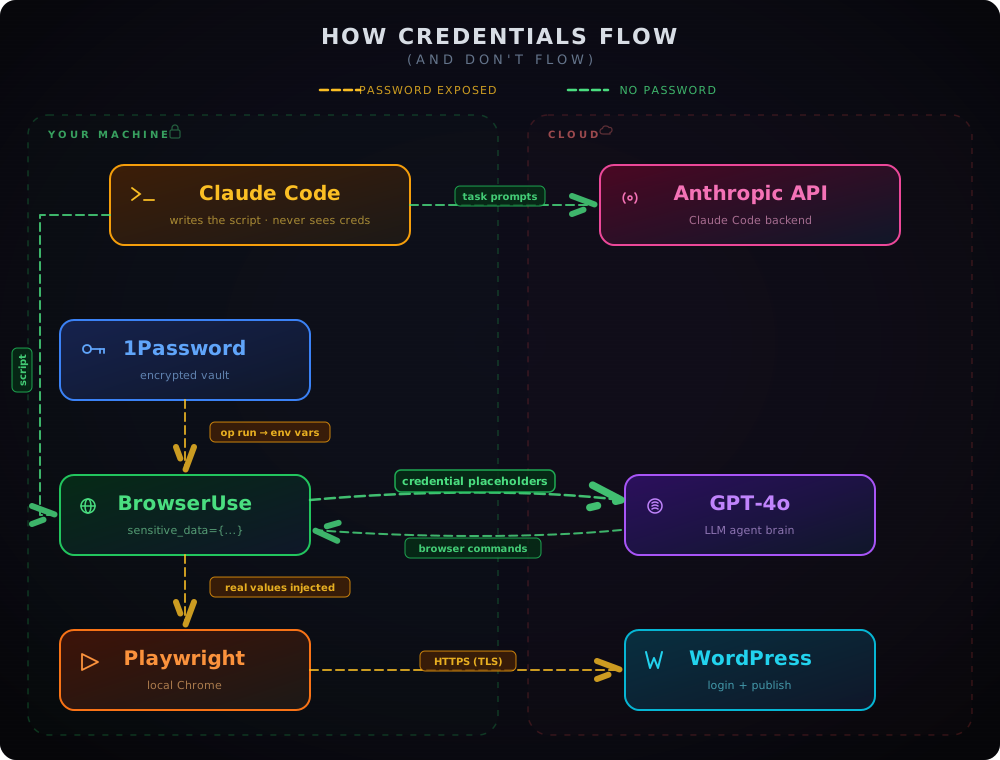
The Why?
People have never been great at keeping their passwords secure. But now with the rise of agent automation, the problem is only getting worse.
Many people don't know that all your Claude Code conversations are stored in the clear in your local ./claude directory. These same conversations are sent to Anthropic's servers where they are likely stored in the clear alongside your identifying information such as your email. This is not to say that Anthropic is doing anything wrong, they don't consider your transcripts to be sensitive and don't claim end-to-end encryption. Yet, it is becoming more and more common for people to share sensitive information with agents in insecure ways.
I don't know if this type of browser automation is a commonly used flow. However, in some previous research it stood out to me as something that seems like it should be simple but is really quite difficult to do in practice.
The What?
The criteria for the challenge were as follows:
-
I must be able to give my agent a one-line command:
Post a random blog on my WordPress site: <URL>and then walk away, make a coffee, and come back to a new, live blog post. -
No password, API key, or any other mildly sensitive information should be available in my local Claude context or ever sent up to an LLM provider.
-
The agent must use some form of browser automation to complete the request. No sneaky APIs or CLIs. Claude let me know that it could probably achieve this with the WordPress CLI (which I didn't know existed) but that would defeat the point of the challenge.
-
It should be free and not require a credit card at any point (excluding actual LLM subscriptions). I dislike free trials that require a card on file as I will inevitably forget about them and end up with a charge. And then feel like I got scammed but also that it was my fault. No thanks.
The How?
I experimented with several options before landing on a working solution. I got Claude to keep notes for me on all the solutions I tried and the blockers I ran into. For interest, I'll leave those at the bottom of this guide, but in short: I tried the Claude in Chrome extension, Kernel, Browserbase, and finally BrowserUse. First with their hosted agent and then swapped that out with an OpenAI model.
The working solution
As shown in the diagram (added here again because I think it looks cool), the working solution consisted of multiple services. I will now briefly go through the role of each of these and explain how they work at a high level.
1Password
I already had 1Password set up from previous experiments, so I used this as my credential store. I saved my WordPress username/password and my OpenAI API key as items in the vault using the 1Password CLI (op).
The key piece is op run. This command reads a template file (.env.tpl) containing op:// references like:
WP_USERNAME=op://Personal/WordPress - agent-research/username
WP_PASSWORD=op://Personal/WordPress - agent-research/password
OPENAI_API_KEY=op://Personal/OpenAI/credential
When you run op run --env-file=.env.tpl -- python script.py, 1Password resolves each reference, injects the real values as environment variables into the subprocess, and destroys them when the process exits. The credentials exist only in memory for the duration of the script.
BrowserUse
BrowserUse is an open-source Python library that connects an LLM to a browser. It reads the page, converts it into a structured list of interactive elements, sends that to the LLM, and executes whatever the LLM decides to do.
Generally, for the automation step, you would write a prompt that describes your desired outcome. BrowserUse will then send this prompt to a configured LLM. In this case, however, we want it to be automated from end to end so we are not manually writing this script but rather tasking the overarching Claude Code instance to update the script as required.
The critical feature for this challenge is the sensitive_data parameter. You pass it a dictionary of placeholder names mapped to real values, and then use those same placeholder names in the task prompt:
sensitive_data = {
    "x_username": os.environ.get("WP_USERNAME"),
    "x_password": os.environ.get("WP_PASSWORD"),
}

agent = Agent(
    task="""
    1. Go to https://my-site.com/wp-login.php
    2. Log in with username x_username and password x_password
    3. Create a new post with title "Hello from the AI Agent"
    4. Publish the post
    """,
    sensitive_data=sensitive_data,
    use_vision=False,
    llm=ChatOpenAI(model="gpt-4o"),
)
The LLM sees the literal string x_username in the task. When it encounters a login form, it tries to type x_username into the username field. BrowserUse intercepts that and swaps in the real value from sensitive_data before passing it to Playwright.
The sensitive data dictionary gets the actual values from the environment variables that 1Password injects at runtime. The LLM never sees the substitution happen.
Setting use_vision=False prevents screenshots from being sent to the LLM, which could otherwise leak credentials visible on screen.
OpenAI (GPT-4o)
I initially tried to get BrowserUse's hosted model to orchestrate the automation. However, it doesn't include any credits with the free trial. Luckily, the library lets you integrate whatever LLM provider you like using an API key. So I got Claude to update the BrowserUse script to use OpenAI, as I had a key lying around.
BrowserUse sends the configured LLM a description of the current page state: the buttons, links, and input fields that are available. The LLM then decides what to do next. BrowserUse then sends these instructions to Playwright to perform actions.
Playwright
Playwright launches and controls a Chrome instance on your machine. BrowserUse uses it under the hood to execute the LLM's decisions.
Playwright is where the real credential values are finally used. When BrowserUse resolves a sensitive_data placeholder, it passes the actual password to Playwright's fill() method, which types it into the browser's DOM. This all happens locally in the same Python process, so the credentials never leave your machine (except over HTTPS to WordPress itself).
Claude Code skill
At this point, the automation works, but without context, the overarching Claude instance doesn't know how to use the flow.
The final piece is a Claude Code skill. Skills are markdown files that teach Claude Code how to perform a specific workflow. I used the skill-creator plugin to generate one:
claude plugin install skill-creator@claude-plugins-official
The skill I created (wp-post) tells Claude Code to:
- Generate blog content based on a topic you provide (or pick one if you don't)
- Edit the task prompt in the BrowserUse script (
post_to_wordpress.py) with the new title and body - Run
op run --env-file=.env.tpl -- uv run python post_to_wordpress.py - Check the output for success
- Fetch the WordPress homepage and return the URL of the published post
With the skill installed, the entire challenge reduces to a single prompt:
/wp-post Write a blog about the life of a fly
Claude generates the content, updates the script, kicks off the automation, and comes back with a link to the live post that will work until my free WordPress trial expires. Credentials never enter Claude's (or GPT's) context.
The... Who?
With this approach, this is a solved problem. But, take a step back and look at what it took to get here: 1Password for credential storage, BrowserUse for the agent-browser bridge, OpenAI for the agent brain, Playwright for browser control, and a Claude Code skill to tie it all together. Five components, three different providers, and a fair amount of debugging to make them talk to each other. That's a lot of moving parts for what should be a straightforward ask.
It was also difficult to find a free-to-use solution. In the ever-evolving AI landscape, everyone is looking to get their slice of the pie. My 1Password trial will end in about 9 days, and I may try to replace it with Bitwarden's new Agent Access SDK. In all the other solutions I explored, I ran into paywalls very quickly.
The question that remains is: who should be solving this? Right now, the responsibility is fragmented between LLM providers, credential managers, and browser automation tools. None of them own the full picture. In a previous article, I looked at the same problem for CLI and API workflows and hit similar walls.
As solutions come and go, don't let your sensitive information leak through the cracks. Make sure you know where your data is being stored and where it ends up.
Appendix: Full notes from the exploration process
I had Claude keep notes on every approach I tried and where I got stuck. Here they are unedited.
Goal Have an AI agent automatically log into a WordPress site and publish a blog post, without credentials ever being exposed to the AI model or sent to Anthropic.
Target site: https://agent-research.uk5.cdn-alpha.com/
What worked: BrowserUse + 1Password CLI + OpenAI
Prerequisites
- 1Password account with CLI installed (
op) - OpenAI API key (for GPT-4o as the agent brain)
- Python 3.11+ and
uvpackage manager - WordPress credentials
What didn't work (and why)
Kernel.sh
- Built-in authentication features are paywalled
- 1Password integration exists in theory but couldn't find the UI for it
Claude Code + Claude in Chrome (MCP extension)
- Claude can navigate and interact with pages via the Chrome extension
- Blocker: Claude's safety rules prevent it from entering passwords in login forms. You'd have to log in manually first, which defeats the "fully automated" goal.
Browserbase (cloud browser + MCP server)
- Successfully connected, created a session, navigated to the login page
- Blocker: The MCP server has no credential management. Using
actto type credentials would pass them through Claude's context. - Browserbase's 1Password integration ("Secure Agentic Autofill") only works in their Director product (no-code UI at director.ai), not via the API or MCP server. Also requires 1Password Business account and is in Early Access.
BrowserUse with ChatBrowserUse (their recommended LLM)
- Their hosted
ChatBrowserUsemodel requires paid credits — the free tier gives you 5 tasks but no LLM credits - Switched to OpenAI's GPT-4o via BrowserUse's native
ChatOpenAIwrapper instead
Gotchas and things to know
- BrowserUse's API changed significantly in v0.12.5 — they moved away from LangChain. Most online examples and even their own docs may reference
langchain_openai.ChatOpenAIwhich no longer works. Usebrowser_use.llm.openai.chat.ChatOpenAIinstead. - 1Password CLI auth timeouts —
op runrequires biometric/password approval. If you're away too long between runs, it times out. Look into 1Password service accounts (OP_SERVICE_ACCOUNT_TOKEN) for truly hands-off automation. - BrowserUse warns about
allowed_domains— if you usesensitive_datawithout restricting which domains the agent can visit, a malicious site could theoretically extract credentials via prompt injection. For production use, lock it down. - The agent's built-in "judge" flagged the task as uncertain because
use_vision=Falsemeant no screenshots to verify success. The task actually completed fine — the agent saw the "Post published" notification in the DOM.
Cost
- OpenAI API usage for GPT-4o: ~15 LLM calls for the full flow
- Everything else was free (BrowserUse open source, 1Password CLI, Playwright)