Which AI Image Generator Has the Best Character Consistency? OpenAI vs Gemini vs Black Forest Labs vs Runway (May 2026)
FLUX.2 and Gemini 3.1 Flash produce the strongest character consistency across our three tests. gpt-image-2 comes in third and Runway Gen-4 last.
Character consistency is one of the hardest problems in AI image generation. Getting a model to place the same person in a new scene without their features drifting is something users expect and models regularly fail at.
We ran three tests across four models to find out which handles this best:
- Can it place a real person in a new scene without changing their features?
- Can it add clothing items to an image while preserving every other detail?
- Can it generate a stylized character consistently across six independent frames?
You can find all the test code in our GitHub repository.
This article was originally published using OpenAI's gpt-image-1. It has been updated to use gpt-image-2.
Results at a glance
FLUX.2 and Gemini 3.1 Flash produced the strongest character consistency across our three tests. Here is how all four models compare.
Placing the same person in a new scene
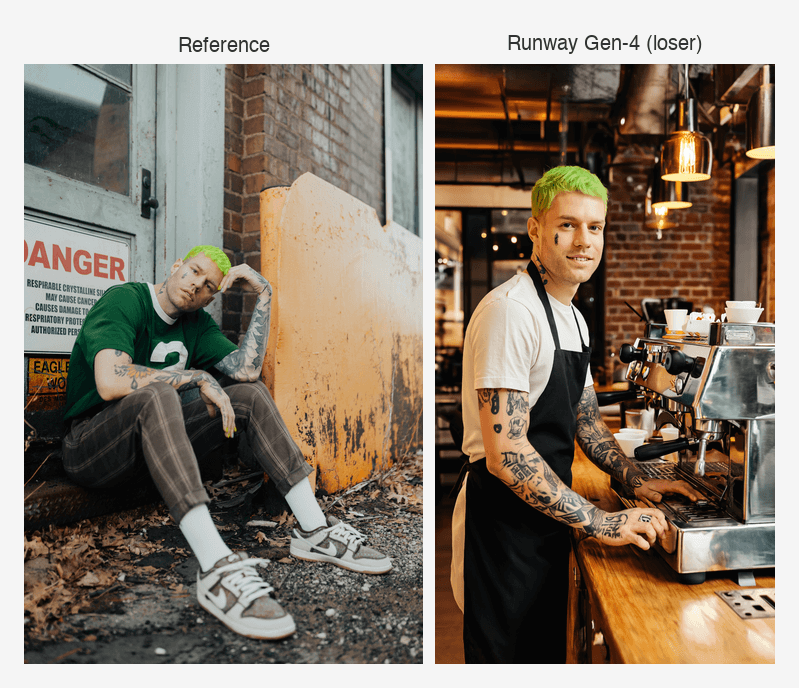
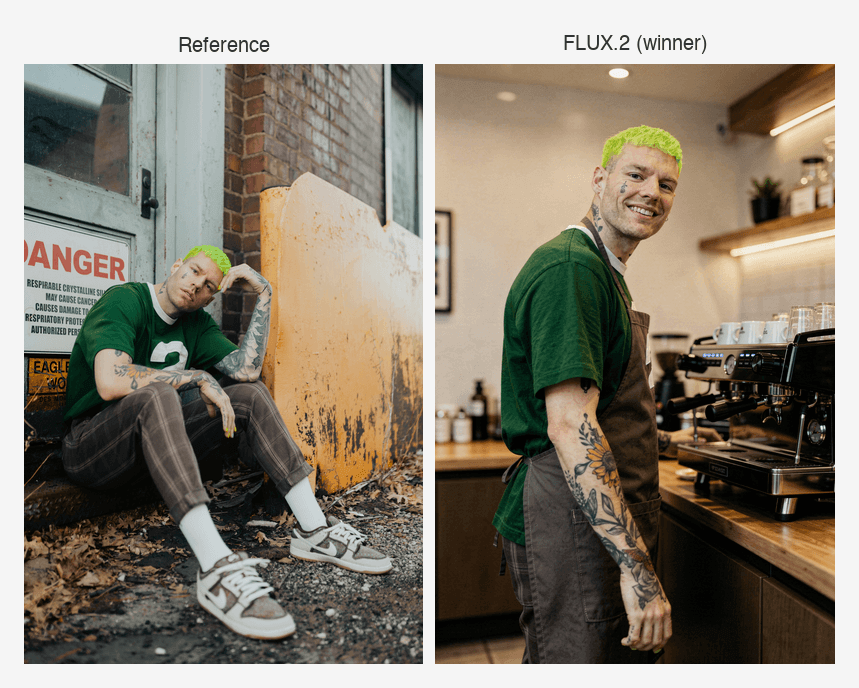
We gave each model a reference photo of a real person and asked it to place them in a new scene as a coffee shop barista, without changing their features.
Winner: FLUX.2
FLUX.2 and Gemini both passed this test. Here is a side-by-side of the best result:
Loser: Runway
Runway failed this test. Here is the result:
Adding items to an image while preserving every other detail
We gave each model a reference photo of a person alongside three clothing items and asked it to place all three items on the person without changing anything else.
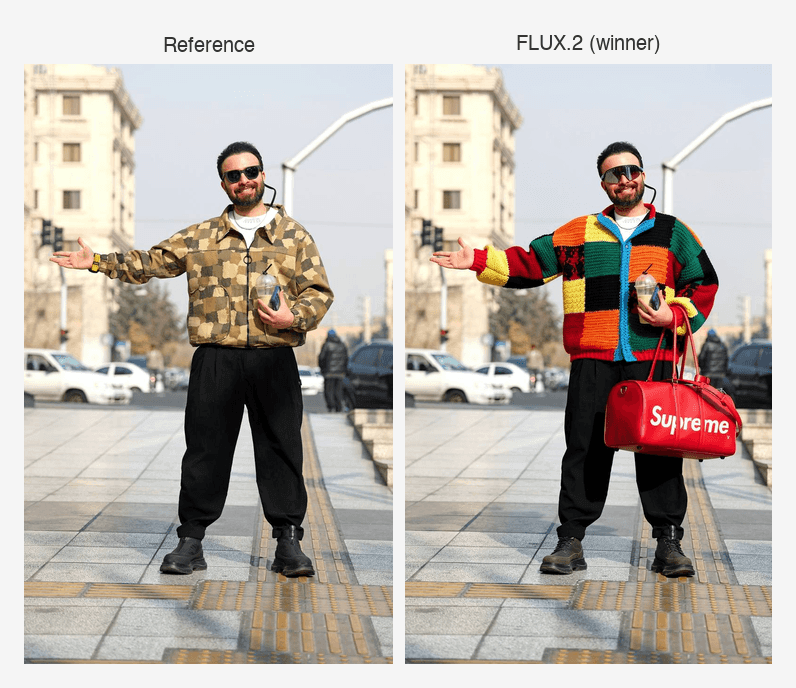
Winner: FLUX.2
FLUX.2 was the clear winner, placing all three items with near-perfect accuracy:
Loser: Runway
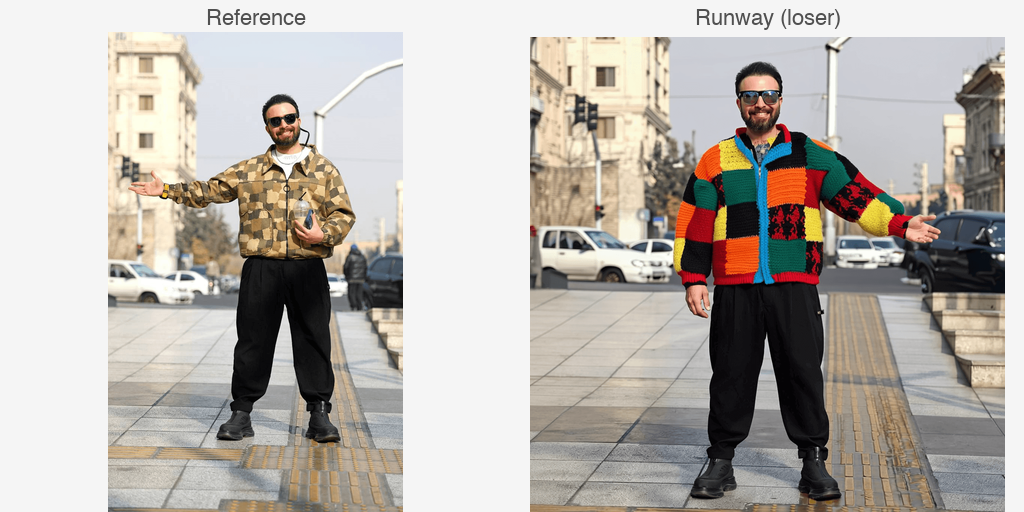
Runway struggled with item accuracy and character consistency:
Generating a stylized character consistently across multiple images
We gave each model a pixel art sprite and asked it to generate six independent frames of a walk cycle, each with a different pose, with no chaining between frames.
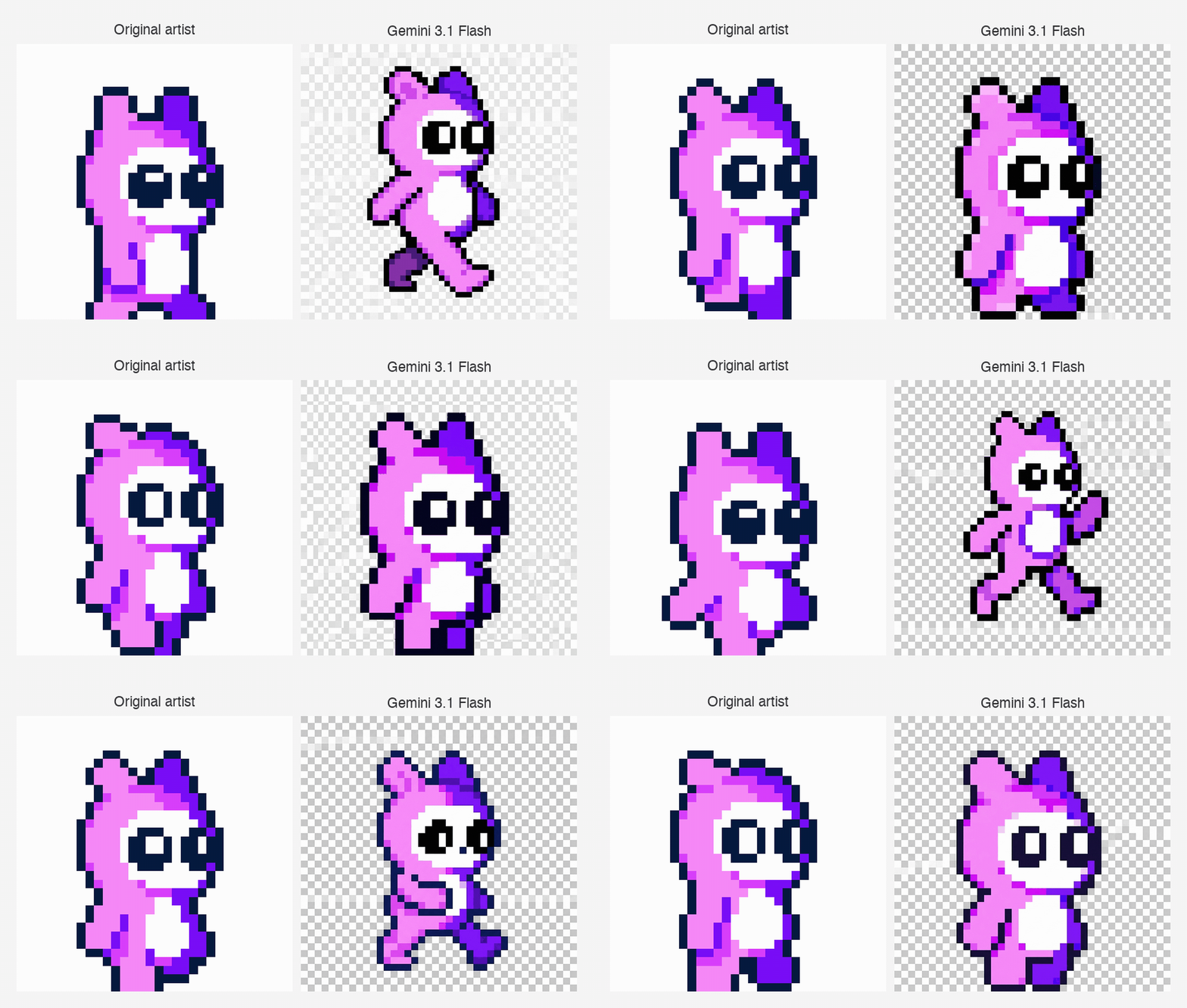
Winner: Gemini 3.1 Flash
Gemini 3.1 Flash showed the most consistent character style across all six frames:
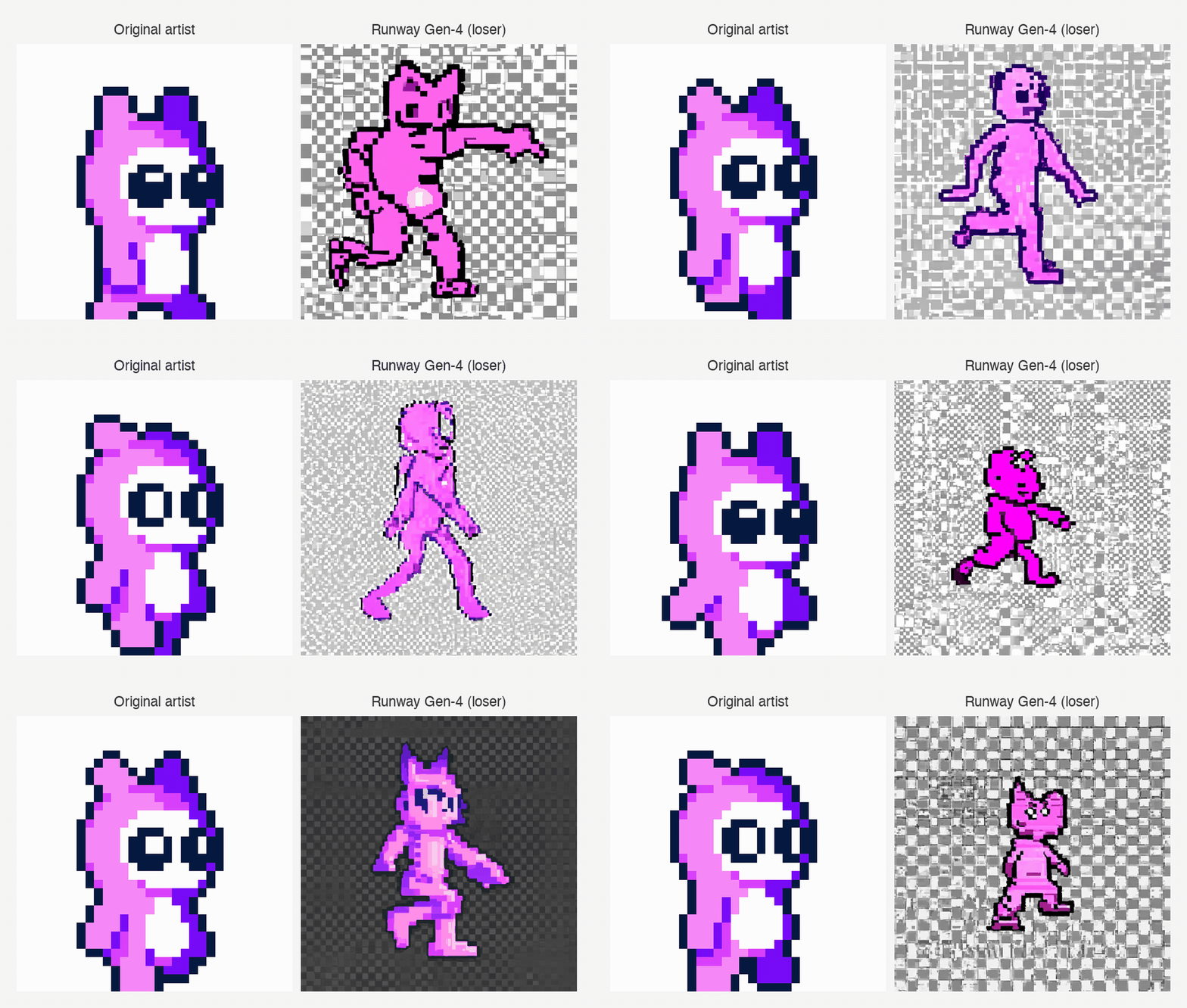
Loser: Runway Gen-4
Runway generated characters that were inconsistent both with the reference and with each other:
Comparing FLUX.2, Gemini 3.1 Flash, gpt-image-2, and Runway Gen-4
Each of the four models takes a different approach to multi-reference image generation. Here is how they compare at a high level.
| Model | Provider | Approach | Max references |
|---|---|---|---|
| FLUX.2 | Black Forest Labs | Multi-reference synthesis | 8 via API |
| Gemini 3.1 Flash | Multi-reference inference | Up to 14 | |
| gpt-image-2 | OpenAI | Multi-reference inference (image edits endpoint) | Up to 16 |
| Gen-4 | Runway | Reference-based inference | 3 |
Full feature comparison
Here is a full breakdown of how each model differs on API approach, output sizes, pricing, and SDK support.
| FLUX.2 | Gemini 3.1 Flash | gpt-image-2 | Runway Gen-4 | |
|---|---|---|---|---|
| Provider | Black Forest Labs | OpenAI | Runway | |
| API approach | Submit request, poll for result | Synchronous (response in single call) | Synchronous (response in single call) | Submit request, poll for result |
| Max reference images | 8 via API, 10 in playground | Up to 14 | Up to 16 | 3 |
| Output sizes | Up to 4MP, any aspect ratio | 512px, 1K, 2K, 4K | 1024x1024, 1024x1536, 1536x1024 | 720p or 1080p |
| Price per image (standard) | From $0.03 ([pro]) to $0.07 ([max]) per MP | ~$0.045 (512px) to ~$0.151 (4K) per image | $0.006 (low) to $0.211 (high) per 1024x1024 | $0.05 (720p) or $0.08 (1080p) per image |
| SDK / auth | REST API, API key in header | Google GenAI SDK (Python/JS), API key | OpenAI SDK (Python/JS), API key | Runway SDK (Python/JS), API key |
| Async / polling | Yes, polling required | No | No | Yes, polling required |
Which model can place the same person in a new scene without changing their features?
Maintaining a consistent character is both a huge problem with AI image generators as well as a huge expectation from their users, especially with human subjects.
A successful character-consistent image requires two things:
- The unique qualities of the subject don't drift away in the new generation.
- Their features don't move into the uncanny valley, where they seem slightly off in general.
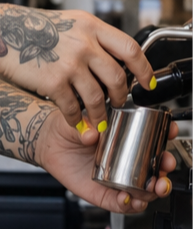
For this test, we use this reference photo of a human subject with distinct features that we can use to easily track consistency across image generation:
- An upside down rose tattoo on the subject's right cheek
- A sunflower tattoo on the subject's right arm
- Short green hair
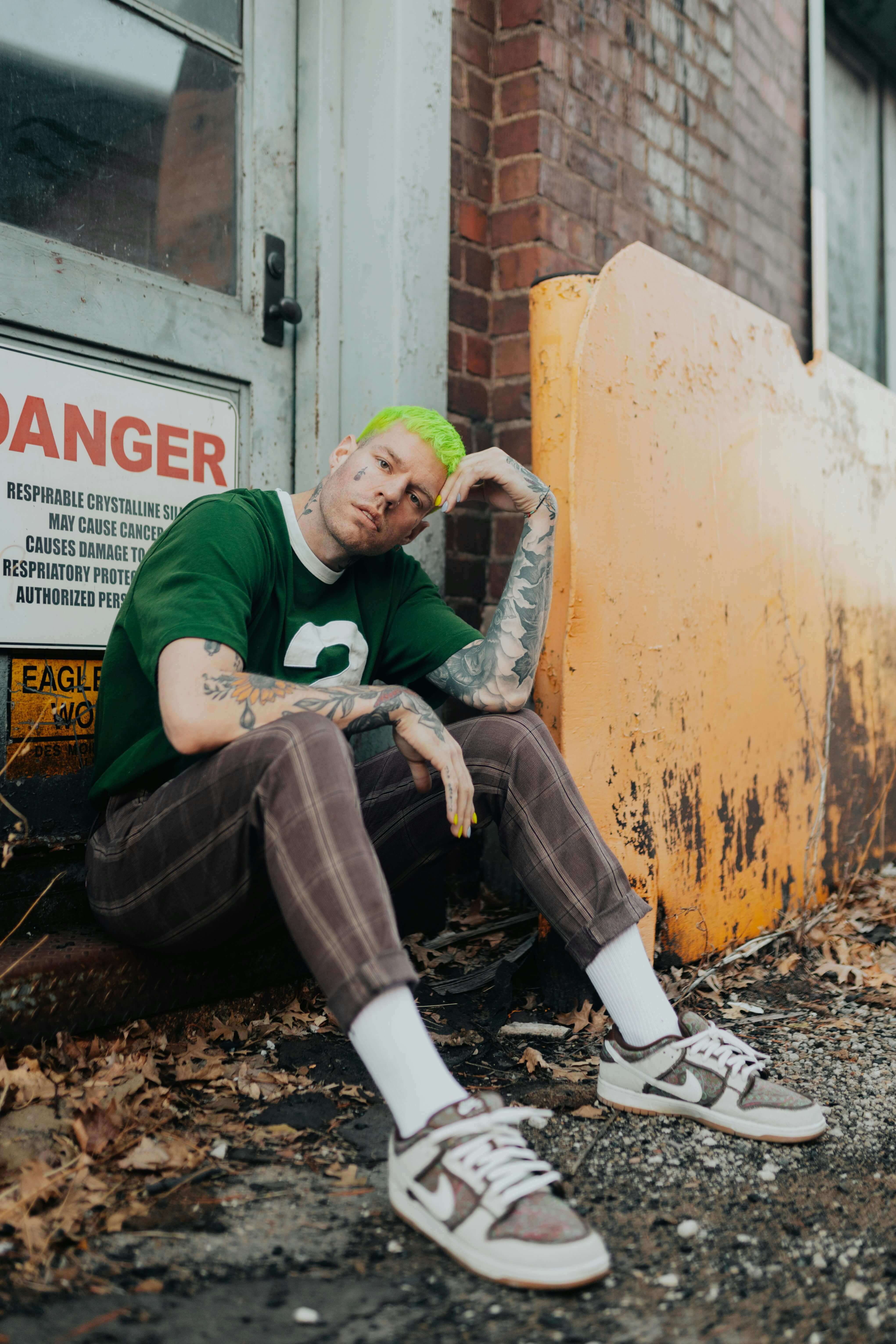
Thanks Megan Ruth for the photo.
We placed the subject in a completely different scene for these tests. Specifically, as a barista in a coffee shop.
FLUX.2
FLUX.2 uses multi-reference synthesis, where you pass a reference image directly as input_image alongside a text prompt.
The model uses this as a character reference and generates a new scene while preserving the subject's identity.
# Encode the reference photo as base64 — this becomes the character reference
character_b64 = encode_image("character.jpg")

# Pass it as input_image alongside a text prompt describing the new scene
response = requests.post(
    f"{BASE_URL}/flux-2-pro-preview",
    headers=HEADERS,
    json={
        "prompt": prompt,                                          # describes the new scene
        "input_image": f"data:image/jpeg;base64,{character_b64}", # the character to preserve
    },
).json()
Result
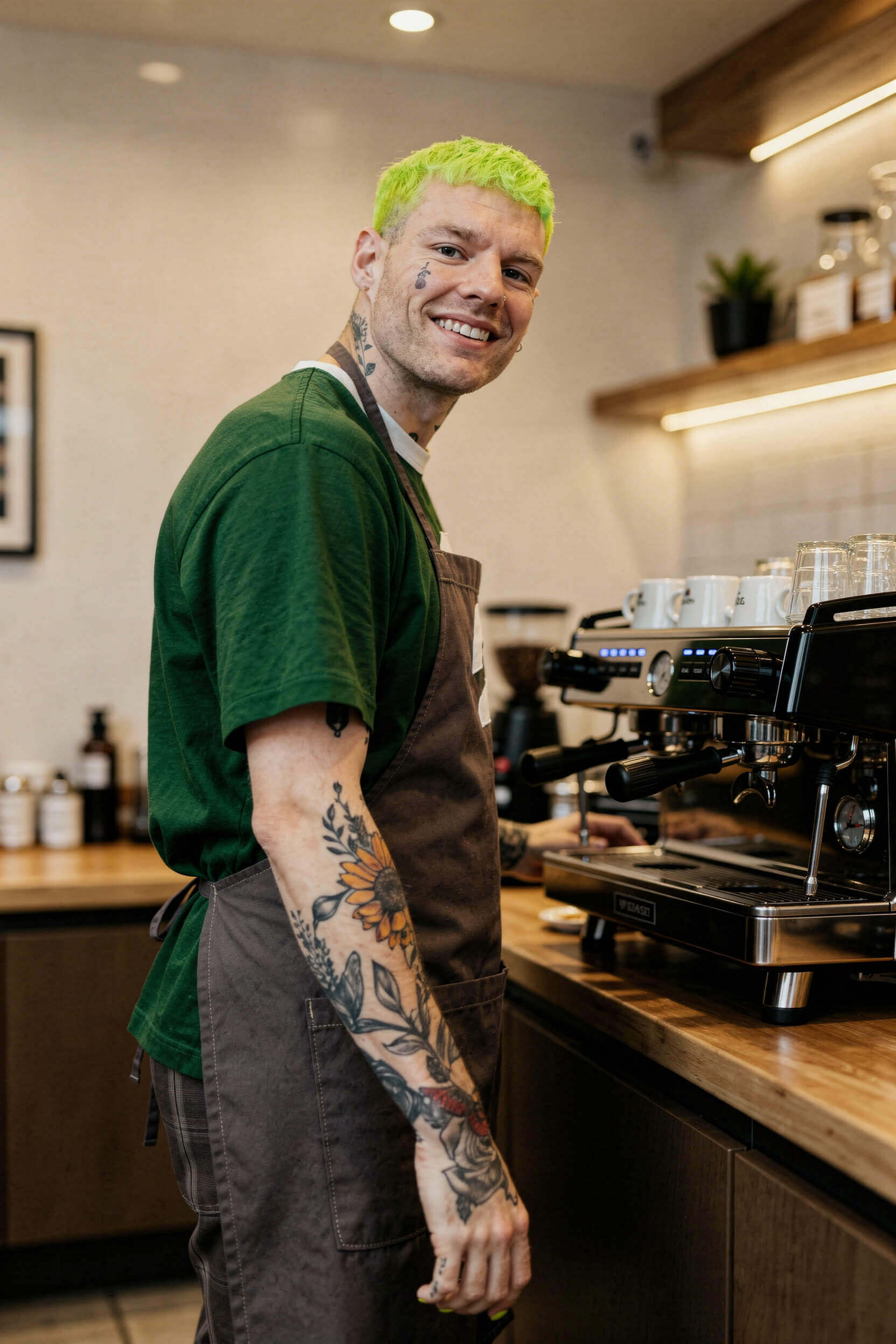
Here is what FLUX.2 generated:
Qualitative analysis
The FLUX.2 result is really quite impressive.
Character consistency
FLUX.2 did an excellent job maintaining the features of the subject in the newly generated image:
- Sunflower tattoo on the right arm is clearly present
- Upside down rose tattoo on the cheek is clearly present
- Short green hair is maintained
Uncanny valley analysis
The subject has not drifted into the uncanny valley. They look extremely lifelike and realistic, maintaining all the same features of the original subject.
Overall image quality
The image is great quality:
- The subject is clear and focused in the shot with the espresso machine
- The background is warm and out of focus
- No strange artifacts in the background or the subject
Performance
Here's how long it took and how much it cost to generate this image.
| Metric | Value |
|---|---|
| Time | 30.5s |
| Cost | $0.135 |
Gemini 3.1 Flash
Gemini 3.1 Flash uses the Google GenAI SDK, where you pass the reference image directly as a content part alongside the text prompt in a single call.
# Load the reference photo as a PIL Image — this becomes the character reference
character = Image.open("character.jpg")

# Pass it as a content part alongside the prompt
response = client.models.generate_content(
    model="gemini-3.1-flash-image-preview",
    contents=[prompt, character],  # prompt describes the scene, character is the reference
    config=types.GenerateContentConfig(
        response_modalities=["IMAGE"],
    ),
)
Result
Here is what Gemini 3.1 Flash generated:

Qualitative analysis
The Gemini 3.1 Flash result shows extremely strong character consistency with the original image.
Character consistency
The character is extremely consistent with the original image, with some small details that aren't extremely noticeable. For example, the rose tattoo on the cheek has become a more abstract teardrop tattoo.
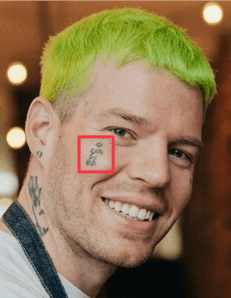
Otherwise, the remaining features are very accurate to the original:
- Sunflower tattoo on the arm is clearly present
- Second sunflower tattoo on the neck is clearly present
- Unique facial features of the subject are maintained
Uncanny valley analysis
There is no uncanny valley detected here. The character's facial features are highly realistic.
Overall image quality
This is an extremely high quality image:
- Good composition and a warm tone
- No strange artifacts across either the subject or the background
Performance
Here's how long it took and how much it cost to generate this image.
| Metric | Value |
|---|---|
| Time | 31.11s |
| Input tokens | 359 |
| Output tokens | 1,296 |
| Cost | ~$0.084 |
gpt-image-2
gpt-image-2 uses the OpenAI SDK's images.edit endpoint, where you pass the reference image as a file object alongside the text prompt.
# Open the reference photo and pass it directly to the images.edit endpoint
with open("character.jpg", "rb") as char_file:
    response = client.images.edit(
        model="gpt-image-2",
        image=char_file,   # the character to preserve
        prompt=prompt,     # describes the new scene
        size="1024x1024",
    )
Result
Here is what gpt-image-2 generated:

Qualitative analysis
The gpt-image-2 result is really quite impressive.
Character consistency
gpt-image-2 did an excellent job maintaining the features of the subject in the newly generated image:
- Sunflower tattoo on the right arm is clearly present
- Upside down rose tattoo on the cheek is clearly present
- Short green hair is maintained
Uncanny valley analysis
There is a subtle uncanny valley effect here, but it comes from an unexpected source: too much consistency. gpt-image-2 has preserved the head position and facial expression from the reference photo so precisely that the character looks unnatural in the new scene. The head is tilted at the same angle as the original and the expression is blank, giving the result a stiff, posed quality.
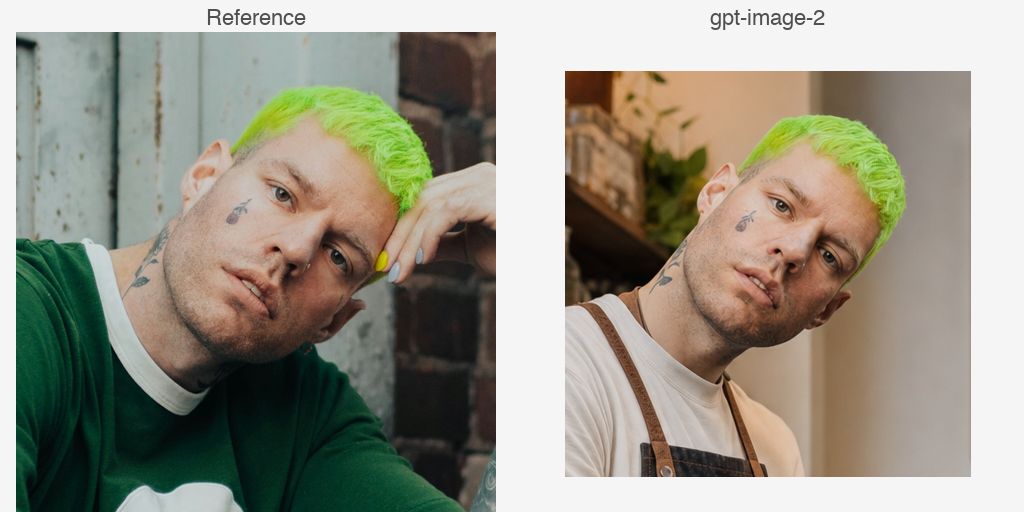
Compare this with the FLUX.2 result, where the character is in a completely different pose and is smiling, yet still looks like the same person. FLUX.2 understood that consistency means preserving identity, not copying posture. gpt-image-2 treated the reference more literally, which produced a face that is arguably more accurate but a scene that feels less natural.
Overall image quality
The image is great quality:
- The subject is well framed with a good composition
- The background is blurred and the foreground is high definition
The one issue worth noting is the hands. Some fingers are morphing into each other, and the hands have an incorrect number of fingers. This is a subtle but common problem with AI image generators.
Performance
Here's how long it took and how much it cost to generate this image.
| Metric | Value |
|---|---|
| Time | 211.95s |
| Input tokens | 1,566 (1,457 image + 109 text) |
| Output tokens | 7,024 |
| Cost | ~$0.224 |
Runway Gen-4
Runway Gen-4 uses its Runway SDK, where you pass the reference image as a base64-encoded entry in a referenceImages array, with a tag assigned to it.
You then reference that tag directly in the prompt using @character, which tells the model which part of the prompt refers to the reference image.
# Encode the reference photo as base64
character_b64 = encode_image("character.jpg")

# Pass it in referenceImages with a tag, then reference it in the prompt via @character
response = requests.post(
    f"{BASE_URL}/text_to_image",
    headers=HEADERS,
    json={
        "model": "gen4_image",
        "promptText": "The @character is working as a barista...",  # @character refers to the tagged image
        "referenceImages": [
            {
                "uri": f"data:image/jpeg;base64,{character_b64}",
                "tag": "character",  # this tag is what @character in the prompt resolves to
            }
        ],
    },
)
Result
Here is what Runway Gen-4 generated:

Qualitative analysis
Runway Gen-4 did a pretty poor job with this test.
Character consistency
Again, this is not the same person as in the original image:
- The facial features are all wrong
- The tattoos are strange, abstract shapes that do not match the original at all
It seems to have understood only that it is trying to generate a man with tattoos and short green hair.
Uncanny valley analysis
There is some uncanny valley here. You can't quite put your finger on it, but his face is quite strange. It's also kind of unclear what he's doing with his hands on the coffee machine.
Overall image quality
The composition is great and the tone is warm. Everything looks pretty good except for the human features of the subject.
Performance
Here's how long it took and how much it cost to generate this image.
| Metric | Value |
|---|---|
| Time | 25.19s |
| Cost | $0.05 |
Which AI image generator best preserves a real person's face?
FLUX.2, Gemini 3.1 Flash, and gpt-image-2 all passed this test, producing images that are clearly recognisable as the same person from the reference photo. Runway Gen-4 failed, generating a different person who only broadly matches the description of the subject.
| FLUX.2 | Gemini 3.1 Flash | gpt-image-2 | Runway Gen-4 | |
|---|---|---|---|---|
| Character preserved? | Yes | Yes | Yes | No |
On time and cost, gpt-image-2 was significantly slower and more expensive than the other models, taking 211.95 seconds and costing ~$0.224 compared to FLUX.2's 30.5 seconds at $0.135, Gemini's 31.11 seconds at ~$0.084, and Runway's 25.19 seconds at $0.05.
| FLUX.2 | Gemini 3.1 Flash | gpt-image-2 | Runway Gen-4 | |
|---|---|---|---|---|
| Time | 30.5s | 31.11s | 211.95s | 25.19s |
| Cost | $0.135 | ~$0.084 | ~$0.224 | $0.05 |
Which model can add an item to an image while preserving every other detail?
Here we want to know whether a model can add items to an existing image while preserving every other detail.
We give each model a picture of a person and three items of clothing:
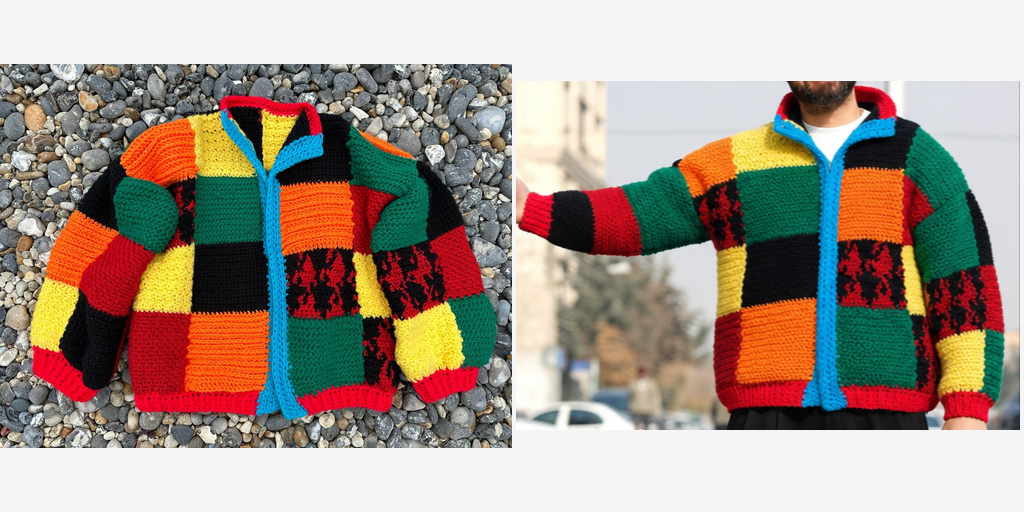
- A multicoloured jacket
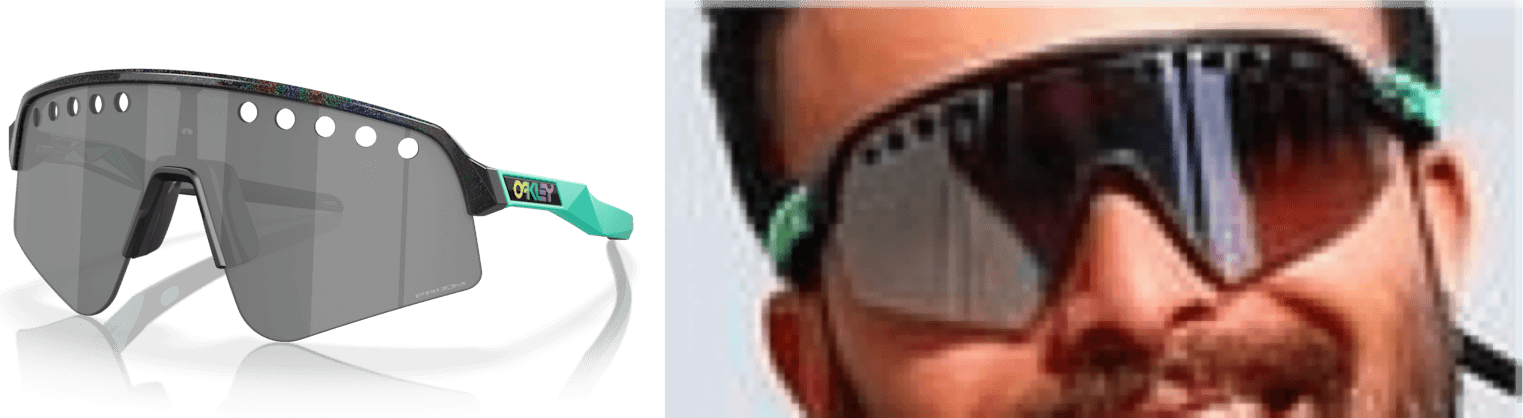
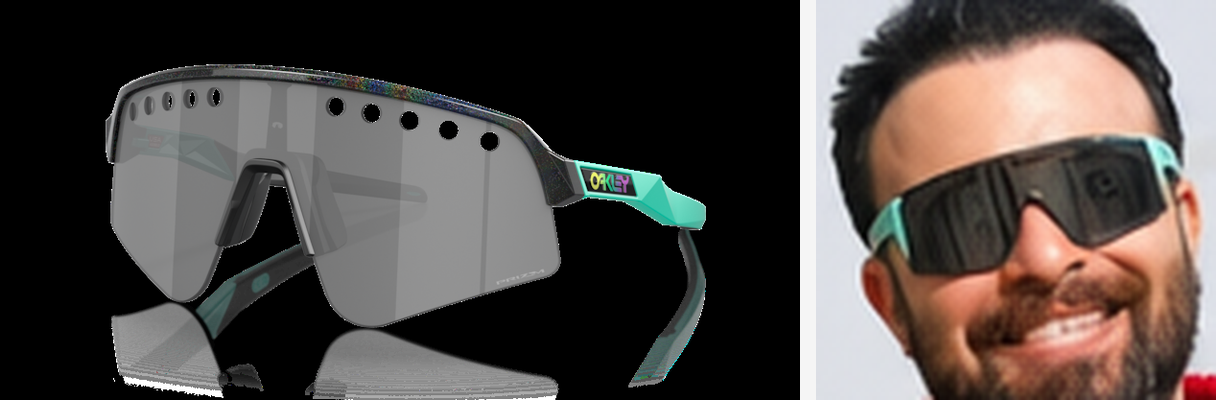
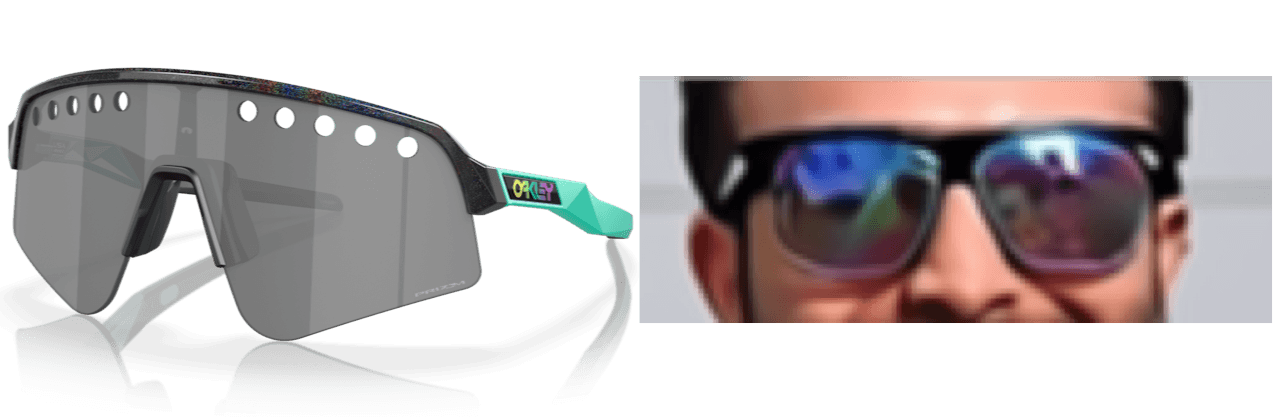
- A large pair of sunglasses
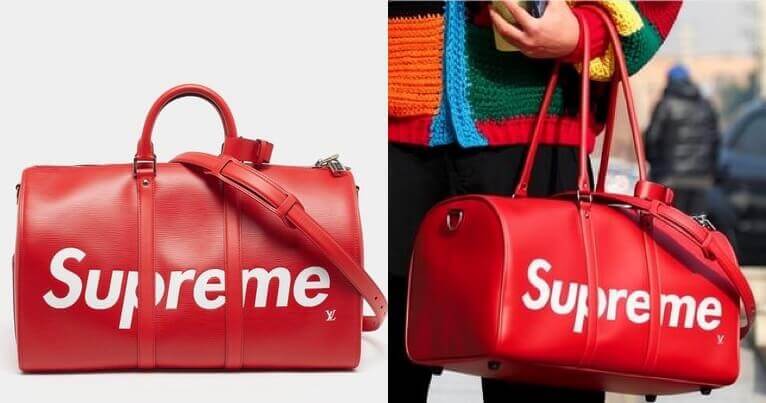
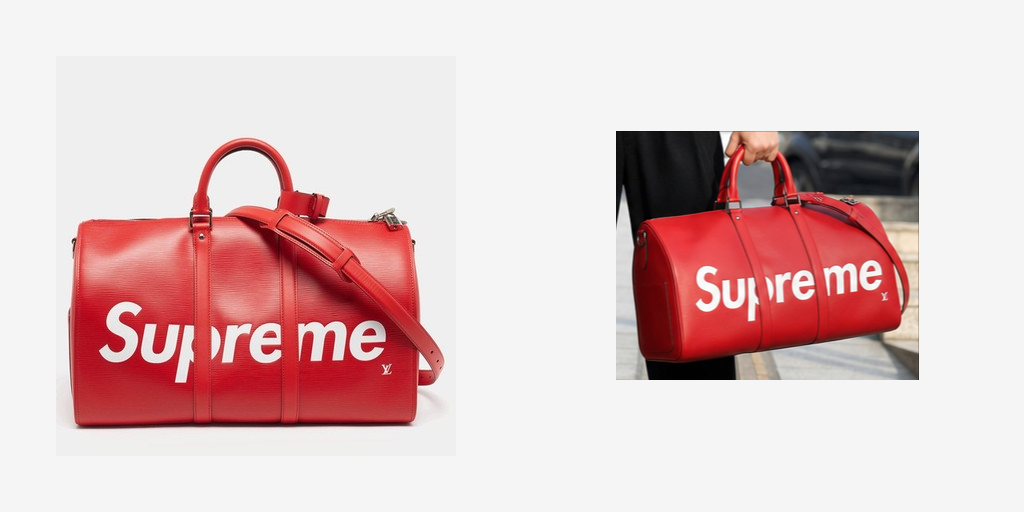
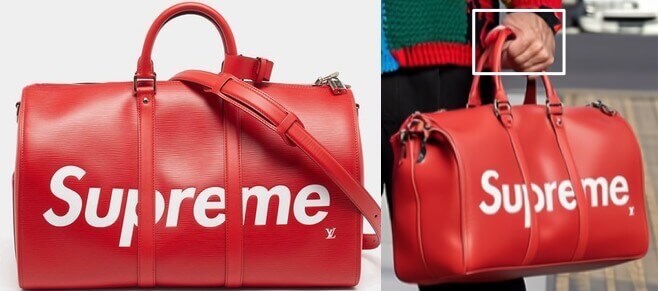
- A red duffel bag
All three items have very distinct, recognisable details that we can use to identify consistency across image generation.
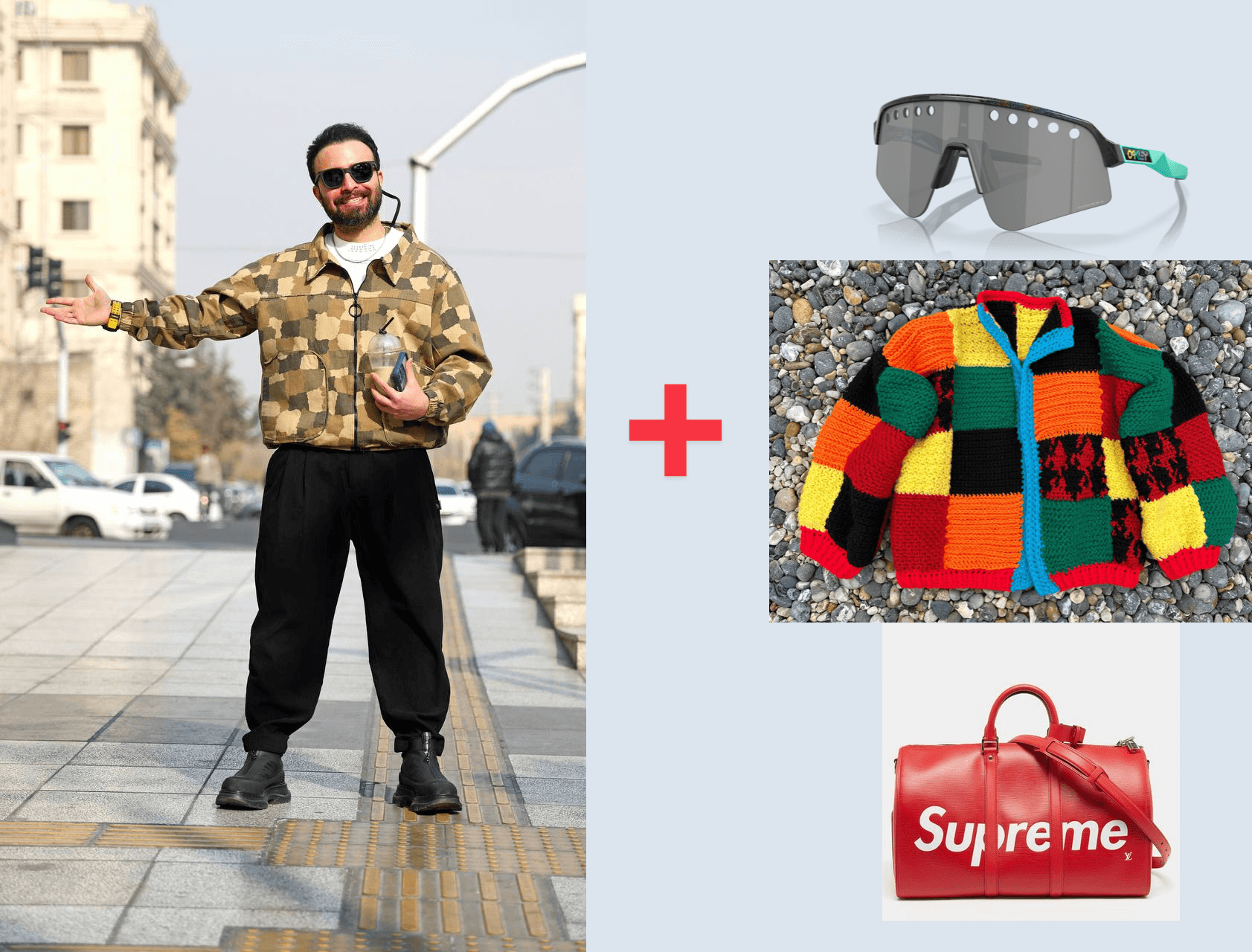
Thanks Babak Eshaghian for the photo.
FLUX.2
FLUX.2 accepts multiple reference images, so we use the same technique as test 2 but pass all four images in together, referencing them as input_image, input_image_2, and so on.
Result
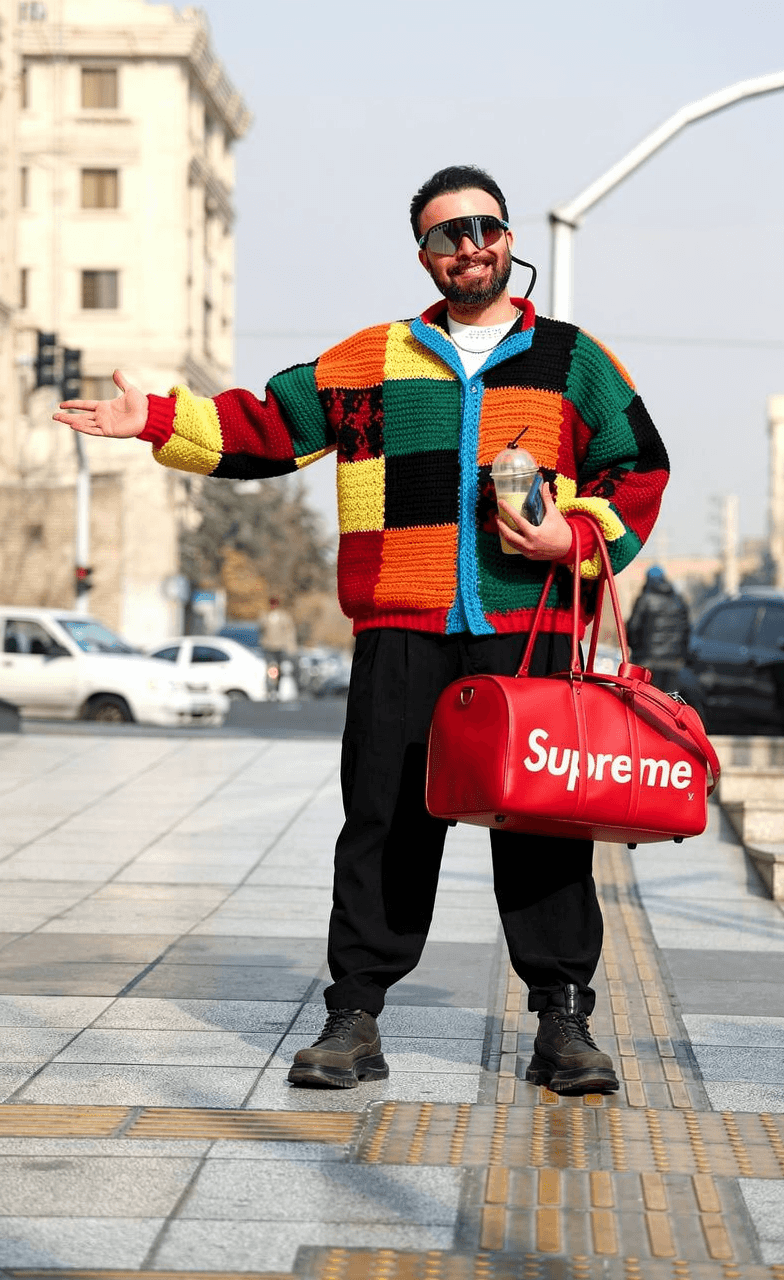
Here is what FLUX.2 generated:
Qualitative analysis
FLUX.2 did a perfect job placing the items in the scene while maintaining all the details from the original image.
Item correctness
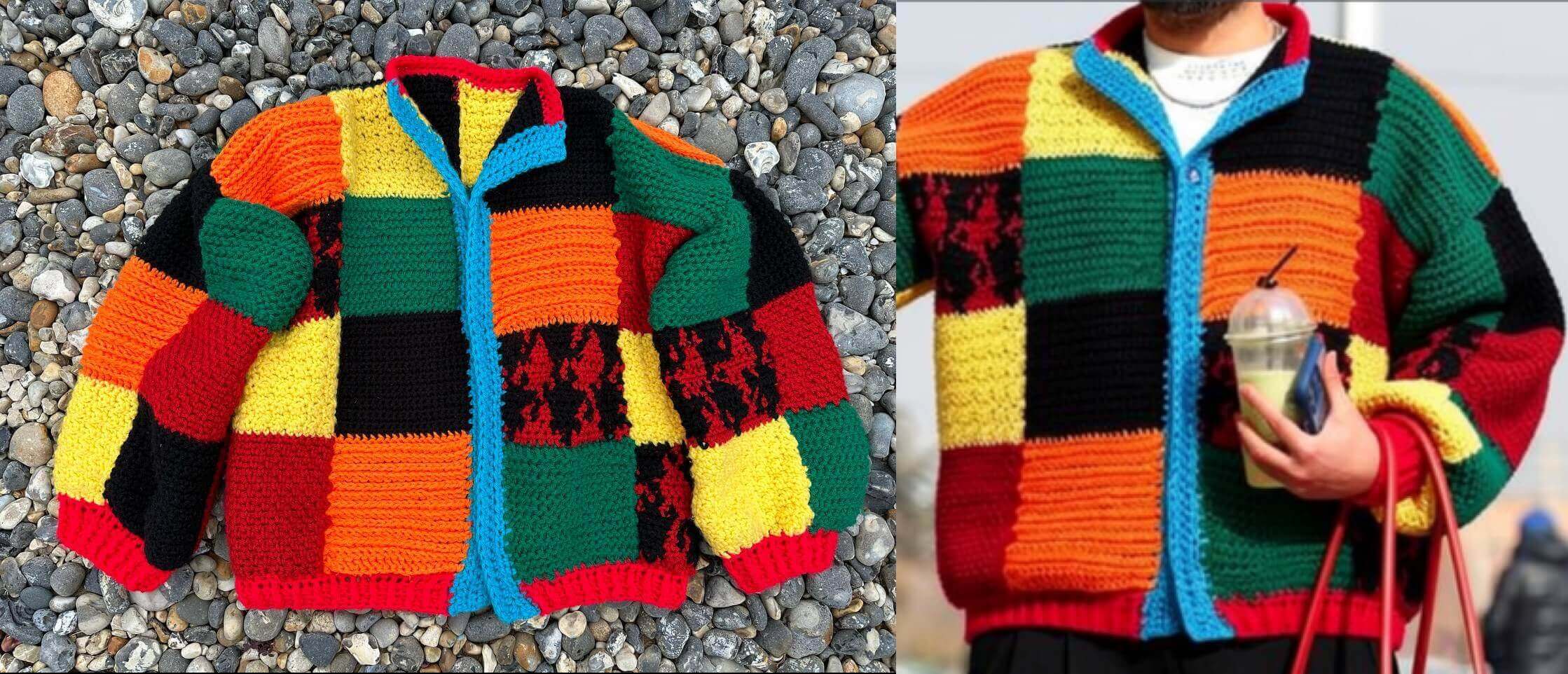
The small details of all the items placed in the scene are basically perfect:
- The crochet jacket has exactly the right squares of colour in exactly the same places as the original image
- The glasses have the small details like the holes at the top of the frame
- The Supreme bag has the straps going over the exact same letters as in the original image, as well as the two straps the bag has
Character consistency
The character consistency is perfect. The character is in the exact same pose and has all the same qualities as the original image.
Performance
Here's how long it took and how much it cost to generate this image.
| Metric | Value |
|---|---|
| Time | 14.47s |
| Cost | $0.09 |
Gemini 3.1 Flash
Gemini 3.1 Flash uses the same technique as test 2, passing all four images as content parts in a single call.
Result
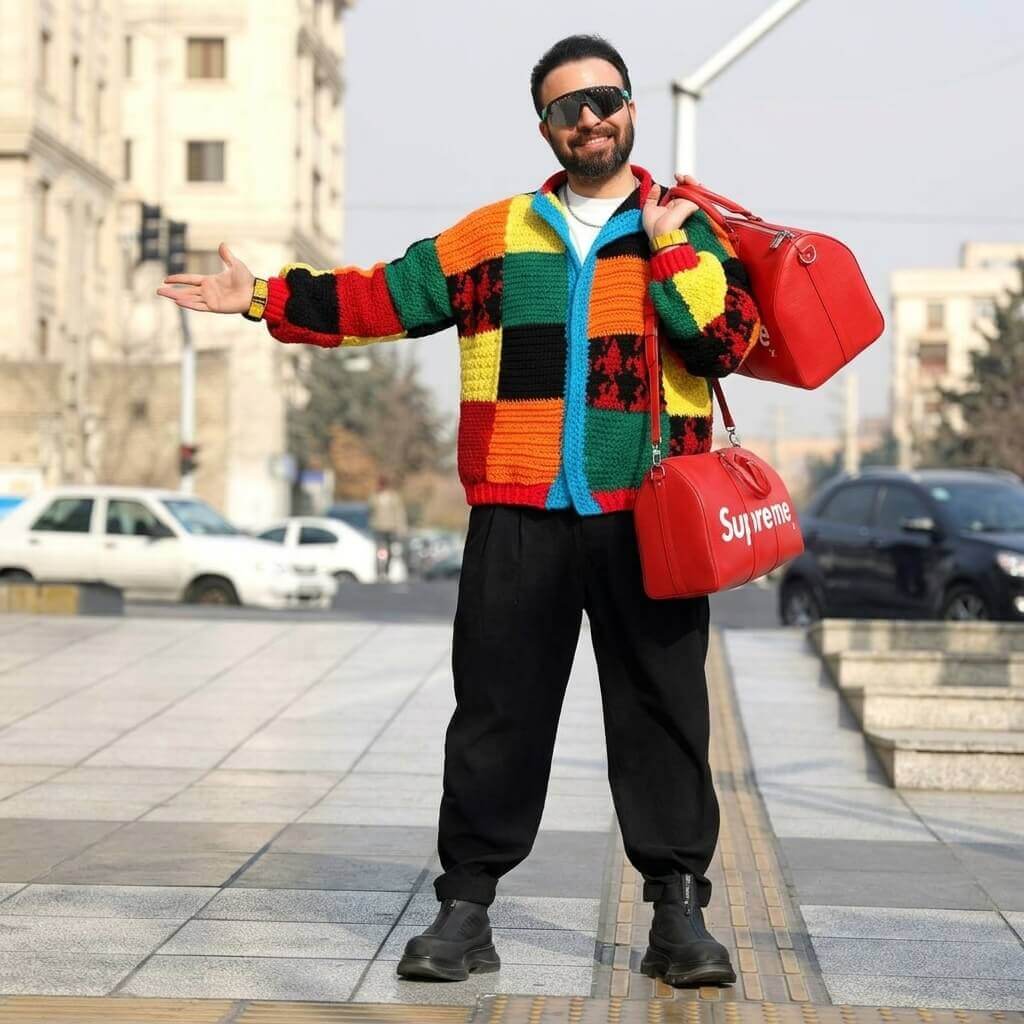
Here is what Gemini 3.1 Flash generated:
Qualitative analysis
Gemini 3.1 Flash is almost perfect in its generated image, with some strange artifacts.
Item correctness
The items of clothing match the original items perfectly:
- The crochet jacket has exactly the right squares of colour in exactly the same places as the original image
- The glasses have the small details like the holes at the top of the frame
- The Supreme bag has the straps going over the exact same letters as in the original image, as well as the two straps the bag has
The one strange artifact is that the character was given two bags for some reason.
Character consistency
The character consistency is almost perfect. The one detail that has changed is that the character's arm position has been changed to hold the bag that was added to the scene. This could be seen as a pro in the intelligence of the model, or it could be seen as a con if you are aiming for more of a paint-in kind of edit where your character stays consistent across generations.
Performance
Here's how long it took and how much it cost to generate this image.
| Metric | Value |
|---|---|
| Time | 16.22s |
| Input tokens | 1,085 |
| Output tokens | 1,373 |
| Cost | ~$0.084 |
gpt-image-2
gpt-image-2 uses the same technique as the previous tests, passing all four images as a list to the images.edit endpoint.
Result
Here is what gpt-image-2 generated:
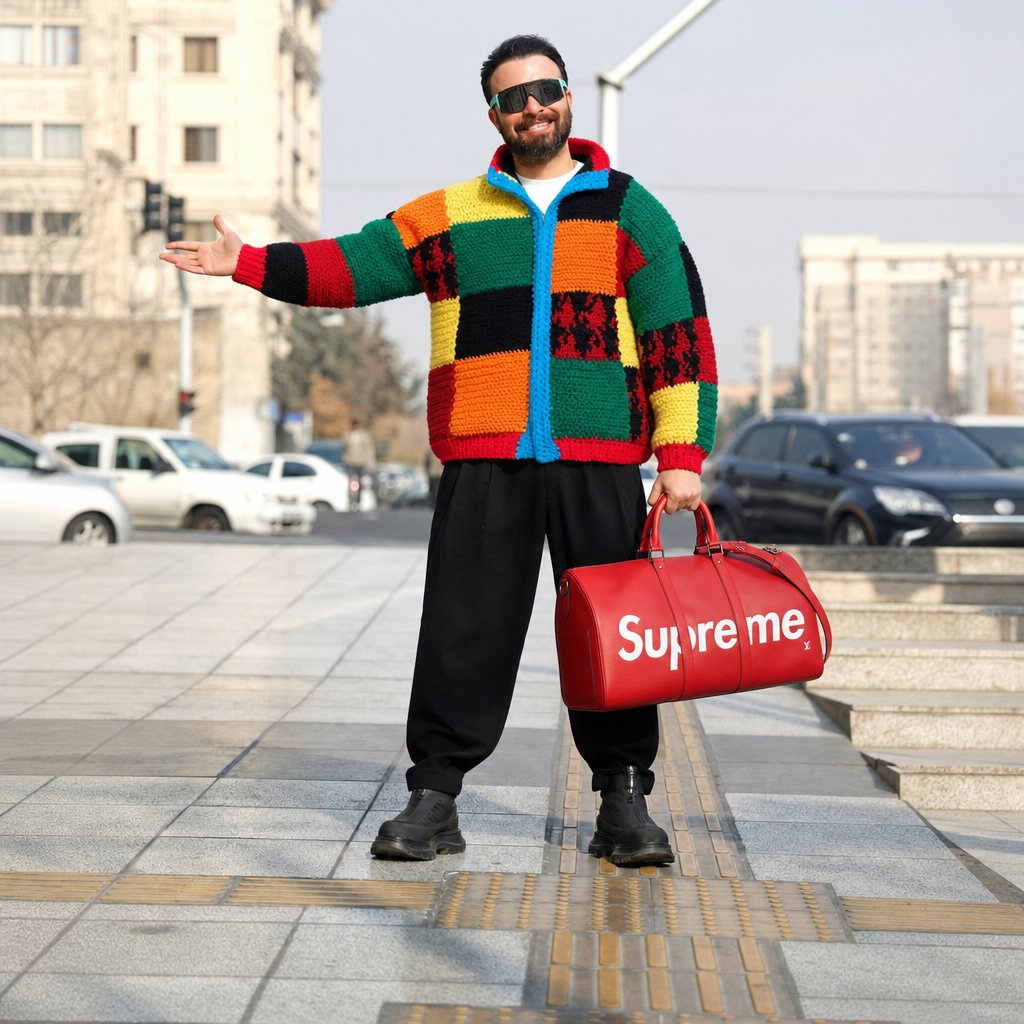
Qualitative analysis
Item correctness
- The jacket is identical to the reference image, with the same colour blocks in the same positions.
- The glasses resemble the reference but with some stylistic differences. The lenses are more square than in the original, and the distinctive holes along the top of the frames are missing.
- The bag is identical to the reference image.
Character consistency
Performance
Here's how long it took and how much it cost to generate this image.
| Metric | Value |
|---|---|
| Time | 197.73s |
| Input tokens | 3,403 |
| Output tokens | 7,024 |
| Cost | ~$0.224 |
Runway Gen-4
Runway Gen-4 uses the same @tag technique as test 2, but with one important limitation: it only supports up to 3 reference images.
Since we have 4 images (character, jacket, glasses, bag), we had to run this test in two passes. The first pass used the character, jacket, and glasses. The second pass added the bag.
Result
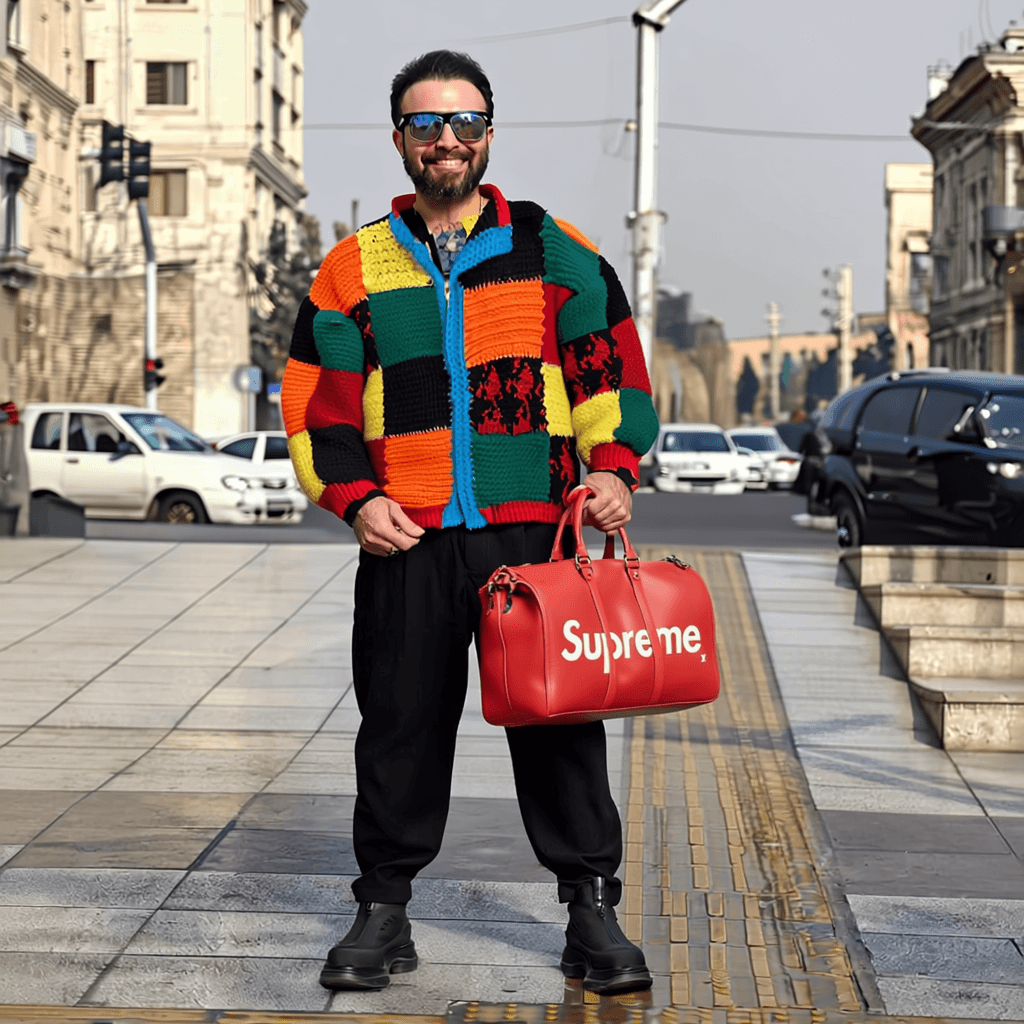
Here is what Runway Gen-4 generated in pass 1 (jacket and glasses):
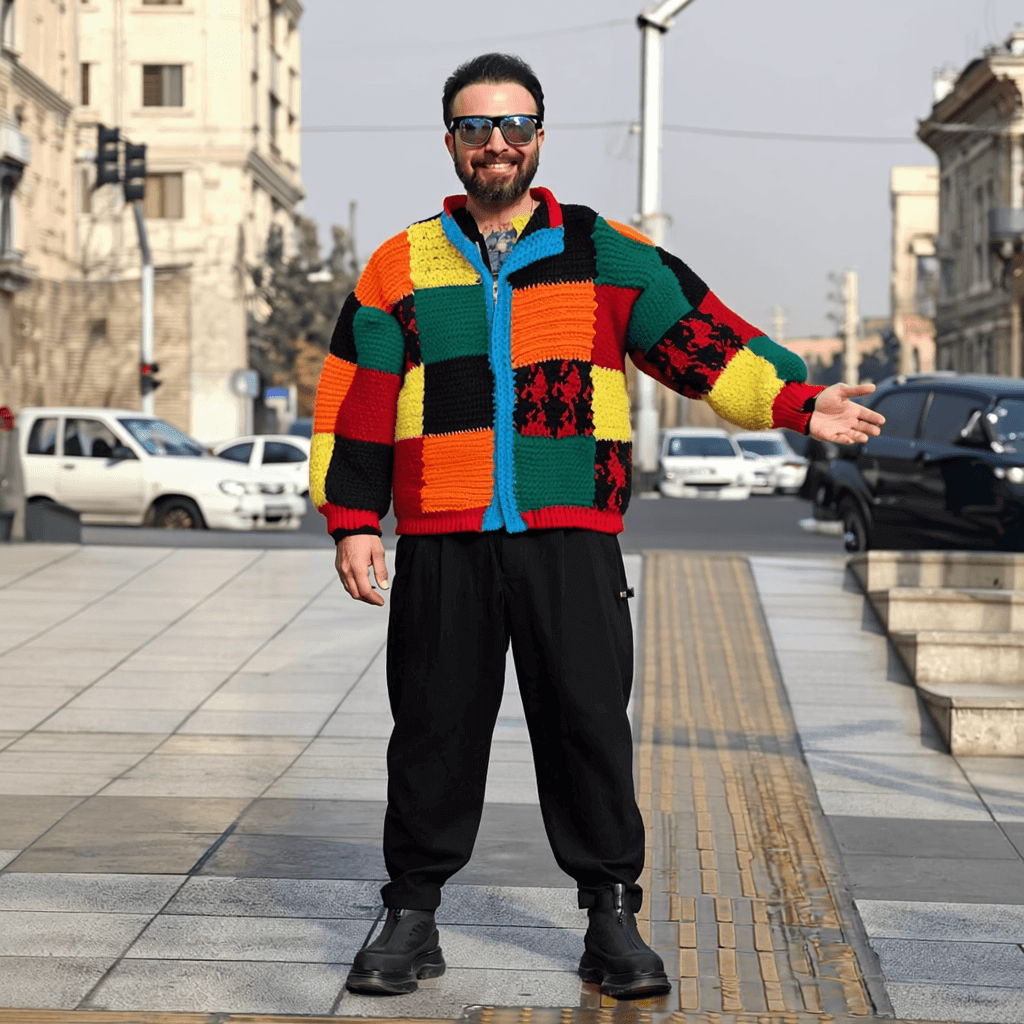
And pass 2 (all three items including the bag):
Qualitative analysis
At first, Runway's output might seem better than gpt-image-2's, but with some further analysis we can see it fell short in several key areas.
Item correctness
-
The crochet jacket was generated well, with good consistency across the colours of the jacket.
-
The sunglasses generated are not the sunglasses we expected at all.
- The bag that was generated is consistent with the image we gave it. However, it does look like it gave the character an extra thumb to hold on to the bag.
Character consistency
In the first pass, the character seems to have been flipped in its body position.
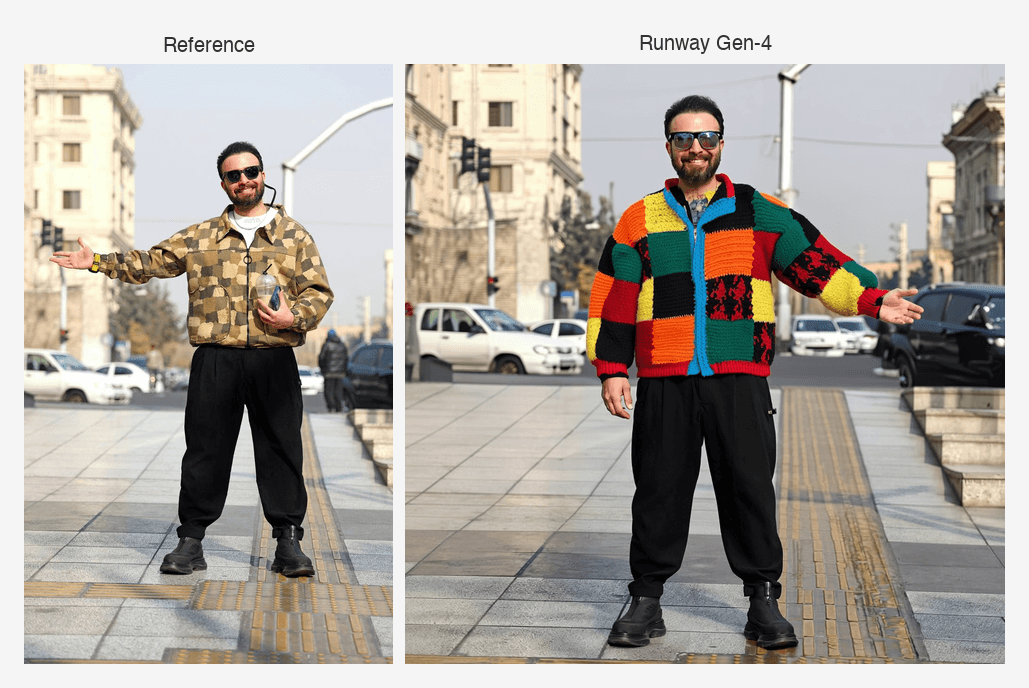
This is not a huge deal if you are not too worried about these smaller details, but if you need the image to be exactly the same across generations, then obviously this fails.
Performance
Here's how long it took and how much it cost to generate this image.
| Metric | Value |
|---|---|
| Time | 30.01s avg across 2 passes |
| Cost | $0.10 (2 images x $0.05) |
Which image generator is best for AI virtual try-on?
FLUX.2 was the clear winner of this test, producing a near-perfect result across all three items with no notable artifacts.
Gemini 3.1 Flash came in second, matching the items well but with the strange two-bag artifact.
gpt-image-2 passed, reproducing the jacket and bag accurately, but fell short on the glasses, missing the distinctive frame details of the original.
Runway Gen-4 struggled with item accuracy and character consistency.
| FLUX.2 | Gemini 3.1 Flash | gpt-image-2 | Runway Gen-4 | |
|---|---|---|---|---|
| Items preserved? | Yes | Mostly | Mostly | No |
gpt-image-2 was significantly slower and more expensive than the other passing models, taking 197.73 seconds and costing ~$0.224 compared to FLUX.2's 14.47 seconds at $0.09 and Gemini's 16.22 seconds at ~$0.084.
| FLUX.2 | Gemini 3.1 Flash | gpt-image-2 | |
|---|---|---|---|
| Time | 14.47s | 16.22s | 197.73s |
| Cost | $0.09 | ~$0.084 | ~$0.224 |
Which model can generate a stylized character consistently across multiple images?
Image generation models are expected to maintain consistency with abstract characters as well as real people.
In this section, we test the model's ability to maintain consistency in a difficult art style for an abstract character. Specifically, this pixel art character:

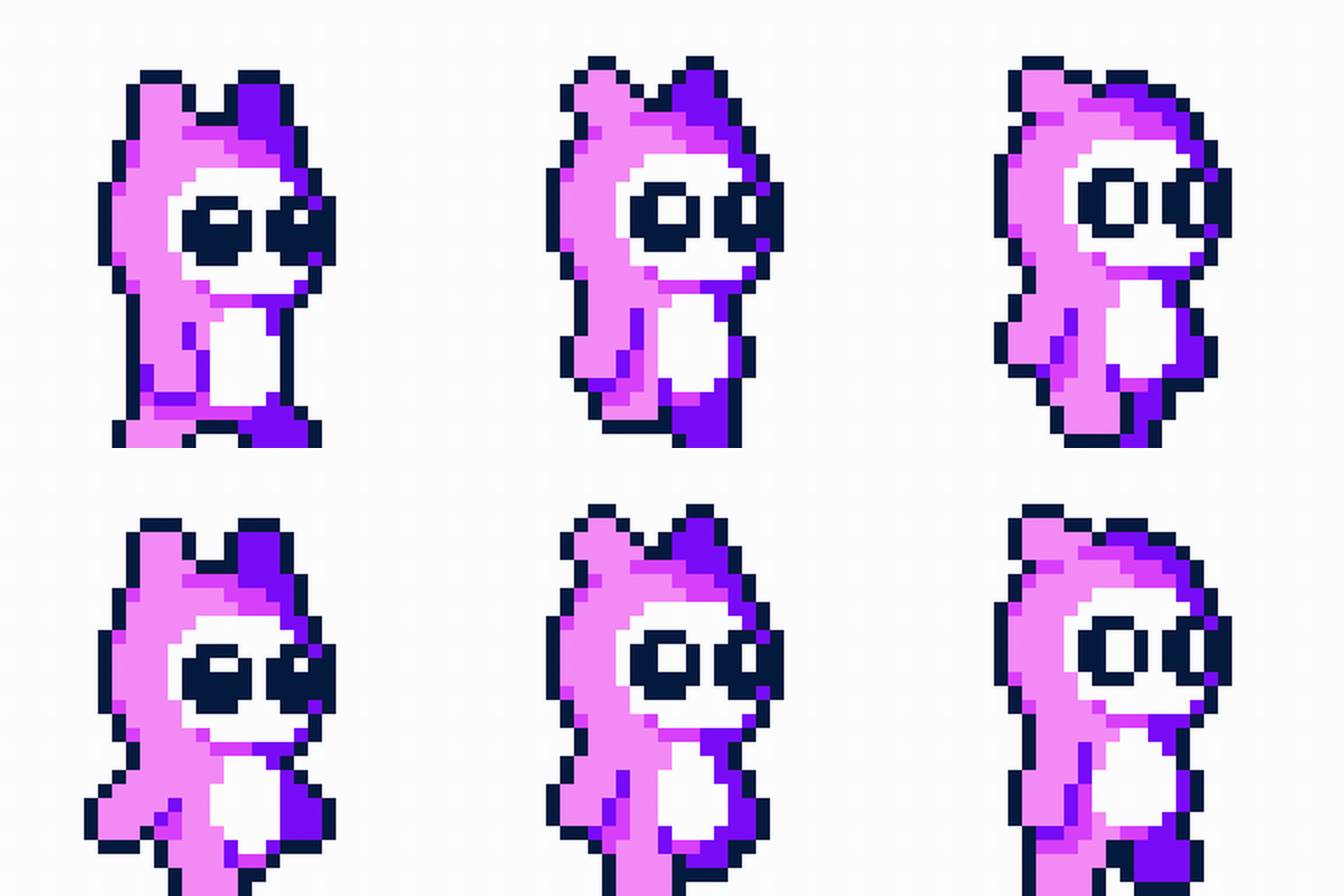
We test a workflow that would be extremely useful in a real life application: generating the sprites needed for an animation sheet of a character.
Here is the human artist's character animation that we will be comparing the model output to:
FLUX.2
FLUX.2 uses the same technique as the previous tests, passing the sprite as input_image alongside a text description of each pose.
We make 6 independent calls, one per frame, with no chaining between them.
Result
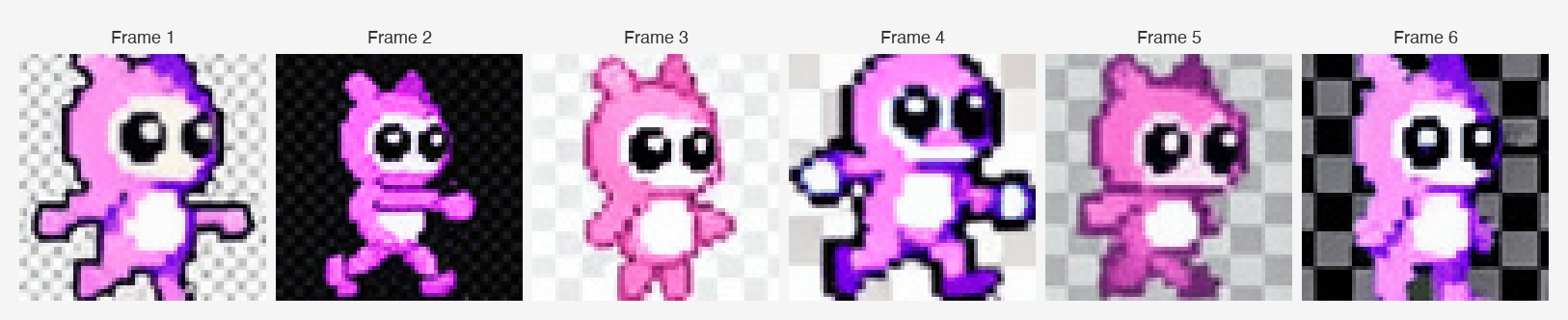
Here are all six frames FLUX.2 generated:
Here is what it looks like when animated:
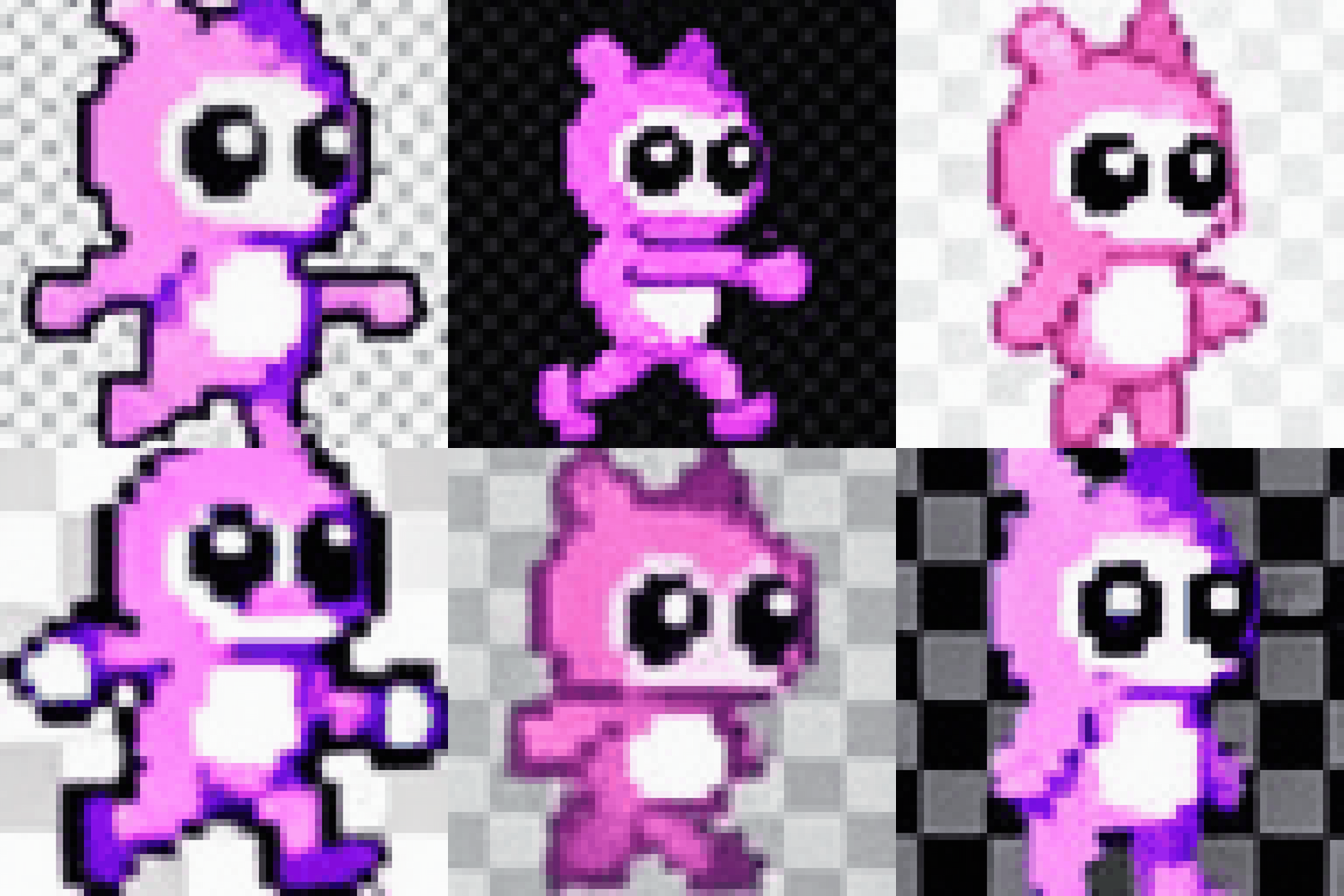
Qualitative analysis
FLUX.2 failed this test.
Character style consistency
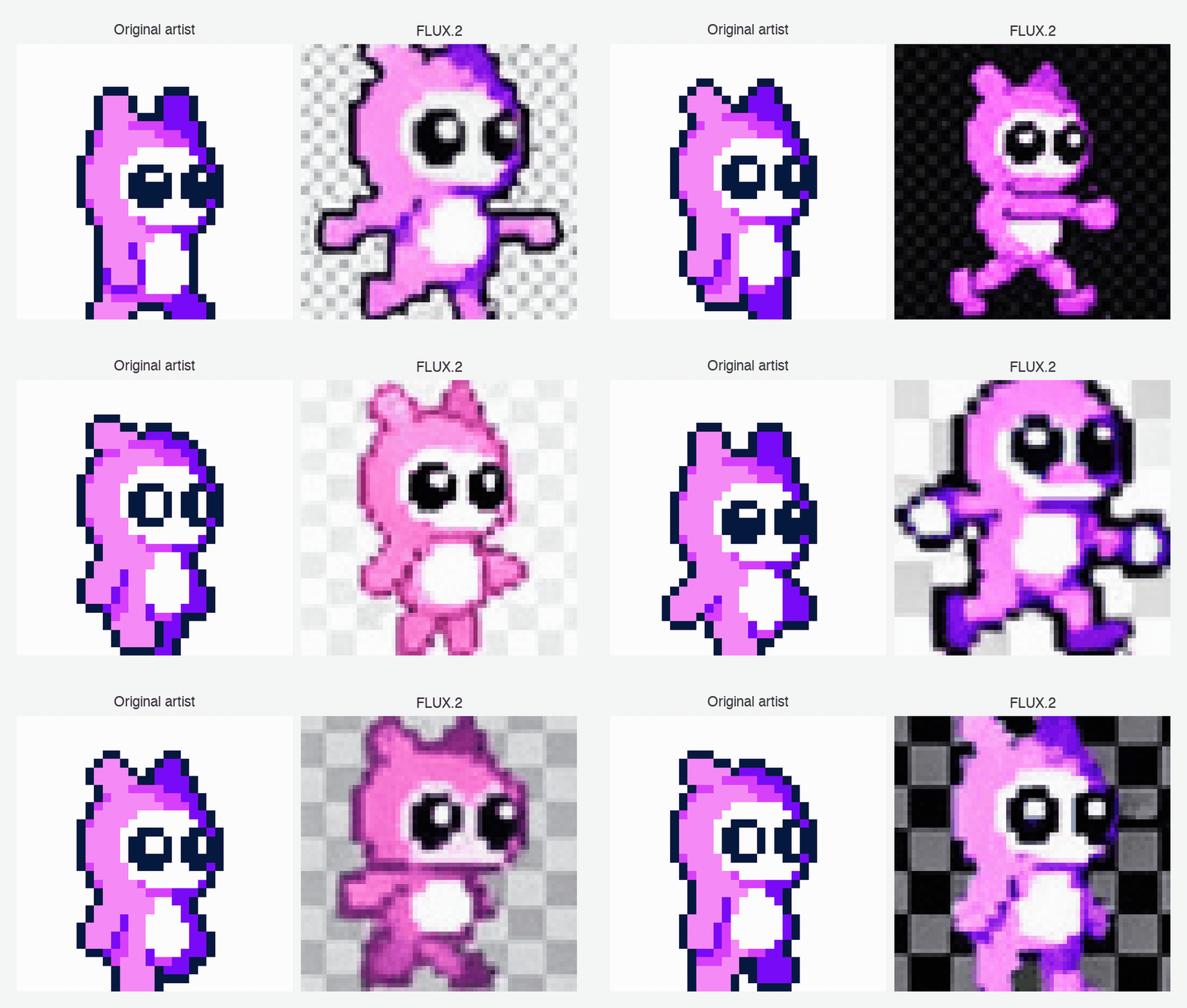
FLUX.2 generated some sprites that could be close to the character style.
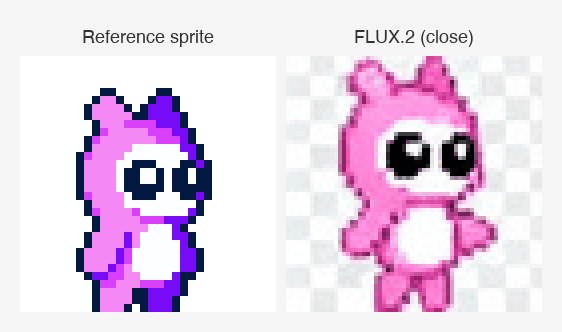
But some of the other sprites were not so consistent.
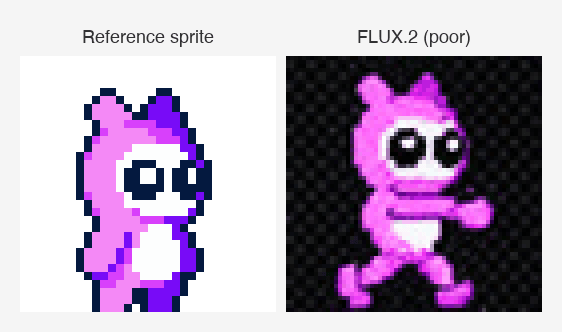
Character pose correctness
If the model had followed our pose instructions correctly, the animated GIF would show a smooth walk cycle where each frame advances from the previous. Instead, FLUX.2 generated inconsistent poses with no clear progression between frames.
Performance
Here's how long it took and how much it cost to generate these frames.
| Metric | Value |
|---|---|
| Frames generated | 6 |
| Avg. time per frame | 7.12s |
| Cost per frame | $0.045 |
| Total cost | $0.27 |
Gemini 3.1 Flash
Gemini 3.1 Flash uses the same technique as the previous tests, passing the sprite alongside a text description of each pose.
We make 6 independent calls, one per frame, with no chaining between them.
Result
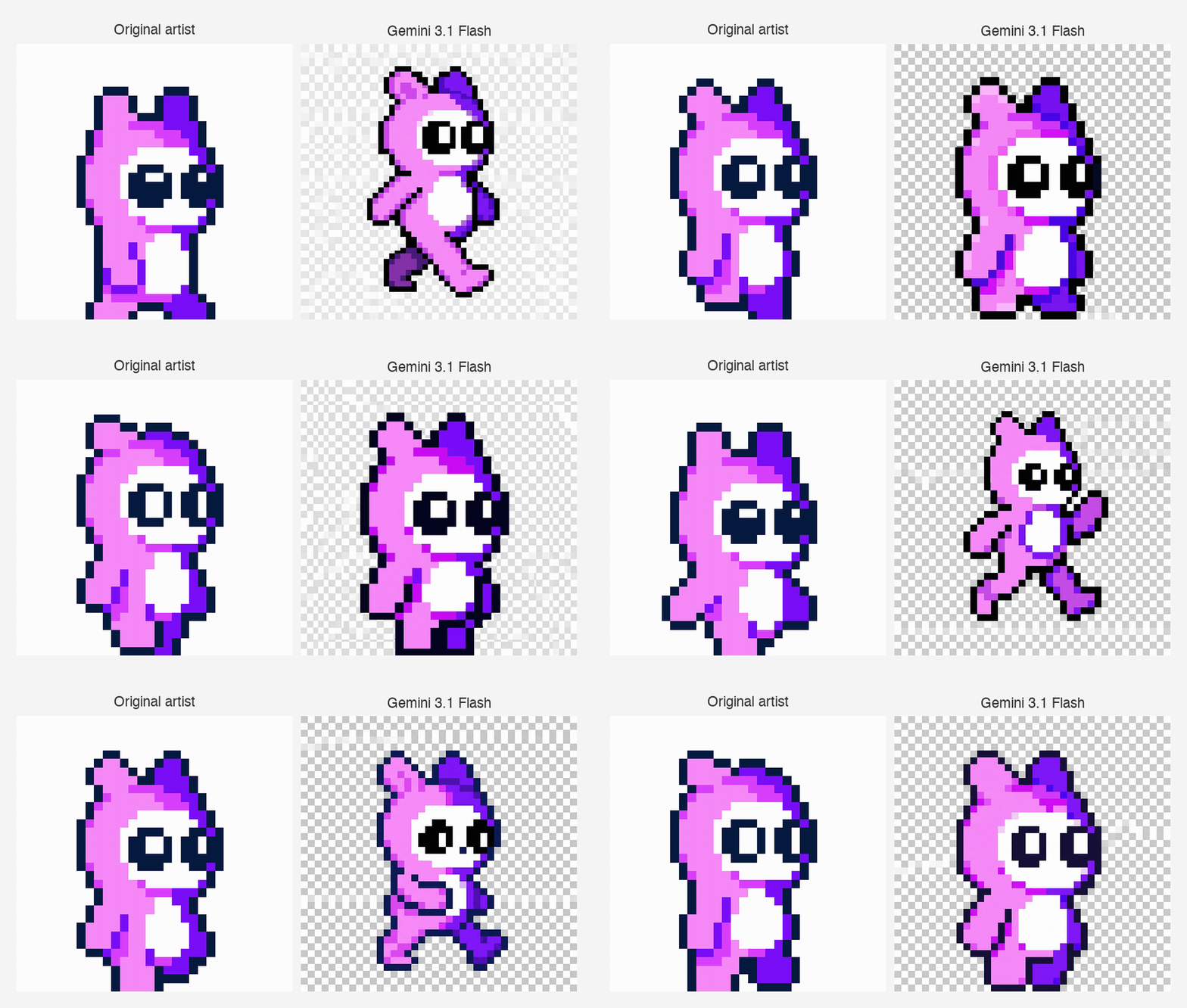
Here are all six frames Gemini 3.1 Flash generated:
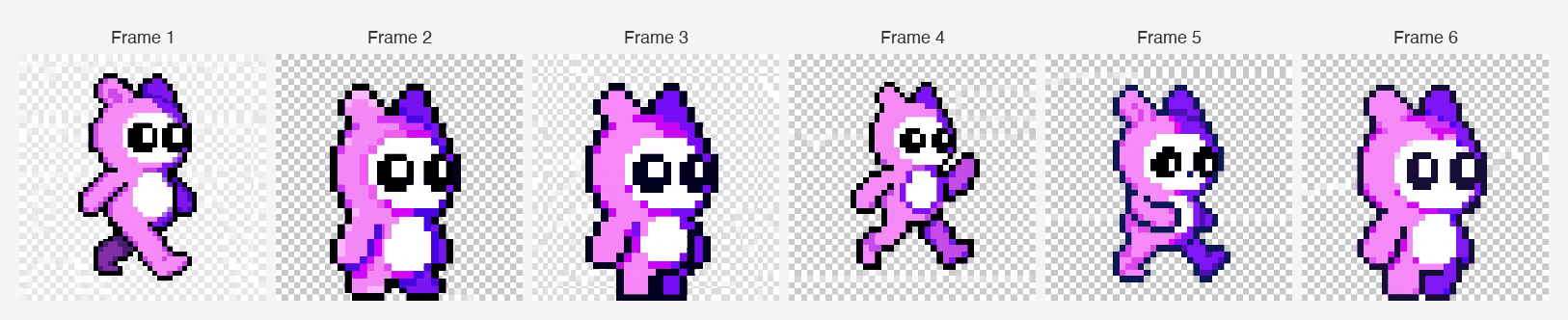
Here is what it looks like when animated:

Qualitative analysis
Gemini also failed this test.
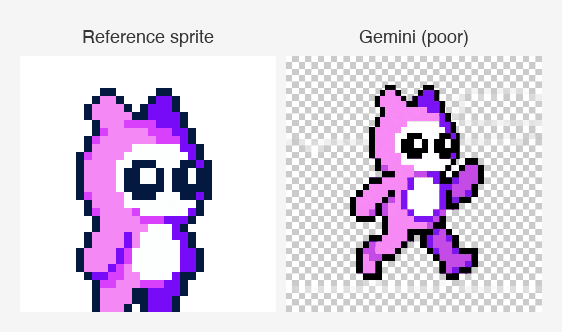
Character style consistency
Some frames manage to create a character consistent with our style.
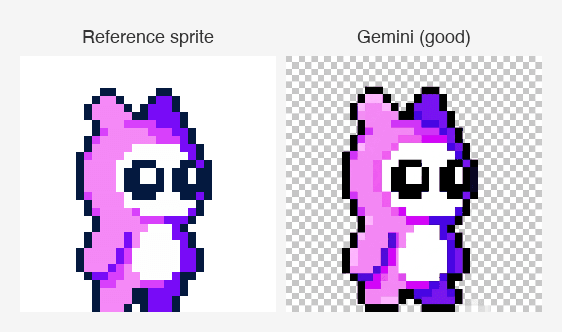
While others seem to fail.
Character pose correctness
If the model had followed our pose instructions correctly, the animated GIF would show a smooth walk cycle where each frame advances from the previous. Instead, Gemini generated frames with no clear pose progression.
Performance
Here's how long it took and how much it cost to generate these frames.
| Metric | Value |
|---|---|
| Frames generated | 6 |
| Avg. time per frame | 19.81s |
| Avg. output tokens | ~1,401 |
| Cost per frame | ~$0.084 |
| Total cost | ~$0.50 |
gpt-image-2
gpt-image-2 uses the same technique, passing the sprite to the images.edit endpoint alongside a text description of each pose for 6 independent calls.
Result
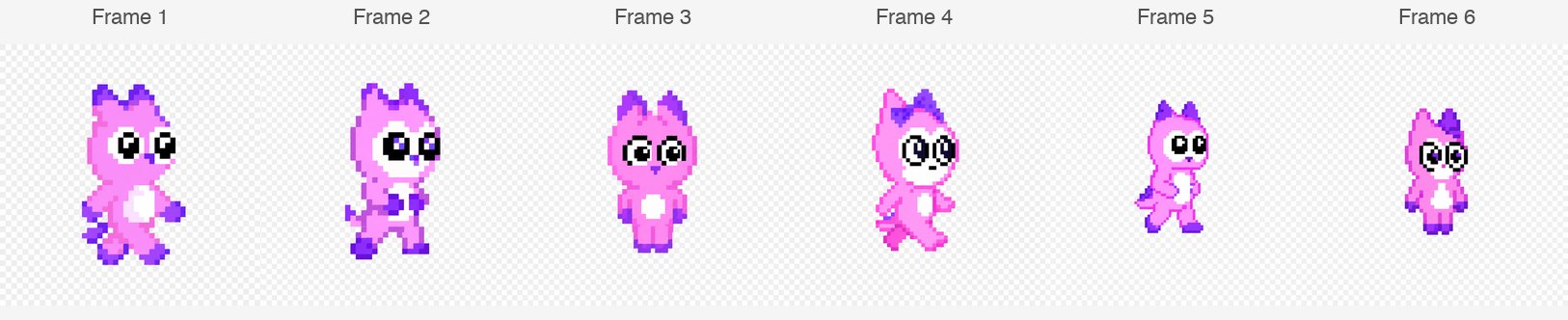
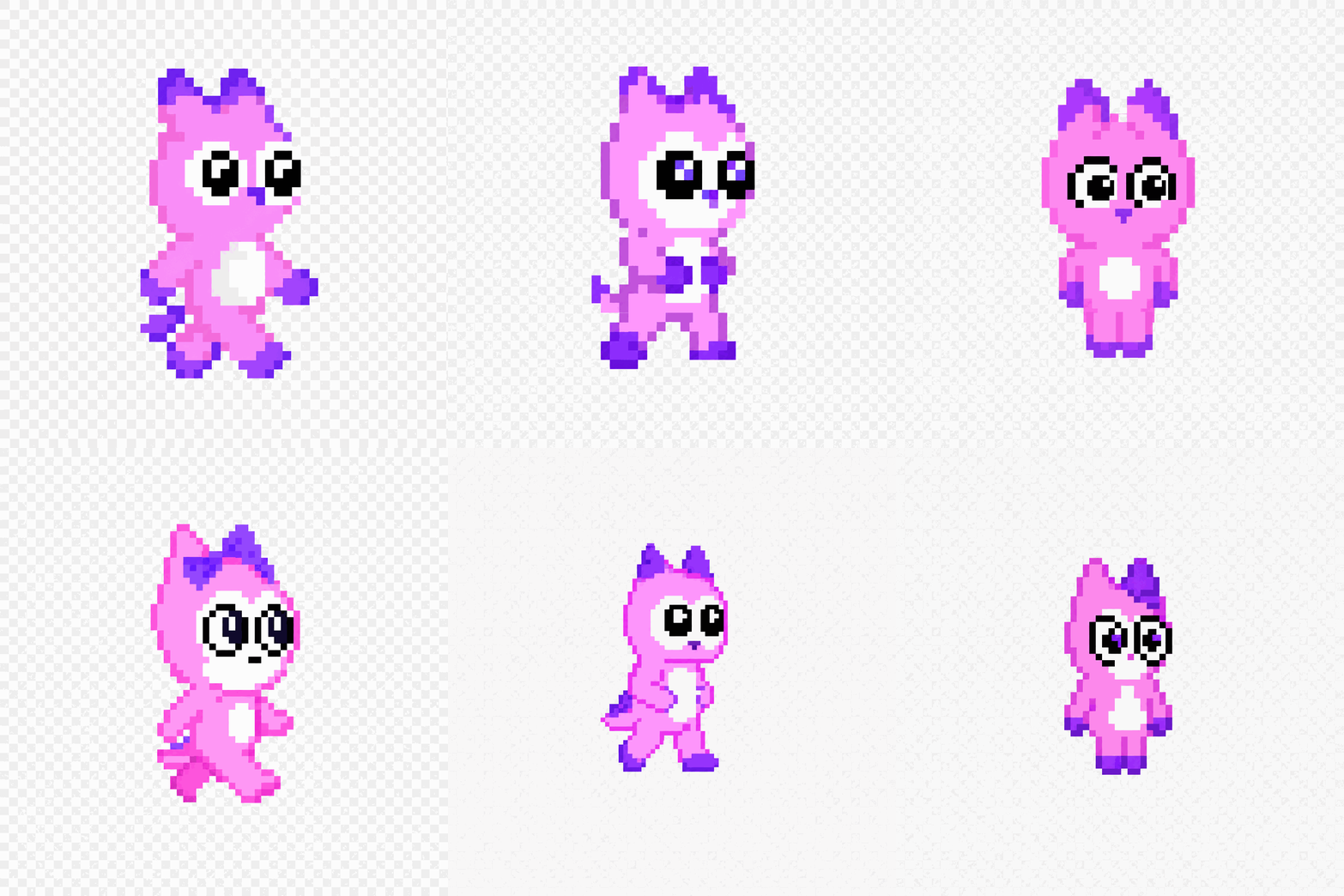
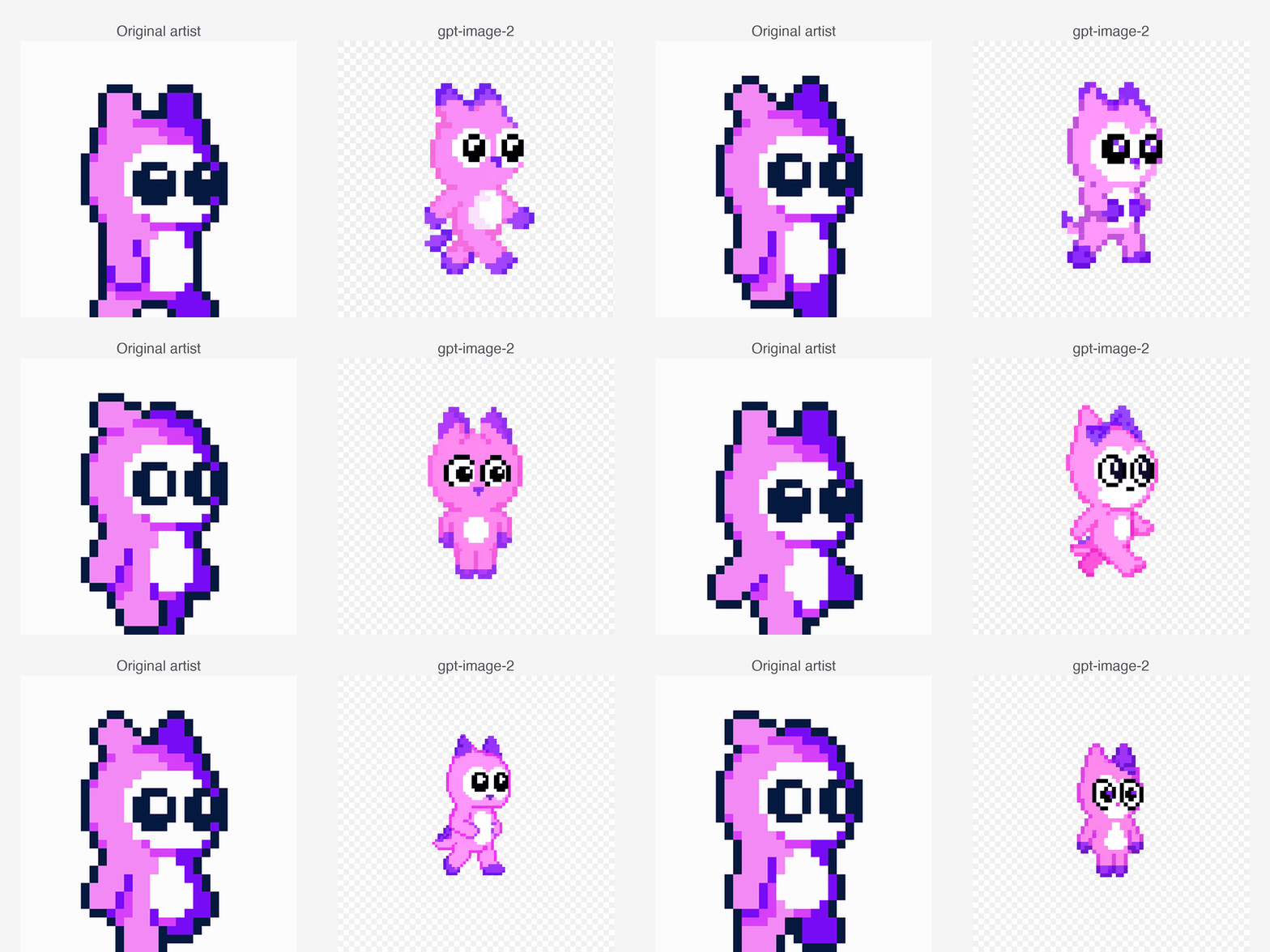
Here are all six frames gpt-image-2 generated:
Here is what it looks like when animated:
Qualitative analysis
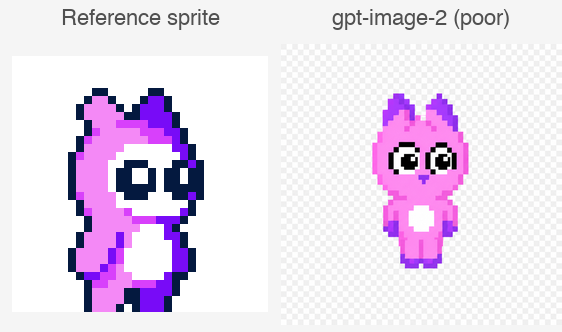
gpt-image-2 also failed this test. Like FLUX.2, it showed poor character consistency across frames.
Character style consistency
Some frames produced a character that was reasonably close to the reference style.
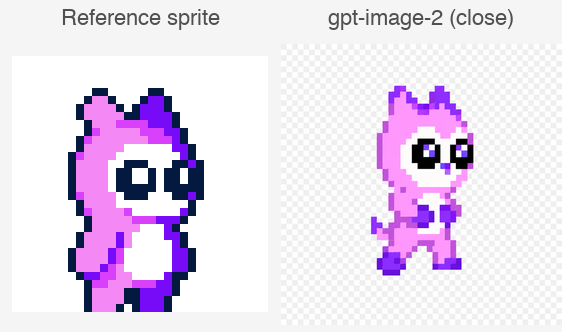
While others drifted significantly from the reference.
Character pose correctness
If the model had followed our pose instructions correctly, the animated GIF would show a smooth walk cycle where each frame advances from the previous. Instead, gpt-image-2 generated frames with no clear pose progression.
Performance
Here's how long it took and how much it cost to generate these frames.
| Metric | Value |
|---|---|
| Frames generated | 6 |
| Avg. time per frame | 59.99s |
| Avg. input tokens | ~81 |
| Output tokens per frame | 1,756 |
| Cost per frame | ~$0.053 |
| Total cost | ~$0.32 |
Runway Gen-4
Runway Gen-4 uses the same technique as the previous tests, passing the sprite as a tagged @sprite reference and describing each pose in text for 6 independent calls.
Result
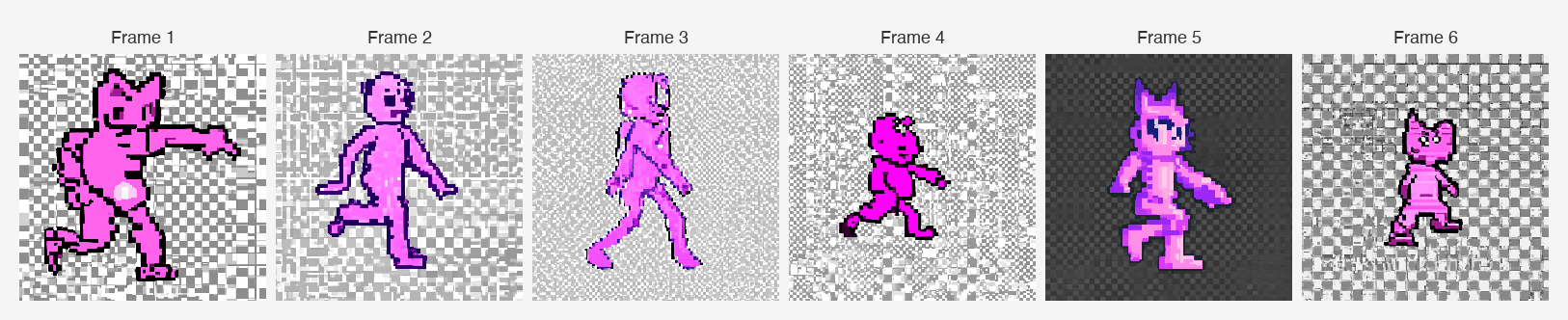
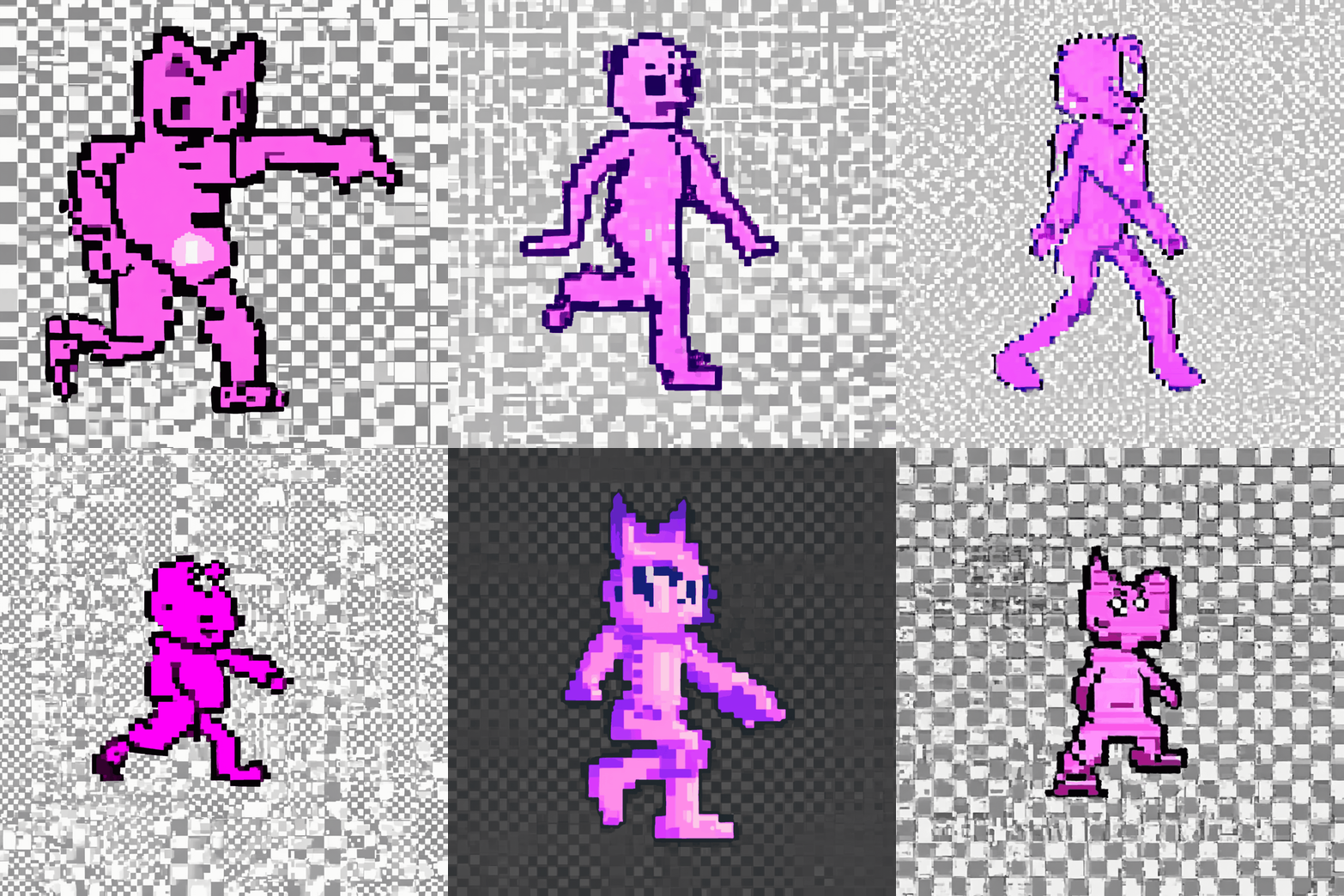
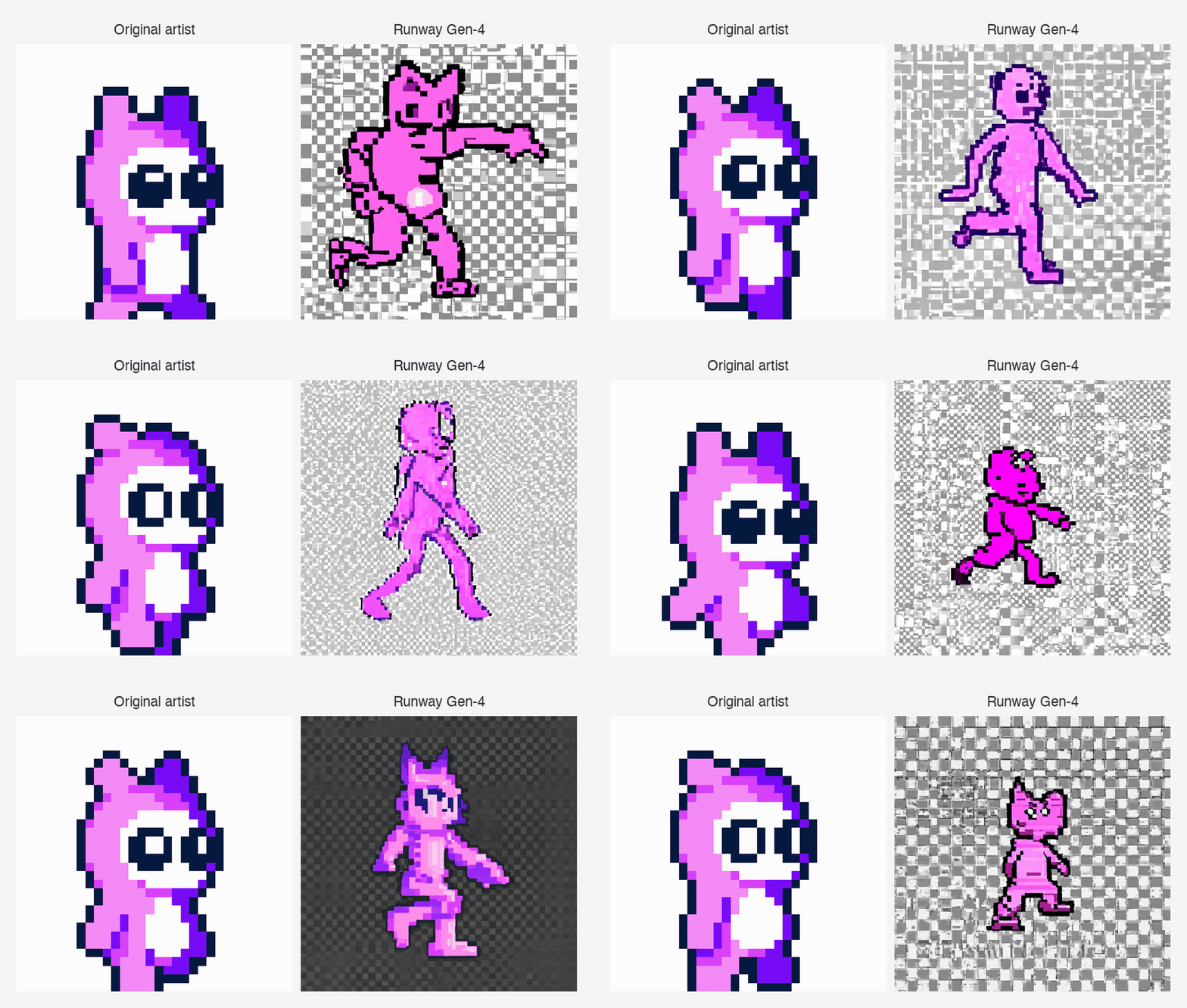
Here are all six frames Runway Gen-4 generated:
Here is what it looks like when animated:
Qualitative analysis
Runway failed this test harder than any of the other models.
Character style consistency
Not only did Runway not generate a single character that was consistent with our reference character, it was unable to even maintain any sort of consistency across all six of the sprites it generated.
Character pose correctness
If the model had followed our pose instructions correctly, the animated GIF would show a smooth walk cycle where each frame advances from the previous. Instead, Runway generated characters that all appear in the same position, with no progression between frames.
Performance
Here's how long it took and how much it cost to generate these frames.
| Metric | Value |
|---|---|
| Frames generated | 6 |
| Avg. time per frame | 26.47s |
| Cost per frame | $0.05 |
| Total cost | $0.30 |
Which AI image generator maintains the most consistent character identity across multiple generations?
All four models failed this test. None of them were able to consistently follow our pose descriptions across six independent generations.
Gemini 3.1 Flash was the best performer on character style consistency, producing the most recognisable version of our reference character across all six frames.
FLUX.2 and gpt-image-2 both showed poor and inconsistent character style across their frames, performing roughly on par with each other. Neither followed the pose descriptions reliably.
Runway performed worst overall, generating characters that were neither consistent with the reference nor consistent with each other across the six frames.
| FLUX.2 | Gemini 3.1 Flash | gpt-image-2 | Runway Gen-4 | |
|---|---|---|---|---|
| Avg. time per frame | 7.12s | 19.81s | 59.99s | 26.47s |
| Cost per frame | $0.045 | ~$0.084 | ~$0.053 | $0.05 |
| Total cost (6 frames) | $0.27 | ~$0.50 | ~$0.32 | $0.30 |
| Character consistency | Inconsistent | Best | Inconsistent | Worst |
| Pose correctness | No | No | No | No |
Which AI image generator is best for character consistency?
Here are the final results:
| FLUX.2 | Gemini 3.1 Flash | gpt-image-2 | Runway Gen-4 | |
|---|---|---|---|---|
| Test 1: walk cycle consistency | Inconsistent | Best | Inconsistent | Worst |
| Test 2: scene placement | Pass | Pass | Pass | Fail |
| Test 3: virtual try-on | Pass | Mostly | Mostly | Fail |
First place: FLUX.2
FLUX.2 was the strongest overall performer across the three tests.
- Preserved a realistic character's identity when placing them in a new scene
- Produced the most accurate virtual try-on result across all three clothing items
- Showed some character style consistency across the walk cycle frames
Second place: Gemini 3.1 Flash
Gemini came in a close second, performing well across all three tests.
- Preserved a realistic character's identity when placing them in a new scene
- Matched all three clothing items accurately in the virtual try-on test
- Produced the most consistent character style across the walk cycle frames of any model
Third place: gpt-image-2
gpt-image-2 passed the realistic character tests but was the slowest and most expensive model by a significant margin.
- Preserved a realistic character's identity in a new scene, though with a tendency to carry over the reference pose too literally
- Reproduced most clothing items accurately in the virtual try-on test, with minor issues on the glasses
- Showed poor and inconsistent character style across the walk cycle frames
Fourth place: Runway Gen-4
Runway Gen-4 failed all three tests and was the weakest performer overall.
- Failed to preserve a realistic character's identity in a new scene
- Failed to accurately reproduce clothing items in the virtual try-on test
- Generated characters that were inconsistent with the reference and with each other across the walk cycle frames
FLUX.2 Speed vs Gemini Price
FLUX.2 and Gemini both produced strong results, but where they differ is on speed and price.
| FLUX.2 | Gemini 3.1 Flash | gpt-image-2 | Runway Gen-4 | |
|---|---|---|---|---|
| Avg. time per image (tests 2+3) | ~22.5s | ~23.7s | ~128s | ~28s |
| Avg. cost per image (tests 2+3) | ~$0.113 | ~$0.084 | ~$0.224 | ~$0.065 |
| Cost per frame (test 1) | $0.045 | ~$0.084 | ~$0.053 | $0.05 |
FLUX.2 wins on speed and quality
FLUX.2 was the fastest model overall and produced the strongest quality results across the tests.
Gemini comes first on price
Gemini was able to produce very comparable results at a lower price. Across the single-image tests, Gemini averaged ~$0.084 per image compared to FLUX.2's ~$0.113, making it roughly 26% cheaper.
Which AI image generator is right for you?
The right model depends on what you are building and what tradeoffs matter most to you.
If you need the best character consistency overall
Use FLUX.2. It consistently preserved identity across both realistic and stylized characters, and produced the strongest virtual try-on results. It is also the fastest model of the four.
If price is your priority
Use Gemini 3.1 Flash. It produced results comparable to FLUX.2 at roughly 26% lower cost per image, and its synchronous API means no polling logic to manage.
If you are building for game dev or sprite animation
None of the four models reliably followed pose descriptions across independent generations in our tests. All four struggled to maintain consistent character style across a walk cycle. This is still an unsolved problem for current image generation APIs.
If you are building a virtual try-on or e-commerce tool
FLUX.2 is the clear choice. It reproduced fine item details across multiple reference images with no notable artifacts. Gemini is a solid second option.
If you are placing a real person in new scenes
FLUX.2, Gemini, and gpt-image-2 all passed this test. FLUX.2 and Gemini are the better choices on speed and cost. gpt-image-2 works but is significantly slower and more expensive, and tends to carry over the reference pose too literally. Runway Gen-4 failed this test entirely.
FAQ
How many reference images does FLUX.2 accept?
FLUX.2 accepts up to 8 reference images via the API and up to 10 in the playground. In our tests, we passed up to 4 reference images simultaneously, covering a character and three clothing items, and the model handled all of them accurately.
How many reference images does Gemini 3.1 Flash accept?
Gemini 3.1 Flash accepts up to 14 reference images as content parts in a single API call.
Does Runway Gen-4 support multiple reference images?
Runway Gen-4 supports up to 3 reference images. Each image is passed with a tag, which you then reference directly in the prompt using @tag. This 3-image limit is the most restrictive of the four models we tested.
Which AI image generator is best for virtual try-on?
FLUX.2 is the best choice for virtual try-on. It reproduced fine details across multiple clothing items, including colour patterns, hardware, and strap placement, while keeping the original character consistent. Gemini 3.1 Flash is a close second and a good option if cost is a priority.
Which AI image generator is cheapest for character consistency tasks?
Gemini 3.1 Flash is the cheapest of the top-performing models, averaging around $0.084 per image across our tests. FLUX.2 averaged around $0.113 per image, making Gemini roughly 26% cheaper while producing comparable results on most tasks.
Is gpt-image-2 fast for image generation?
gpt-image-2 was the slowest of the four models in our tests by a significant margin, averaging around 128 seconds per image across the single-image tests and around 60 seconds per frame in the walk cycle test. FLUX.2 was the fastest at around 22.5 seconds per image, followed by Gemini at around 23.7 seconds.