
How to Do an AX Audit
If you've read What Is Agent Experience and Why Should You Care? you already know that agent experience (AX) is the new developer experience — and that if AI coding agents can't find, understand, and use your platform, you're invisible to a growing portion of the developer market.
The natural follow-up question is: how do you measure it objectively?
The obvious answer — ask an agent to audit your AX — turns out not to work that well. Agents don't use developer platforms in the same way humans do, and while an agent can produce a convincing AX report for a given target, we found that those reports didn't always match up to our actual experiences using those platforms with our agents.
So we've developed a rubric and a mix of automated and manual testing to evaluate technical products from an agent's point of view. We summarize this into topline metrics across four stages, and then show detailed qualitative examples of working with an agent to discover, onboard to, and use a specific platform.
All testing in this article was done with Claude Sonnet 4.6. Discoverability was tested via the Anthropic API with a fresh session per prompt. Onboarding, integration, and agent tooling were tested using a fresh Claude Code session running in a new Lima VM.
The four stages of an AX audit
We break an AX audit into four stages:
| Stage | Question |
|---|---|
| Discoverability | Can an agent find you, and is it positive about your offering? |
| Onboarding | Can an agent get started with no or minimal help from a human? |
| Integration | Can an agent build a working integration without hand-holding? |
| Agent tooling | Do you provide MCP servers, skills, markdown docs, or other agent-native interfaces — and do they actually help? |
Each stage gets a score from 1 to 4:
- 4/4 — GOOD — Working as expected; no significant friction
- 3/4 — OK — Mostly works; minor gaps
- 2/4 — POOR — Partial; significant friction or gaps
- 1/4 — FAIL — Broken or absent
Here's our walkthrough of auditing Kestra.
Kestra AX scorecard
Here's an example AX Scorecard — for Kestra, an open-source event-driven workflow orchestration platform:
AX Audit stage 1: Agent Discoverability and Sentiment
Discoverability is a measure of whether agents know about you, whether they can find you, and what they think about you. The most valuable — but also hardest to influence — is how you're represented in the LLM's training data: will it recommend you for generic queries without consulting any sources?
After that we get more specific, allowing the agent to do web searches if needed as we make our requirements more and more niche, or ask for more and more alternatives, until the target is mentioned.
Finally, once the target has been mentioned, we ask if it's recommended — first overall, and then for specific scenarios.
Rating scale
| Score | What it means |
|---|---|
| 4/4 — GOOD | Recommended as the top choice for several relevant prompts |
| 3/4 — OK | Recommended as one of the top 3 choices, but not #1, for several relevant prompts |
| 2/4 — POOR | Mentioned when asked for more options or alternatives, but not a top choice |
| 1/4 — FAIL | LLM doesn't know about it and won't recommend unless asked directly by name |
How to test it
Start with generic recommendation prompts that a developer in your target audience might plausibly send. Keep the session fresh — no prior context that might prime the model. If the product doesn't appear as a top-3 recommendation, keep narrowing toward its specific strengths until it surfaces. Once it does appear, follow up: ask what the agent thinks of it generally, and whether it would recommend it above alternatives for specific scenarios.
The prompt sequence looks like:
- A generic, open question about the problem space
- A more specific question naming the constraints (open source, event-driven, etc.)
- A request for alternatives to the obvious choices — if the product hasn't appeared yet
- Once it appears: "What do you think of [product] for this use case? Would you recommend it over [competitor]?"
Kestra's discoverability: 2/4
We ran our full prompt set against Claude Sonnet with a fresh session for each prompt.
Generic prompts (0/3 mentions). Kestra doesn't appear in any response to broad questions like "what tool should I use for workflow orchestration?" or "I need to automate some data pipelines, what do people use?". The consistent top-three are Airflow, Prefect, and Dagster — with Temporal and cloud-native options like AWS Step Functions making occasional appearances. Kestra is absent even from the "best open source job scheduler" response, which lists Airflow, Prefect, Dagster, Celery, and APScheduler.
Constrained prompts (1/4 mentions). Narrowing to Kestra's specific strengths helps, but less than you'd expect. "I want something open source and event-driven for data pipelines" produces Kafka, Flink, Airflow, Prefect, Dagster, and Pulsar — no Kestra. "What orchestration tools support YAML-defined workflows and webhook triggers?" lists GitHub Actions, GitLab CI, Argo Workflows, Temporal, Airflow, Prefect, n8n, and Tekton — still no Kestra, despite YAML workflows being one of its defining features. Kestra finally surfaces in one of four constrained prompts: "What's a good Airflow alternative for teams who prefer declarative config over Python DAGs?" — where it's described as "probably the strongest pure declarative answer."
Alternatives prompts (2/3 mentions). Kestra appears in two of three responses when alternatives are explicitly requested, though always as a brief listing rather than a lead recommendation. In the "less well-known orchestrators" response it doesn't appear at all — Ploomber, Metaflow, Flyte, and Windmill get the mentions instead.
Sentiment (positive with caveats). Once Kestra is in scope, the model's view is broadly positive but consistently qualified. It's recommended for event-driven pipelines, YAML-first teams, and as a self-hosted Airflow alternative — but every response flags that it's less mature than Airflow or Prefect, has a smaller community, and a narrower talent pool. The framing is "solid choice for the right team" rather than a default recommendation.
Kestra scores 2/4 for discoverability. The model knows that Kestra exists, but strongly prefers more established players.
AX Audit stage 2: Agent Onboarding
Onboarding measures whether an agent can get access to and start using your product with no or minimal human intervention. Not everyone wants to score well here — sometimes fighting automated signups from spammers, or only letting high-quality leads through the gate, is more important than a frictionless on-ramp. But we rate this from a customer perspective where fewer human interactions are better. Sometimes the agent will need the human to check an email or paste an API key, but ideally this should take no more than 60 seconds.
Rating scale
| Score | What it means |
|---|---|
| 4/4 — GOOD | Agent completes onboarding with no human steps |
| 3/4 — OK | One short human step required (e.g. confirm email, paste API key) |
| 2/4 — POOR | Multiple human steps or significant friction; agent can't proceed independently |
| 1/4 — FAIL | Agent can't complete any meaningful part of onboarding without human help |
How to test it
Follow on from the discoverability prompts. Start with a generic instruction like "Get access to a free version of Kestra" for a cloud product, or "Download and set up Kestra and give me a localhost link to try" for a self-hosted one.
Kestra's onboarding: 3/4
Cloud. Our agent refused to attempt a cloud signup without a URL, and when we tried manually we saw why — the "Get started" button leads to a page where "Book a demo" and "Read the docs" are the only options. There is no self-serve free tier for the cloud product. An agent cannot complete this path at all.
Self-hosted. Kestra does have a quickstart for the open-source self-hosted edition, and the agent set it up with no problems. The Docker Compose configuration, Postgres backend, and port bindings were all generated from training data without consulting any docs, and both containers came up healthy on the first attempt.
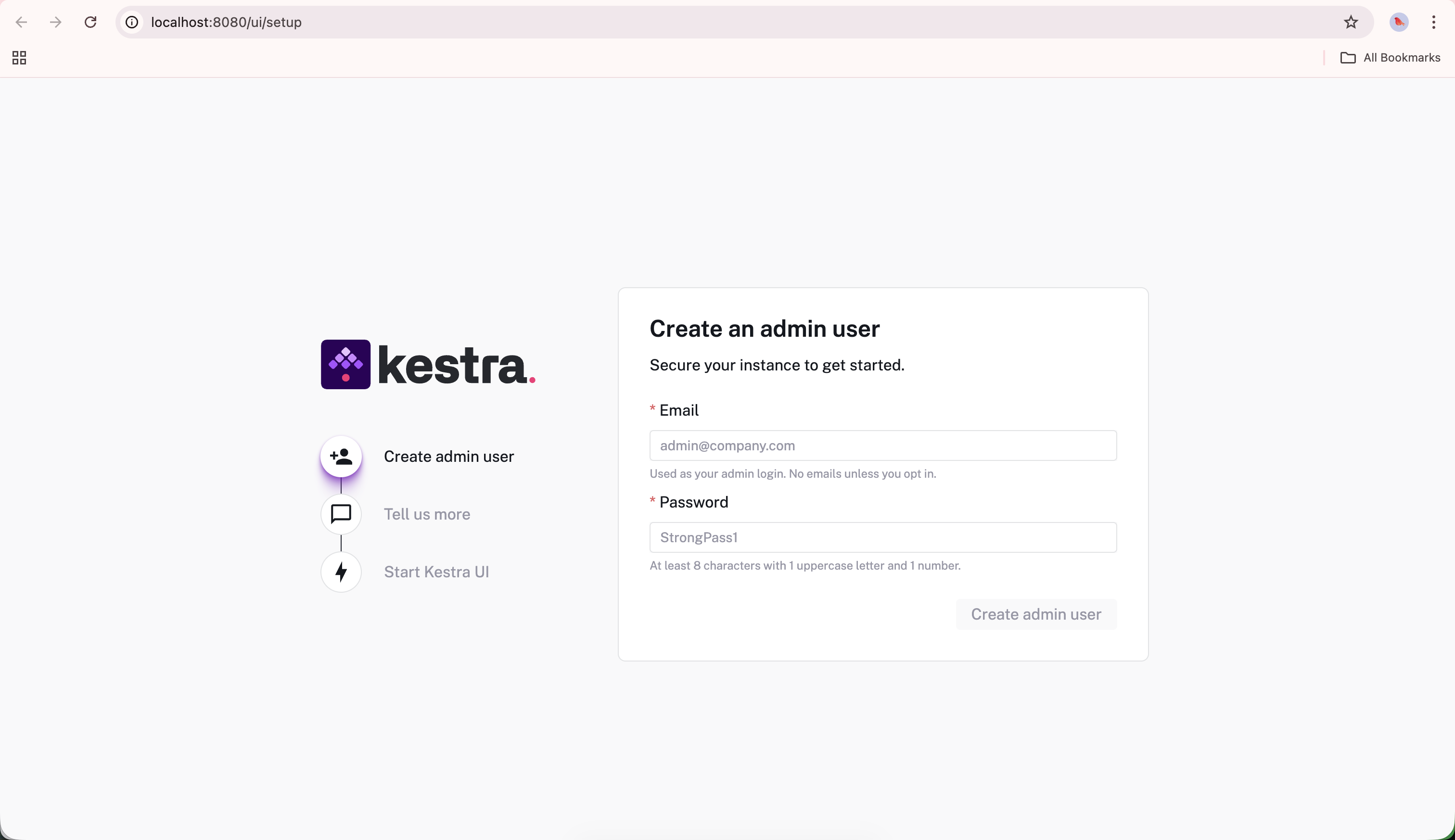
The first screen after a fresh self-hosted install — create an admin user to get started. One human step, takes under 60 seconds.
After signing in, we asked the agent how to generate an API key to use in our integration. It confidently returned step-by-step instructions — navigate to Settings → API Keys and create a token. The screen doesn't exist in the community edition. After a follow-up, the agent corrected itself: API keys are an Enterprise feature; community users must use basic authentication instead. Kestra scores 3/4 for onboarding. The self-hosted path works well and the one human step (creating an admin account) takes under a minute. The cloud offering's lack of a self-serve option and the API key hallucination are the friction points keeping it from a 4/4.
AX Audit stage 3: Integration
Integration measures whether an agent can build the equivalent of a "hello world" with the target product — something real, but not complex.
Rating scale
| Score | What it means |
|---|---|
| 4/4 — GOOD | Agent implements a working flow end-to-end with minimal friction |
| 3/4 — OK | Works but requires agent to work around one or two gaps in docs/API |
| 2/4 — POOR | Agent needs hand-holding from a human or extensive external resources to build a basic integration |
| 1/4 — FAIL | Agent can't complete a working integration |
How to test it
Give the agent a simple goal that's easy to verify. This should be something a bit niche rather than copied from the target's onboarding documentation, but keep it as close to a "hello world" example as possible. Anything more complicated and you get into a whole new benchmarking territory where you're more likely to suffer from bias and a lack of repeatability.
Kestra's integration: 3/4
For Kestra, that meant adding a single flow that did something useful. We asked it to scrape a CSV and create a graph with the prompt:
"I want to daily scrape https://www.eskom.co.za/dataportal/supply-side/station-build-up-for-yesterday/ and get the CSV file. Then I want to download that data and keep a sqlite version and build a longer term graph because that one only goes back one week."
The agent managed to build an end-to-end working flow with most of the functionality requested after a few turns. There was some significant friction with attempting to set up a local SQLite file within the existing Docker Compose stack, and the agent decided to use a messy hack of storing data in the already-running Postgres database instead of using SQLite as we had requested.
We also needed to give the agent access to a plaintext username and password so that it could set up the flow, given that API access is not included in the open source edition.
The final version simply outputs the image as an execution output, but it works as expected.
Here's the YAML definition it created, and the execution output it produced.
id: eskom-station-buildup
namespace: default
triggers:
  - id: daily
    type: io.kestra.plugin.core.trigger.Schedule
    cron: "0 7 * * *"
tasks:
  - id: scrape_and_store
    type: io.kestra.plugin.scripts.python.Script
    containerImage: python:3.11-slim
    docker:
      networkMode: kestra_default
    env:
      PG_HOST: postgres
    outputFiles:
      - "*.png"
    script: |
      # ... scrape CSV, store to Postgres, generate chart
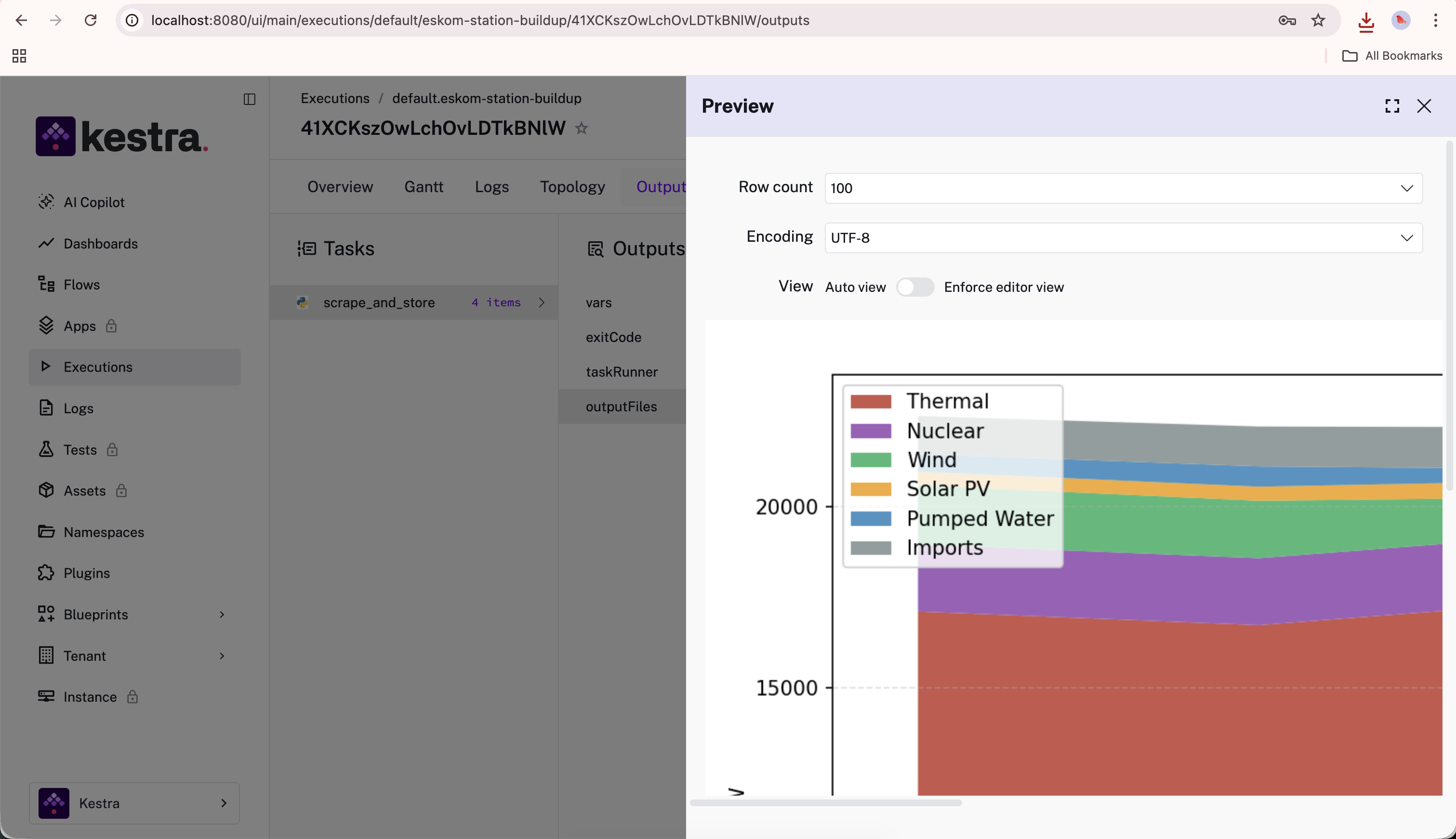
The completed flow's output tab in Kestra — a stacked area chart of Eskom's daily generation mix (Thermal, Nuclear, Wind, Solar PV, Pumped Water, Imports), built and stored automatically by the agent-written flow.
We gave integration a 3/4 rating as the agent had significant knowledge of how Kestra works and was able to build a basic flow without needing to search the web or read the documentation. That said, there was still significant friction and a bunch of failed attempts in working within the Docker Compose setup, and hacking the image output into the Kestra execution instead of integrating it cleanly with an external database.
AX Audit stage 4: Agent Tooling
While some products are inherently more agent-friendly — better represented in the training set, easier to figure out through experimentation, or just more intuitive — others make up any gaps with explicit tooling designed for agents. This is a fast-changing field, but the main ways we see companies explicitly helping agents at the moment are through documentation targeted specifically at agents (usually .md or .txt files), OpenAPI specifications, MCP servers, and skills.
Rating scale
| Score | What it means |
|---|---|
| 4/4 — GOOD | MCP server + docs MCP or llms.txt + agent skills covering getting started through to advanced use |
| 3/4 — OK | MCP server and/or agent skills exist; markdown docs accessible; some gaps in coverage |
| 2/4 — POOR | API accessible but underdocumented; no MCP server; agent must guess endpoints or scrape HTML docs |
| 1/4 — FAIL | No structured tooling of any kind |
How to test it
While the tooling itself is important, discoverability is also a factor here. It's no good having an MCP server if the agent doesn't know about it. Ideally, agents should use your tools unprompted, but we also ask our agents explicitly to look for agent-specific tooling when evaluating this stage.
Kestra's agent tooling: 3/4
Agent-friendly documentation. Kestra has some good basics in place here. Adding .md to any of their docs URLs gives you a markdown version, but the only way to discover this is by trying it or reading their llms.txt file. The llms.txt is available at the root of their site (kestra.io/llms.txt), which took us a few attempts to find.
Skills. Kestra provides two skills installable via npx skills add kestra-io/agent-skills: kestra-flow (generates and modifies flow YAML using the live schema) and kestra-ops (wraps kestractl for deployment and monitoring). Both assume a running Kestra instance, so they're most useful once you're already up and running rather than during onboarding.
MCP server. Kestra provides an MCP server at github.com/kestra-io/mcp-server-python, but you have to set it up and host it yourself, and it's specifically for agents to use the platform directly rather than to help them learn it. Unlike some other agent-first products, Kestra doesn't host an MCP server for their docs — there's no mcp.kestra.io equivalent.
Crucially, our agent didn't discover any of this during our onboarding and integration testing, only finding it when we sent it on an explicit search.
Kestra scores 3/4 for agent tooling.
Overall scorecard: Kestra
| Phase | Grade | Score | Key friction |
|---|---|---|---|
| Discoverability | POOR | 2/4 | Airflow, Prefect, Dagster recommended instead; Kestra only surfaces when alternatives are explicitly requested |
| Onboarding | OK | 3/4 | Self-hosted works well; one human step (admin account creation); cloud gated behind sales call |
| Integration | OK | 3/4 | Agent built a working flow without consulting docs; API access gated to Enterprise adds friction |
| Agent Tooling | OK | 3/4 | llms.txt, MCP server, and two agent skills exist; no docs MCP server; skills assume Kestra already running |
| Average | OK | 3/4 (rounded up from 2.75) |
Discoverability is Kestra's weakest point and unfortunately also the hardest one to fix, especially as the agents explicitly prefer the others for being more established and having bigger communities. Only time can fix those fundamentals, but Kestra can help accelerate this cycle by publishing more high-quality content about their strengths as compared to those competing platforms, and by polishing their product (especially the open source version) until developers recommend it naturally.
For onboarding, it would be nice if Kestra had a public free trial of their cloud offering. We believe that API access is becoming a basic expectation for technical products, and no longer something that can be gated behind an Enterprise paywall if you want people to grow from your community edition to your enterprise one.
The agents already understand what Kestra is and how to use it without needing external resources, so Kestra has a good start on integration, but could improve it by explicitly providing agents with more resources and documentation, and by showing more getting-started examples that agents could copy without needing to experiment.
Finally, Kestra has put in some effort on agent tooling but a hosted docs MCP server and some more skills aimed at more generic getting-started use cases could help agents use Kestra with less friction.
Want help understanding and fixing the AX of your own technical product or platform? At Ritza our Engineering Writers work at agent speed with human-expert verification (no slop) to win at GTM.