
We've been running developer products through a four-stage agent experience audit to see how well they hold up when AI coding agents take the lead, helping developers discover, onboard to, and integrate their products. The framework comes from our earlier piece on what agent experience actually is and why it's becoming the thing that determines whether a developer platform gets adopted or overlooked.
Today we're taking a look at Airweave. It's an open-source context retrieval layer for AI agents. It connects to SaaS tools like Slack, Notion, GitHub, and Google Drive, continuously syncs their data, and exposes a single unified search API that agents can query at runtime. The pitch is: stop building individual connectors and managing your own vector database.
We evaluated Airweave across the four stages: discoverability, onboarding, integration, and agent tooling. It averages 3.5/4. The product is genuinely well-suited to agent-driven development, the documentation is accurate, and agents can build a working integration with minimal friction. The MCP server is the one thing that needs fixing.
Scores at a glance
llms.txt and skills present and effective; MCP server non-functional due to auth bugDiscoverability is a strength
Airweave scored 4/4 for discoverability. It surfaced naturally in generic queries about the problem space and was clearly positioned as the right choice for developers building custom AI assistants. The community presence on Hacker News gave agents access to genuine developer sentiment, and what they found was largely positive.
The documentation does real work
Across both the hello world and the complex integration tests, our agents produced working code with zero debugging. The llms.txt and agent skills give agents a clear map of the documentation and the right patterns to follow. This is what made the one-shot integration possible.
The MCP server needs fixing
The airweave-mcp-search package sends an Authorization: Bearer header, but the Airweave search endpoint requires x-api-key. This meant the MCP server was non-functional across both test sessions despite being correctly configured. Agents fell back to direct HTTP calls every time. The skills meant this workaround was found quickly, but a working MCP server would have meaningfully reduced friction.
Discoverability
In this section, we test a company's discoverability by prompting AI agents with queries that should surface the company if they are highly documented, highly rated among a developer community, and have managed their SEO. Here is where Airweave scored.
How we tested it
The way we test this is to start from a generic prompt that mentions a lot of the features the company offers. Airweave gives AI agents connections to internal data systems, so we construct a prompt around that. If the company is mentioned in this first response, that is excellent SEO. If the company is the top recommended choice, that scores four marks. If the company does not appear at all, they lose marks.
Once the company has appeared in the agent response, we ask the agent to compare it against its competitors, to rate the sentiment the agent has towards the company. Does it believe it is a good option, or does it prioritize other companies over this one and for what reasons?
Generic prompt
Here is the generic prompt we structured for Airweave. It aims at the product's strengths and asks for exactly what Airweave offers, to see if their basic offerings are discoverable.
I'm building an AI assistant for my company and I need it to be able to answer questions using data from our internal tools. Things like our project management software, our cloud storage, our communication tools, and maybe our CRM. Use web search to find what tools or platforms people use to solve this problem.
The agent performed some web searches, pulling from sources including "10 best RAG tools and platforms" and "best enterprise search tools."
Finally, the agent offered a breakdown of the landscape and presented two options: managed platforms, and building with your own connector framework.
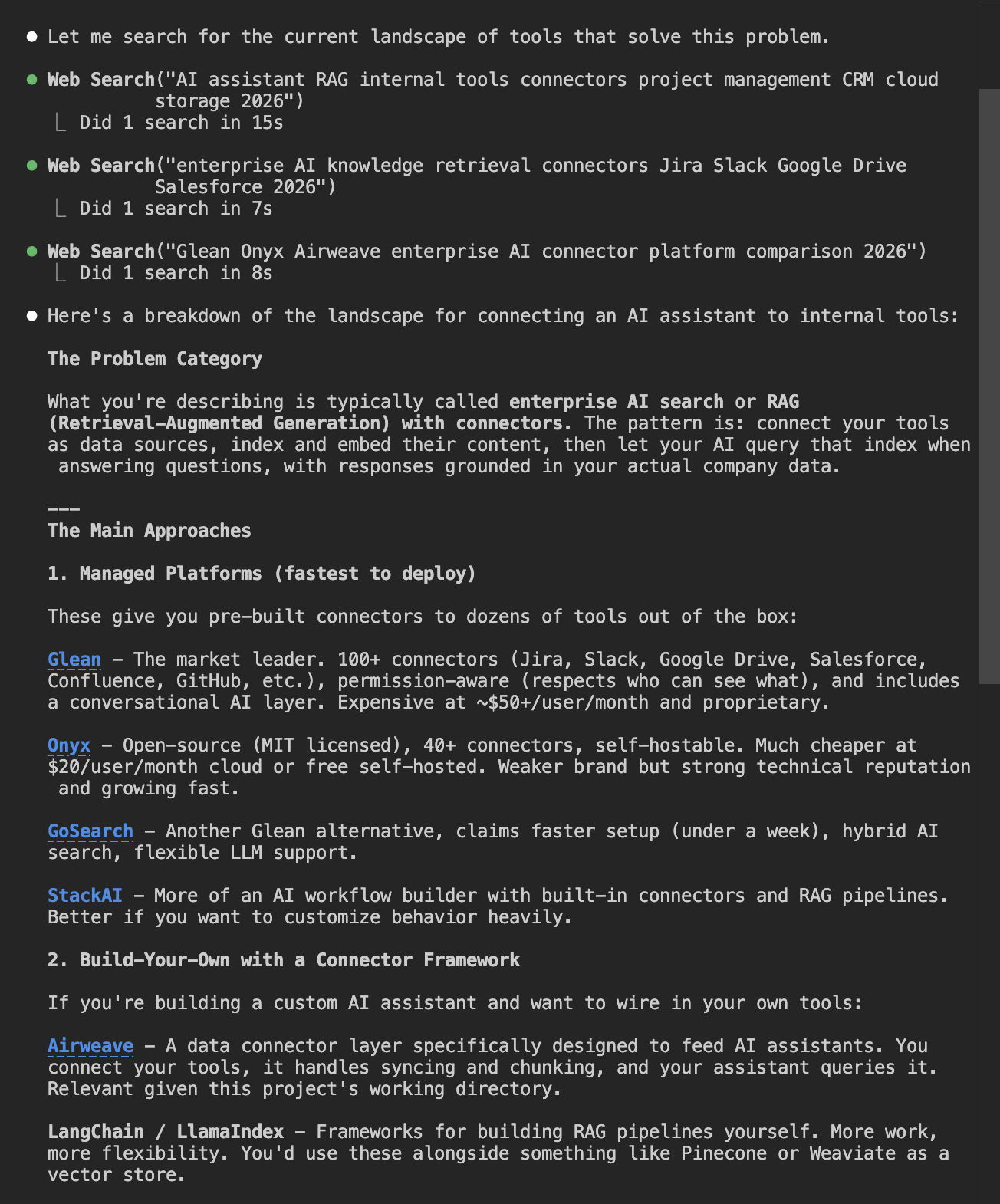
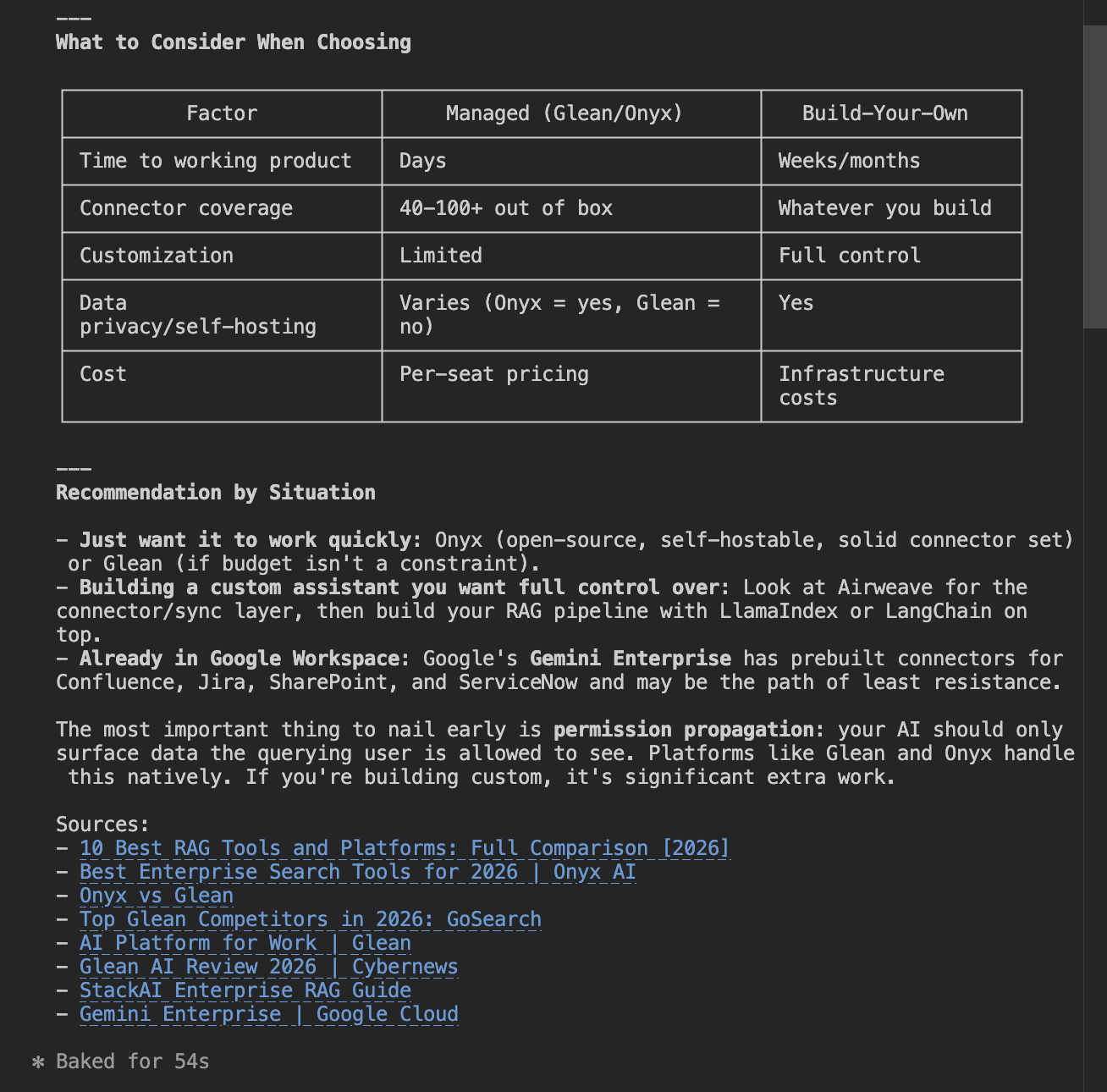
As we can see, Airweave was suggested as the option for building with your own connector framework. It scores very highly on the generic prompt test.
Competitive comparison
Since Airweave was highly recommended in the generic prompt, we did not need to test with more specific prompts. Instead, we moved straight to the competitive comparison to see how agents rank Airweave amongst its competitors.
What are Airweave's main strengths and weaknesses compared to its alternatives and competitors? Use web search to find recent information and give me a balanced view.
The agent performed some web searches and seemed to use Hacker News articles to get comparisons and community thoughts on the company. It then produced a report outlining Airweave's strengths and weaknesses in detail.
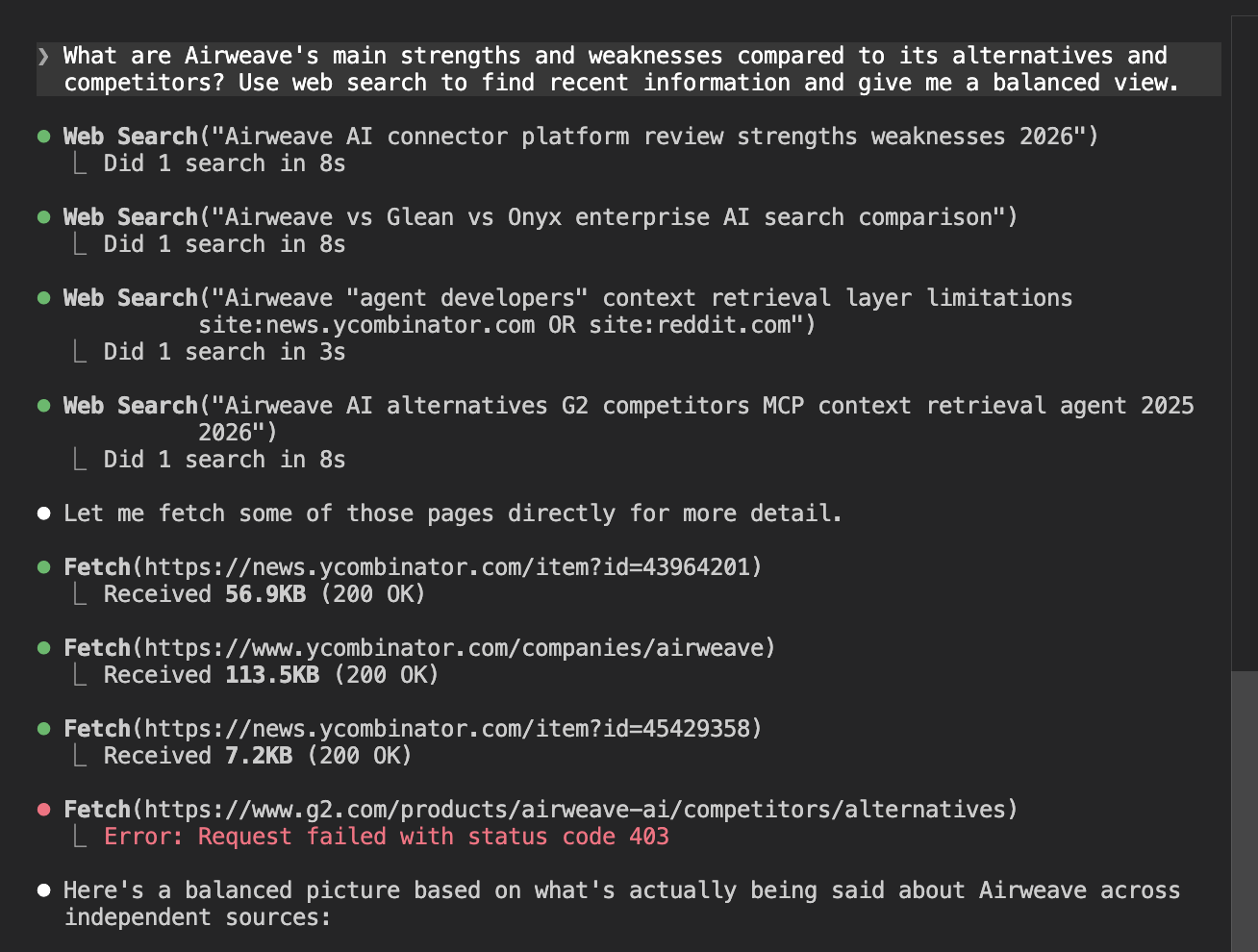
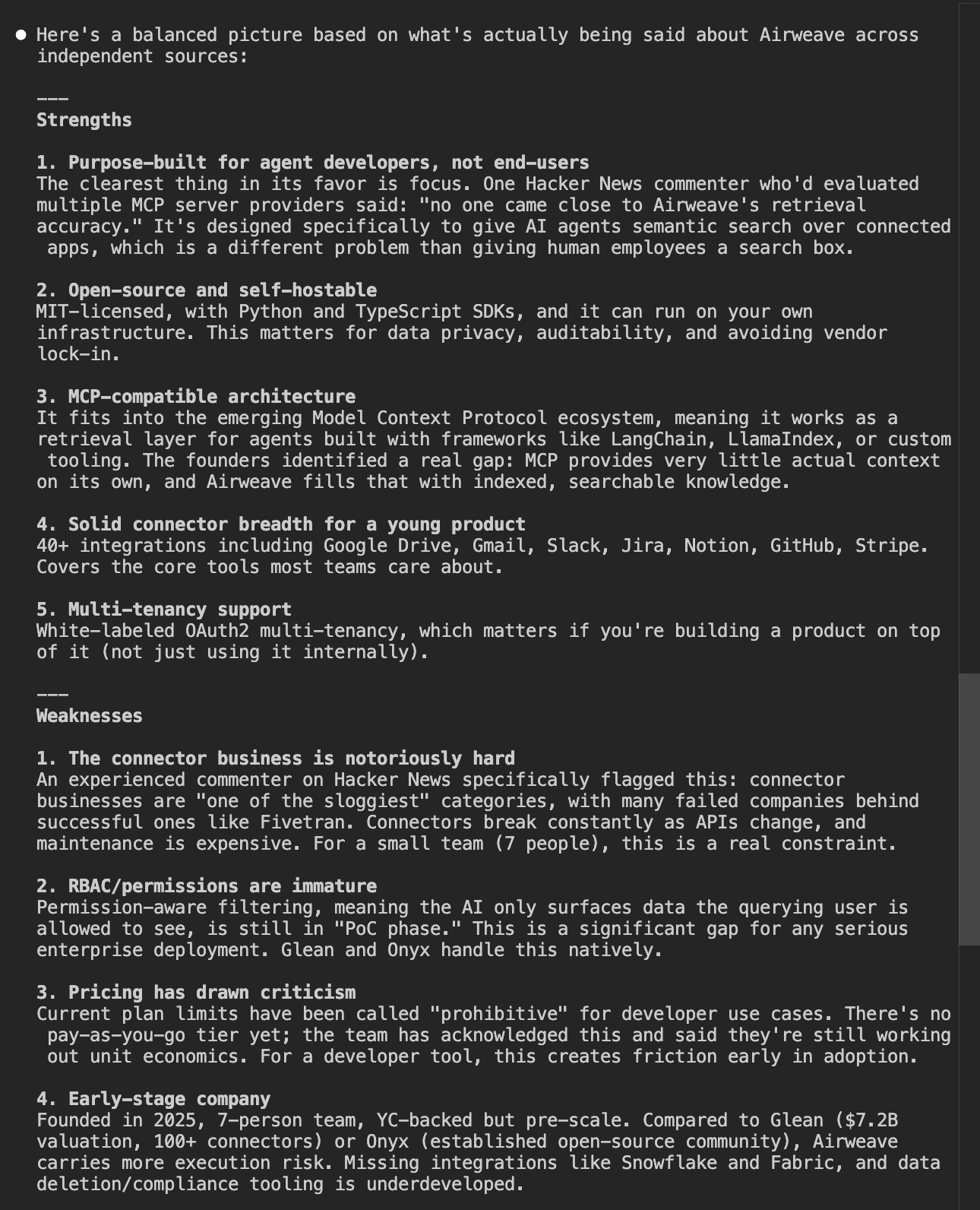
It then offered a comparison table, putting Airweave up against two major competitors.
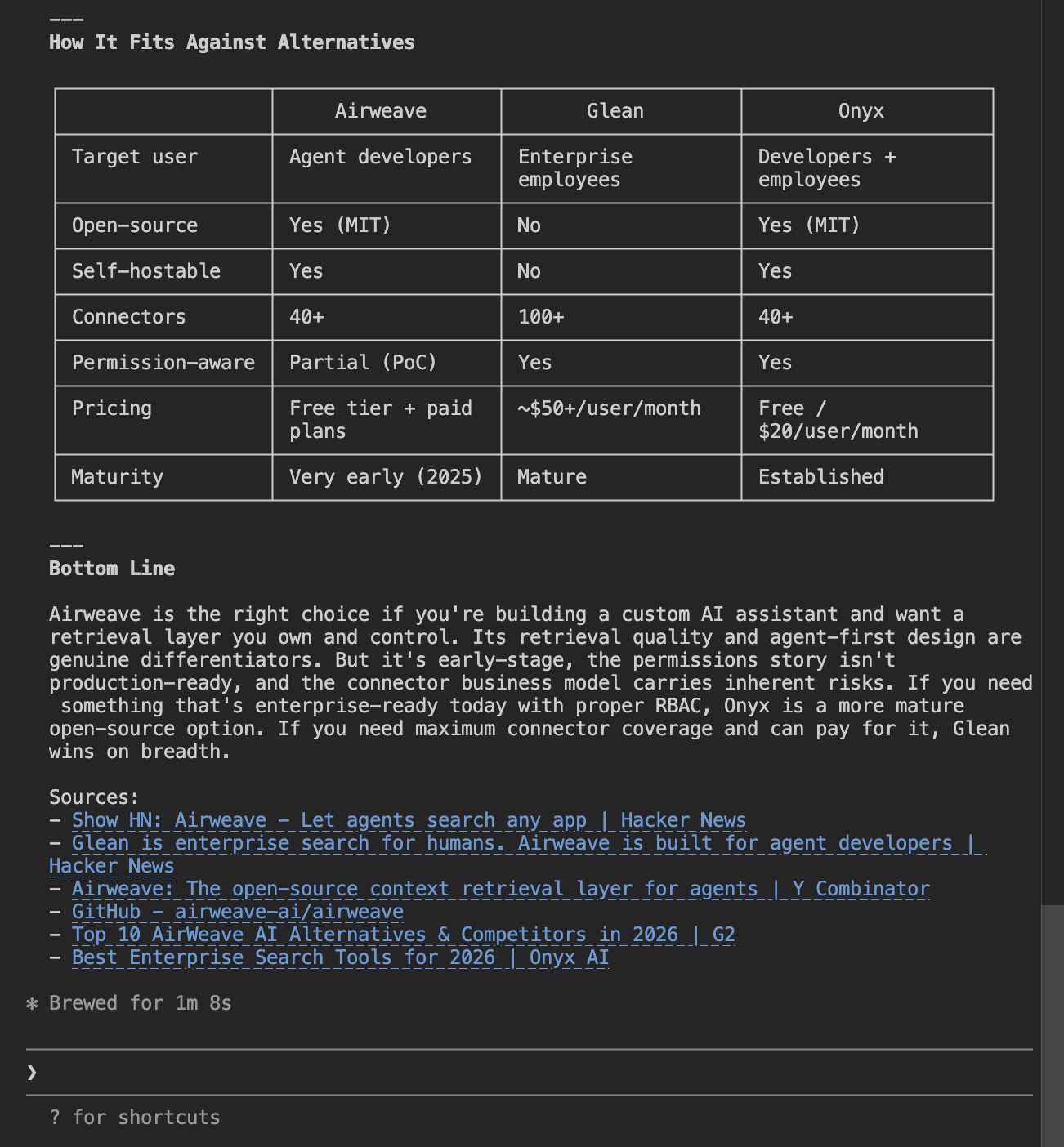
After the comparison table, the agent concluded that Airweave is the right choice if you want to build a custom AI assistant. The company did extremely well. It was highly recommended for the use case it appeals to and positioned clearly as the only option if you are wanting to build from scratch.
Discoverability score
Airweave was surfaced as the only solution for building from scratch, alongside Langchain. It was highly regarded with few criticisms and stood out clearly against the managed platforms that make up most of the competition in this space.
Onboarding and hello world
To test the onboarding experience, we see how much of the process can be taken on by the agent, or at least how well the agent can help the developer onboard. Here is where Airweave scored.
How we tested it
Full marks is scored for a fully agent-automated process, perhaps with a command-line tool or an MCP server that allows the agent to create an account on the developer's behalf. Three out of four would constitute accurate instructions given by the agent for setting up the account, as well as a simple setup process. Points are lost if the agent is completely unable to help the developer with the sign-up experience.
Creating an account
To begin, we ask the agent to set us up with an account and an API key.
I want to get started with Airweave (airweave.ai) to give an AI agent access to some of my company's tools. Get me signed up and set up with an API key.
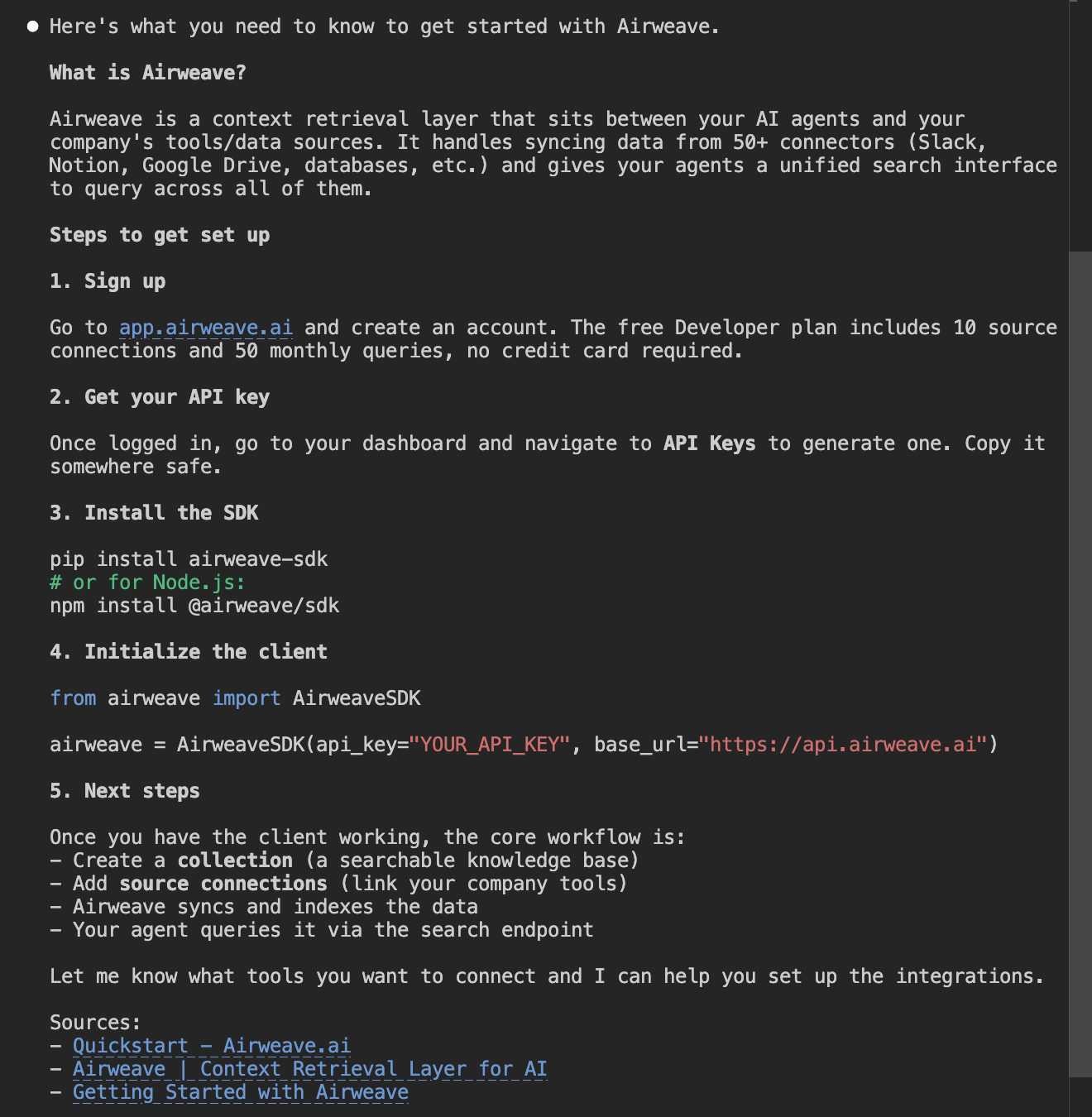
Clear instructions on how to set up an account ourselves. Just to double-check the agent's knowledge, we ask whether there is any way for the agent to do this itself without us having to go through the web UI.
Before I sign up manually, is there a CLI tool, MCP server, or any other programmatic way to create an Airweave account and get API credentials without going through the web UI?
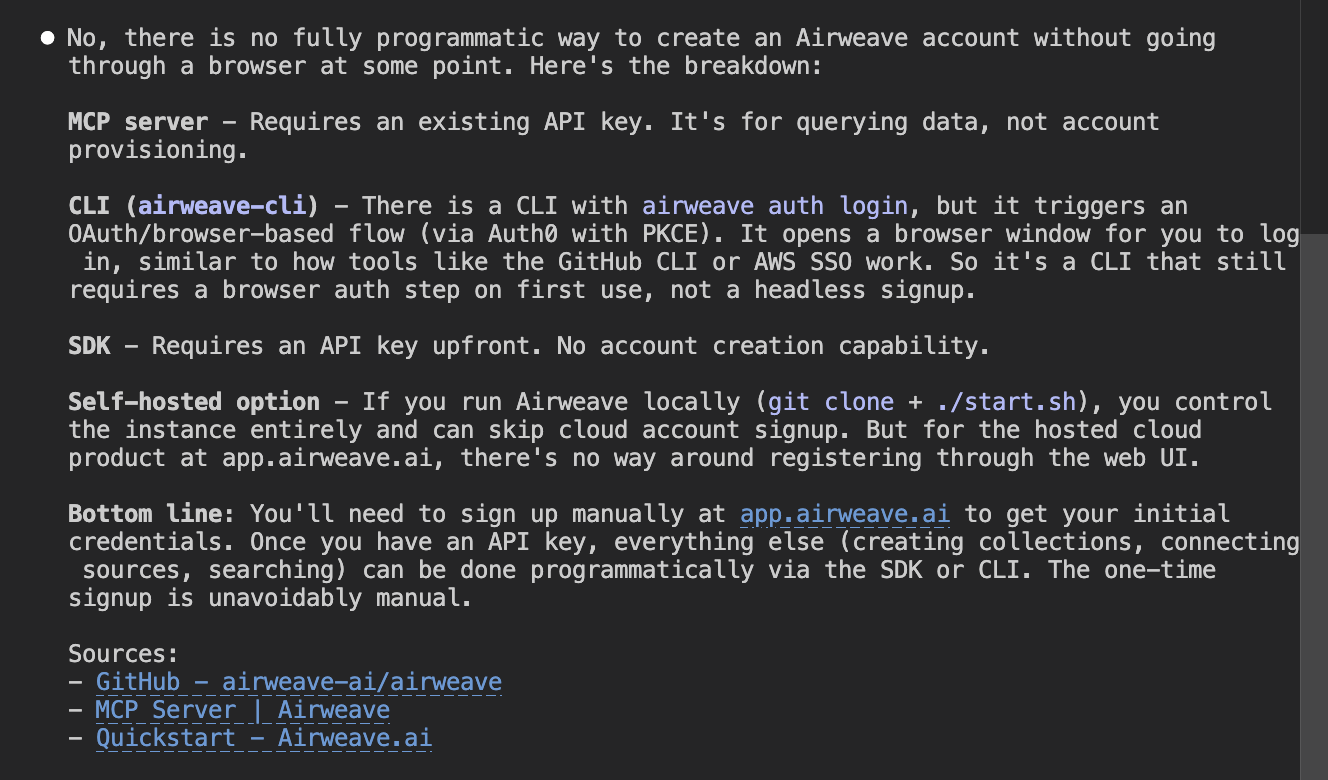
The agent informs us that there is in fact no way to do this. The setup process is very clear, straightforward, and easy. However, we do believe that the future of onboarding will be through automated processes that allow the agent to onboard on behalf of the developer.
Setting up agent tooling
Before we begin building a hello world, we ask the agent to set up our developer environment with any agent tools the company might provide, like an MCP server or an agent skill.
Before we start building, does Airweave provide any agent-specific tooling I should set up? Things like an MCP server, agent skills, llms.txt, or anything else designed to help AI agents work with the platform?
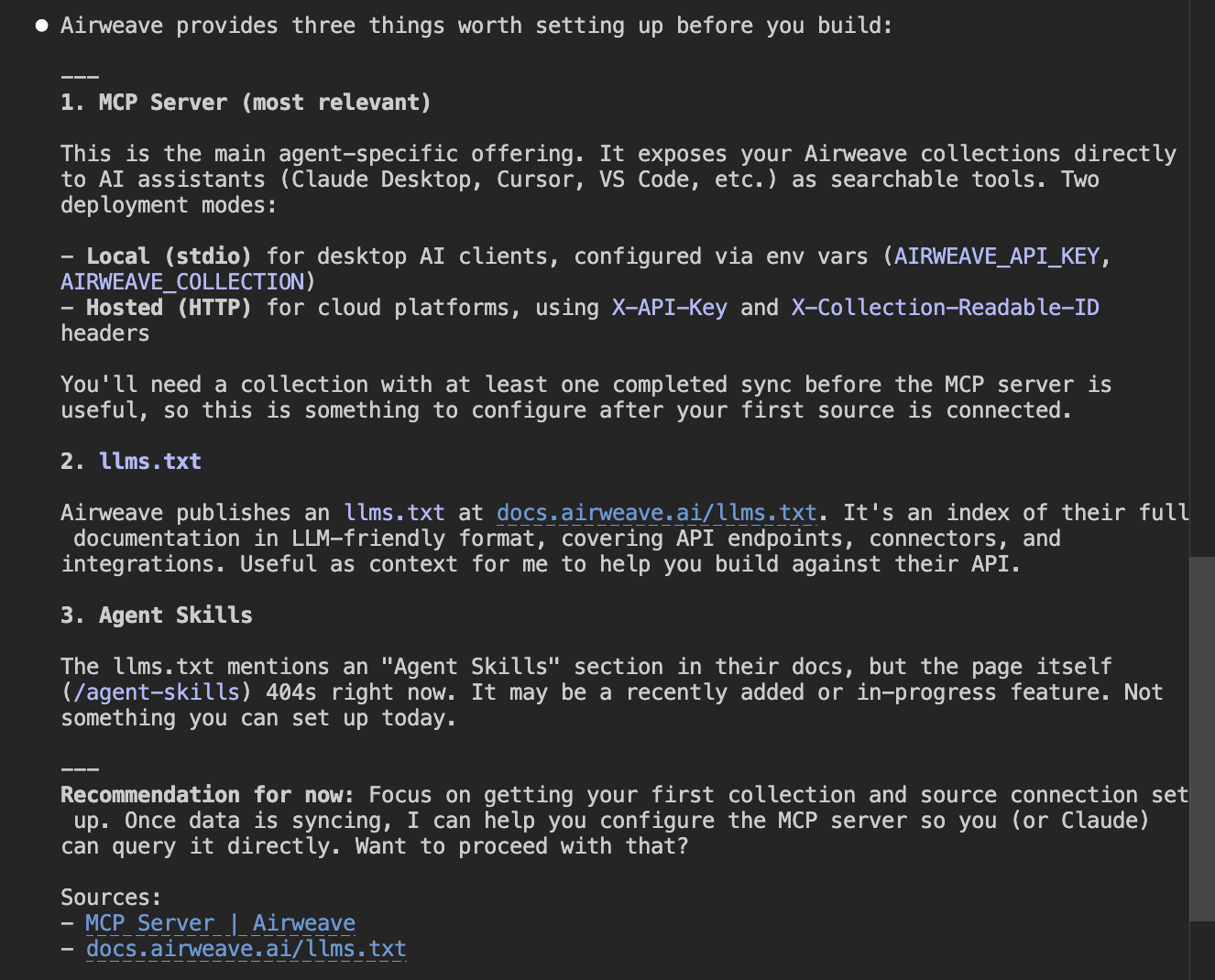
The agent comes back with a list of all the agent tools made available by Airweave, including an MCP server, agent skills, and an llms.txt file. This is an excellent result.
These agent tools, if built properly, can allow agents to get the developer onboarded and develop their prototype or full product much more quickly, creating an excellent developer experience as well as an agent experience.
The presence of this automated tooling is great. What gives it top marks is whether the agent can set this tooling up itself.
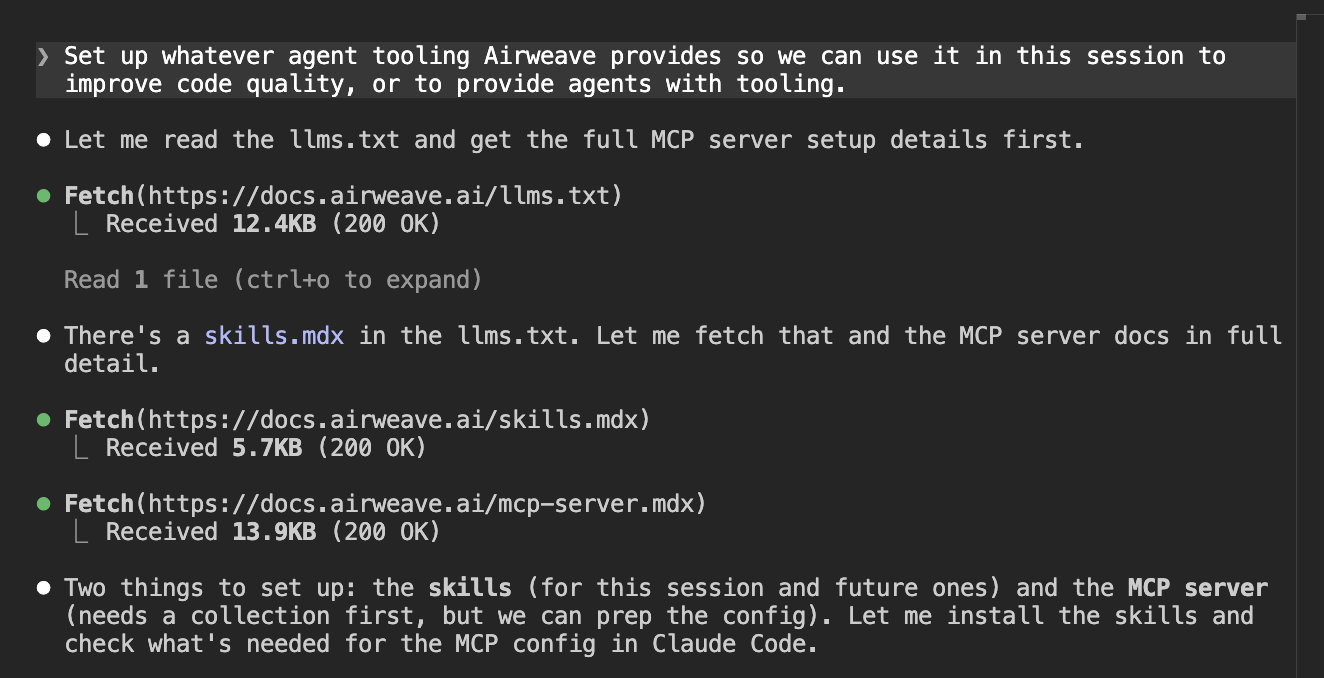
Set up whatever agent tooling Airweave provides so we can use it in this session to improve code quality, or to provide agents with tooling.
The agent does some web searches, finds what it needs, and installs the skills into our coding environment.
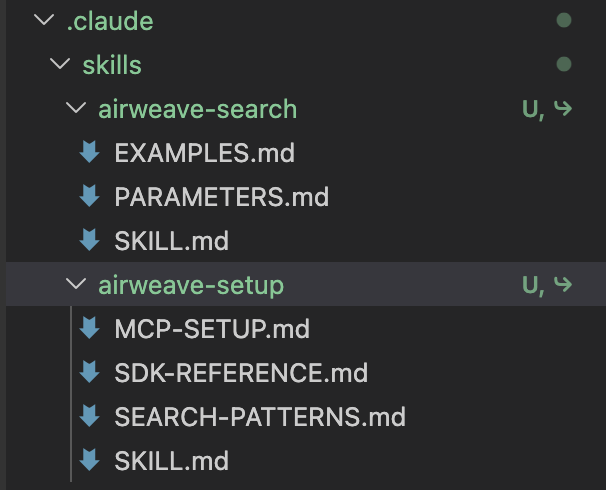
Here are the skills it installed.
It then tells us that before we can set up the MCP server, we need to create a collection and connect a source.
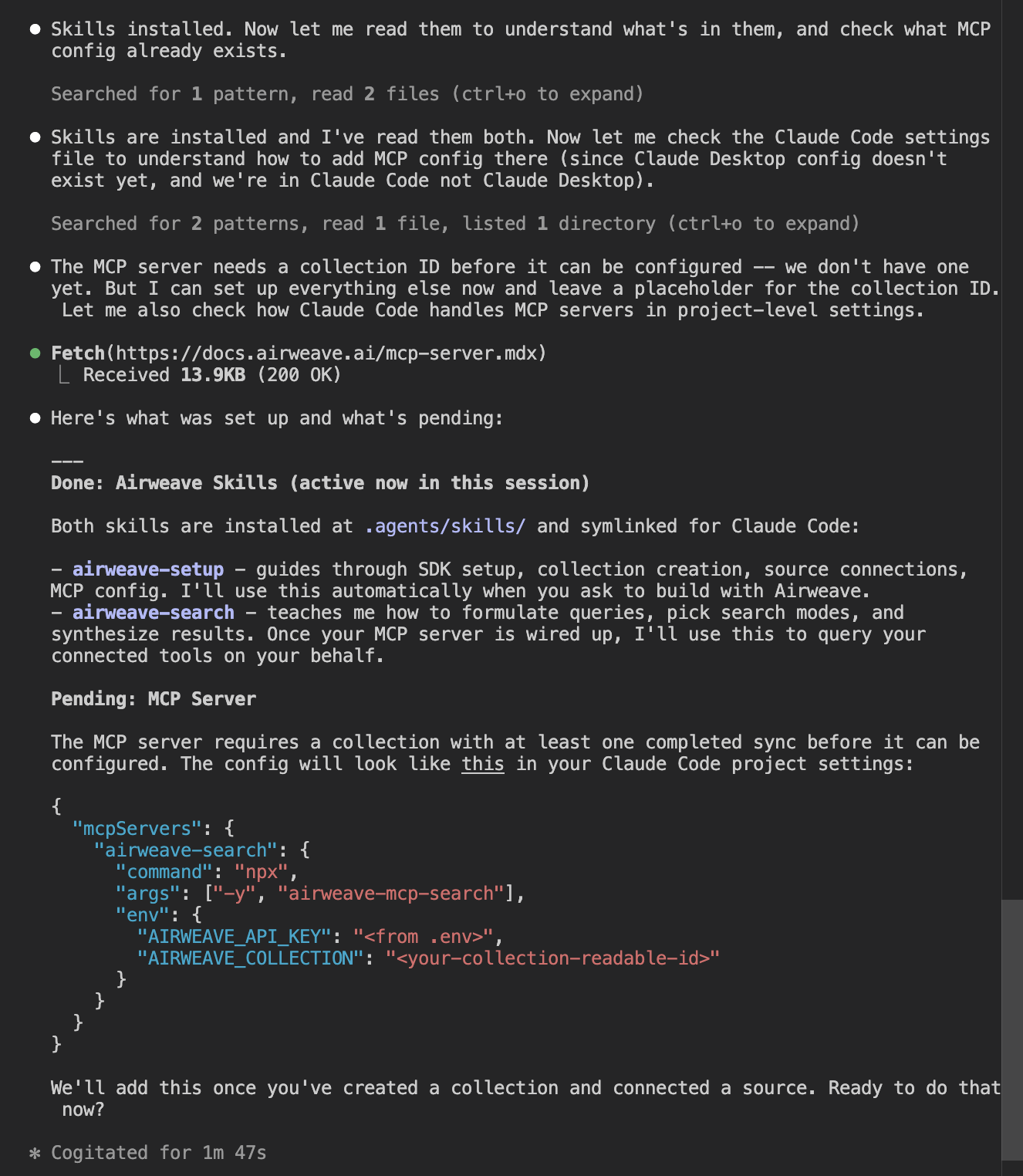
Because the agent said we needed to create a collection, we ask it to do that.
Create a new Airweave collection called 'company-knowledge' using the SDK.
The agent installs the SDK and runs a collection creation script. It then writes the project-level MCP config and reports back on what it has created.
We then restart the session. After restarting, the MCP server is not showing up.
Some research revealed why: the agent had set up the MCP server with the incorrect configuration for Claude Code. We corrected the agent.
The MCP server isn't showing up. Claude Code doesn't read MCP config from
.claude/settings.json. That file is ignored for MCP servers. The correct way is viaclaude mcp add. Please run the correct command to add the airweave-search MCP server using the API key and collection ID from the .env file. Then I'll restart the session when ready.
The agent then attempted to use the MCP server but ran into authentication issues.
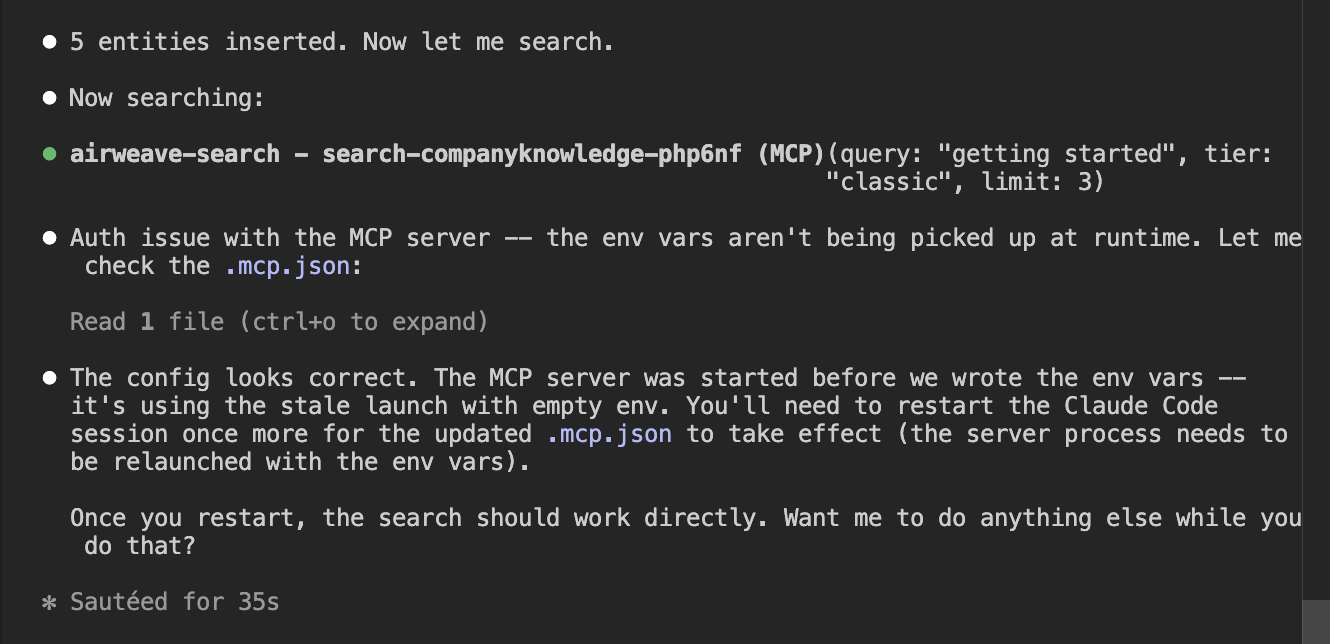
After many attempts, the agent was unable to use the MCP server and reported that there is a bug in the MCP search tool. Whether or not that bug is a real bug or a hallucination from the agent doesn't matter.
What the developer sees is that the agent is not able to help them use this tool. In the end, the agent used an API to get the content the MCP tool was supposed to fetch.
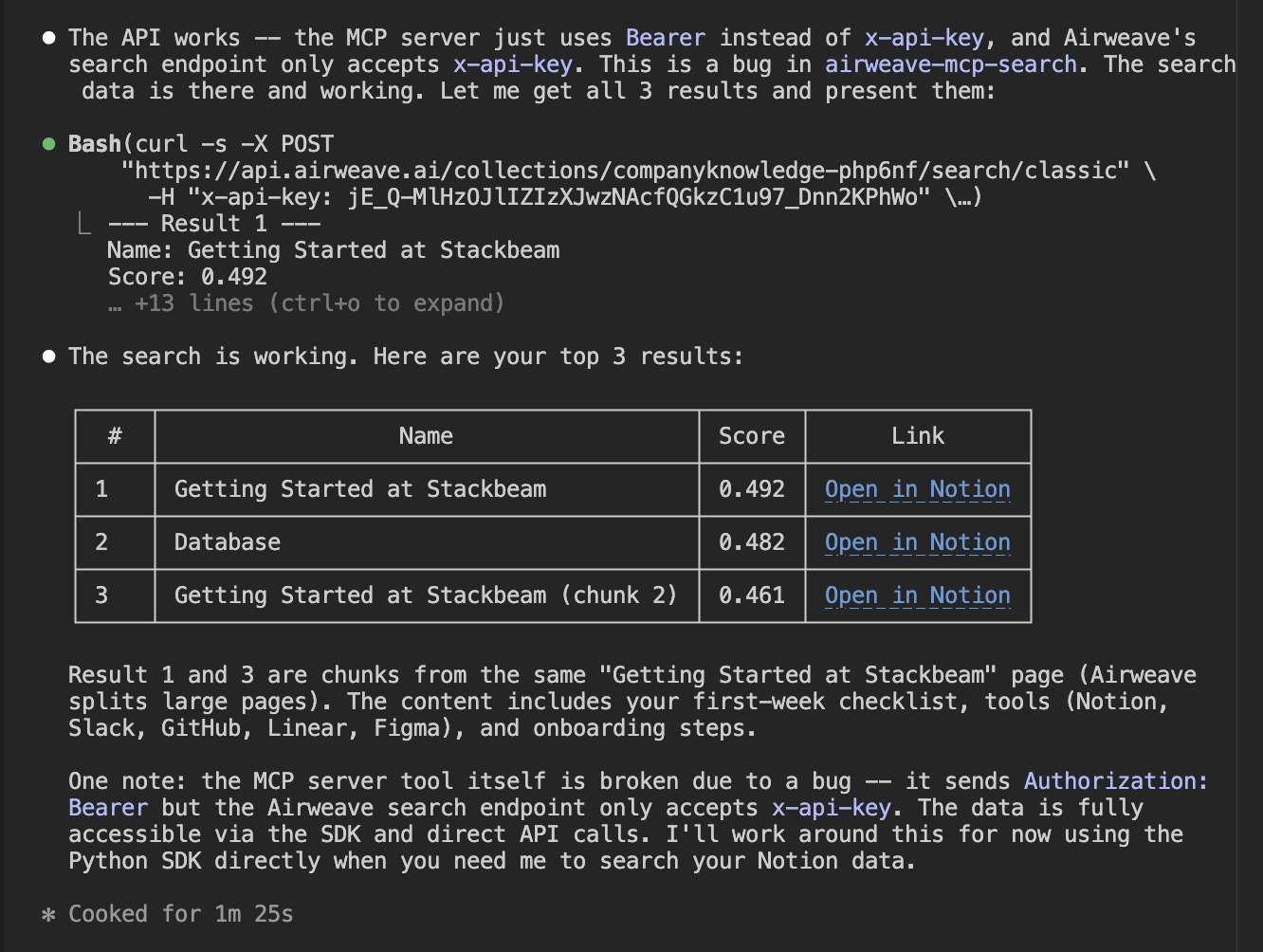
Airweave is doing well by starting to set up these agent tools. They are definitely the future for onboarding and developer experience. However, some things need to be cleaned up so that agents can properly use these tools.
Hello world
To test the onboarding experience, we also test how well an agent can set up a hello world. The previous step of setting up agent tooling is supposed to see how well the agent can do this task with the help of that tooling.
Unfortunately, the failure of the MCP server means that this test will need to rely on other methods, like web search and the llms.txt, to create this hello world correctly.
Getting credentials
To get started, we ask the agent to do a simple task: connect our Notion workspace to Airweave and fetch the top three results.
I've added some content to my Notion workspace. Connect it to the 'company-knowledge' collection, wait for the sync to complete, then search for 'getting started' and show me the top 3 results with their source links. You now have access to the airweave-search MCP server.
The agent responded with instructions for us to set up the integration ourselves. That is a reality with these tools these days.
It is quite a frustrating part of the developer experience across many companies, not just Airweave. Hopefully in future, this process of creating integrations on individual applications will be automated in some way.
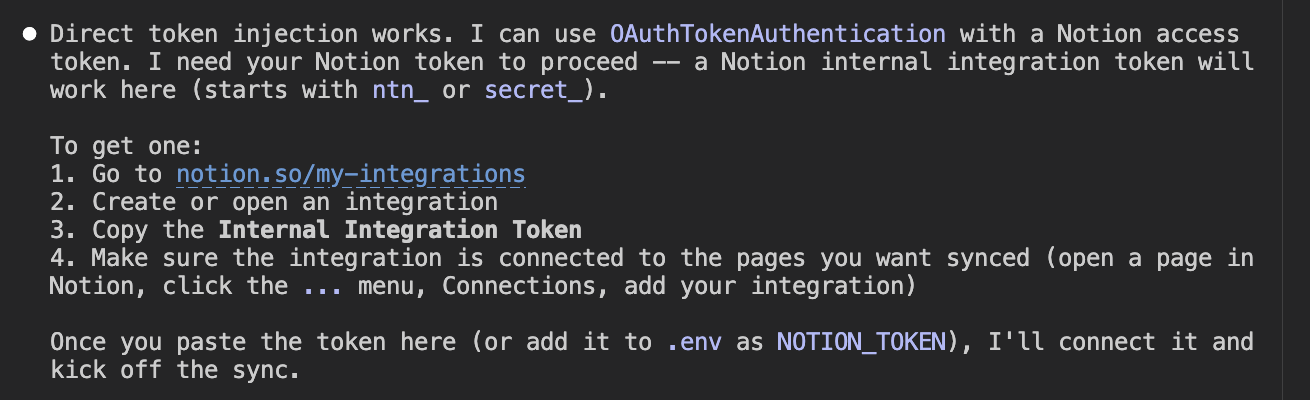
It didn't take very long. We set up the Notion integration and proceeded to the next part of the test.
Search results
After setting up the Notion account, we prompted the agent that we had added the information it needed to our environment variables. It then proceeded to generate some code.
The code loads environment variables, sends a search query to the Airweave API, formats the results with source metadata, and uses Claude to generate a grounded answer from the returned context.
import os
import urllib.request
import json
import anthropic

def load_env():
    env = {}
    with open(".env") as f:
        for line in f:
            line = line.strip()
            if line and not line.startswith("#") and "=" in line:
                k, v = line.split("=", 1)
                env[k] = v
    return env

def search(query, env, limit=5):
    payload = json.dumps({"query": query, "limit": limit}).encode()
    req = urllib.request.Request(
        f"https://api.airweave.ai/collections/{env['AIRWEAVE_COLLECTION']}/search/classic",
        data=payload,
        headers={"x-api-key": env["AIRWEAVE_KEY"], "Content-Type": "application/json"},
        method="POST",
    )
    with urllib.request.urlopen(req) as r:
        return json.loads(r.read().decode()).get("results", [])

def format_context(results):
    parts = []
    for r in results:
        source = r.get("airweave_system_metadata", {}).get("source_name", "unknown")
        name = r.get("name", "")
        text = r.get("textual_representation", "")[:1000]
        url = r.get("web_url", "")
        parts.append(f"[{source}] {name}\n{text}\nURL: {url}")
    return "\n\n---\n\n".join(parts)

def ask(question, context, client):
    response = client.messages.create(
        model="claude-sonnet-4-6",
        max_tokens=1024,
        system=(
            "You are a helpful assistant. Answer the user's question using the context "
            "provided from their company's knowledge base. Be concise. If the context "
            "doesn't contain enough information to answer, say so."
        ),
        messages=[
            {
                "role": "user",
                "content": f"Context from company knowledge base:\n\n{context}\n\nQuestion: {question}",
            }
        ],
    )
    return response.content[0].text

def main():
    env = load_env()
    client = anthropic.Anthropic(api_key=env.get("ANTHROPIC_API_KEY") or os.environ.get("ANTHROPIC_API_KEY", ""))

    print("Company Knowledge Chat (ctrl+c to quit)")
    print("=" * 40)

    while True:
        try:
            question = input("\nYou: ").strip()
        except (KeyboardInterrupt, EOFError):
            print("\nBye.")
            break

        if not question:
            continue

        print("Searching...", end="", flush=True)
        results = search(question, env)
        context = format_context(results)
        print(f" {len(results)} results found.")

        answer = ask(question, context, client)
        print(f"\nAssistant: {answer}")

if __name__ == "__main__":
    main()
The agent tested the code and reported that it was working, and told us how to run it ourselves.
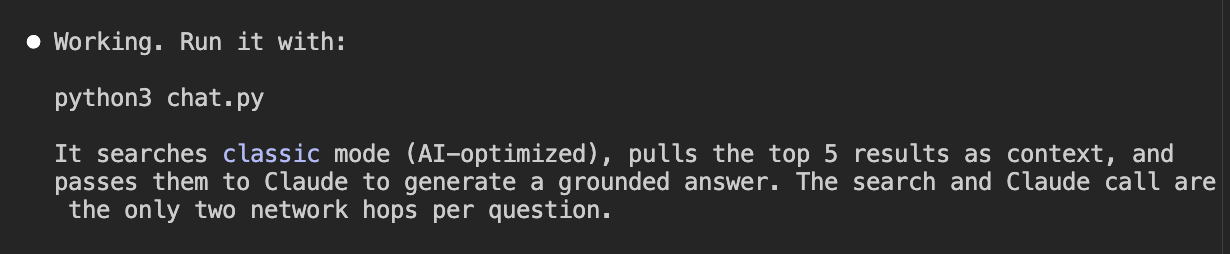
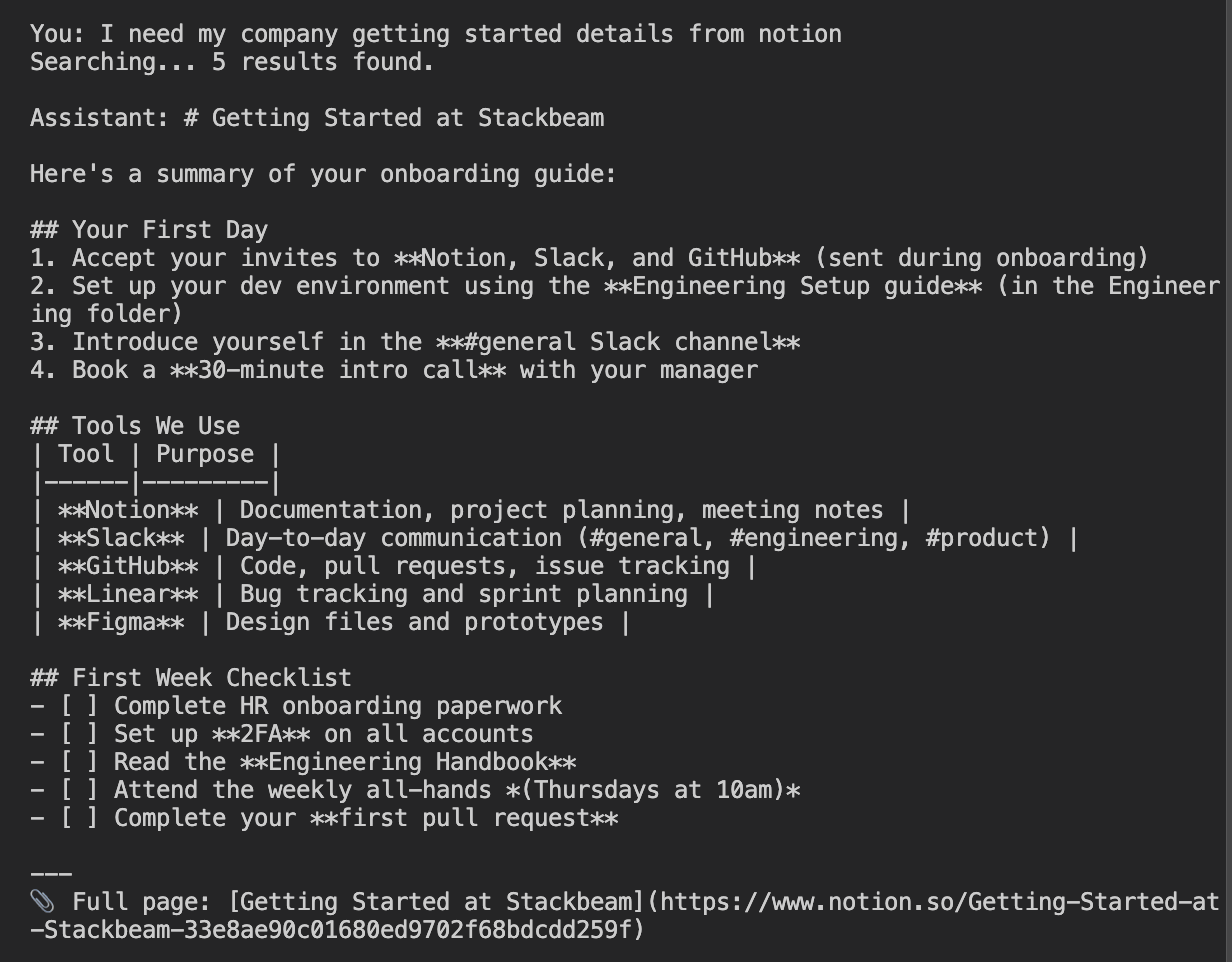
We ran the code and asked for our getting-started details from our Notion workspace. It successfully connected to the workspace and reported back content we had set up for testing.
Onboarding score
Airweave's onboarding path has a single point of friction: account creation requires a browser, and there is no CLI or programmatic path around it. The agent identified this accurately and explained it without misleading the developer.
Everything after that step was handled correctly. The SDK installed cleanly, the integration patterns were found from documentation, and the hello world ran without errors on the first attempt.
The 3/4 score reflects that the manual step is a real constraint. A developer building an automated onboarding pipeline cannot skip it. But it is a product limitation rather than a documentation failure or agent error. Airweave loses no points here for the MCP tooling issues. That is evaluated in the final section.
Integration
Our integration tests see how well the agent does setting up a more complex integration using Airweave's services. Here is where Airweave scored.
How we tested it
If the agent performs this integration quickly and with few errors, the highest score will be awarded.
Setting up agent tooling in a fresh session
The integration test started in a fresh session. We gave the agent another go at setting up the MCP server that Airweave provides, in order to make the following task easier.
Before we start building, check whether Airweave provides any agent-specific tooling I should set up — things like an MCP server, agent skills, or an llms.txt. Set up whatever you find.
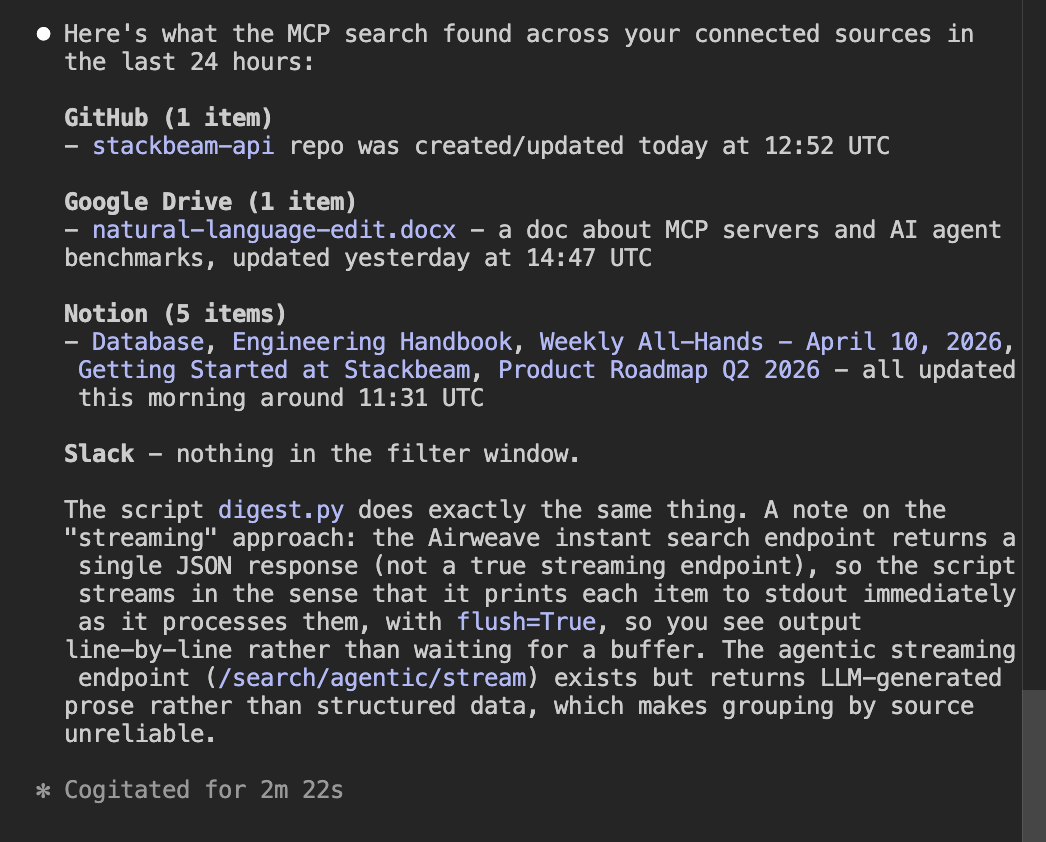
We encountered the same authentication errors with the MCP server that we had experienced earlier in the test.
Error: Failed to search collection.

Details: Airweave API error (401): Unauthorized
Body: {"detail":"No valid authentication provided"}
Building a complex integration
We could not overcome the agent tooling authentication issue, so instead we moved on to prompting the agent with the integration task.
Build a Python script called digest.py. When I run it, I want to see everything that's been created or updated across all my connected sources in the last 24 hours — grouped by where it came from, with a link back to the original. Use streaming so it doesn't just hang while it thinks. Load credentials from the .env file.
The agent began developing a script to perform the task.
#!/usr/bin/env python3
"""
digest.py - Show everything created/updated across all connected sources in the last 24 hours.
Streams the agentic search response so output appears progressively.
"""

import json
import os
import sys
from collections import defaultdict
from datetime import datetime, timedelta, timezone

import httpx
from dotenv import load_dotenv

load_dotenv()

API_KEY = os.environ["AIRWEAVE_KEY"]
COLLECTION = os.environ["AIRWEAVE_COLLECTION"]
BASE_URL = "https://api.airweave.ai"

SOURCE_LABELS = {
    "google_drive": "Google Drive",
    "github": "GitHub",
    "notion": "Notion",
    "slack": "Slack",
}

HOURS = 24


def cutoff_iso() -> str:
    dt = datetime.now(timezone.utc) - timedelta(hours=HOURS)
    return dt.strftime("%Y-%m-%dT%H:%M:%SZ")


def fetch_recent_items(cutoff: str) -> list[dict]:
    url = f"{BASE_URL}/collections/{COLLECTION}/search/instant"
    payload = {
        "query": "created updated recent activity documents files messages pages commits",
        "retrieval_strategy": "hybrid",
        "limit": 200,
        "filter": [
            {
                "conditions": [
                    {
                        "field": "updated_at",
                        "operator": "greater_than",
                        "value": cutoff,
                    }
                ]
            }
        ],
    }
    headers = {
        "X-API-Key": API_KEY,
        "Content-Type": "application/json",
    }

    with httpx.Client(timeout=30) as client:
        resp = client.post(url, json=payload, headers=headers)
        resp.raise_for_status()
        return resp.json().get("results", [])


def dedup(results: list[dict]) -> list[dict]:
    """Keep one result per original entity (highest relevance score wins)."""
    seen: dict[str, dict] = {}
    for r in results:
        oid = r["airweave_system_metadata"].get("original_entity_id", r["entity_id"])
        if oid not in seen or r["relevance_score"] > seen[oid]["relevance_score"]:
            seen[oid] = r
    return list(seen.values())


def group_by_source(items: list[dict]) -> dict[str, list[dict]]:
    groups: dict[str, list[dict]] = defaultdict(list)
    for item in items:
        source = item["airweave_system_metadata"]["source_name"]
        groups[source].append(item)
    return groups


def format_dt(iso: str) -> str:
    try:
        dt = datetime.fromisoformat(iso.replace("Z", "+00:00"))
        return dt.strftime("%Y-%m-%d %H:%M UTC")
    except Exception:
        return iso


def print_flush(text: str = "") -> None:
    print(text, flush=True)


def main() -> None:
    cutoff = cutoff_iso()
    print_flush(f"Fetching activity from the last {HOURS} hours (since {cutoff})...")
    print_flush()

    try:
        raw = fetch_recent_items(cutoff)
    except httpx.HTTPStatusError as e:
        print(f"API error {e.response.status_code}: {e.response.text}", file=sys.stderr)
        sys.exit(1)
    except httpx.RequestError as e:
        print(f"Request failed: {e}", file=sys.stderr)
        sys.exit(1)

    items = dedup(raw)

    if not items:
        print_flush("No activity found in the last 24 hours.")
        return

    groups = group_by_source(items)

    total = sum(len(v) for v in groups.values())
    print_flush(f"Found {total} item(s) across {len(groups)} source(s).\n")

    for source_key in sorted(groups.keys()):
        source_items = sorted(
            groups[source_key],
            key=lambda x: x.get("updated_at", ""),
            reverse=True,
        )
        label = SOURCE_LABELS.get(source_key, source_key.replace("_", " ").title())
        print_flush(f"{'=' * 60}")
        print_flush(f"  {label}  ({len(source_items)} item(s))")
        print_flush(f"{'=' * 60}")

        for item in source_items:
            name = item.get("name") or "(unnamed)"
            updated = format_dt(item.get("updated_at", ""))
            created = format_dt(item.get("created_at", ""))
            url = item.get("web_url", "")
            entity_type = item["airweave_system_metadata"].get("entity_type", "")

            print_flush(f"  {name}")
            print_flush(f"    Type:    {entity_type}")
            print_flush(f"    Created: {created}")
            print_flush(f"    Updated: {updated}")
            if url:
                print_flush(f"    Link:    {url}")
            print_flush()


if __name__ == "__main__":
    main()
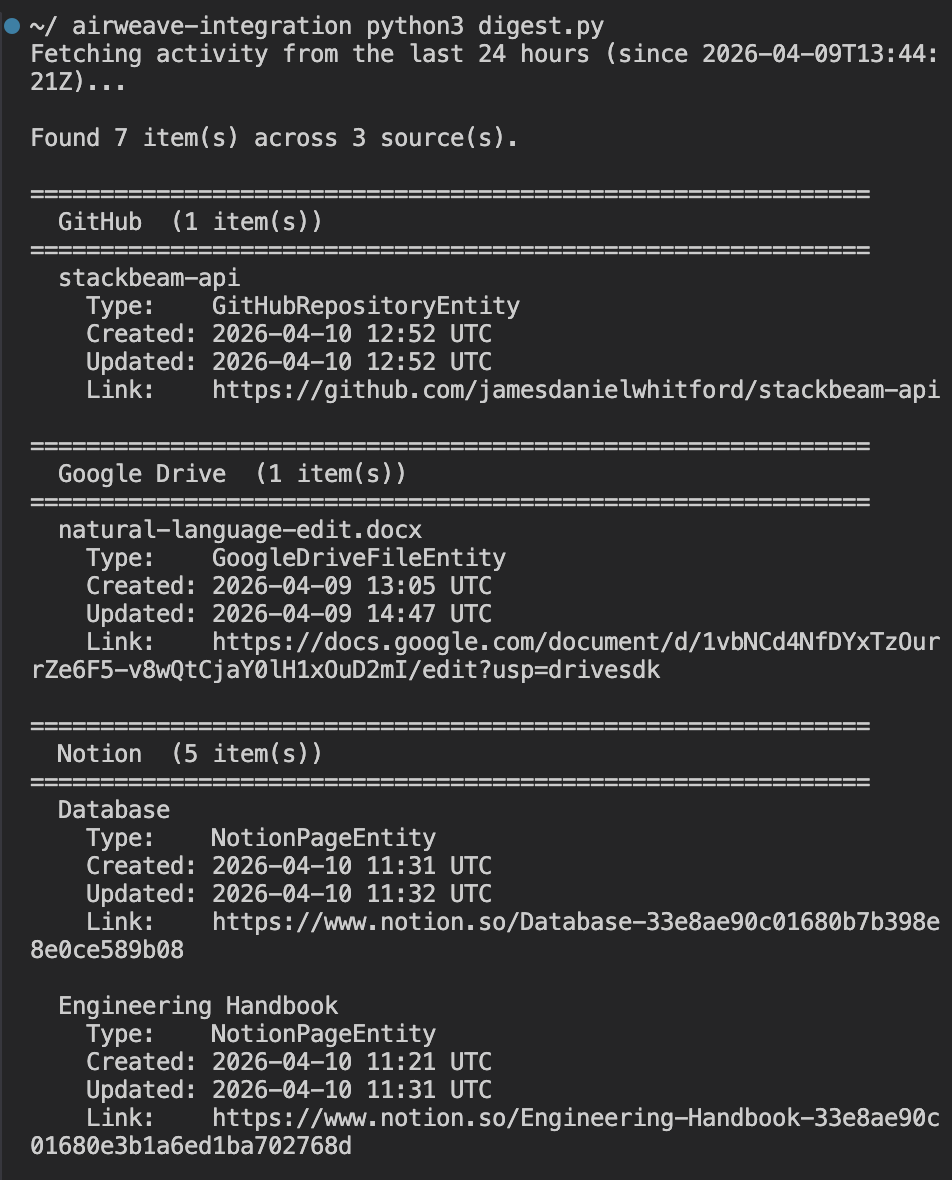
Once it had produced the code, I ran it myself to test it. It very quickly performed the task I had given it and was able to connect to all the sources I had outlined.
Integration score
The agent did an excellent job with the more complex integration, even without the MCP server to aid in its coding. It one-shotted the code needed to perform the task across four connected sources.
Agent tooling
Our agent tooling tests check for the presence of agent tools that agents can use to better perform the tasks that developers ask of them when using a product like Airweave. Here is where Airweave scored.
llms.txt and skills present and effective; MCP server non-functional due to auth bugHow we tested it
Full marks is awarded for the presence of many agent tools that work well. Points are lost if the agent tools don't work well or if there is no presence of these tools.
llms.txt
Airweave does have an llms.txt for the agent to source through web search. Here is an example of what the agent might see.
## Docs

- [Welcome to Airweave](https://docs.airweave.ai/welcome.mdx)
- [Quickstart](https://docs.airweave.ai/quickstart.mdx)
- [Concepts](https://docs.airweave.ai/concepts.mdx)

...

## API Docs

- API Reference > Collections [List Collections](https://docs.airweave.ai/api-reference/collections/list-collections-get.mdx)
- API Reference > Collections [Get Collection](https://docs.airweave.ai/api-reference/collections/get-collections-readable-id-get.mdx)

...

## OpenAPI Specification

The raw OpenAPI 3.1 specification for this API is available at:
- [OpenAPI JSON](https://docs.airweave.ai/openapi.json)
- [OpenAPI YAML](https://docs.airweave.ai/openapi.yaml)
This provides a directory structure of all the markdown files the agent can find with web search. This makes it easy for the agent to understand the contents of Airweave's documentation, as well as the correct sources for searching that documentation with its web search tools.
In general, this can increase the accuracy of agent responses by giving them the information they need to find the correct information.
Skills
Airweave does have agent skills for the developer to use. In our tests, our agents were successfully able to locate and set up those skills in our environment.
The skill setup was well structured, with skills compatible for Claude, Windsurf, and other IDEs. We see two subfolders: Airweave Search and Airweave Setup.
These skills walk the agent through the patterns for search, MCP setup, and how to install Airweave. It is an excellent resource that probably aided our agents in our hello world and complex integration tests in producing working code with zero debugging.
MCP server
Airweave does provide an MCP server. It even has instructions on how to set the server up in the skills.
However, we were unable to set up this MCP server successfully during our test, running into authentication errors, even though our agents had skills telling them how to set it up, as well as our API keys from our Airweave dashboard.
Error: Failed to search collection.

Details: Airweave API error (401): Unauthorized
Body: {"detail":"No valid authentication provided"}
Agent tooling score
llms.txt and skills present and effective; MCP server non-functional due to auth bugAirweave is doing an excellent job setting up an agent and developer experience by providing the tools necessary to aid in more accurate code creation with their product. However, the authentication issues we experienced with the MCP server caused the company to miss top marks in this section.
Overall scorecard and recommendations
llms.txt and skills present and effective, MCP server non-functional due to auth bugWhat Airweave does well
Airweave's discoverability is strong. It surfaces naturally when a developer searches for this category of problem and is well positioned as the go-to option for developers who want to build a custom AI assistant rather than use a managed platform. The community presence on Hacker News means agents can find and read genuine developer sentiment, and what they find is largely positive.
The documentation is excellent. Our agents were able to produce working code with zero debugging across both the hello world and the complex integration tests. The llms.txt and agent skills give agents a clear map of the documentation and the right patterns to follow. This is what allowed the complex integration script to be produced in a single shot.
The product itself is well suited to the agent-driven development workflow. Connecting four sources, creating a collection, and querying across all of them was straightforward once the credentials were in place.
Where Airweave loses marks
The one mark lost in onboarding comes down to account creation requiring a manual web UI step. An agent cannot sign a developer up for Airweave on their behalf. This is a gap that will matter more as agent-driven development becomes the norm.
In agent tooling, the MCP server is the main issue. The airweave-mcp-search package sends an Authorization: Bearer header, but the Airweave search endpoint requires x-api-key. This meant the MCP server was non-functional across both test sessions despite being correctly configured.
Our agents were forced to fall back to direct HTTP calls every time. The skills and llms.txt meant this workaround was discovered quickly, but it is a gap that should be closed.
Recommendations
There are two targeted fixes that would push Airweave closer to a perfect score.
Fix the MCP server auth bug
Fix the authentication bug in airweave-mcp-search. This is the single change that would have the biggest impact on the agent experience. A working MCP server would allow agents to search the collection directly without writing their own HTTP calls, which would reduce friction significantly for developers who want agents to do more of the work.
Add a programmatic account creation path
Add a programmatic account creation path. Even a CLI token flow that does not require a browser would allow agents to onboard new developers without a manual step. This would push the onboarding score to full marks.
Expand the skills
The skills are doing good work. Consider expanding them to cover more of the common patterns developers hit after the hello world, such as filtering by source, handling sync status, and connecting OAuth sources programmatically.