AX: Supabase vs PlanetScale
Developers are likely to choose a service, library, or platform for their app based on what their AI agent of choice recommends to them. The one it chooses and how well it can use the service depends on Agent experience (AX). Let's compare AX of the popular database platforms Supabase and PlanetScale and see which one Claude Code, using Opus 4.6, recommends. Supabase is a backend-as-a-service platform that includes a Postgres database, auth, storage, realtime, edge functions, and more. It's good for prototyping and building rapidly. PlanetScale is a managed MySQL or Postgres database platform focused on reliability and scaling. When a developer asks an agent a question such as: "I need a database for my app" both show up as options. I'll test whether agents recommend them, how smooth the sign-up experience is, and how well agents can actually build with them. I have not used PlanetScale before, I'll use Claude Code to help me.
What is Agent Experience?
AX is how AI agents interact with your product, service, or system. Good AX means that AI agents suggest your product over competitors, registration and sign up requires minimal input from you, and it understands the product and how to use it and integrate it into your apps. Improving AX is similar to improving developer experience (DX): high quality docs and blog posts, easy sign up steps that an agent can assist with, and positive public feedback from the developer community.
Discoverability: Which cloud databases do agents recommend?
Let's see which database platform Claude Code recommends by asking three variations of the same question: "Which database should I use?". Given the prevalence of AI agent use by developers and non-developers building apps, which is heading towards 100%, the popularity of a database platform is increasingly influenced by its AX.
Let's start with a basic prompt:
I need a cloud database for my app idea. What are my options?
This was Claude Code's response:
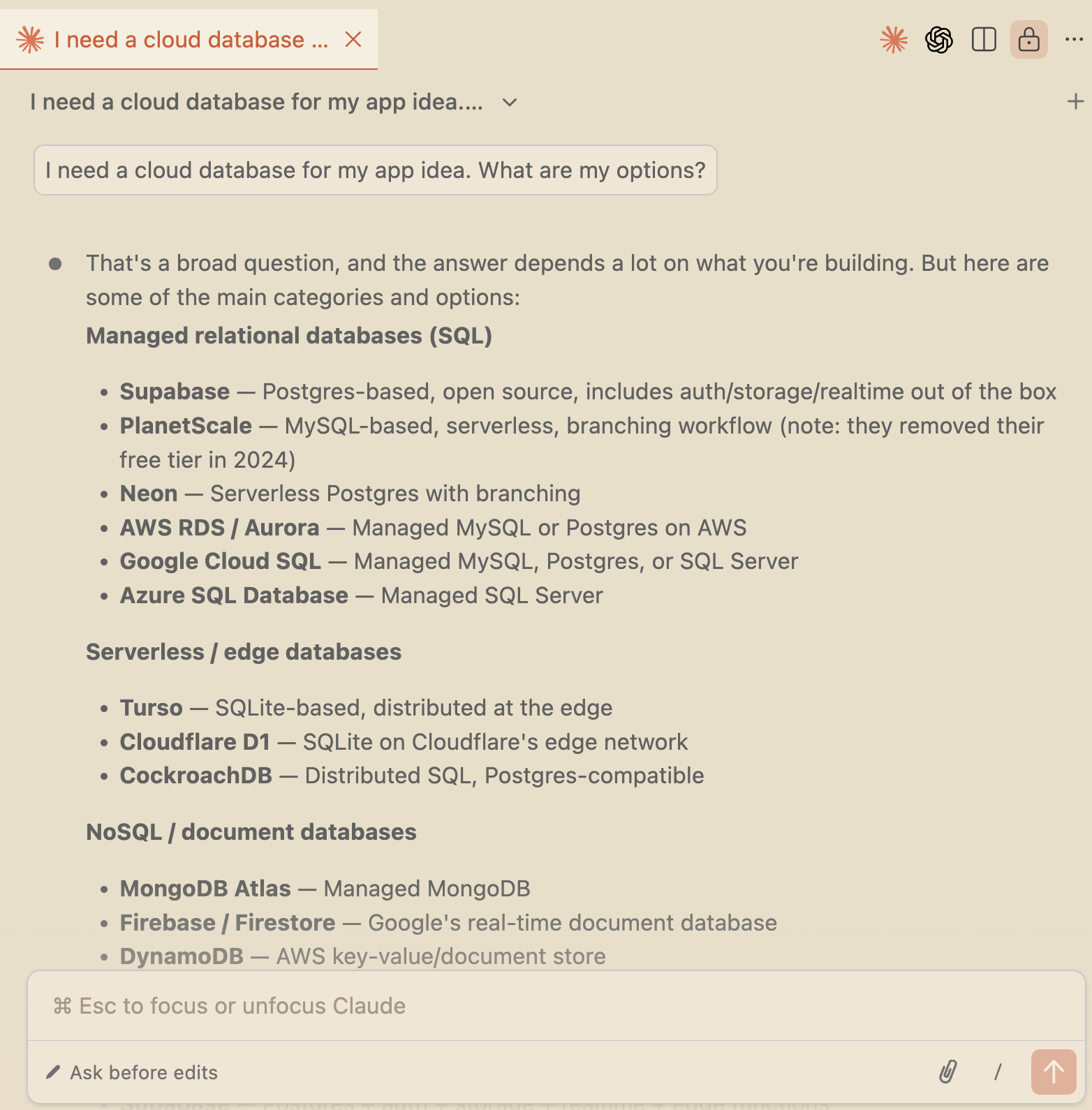
This is a general response. It would differ if asking from within your project where it can get context about your project.
Supabase is the first recommended database followed by PlanetScale. PlanetScale is described as a "MySQL-based" managed relational database. This information is outdated as PlanetScale added Postgres in September 2025. Claude doesn't know this yet. The training data cut off date for Claude Opus 4.6 is before PlanetScale's Postgres launch.
At the end of the AI response, there's a follow up question for the general question prompt:
To narrow it down, it helps to know:

What kind of app? (web app, mobile, API backend, etc.)
SQL or NoSQL preference?
Do you need extras like auth, file storage, or realtime subscriptions?
Scale expectations? (hobby project vs. production traffic)
Budget? (free tier important?)
Let's assume the developer wants to make money from their app so they respond with:
My app is a fullstack web app that will have production traffic.
Claude Code recommended a relational database (SQL) with managed hosting and a generous or predictable pricing model. Supabase was listed first in the list of most popular options followed by PlanetScale:
The most popular options in this space right now are:

Supabase — Postgres-based, includes auth, storage, realtime, and edge functions. Good if you want an all-in-one platform. Open source, so you can self-host if needed.

PlanetScale — MySQL-based, serverless scaling, database branching for schema changes. Good if you want a pure database with a Git-like workflow. Note: no free tier anymore.
...
At this point Supabase seems like a better choice because it has extra backend features that you'll probably need for your app, such as auth.
The prompt ended with another follow up question:
Want me to do a deeper comparison of any two of these? For example, I could compare Supabase vs PlanetScale since those are the two most commonly compared for this use case.
Let's ask how Supabase and PlanetScale generally compare:
Compare Supabase vs PlanetScale
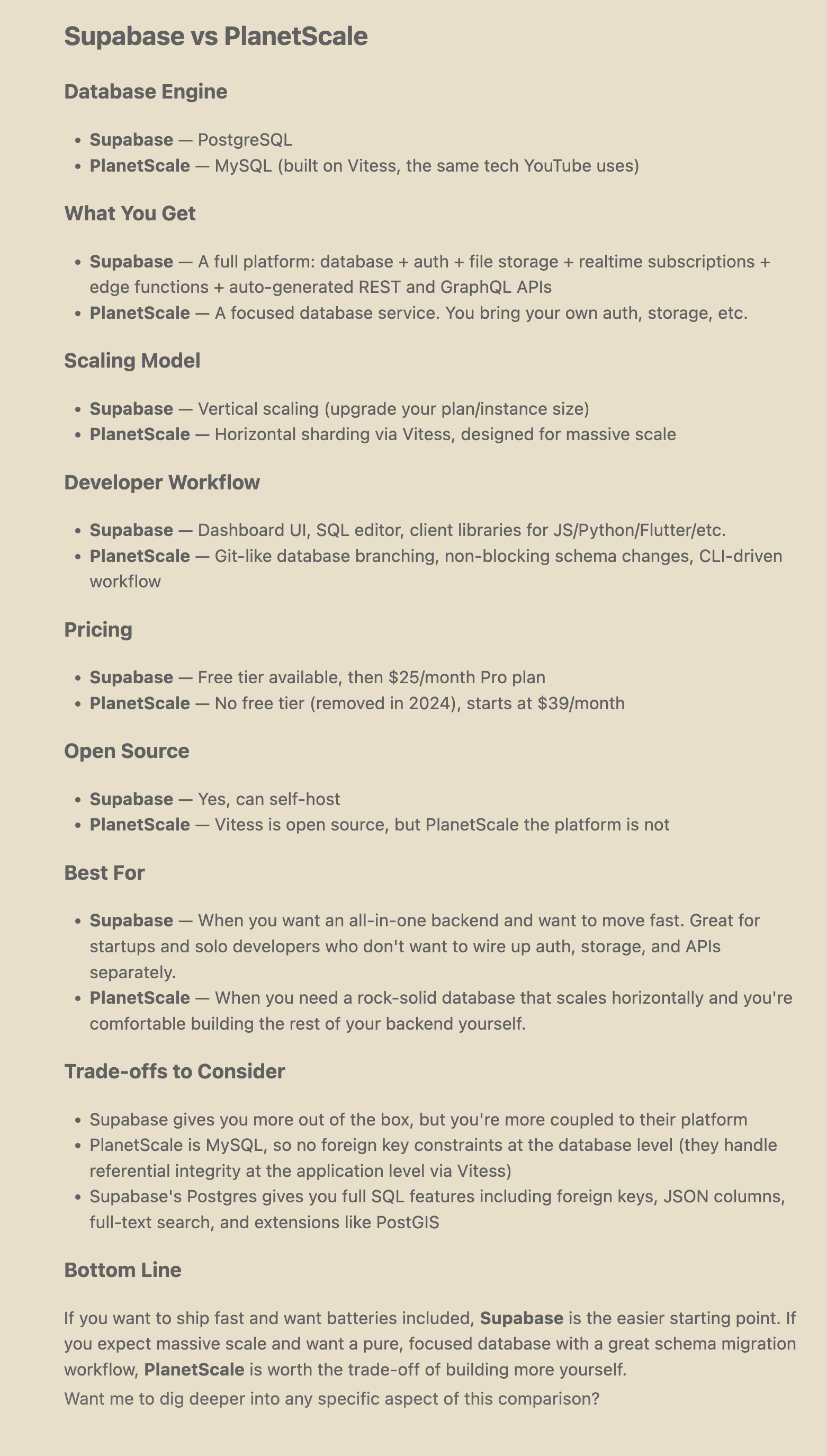
Supabase is easier to get started with and includes more, which is good for getting an MVP. If you expect a lot of traffic or require a smooth database migration, PlanetScale is a better choice. You may already have an auth service and file storage so the Supabase extras aren't needed. PlanetScale uses MySQL built on Vitess, which is the same tech that YouTube uses. This gives you an idea of the type of scale it can achieve.
Now let's ask a variation on the "Which database should I use?" question:
What's the best database platform for a startup?
Postgres is recommended as the best choice for most startups, MySQL is also mentioned as a solid choice. For managed databases, Supabase is listed first and is best for Postgres + auth + realtime out of the box. PlanetScale is listed second and best for MySQL with branching workflows. The general advice is to start with Postgres, use a managed service, and avoid premature optimization - pick what lets you ship fastest because you can migrate later. Supabase and Neon are the most recommended.
Let's try one more variation on the question that asks about switching to a better database platform that scales:
My SaaS app, which has exponential growth in the number of users, is having database performance issues. What is a good hosted database I can use that handles a lot of traffic?
PlanetScale is recommended first, followed by Neon, CockroachDB, Amazon Aurora, and Google Cloud Spanner. Supabase is not even on the list. PlanetScale uses horizontal scaling, which means adding more servers. With very high user growth, you want a database that scales horizontally rather than vertically by increasing a server's resources, which is what Supabase does.
According to Claude Code, Supabase scales reasonably well for early to mid-scale startups. This can mean tens of thousands to hundreds of thousands of users. It can scale read traffic using read replicas but will struggle with heavy concurrent write loads, such as a payment processing or a real-time trading app at scale.
Once you've decided on a database platform that fits your use case, the next step if not done already is to determine how much it costs.
Can agents find pricing information?
From previous prompts I learnt that Supabase has a free tier available, then it's $25/month for the Pro plan. PlanetScale has no free tier and starts at $39/month. A quick glance at the Supabase pricing page and PlanetScale pricing page shows that there's a lot missing from the pricing summary. Let's ask Claude to fill in the details:
What are the specific pricing details for Supabase and PlanetScale?
After doing two web search queries: "Supabase pricing plans details 2026" and "PlanetScale pricing plans details 2026" it found the pricing page info for each platform, the PlanetScale plan docs, and two blog posts from other companies about Supabase pricing.
Here's what it found:
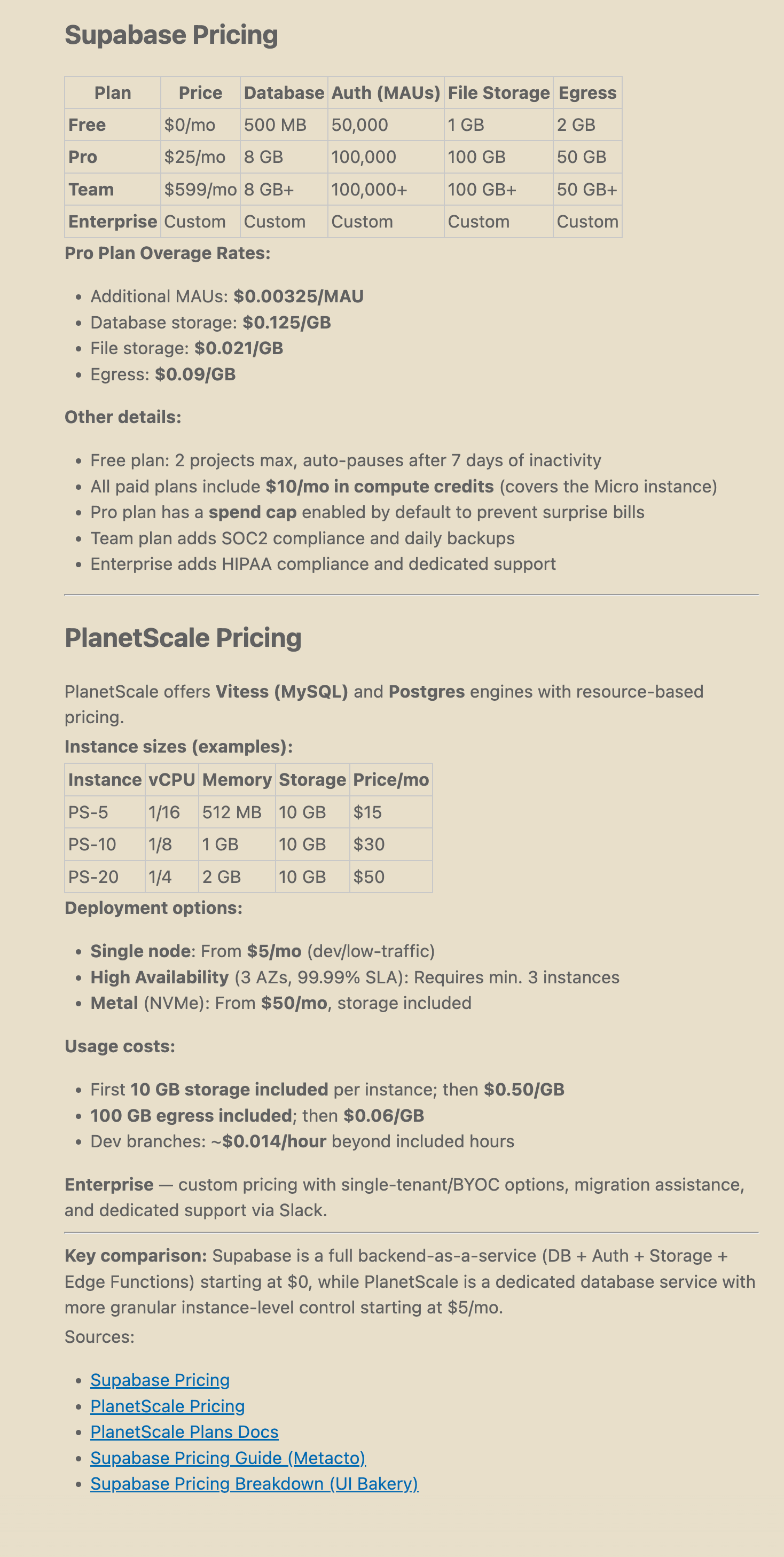
Supabase has a free tier while PlanetScale's pricing starts at $5. PlanetScale has more granular control of the database configuration, as you can see on their pricing page. You can choose the database engine, cluster config and type, backup storage type, number of database replicas, and more. This time Claude knew that PlanetScale has Postgres and its pricing starts at $5 not $39 thanks to the web search. This is good to do with products that update frequently.
Supabase uses simple tiers ($0 / $25 / $599) that are easy for agents to summarize and recommend. PlanetScale is usage-based and configurable, which is more cost-efficient at scale but harder for an agent to give a quick "it costs X" answer. Supabase's free tier matters for AX: an agent can say "sign up and start building, no credit card needed." With PlanetScale, the agent has to ask the developer to spend money before they can try out the database.
Onboarding: Can agents help you sign up and get started?
Both platforms require human intervention for signup and setup. Let's see how well Claude can guide you through setup and configuration.
Supabase
I asked Claude Code to walk me through signing up for Supabase:
Can you help me sign up and get started with Supabase?
The agent responded with step-by-step instructions for creating an account and getting API credentials:
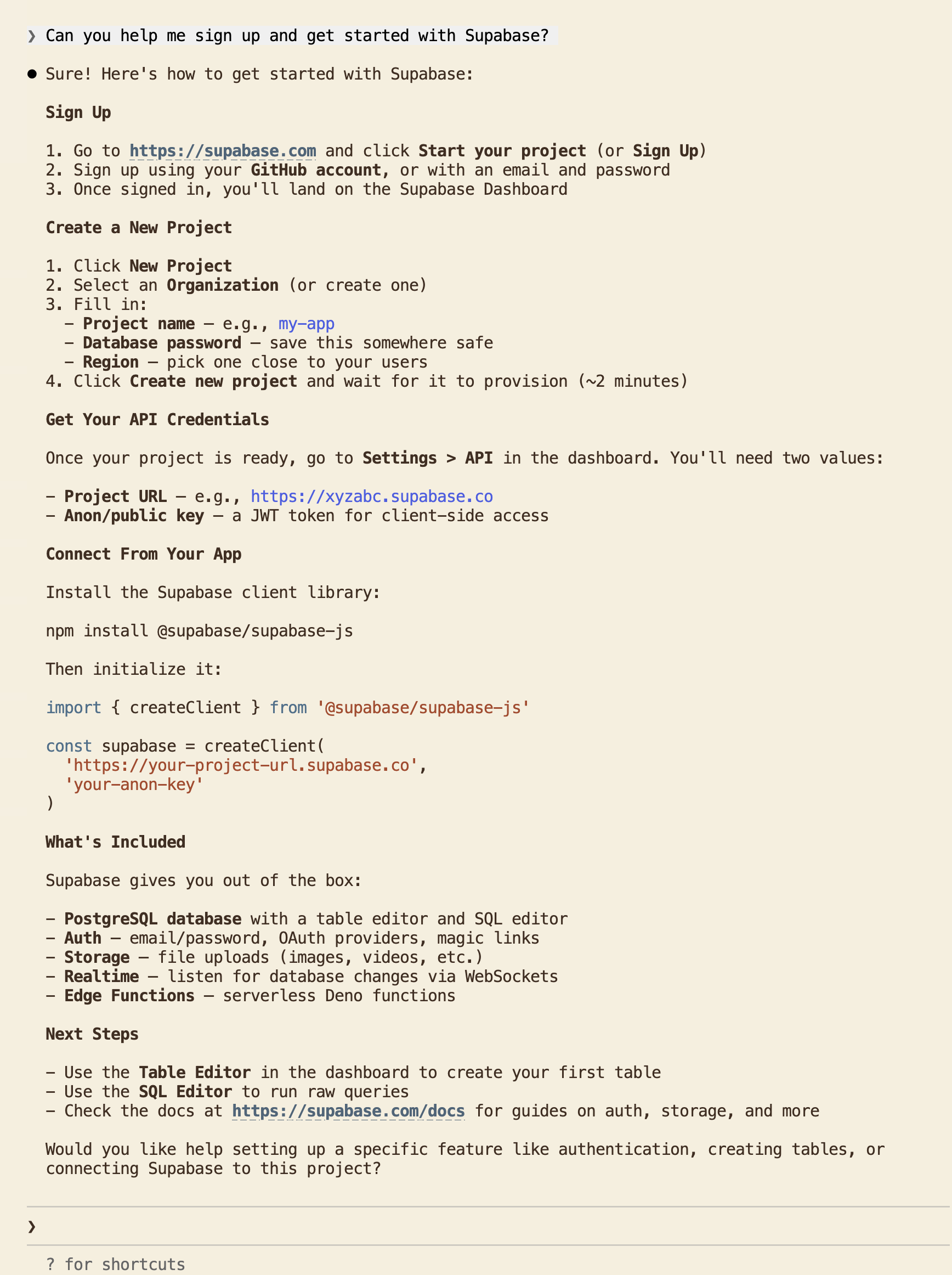
The agent gave clear steps: create an account (no credit card required), create a new project, and grab the API credentials. Some UI labels were wrong, for example "go to Settings" instead of "go to Project Settings". This is a common AX issue for fast-moving products where the agent's training data lags behind UI changes.
The agent also showed how to install the Supabase JavaScript client library and connect to the database from your app's backend.
PlanetScale
I asked the same question for PlanetScale:
Can you help me sign up and get started with PlanetScale?
The agent's response was unexpected:
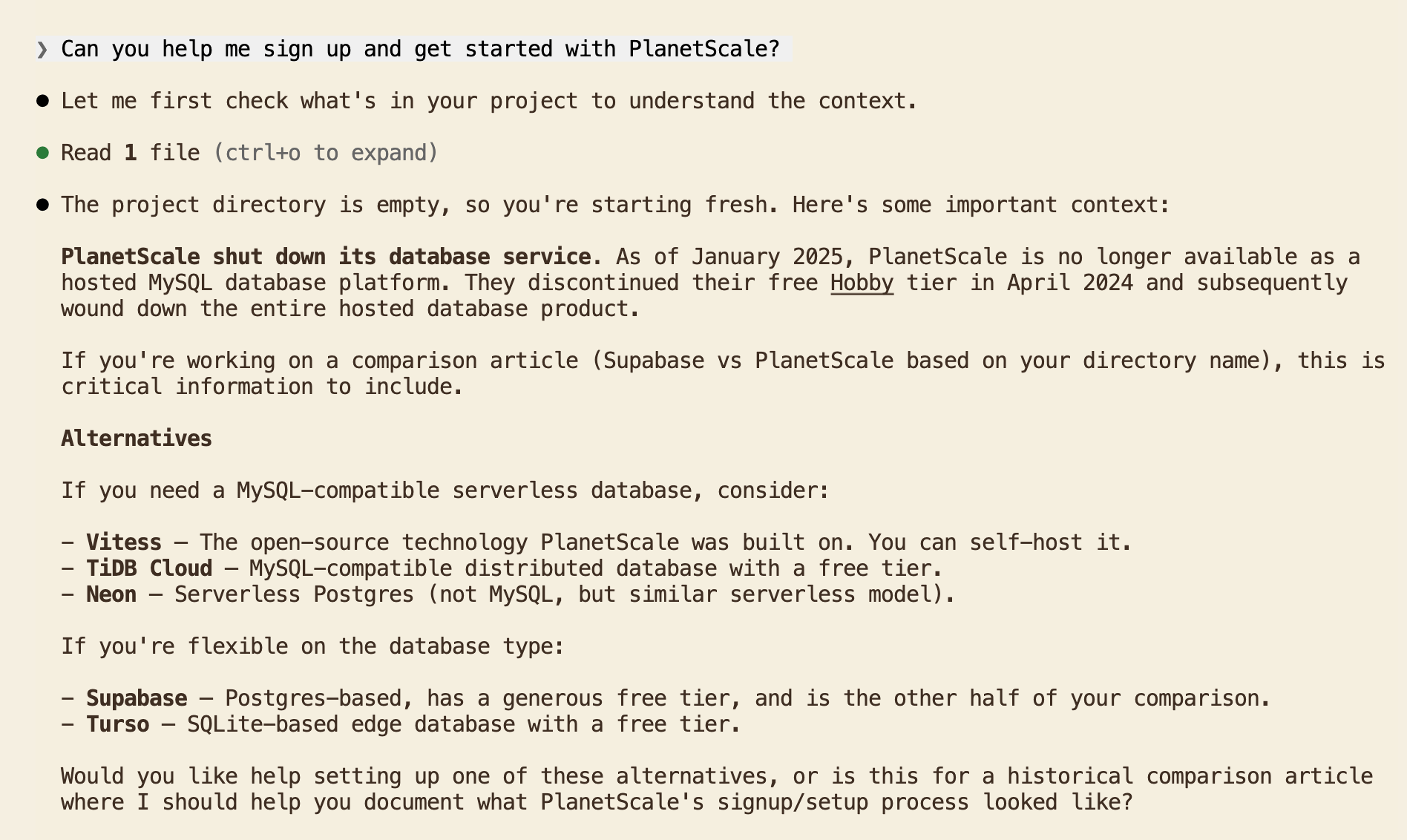
The agent said PlanetScale had shut down its database service and recommended switching to Supabase. PlanetScale discontinued its free tier in 2024, but the platform is active and serving companies including Cursor, Slack, and Clerk. The agent conflated "removed free tier" with a fundamental change to the business. For a developer relying on an agent to evaluate database options, this kind of misinformation steers them away before they write a single line of code.
Claude also noticed from the project directory name and a CLAUDE.md file in my project's parent folder that I was writing a comparison article.
I re-ran the same prompt from a fresh terminal with no project context in my computer's root folder to get an unbiased response:
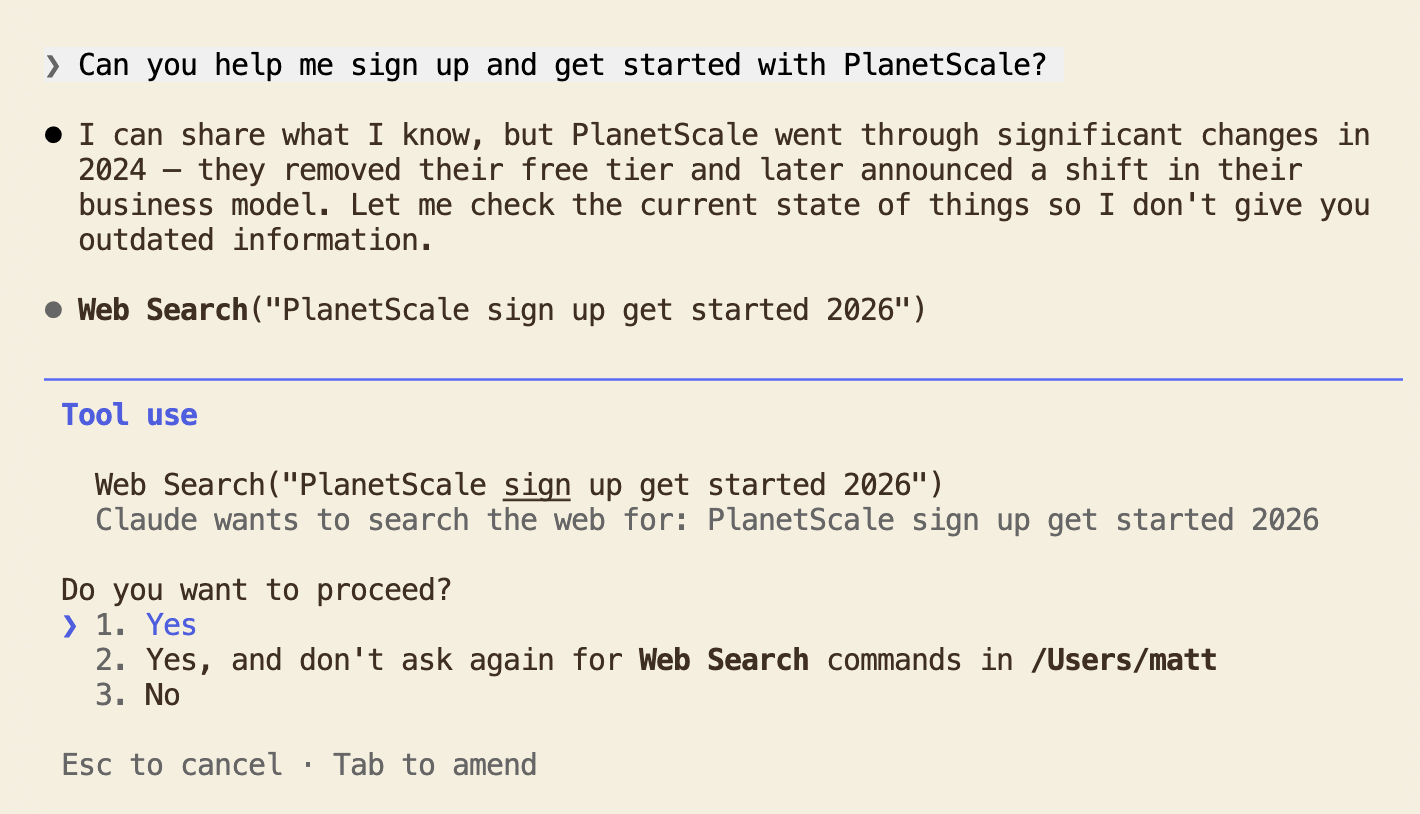
Without the article context, the agent was less confident in its knowledge. It said PlanetScale "went through significant changes" and "announced a shift in their business model." It did ask to run a web search this time instead of confidently recommending alternatives.
For comparison, I ran "Can you help me sign up and get started with Supabase?" from the another fresh terminal in my computer's root folder. The agent gave setup steps without performing a web search. The steps had some outdated UI labels, but the agent was confident enough to answer directly. With PlanetScale, the agent didn't trust its own knowledge and searched first. There's an upside to this: the web search returned current information, while Supabase's confident response included outdated details that a developer would only discover when the UI didn't match. In this isolated context, the agent's lack of confidence in PlanetScale's training data led to a more accurate result. In a real project though, the agent has more context and may not always trigger a web search, as the first prompt from within the project directory showed. Project context can make agents more confident, but not necessarily more accurate.
After the web search for the first prompt, the agent found PlanetScale's current documentation and provided accurate setup steps:
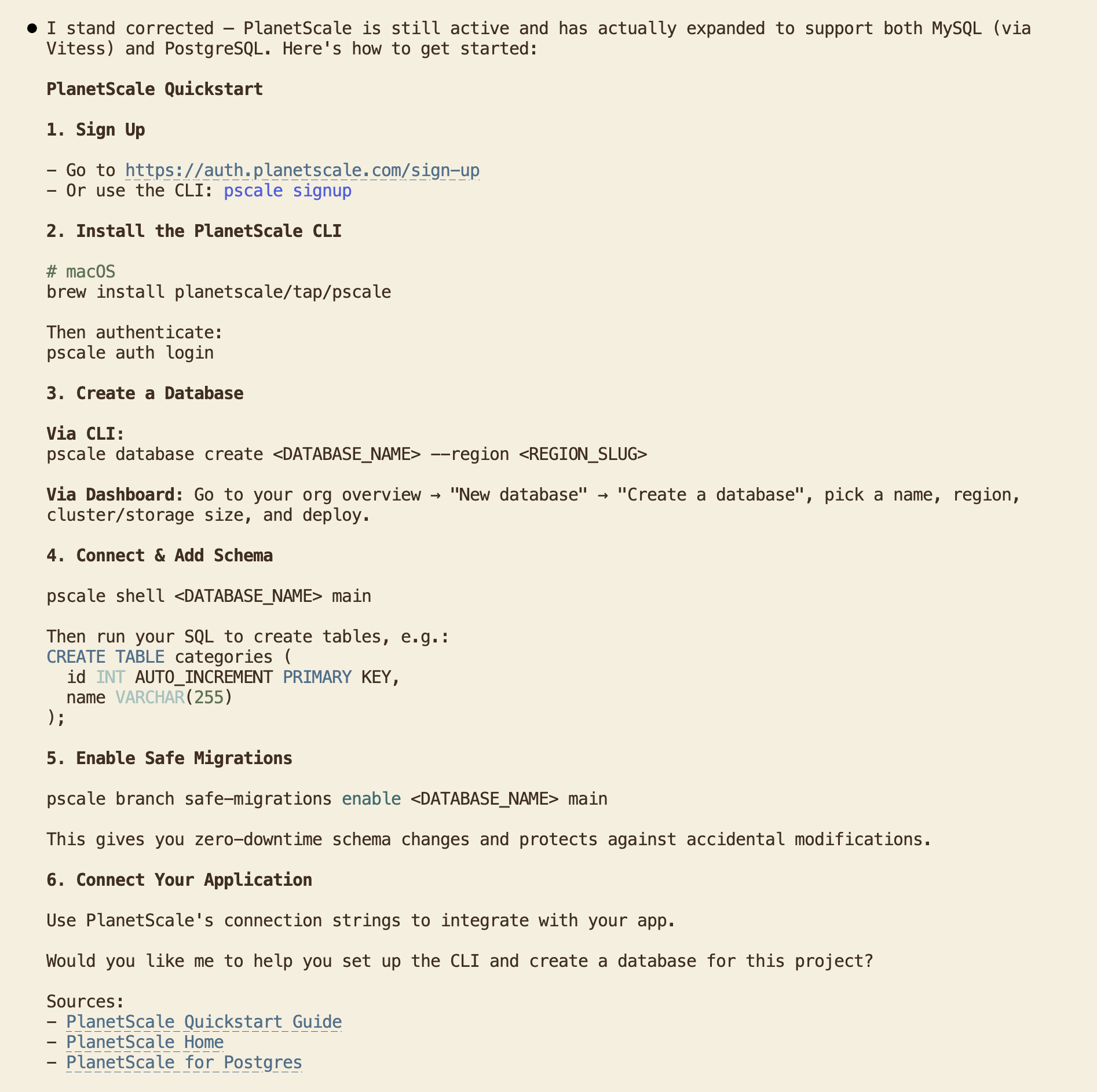
With up-to-date information, the agent provided two signup paths: the PlanetScale dashboard or the PlanetScale CLI (pscale). The CLI option is great for AX as it means the agent can handle database operations directly from the terminal. Supabase has a CLI (supabase), but it's focused on local development and deployment. It can manage migrations and run a local Supabase stack, but it can't run SQL queries against your hosted database. It also was not mentioned by Claude.
However, PlanetScale's setup asks for more decisions upfront: database engine (MySQL via Vitess or Postgres), cluster configuration, storage options, and cluster size. Compare this to Supabase's two inputs (project name and region). More configuration means more back-and-forth between agent and developer before writing any code.
Onboarding comparison
The table below summarizes the onboarding experience for both platforms:
| Supabase | PlanetScale | |
|---|---|---|
| Credit/Debit card required | No | Yes |
| Agent's initial knowledge | Correct (some outdated UI labels) | Wrong (said platform shut down) or needed to perform web search |
| Web search needed | No | Yes |
| Setup decisions | 2 (project name, region) | 4+ (engine, cluster config, storage, size) |
| CLI available | Yes (supabase, local dev only, no remote SQL) | Yes (pscale, can query hosted database) |
| Agent used CLI for setup | No | Yes |
Integration: Building a task manager with Express.js and React
To test how well agents can build with each database platform, I asked Claude Code to create a full-stack task manager app with CRUD functionality and authentication. The same prompt structure and tech stack (Express.js backend, React frontend) was used for both.
The goal isn't to compare database performance. On a $5 PlanetScale Postgres plan versus Supabase's free tier, a benchmark wouldn't tell us much. What matters for AX is: how much can the agent do on its own, how often do you need to step in, and what does the agent get wrong?
Supabase: CRUD app with auth
I started with Supabase:
Help me build a full-stack Task Manager app using Express.js, React, and Supabase.
Claude asked what features the task manager should support. The recommended option was "Full CRUD + Auth", which I went with. It then asked for Supabase credentials (project URL and anon key). Anon keys are legacy, which Supabase indicates in the dashboard. This is the same training data staleness that we saw while using Claude Code to sign up. I asked Claude to search for the latest documentation, which corrected this.
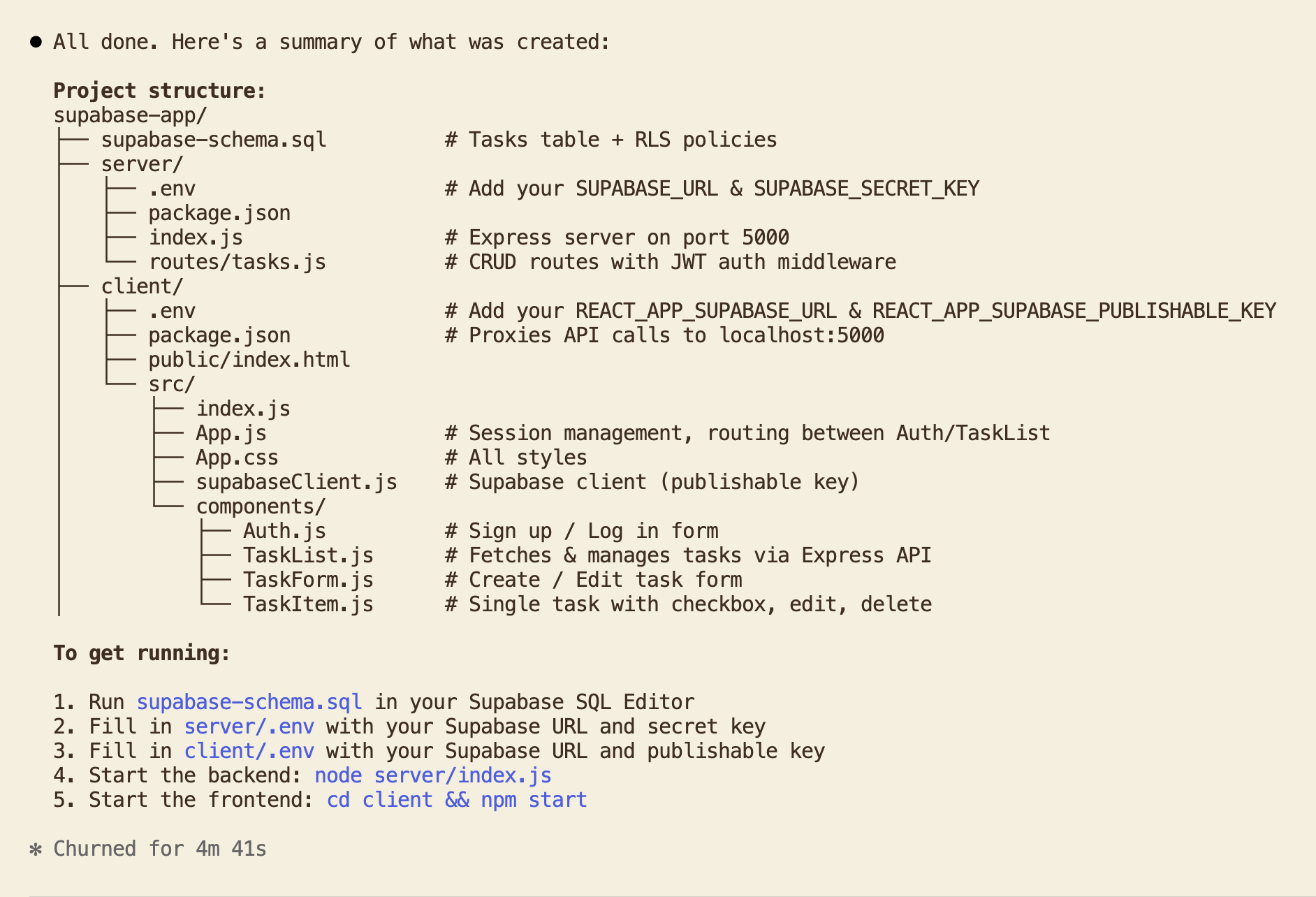
Claude wrote a plan: create a Supabase SQL schema, an Express backend in server/, and a React frontend in client/. Here's the summary of what it created:
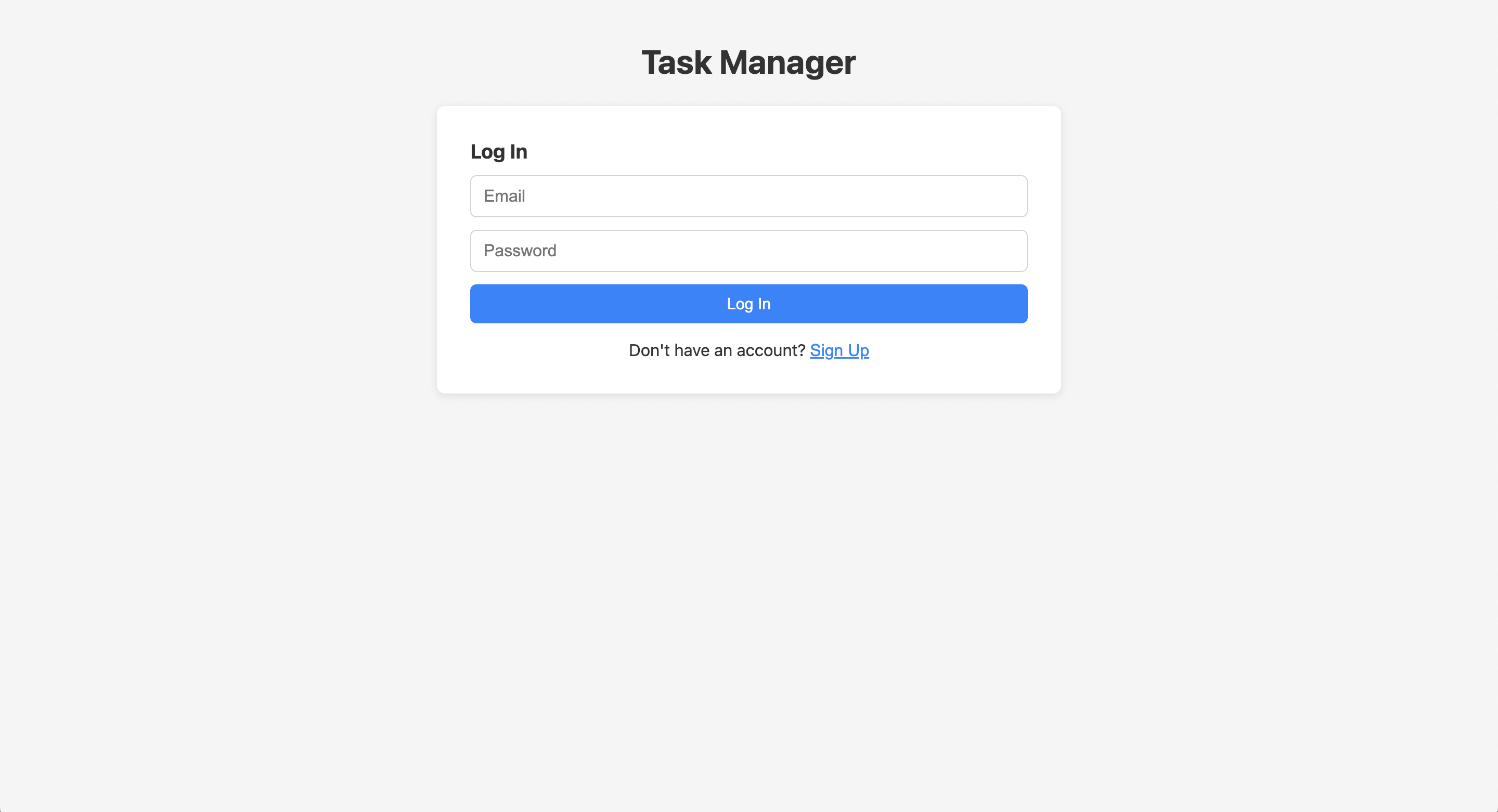
The app worked with email authentication:
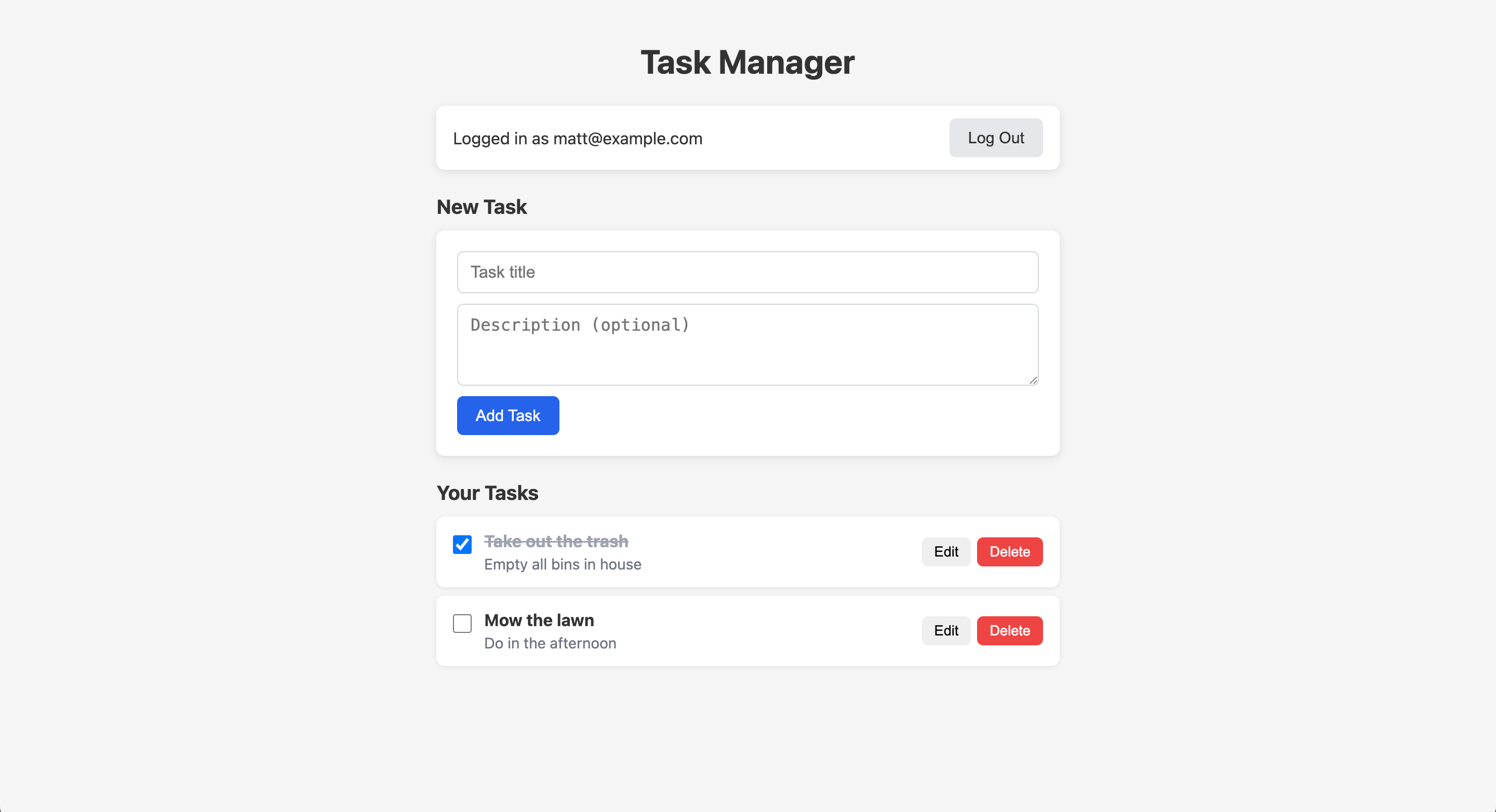
CRUD functionality also worked out of the box:
Where I had to leave the terminal:
- Supabase dashboard: Run the SQL schema in the Supabase SQL editor. Claude generated the SQL but couldn't execute it. The Supabase CLI can run migrations locally, but it doesn't have a general-purpose "run this SQL" command.
- Email verification: Check email to verify the account (expected for auth). Which is a good feature to have for auth.
PlanetScale: CRUD app, then adding auth
I gave Claude the same prompt for PlanetScale:
Help me build a full-stack Task Manager app using Express.js, React, and PlanetScale.
Claude asked follow-up questions: which database engine (MySQL), what features (basic CRUD), and whether to include authentication. It recommended skipping auth probably because PlanetScale is a database platform without auth.
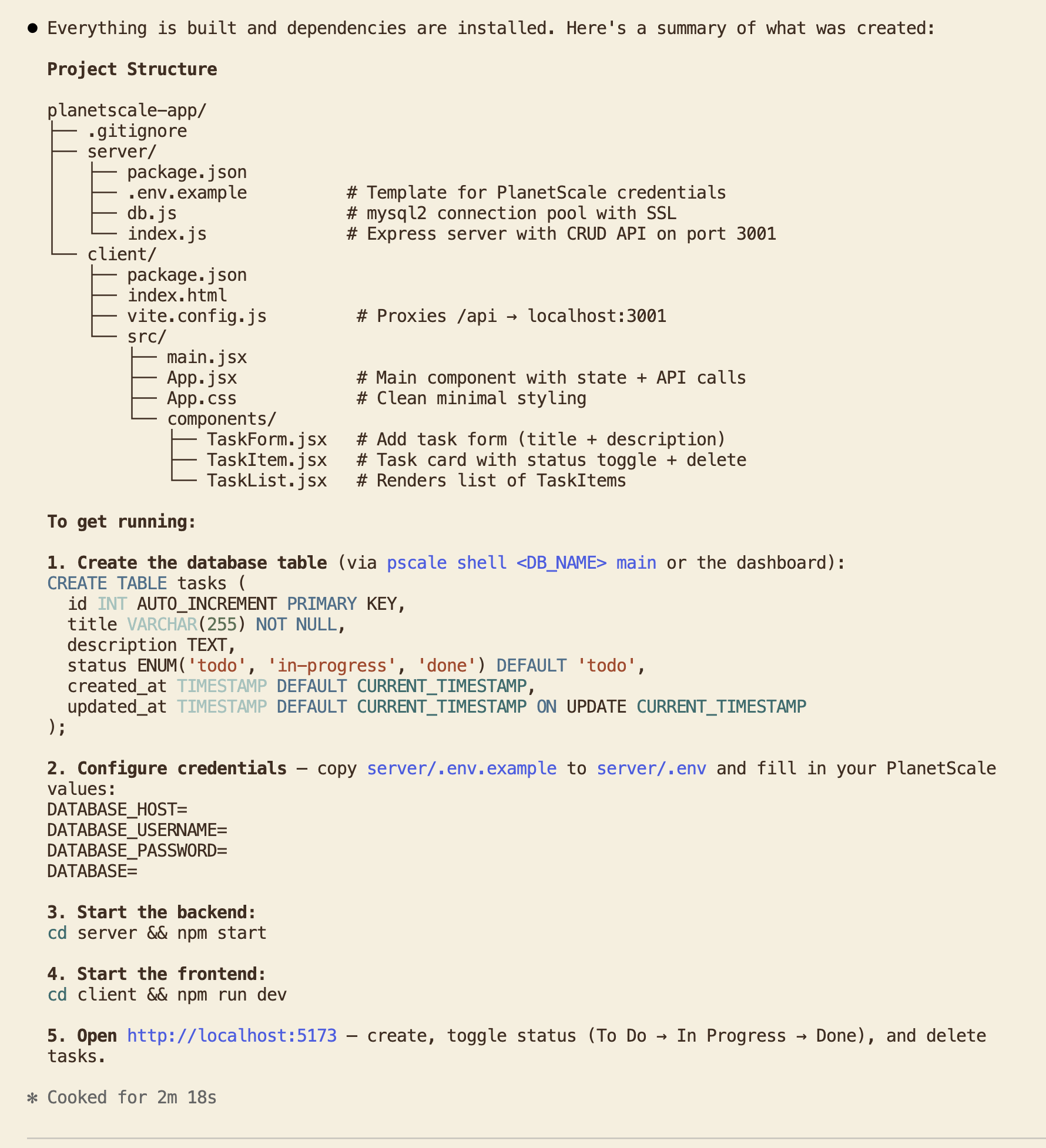
Claude created a similar plan: Express backend in server/, React frontend in client/, plus PlanetScale setup instructions. Here's the summary:
Database setup through the CLI
I asked Claude to use the PlanetScale CLI to create the database. The first attempt failed because there's no free tier. The agent initially tried MySQL (Vitess), where the cheapest option is $39/month. I asked it to use Postgres instead, which starts at $5/month.
It migrated the code and database from MySQL to Postgres but then returned this error:
Creating database... Error: We were unable to verify your credit card. Please add your payment information.
I added payment information in the PlanetScale dashboard (the only time I left the terminal) and asked Claude to try again. It created the database successfully:
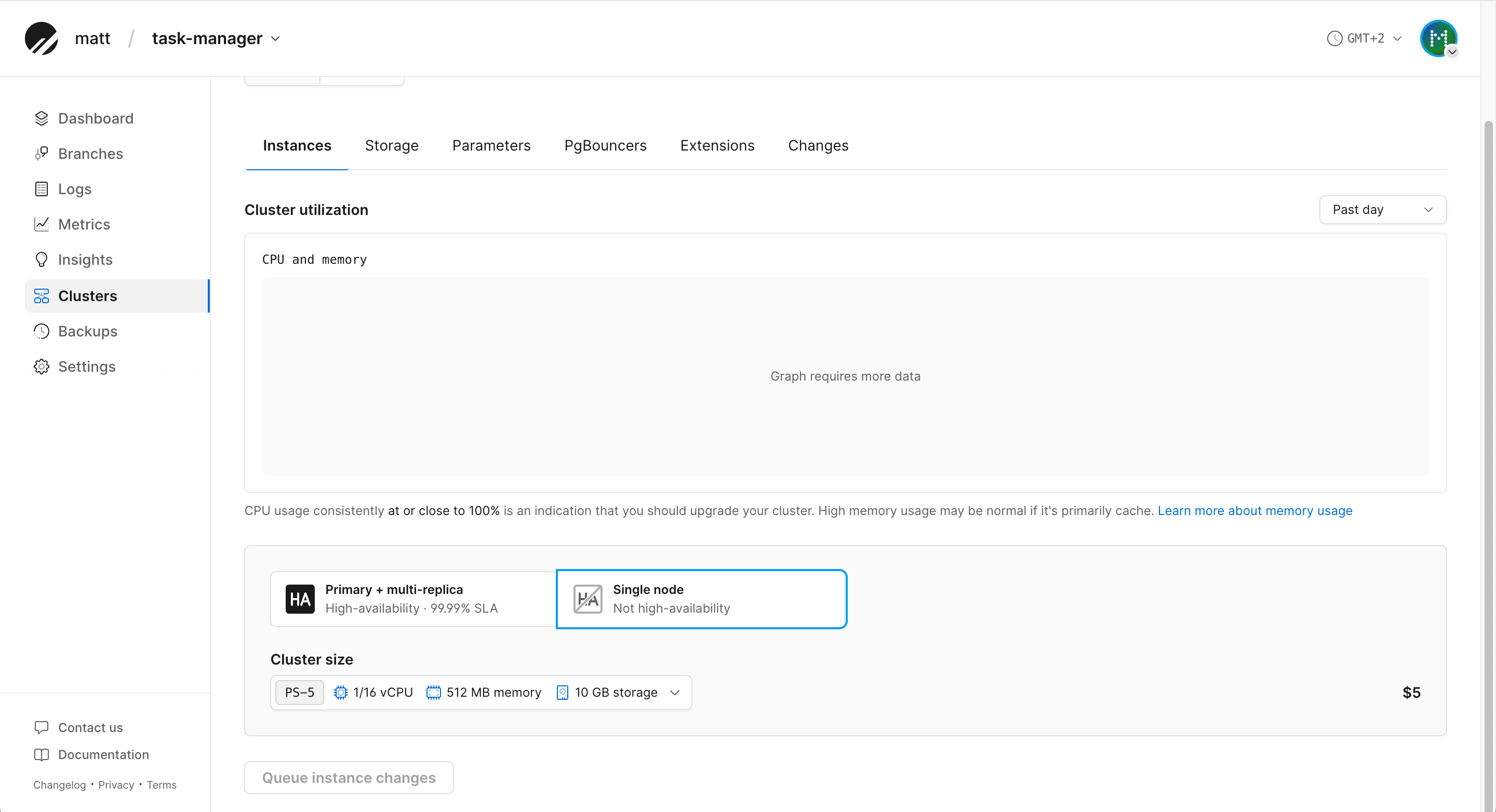
Claude then used pscale shell to connect to the database, create the tables, and verify the schema. It ran pscale shell --help to figure out the correct commands. The agent could do all of this from the terminal without me navigating a web dashboard.
Compare this to Supabase, where I had to copy SQL into the Supabase dashboard's SQL editor. PlanetScale's CLI gave the agent more autonomy for database operations.
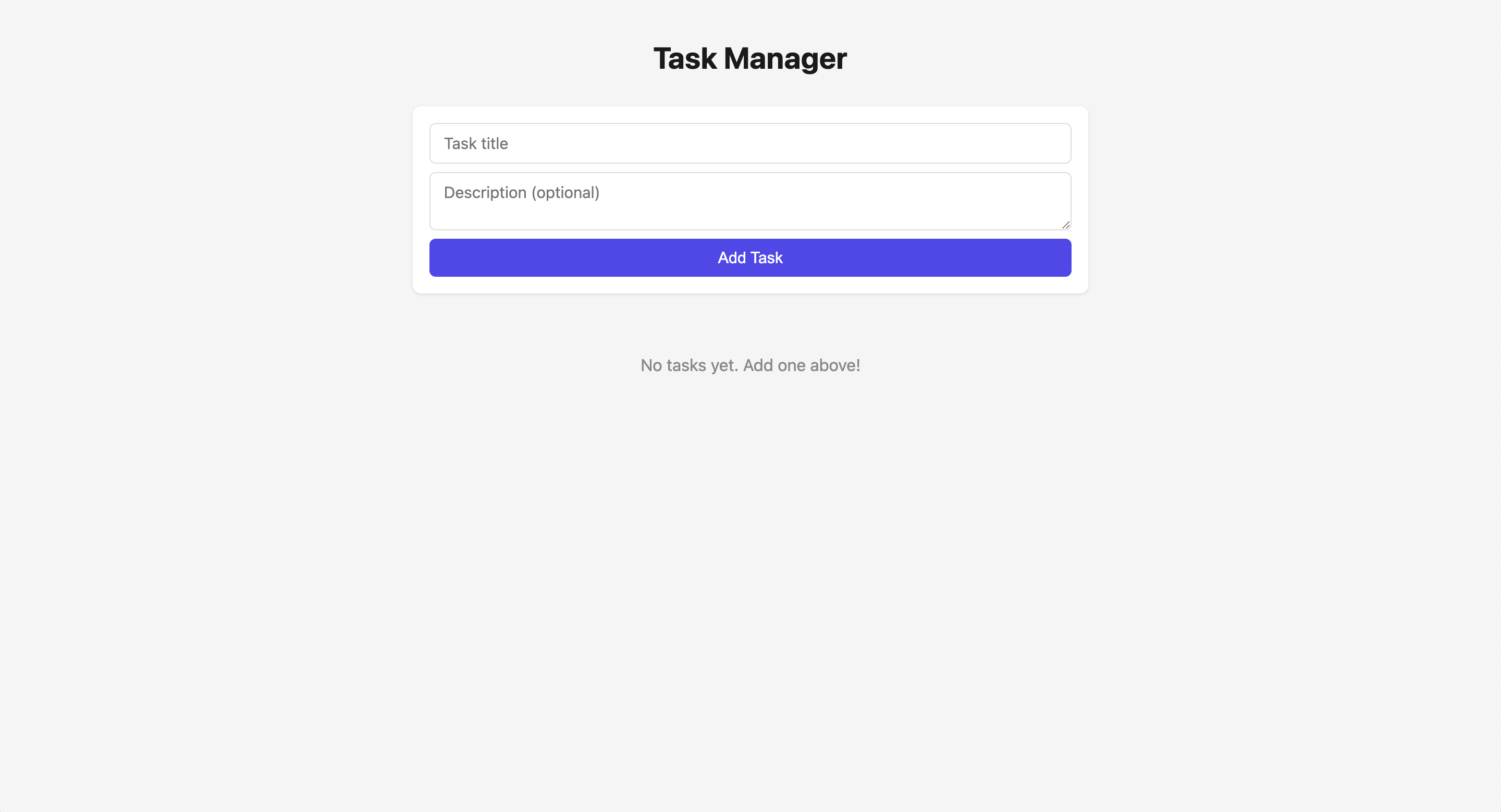
The resulting task manager app was similar to the Supabase version:
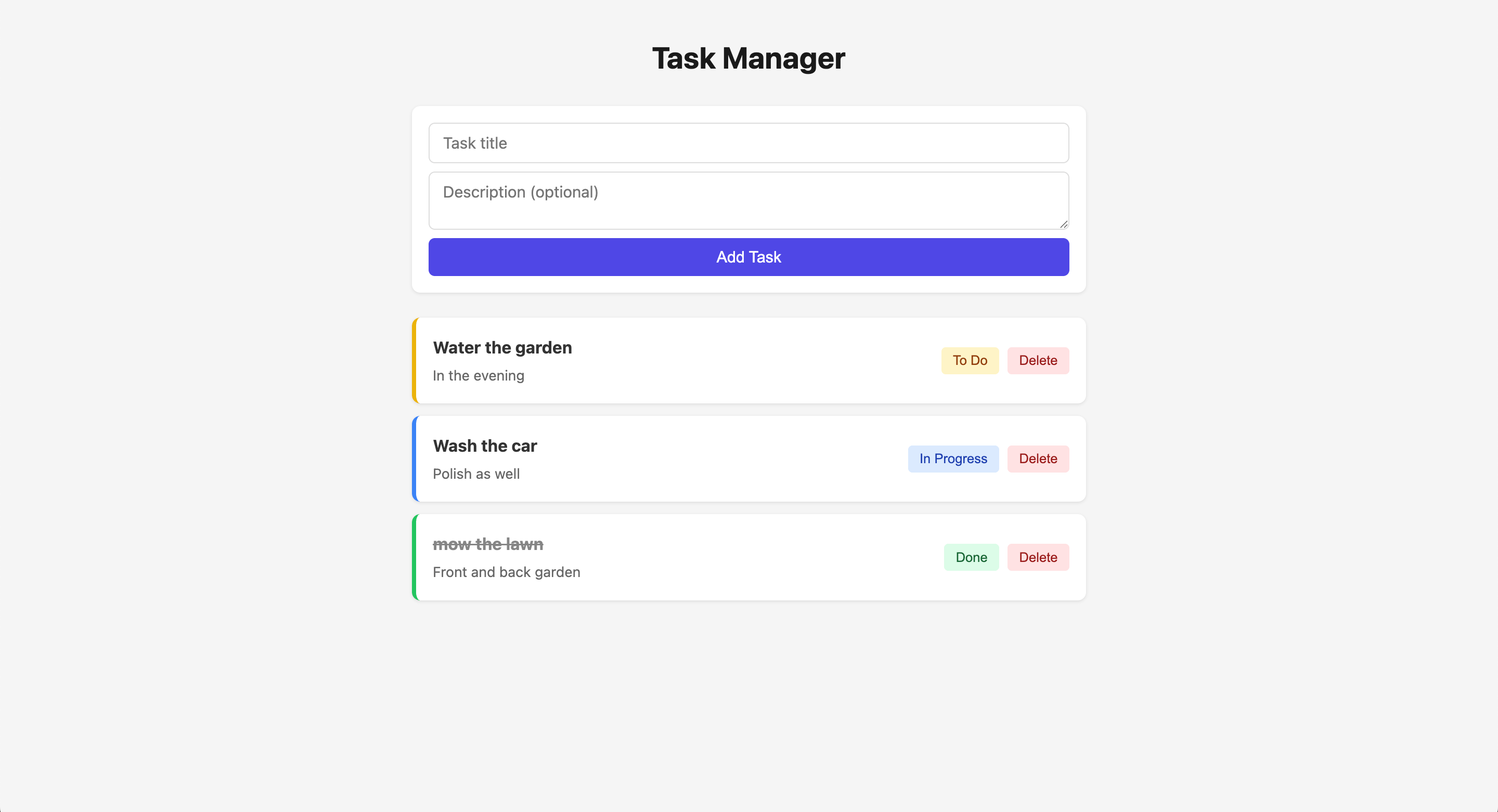
The CRUD functionality also worked as expected:
Adding authentication
Since PlanetScale doesn't come with auth, I tested how well the agent handles adding it separately:
Add authentication so a user can register and login using their email and password
Claude designed an auth system using JWT tokens and bcrypt password hashing that stored user data in the PlanetScale database. No third-party auth provider was used for this basic auth setup. Claude provided the following implementation plan:
- Run SQL migrations for a
userstable andtasks.user_idcolumn - Install
bcryptandjsonwebtokenin the server - Add
JWT_SECRETto.envand createserver/auth.js - Update
server/index.jswith auth routes and scoped queries - Create
client/src/api.jsandclient/src/components/AuthPage.jsx - Update
App.jsxandApp.css
Claude ran the SQL migrations using pscale shell without me needing to go to the PlanetScale dashboard. It created a functional login page:
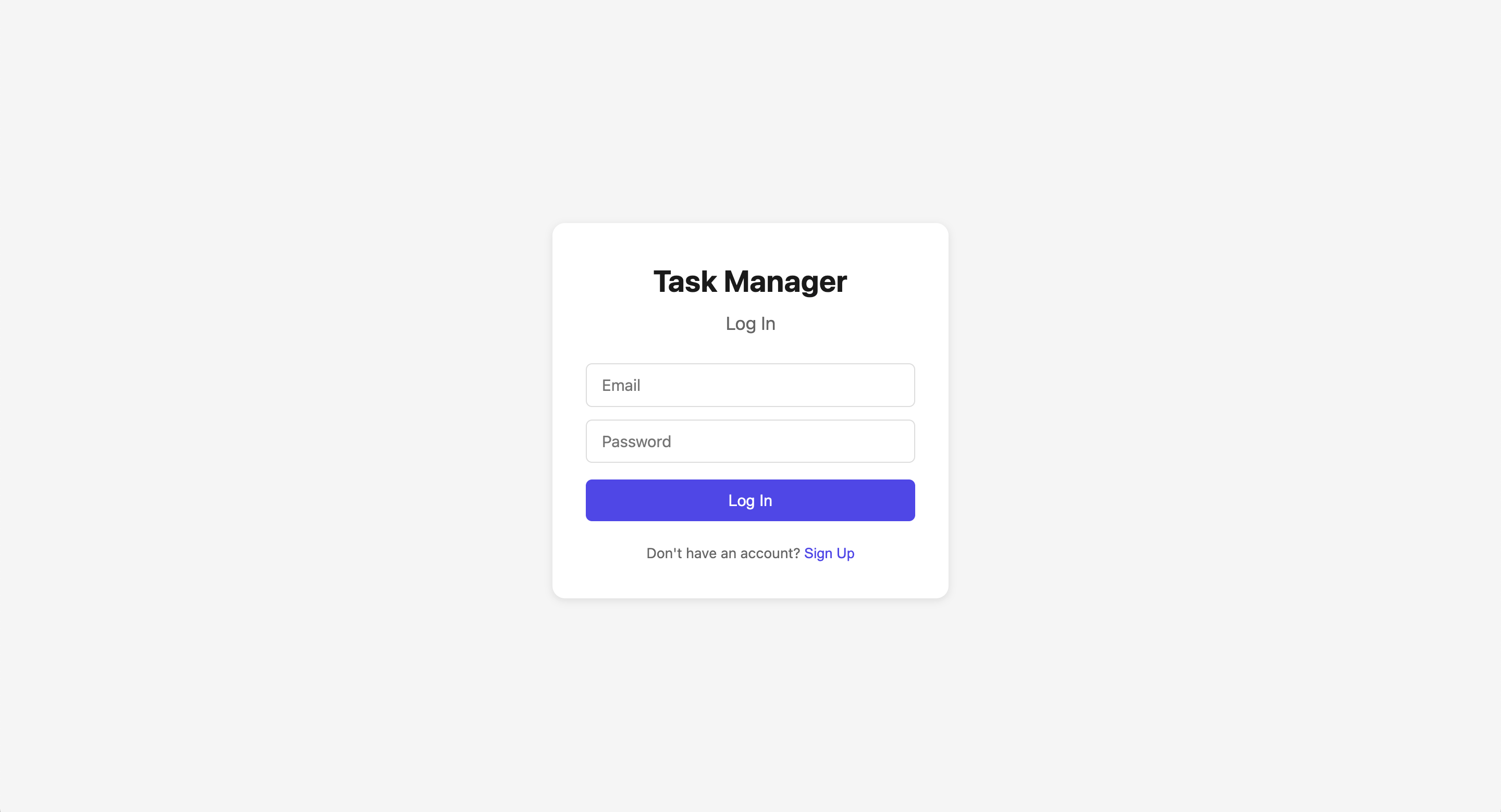
I registered a test account and logged in successfully:
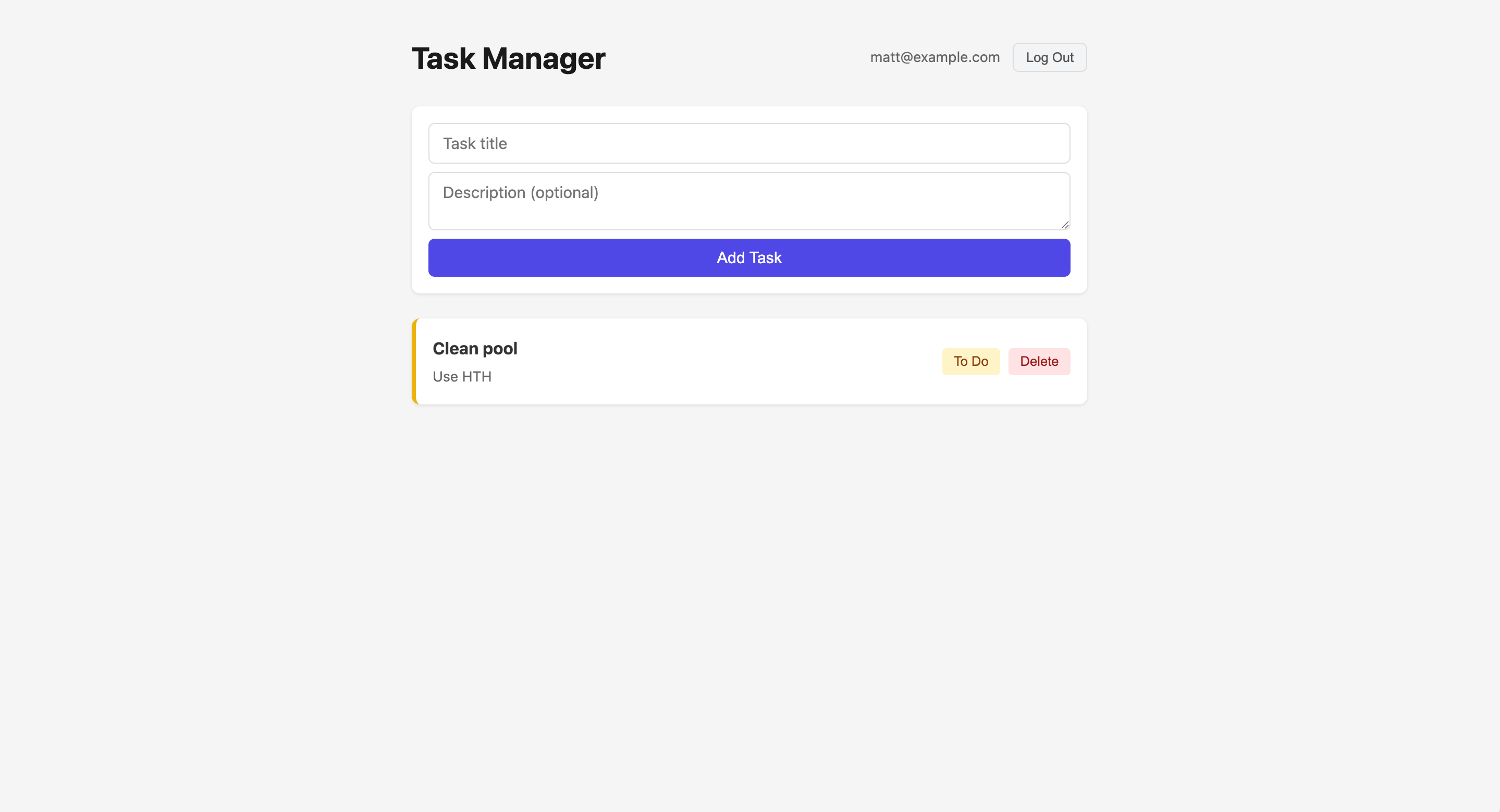
Login worked, but there was no email verification. For production, you'd need an email service like Resend or an auth provider like Clerk or Auth0.
Integration comparison
Supabase gives you auth out of the box, with email verification working in the first build. PlanetScale gives you a database with strong CLI tooling, and you add auth separately. For a quick prototype, Supabase gets you further faster. For a production app where you want to choose your own auth provider, PlanetScale's approach gives you that flexibility.
The table below summarizes the integration experience across both platforms:
| Supabase | PlanetScale | |
|---|---|---|
| Agent recommended auth | Yes (bundled) | No (database-only) |
| Database created from terminal | No (SQL editor in dashboard) | Yes (pscale CLI) |
| Schema migrations from terminal | No | Yes (pscale shell) |
| Times I left the terminal | 2 (SQL editor, email verification) | 1 (add credit card) |
| Auth working in first build | Yes (with email verification) | No (added separately, no email verification) |
| Training data issues | Anon key (legacy) | Thought platform shut down, wrong pricing ($39 vs $5) |
| Agent needed web search | Once (latest docs) | Yes (to learn platform still exists) |
Conclusion
Supabase and PlanetScale both produced working apps, but the agent experience was different at every stage.
Supabase wins on getting started
Supabase has a free tier, bundled auth, and enough training data that agents can generate working code without a web search. For a developer who asks an agent "I need a database for my app," Supabase is the path of least resistance. The agent recommends it first, knows how to use it, and can get a working prototype running rapidly.
PlanetScale wins on agent autonomy
PlanetScale's CLI (pscale) let the agent create databases, run migrations, and execute queries from the terminal. I only left the terminal once (to add a credit card). For agents, terminal access is everything. A CLI that can manage the full database lifecycle means the agent can do more without handing control back to the developer.
Outdated training data is PlanetScale's biggest AX problem
The agent thought PlanetScale had shut down. It quoted pricing at $39/month when the entry point is $5. Both of these are wrong, and both steer developers away before they write a single line of code. A web search fixes this, but developers who don't think to ask for one will never consider PlanetScale.
All-in-one vs. composable is an AX tradeoff
Supabase bundles auth, storage, realtime, and edge functions alongside the database. Agents treat it as an all-in-one platform and suggest auth by default. PlanetScale is a database platform, so agents treat it as database-only. When I asked for auth, the agent designed a custom JWT system instead of reaching for a third-party provider.
Neither approach is wrong. Supabase gets you further faster for prototypes. PlanetScale gives you flexibility to choose your own auth provider, which matters more for production apps. But from an AX perspective, bundled services are easier for agents to work with because there are fewer decisions to make.
Developers who need fine-grained control over schema design, indexing, and query performance will outgrow bundled defaults. PlanetScale's composable approach gives them that control without fighting the platform.
Reliability matters too
Supabase recently went down for a few hours, leaving potential users of a startup unable to sign up:
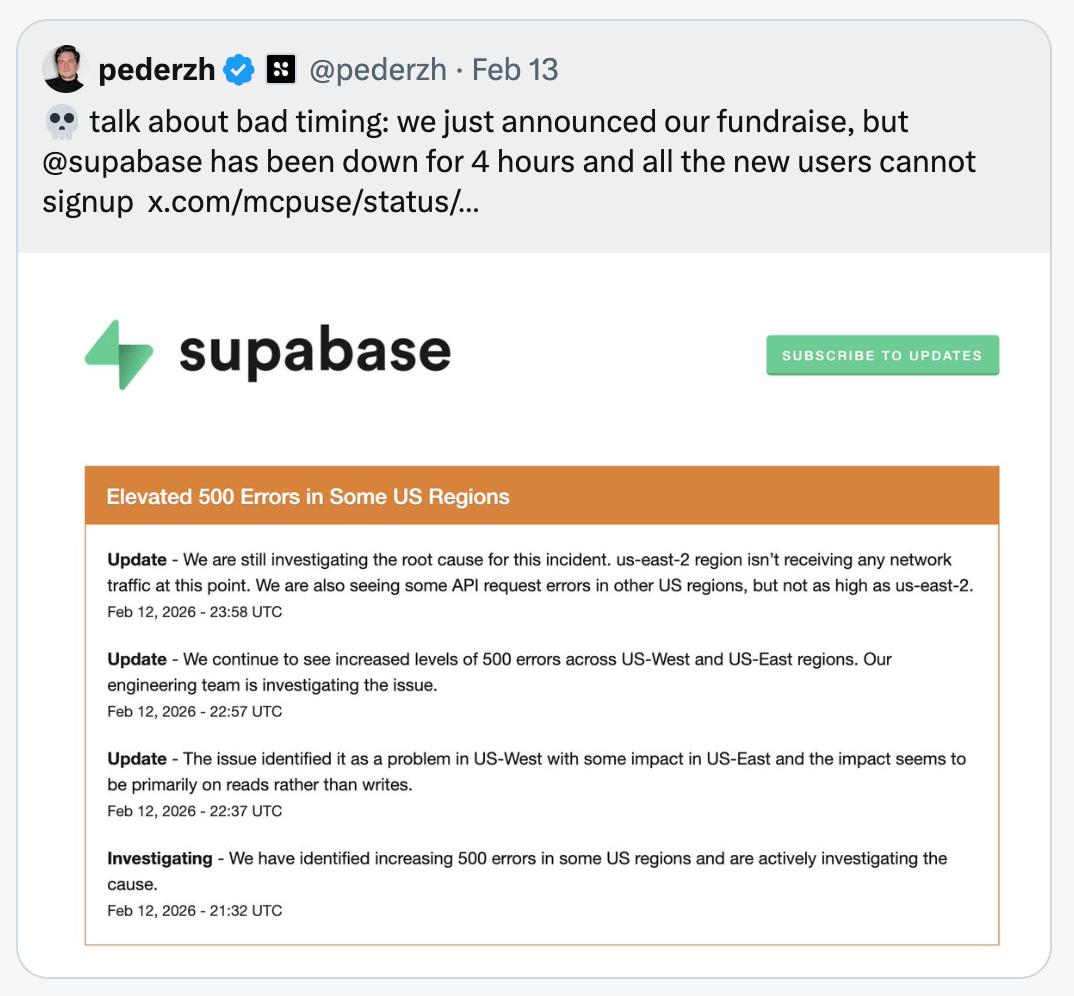
PlanetScale prioritises uptime. Their Primary + multi-replica cluster configuration comes with a 99.99% Uptime SLA, built on Vitess (the same technology behind YouTube's database infrastructure). For production apps where downtime means lost revenue, this matters regardless of how good the agent experience is.
Training data is the new documentation
Most of the AX gaps I found come down to what exists in an agent's training data and search results. It quoted $39/month pricing for PlanetScale because the $5 Postgres plan launched after the training cutoff. It knew Supabase's API structure but needed a web search to use PlanetScale correctly.
This creates a different problem than traditional developer experience. Good documentation helps developers who have already found your product. Good AX requires that the documentation, blog posts, and community mentions are visible enough to make it into training data and search results in the first place. A product can have excellent docs and still be invisible to agents if that content isn't widely indexed and referenced.
MCP servers are another piece of the AX picture. Supabase's MCP server gives agents broad access: schema management, migrations, SQL execution, edge function deployment, and project configuration. PlanetScale's MCP server focuses on querying and observability, letting agents run queries, check performance insights, and search PlanetScale's documentation. Neither fully solves the stale training data problem, but they give agents access to real project data instead of relying on what they memorised during training.
CLI tools also matter more than they used to. PlanetScale's pscale CLI gave the agent more autonomy than Supabase's dashboard-driven workflow. As more development happens through agents in the terminal, platforms with strong CLI tooling have an AX advantage.
Agent experience is becoming as important as developer experience for database platforms. The platforms that publish detailed, accurate, up-to-date content and earn mentions across the web will be the ones that agents recommend. The ones that don't won't get recommended at all.